 Set as a preferred Google source
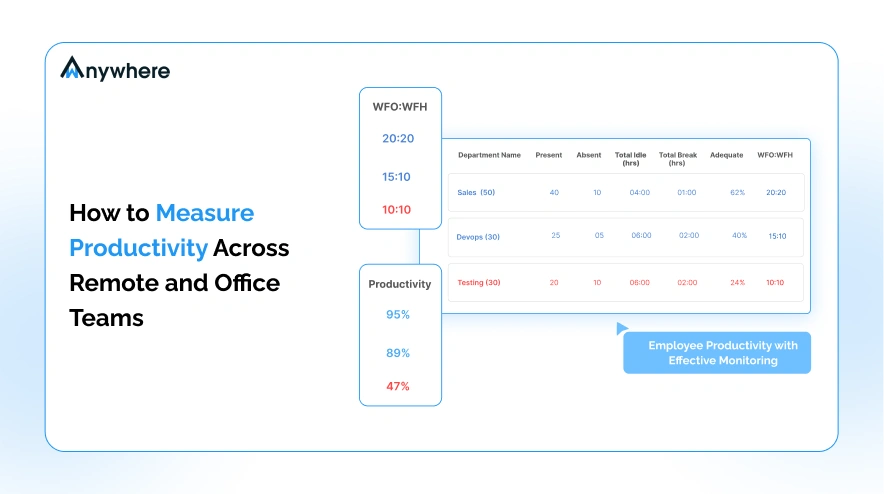
Fair employee productivity measurement across remote and office teams comes down to one definition of output, one metric set, and one system applied to both groups, with every comparison made by role rather than by location. When the same standard runs everywhere, the argument about who works harder disappears and the conversation shifts to what actually got done.
Most organizations get this wrong in a specific way. Remote staff are measured by software, their activity logged minute by minute, while office staff are measured by visibility and manager impression, judged on who looks busy at their desk. Two standards applied to the same job function is not measurement, it is proximity bias wearing a metrics costume. Learning how to measure employee productivity fairly starts with removing that split and building one scorecard that both groups sit inside.
A credible number does not come from one source. It comes from four data layers read together.
- Output data
- Time and activity data
- Quality data
- Goal data
This guide walks through what each layer measures, the methods that combine them into one score, the step by step rollout, the metrics worth tracking, and how to choose tools that keep the process fair on both sides of the office door.

See Your Productivity Data in One Dashboard
Book an employee productivity measurement software demo and watch a real account get scored end to end.
What Employee Productivity Measurement Actually Measures
Before any tool gets deployed, it helps to separate what productivity actually is from what most software shows on a dashboard. The two are not the same, and confusing them is where most measurement programs go wrong.
Output Matters More Than Presence
Productivity is a ratio, output divided by input, not a single score a dashboard hands you. A support agent who resolves forty tickets in six hours is more productive than one who resolves twenty five in eight, even though the second agent logged more hours and looked busier on screen. When measurement rewards logged hours instead of resolved tickets, it quietly trains teams to stretch work to fill the clock, because presence based measurement pays off more than finishing early.
The Four Data Layers Behind a Credible Productivity Number
- Output data. Tickets closed, calls handled, invoices processed, code merged, deals closed
- Time and activity data. Active time, idle time, focus blocks, application usage, meeting load
- Quality data. Error rate, rework, customer satisfaction scores, defects found after delivery
- Goal data. OKR attainment, quarterly targets, milestone delivery
Read alone, output data hides how much time or help it took to reach that number. Time and activity data hides whether the work delivered was any good. Quality data hides whether someone is fast or just careful. Goal data hides the daily grind that got a team to the milestone. None of the four layers tells the full story by itself, which is why a credible number reads all four together.
Why Remote and Office Teams Need One Measurement System
Running two systems produces arguments about whose data is more accurate rather than conversations about performance. One baseline, one report, one standard, applied regardless of where someone logs in from, removes that argument before it starts and lets managers spend review time on the work itself.
Also Read: How To Measure and Monitor Employee Productivity
Why Measuring Across Remote and Office Teams Is Harder Than It Looks
The four data layers are simple in theory. Applying them evenly across a hybrid workforce is where most programs run into friction, for four specific reasons.
Proximity Bias Rewards the Visible
Managers rate the person they can see. Someone at the next desk who stays late gets read as a hard worker, even if their output is average, while a remote employee who finishes the same work in half the time gets no credit for it because no one watched them do it. Microsoft’s Work Trend Index found the same split at scale, 85 percent of leaders said hybrid work made it hard to feel confident employees were being productive, even though 87 percent of employees reported that they were, a gap created by visibility, not by output.
Two Toolsets Create Two Standards
Remote teams get monitoring software, office teams get a walk through the floor. The two produce different kinds of evidence, one quantitative and one impressionistic, and comparing an office employee’s manager rating against a remote employee’s activity log is comparing two different languages.
Hours Logged Are Not Hours Worked
A logged eight hour day can include an hour of idle time, a long lunch, or a stretch spent waiting on another team, none of which shows up as a gap unless the system separates active time from time simply logged in. Treating logged hours as worked hours overstates output for anyone who is good at looking occupied.
Roles Do Not Share a Common Unit of Work
A support agent’s unit of work is a resolved ticket. A developer’s unit of work is a merged change. A salesperson’s unit of work is a closed deal. Comparing raw output numbers across these roles is meaningless, which is why productivity has to be benchmarked inside a role, against its own baseline, not across the whole company.
Also Read: How to Track Employee Productivity in a Hybrid Work Environment
Employee Productivity Measurement Methods That Work in Both Settings
There is no single employee productivity measurement method that covers every role. Most organizations end up blending two or three of the six below, weighted differently depending on whether the work is transactional, creative, or relationship driven.
Output Based Measurement
Counts completed units of work per period, tickets, calls, invoices, deals. Works best for roles with one clear countable unit and struggles for roles where output is not a single repeatable action.
Time and Utilization Measurement
Compares active time against total logged time. Useful for spotting idle stretches but misleading on its own, since it says nothing about what the active time produced.
Quality Weighted Measurement
Adjusts output by error rate or rework, so a fast but sloppy pace does not outscore a slower but accurate one.
Goal and OKR Attainment
Scores progress against quarterly targets and milestones. Fits roles where daily output resists a clean count, strategy, design, and cross functional projects.
Feedback and Structured Review
Brings in manager and peer input for judgment heavy work that a number cannot fully capture on its own.
Composite Scoring
Blends output, quality, and goal data into one weighted number, most useful when leadership needs to compare across functions rather than within one.
The table below lines up these employee productivity measurement methods against what each one is best suited for and what it misses when used in isolation.
| Method | Best For | What It Misses Alone |
| Output based measurement | Roles with a countable unit of work, tickets, calls, closed deals | Effort, quality, and context behind the number |
| Time and utilization measurement | Confirming logged hours reflect active work | Whether the work produced was any good |
| Quality weighted measurement | Roles where accuracy matters more than speed | Overall throughput and volume |
| Goal and OKR attainment | Roles where daily output is hard to count, strategy, design | The daily pace that got a team to the milestone |
| Feedback and structured review | Judgment heavy work that resists a clean number | Objectivity and consistency across reviewers |
| Composite scoring | Comparing across functions on one weighted number | Nuance within a single data layer |
Also Read How Productivity Analytics Improve Employee Performance
How to Measure Productivity Across Remote and Office Teams Step by Step
Once the methods are chosen, the rollout itself follows a fixed sequence. Skipping a step or reordering it is the most common reason a measurement program loses credibility in its first quarter.
- Define the unit of output for every role, in writing, before any data collection starts
- Build the baseline from four to six weeks of real data, not a single snapshot week
- Deploy the same measurement system in both locations, same tool, same thresholds, same reporting cadence
- Normalize for meeting load, on call duty, mentoring, leave, and downtime, so a heavy meeting week is not scored the same as a heavy output week
- Review weekly at team level, monthly at individual level, and quarterly for target setting
- Close the loop with the employee and agree one change per cycle, rather than a long list of fixes at once
See It Run on Your Own Team Numbers
Request an employee productivity measurement software demo and watch a baseline built live from real data.
Core Metrics to Track Across Remote and Office Teams
A small, consistent metric set beats a large one nobody reviews. The list below covers the employee productivity metrics that show up most often across output, time, quality, and goal data.
- Throughput, meaning completed units of work per employee per period
- Utilization ratio of productive hours against total logged hours
- Active time compared with idle time
- Focus time measured in uninterrupted blocks longer than 45 minutes
- Cycle time from assignment to completion
- Rework rate and first pass accuracy
- Goal attainment against the agreed quarterly target
- Meeting load as a share of scheduled work hours
- Attendance and schedule adherence across shifts and time zones
- Application and website usage split into productive and unproductive categories
- Output variance between the remote group and the office group in the same role
Also Read: 7 Employee Performance Metrics Every Manager Needs
Employee Productivity Measurement Tools and How to Evaluate Them
The right employee productivity measurement tools depend less on features and more on the question the organization actually needs answered. Evaluation gets easier once that question is clear.
Start From the Question You Need Answered
Capacity planning, fair appraisal evidence, billable hour accuracy, and audit ready records each point toward a different feature set, so the evaluation should start with which of these the organization needs most.
Assess Data Depth and Accuracy
Look for automatic capture over manual entry, configurable productive categories, offline capture with sync on reconnect, and real time dashboards that update without a manual export step.
Check Operational Fit
Confirm coverage across Windows, macOS, and virtual desktop environments, a light agent footprint that does not slow devices down, integration with existing HR and project systems, and the ability to scale across shifts and sites.
Review Privacy and Governance Controls
Check for scope controls by role and team, field level masking for sensitive data, role based access to reports, a defined retention period, and exportable logs for audit purposes.
Judge the Reporting Layer
Ask to see the manager view, the employee view, and the leadership rollup during evaluation, since a tool that only shows leadership a clean summary but gives managers a confusing raw feed will fail at the team level.
Also Read: 10 Best Employee Monitoring Software
Common Mistakes That Break Productivity Measurement
Most measurement programs do not fail because the metrics are wrong. They fail because of how the metrics get used.
Measuring Activity and Calling It Output
Logging keystrokes or application time is not the same as tracking what got produced, and treating the two as interchangeable rewards busywork over finished work.
Running Separate Systems for Separate Locations
A remote only monitoring tool paired with office only manager judgment guarantees two standards, and two standards eventually become a fairness complaint.
Comparing Roles That Share No Unit of Work
Ranking a developer against a salesperson on the same output chart tells leadership nothing useful and tells the developer their work is being measured by the wrong yardstick.
Reading Numbers Without Context
A dip in output during a week with three days of mandatory training is not a productivity problem, and treating it as one erodes trust in the whole system.
Keeping the Metrics Hidden From Employees
A scorecard nobody sees cannot be trusted, and employees who do not know how they are being measured tend to assume the worst about why.
How to Keep Measurement Fair and Transparent
The methods and metrics only hold up if the process around them is visible and consistent from day one, and this is where remote employee productivity programs either earn trust or lose it.
Publish the Policy Before the Rollout
Share what is measured, why, and how the data will be used before the first data point is collected, not after someone asks.
Measure Teams Before Individuals
Start review conversations at the team level so the baseline settles before any single employee’s number becomes the topic of a one on one.
Give Employees Their Own Dashboard
Employees who can see their own numbers in real time stop guessing about how they are being judged and start managing toward the same target their manager is watching.
Limit Scope, Access, and Retention
Collect only what the defined use case requires, restrict who can view raw data, and set a retention period that gets enforced automatically rather than left to memory.
Also Read: Employee Productivity Formula and How to Calculate It
Conclusion
Measuring productivity fairly across remote and office teams is a definition problem before it is a tooling problem. Once every role has one agreed unit of output, the tool choice becomes a technical decision rather than a source of conflict.
The four data layers, output, time and activity, quality, and goal data, only produce a trustworthy picture when they are read together and benchmarked inside each role, never across unrelated ones. This is the same principle wAnywhere is built around, one system reading all four layers instead of four disconnected reports.
A program that stays transparent and sticks to a small metric set is the one that survives past its first quarter. Get employee productivity measurement right at that level, and the debate about who works harder gives way to a shared view of what actually got done.
FAQs
How Do You Measure Productivity for Remote Employees Fairly
Apply the same four data layers and the same baseline used for office staff, benchmark within the role rather than across the company, and normalize for meetings, on call duty, and leave so a remote employee is never judged by a different clock than their office counterpart.
What Are the Best Employee Productivity Measurement Methods
Most organizations get the clearest picture by combining output based measurement with quality weighted measurement and goal attainment, since each method covers a gap the others leave open, rather than relying on any single employee productivity measurement method alone.
Which Metrics Work Best Across Hybrid Teams
Throughput, cycle time, rework rate, and goal attainment travel well across both remote and office settings because none of them depend on where someone is physically sitting.
Do Employee Productivity Measurement Tools Work for Office Teams Too
Yes. The same employee productivity measurement tools that track remote activity can run on office devices, which is what closes the gap between a data driven remote scorecard and a manager impression based office review.
How Often Should Employee Productivity Be Measured
Review at team level weekly, at individual level monthly, and reset targets quarterly, so short term noise does not get mistaken for a trend.
Is Measuring Employee Productivity Legal
In most jurisdictions, yes, provided employees are notified about what is being tracked and why, the data collected is limited to work related activity, and the organization follows applicable local labor and privacy law, which varies by region.

Table of Contents
Boost productivity and compliance with wAnywhere
Read summarized version with