 Set as a preferred Google source
Your in-office employees are visible. You can see when they arrive, when they step away, and how long they stay. Your remote employees are not. Yet you are expected to evaluate both groups with the same level of accuracy and fairness. For most managers running hybrid teams, this is not a hypothetical concern.
Employee productivity tracking in hybrid work environments is fundamentally different from tracking a fully in-office or fully remote team. You are not dealing with one consistent work environment but two, and the data you collect is rarely unified. The result is an uneven picture of who is productive and who is not.
This guide walks you through how to build a fair, consistent tracking system for hybrid teams. You will learn the specific challenges that make hybrid workforce management harder, seven practical best practices, the metrics worth tracking week to week, and what to look for in employee productivity tracking software designed for split teams. The goal here is not surveillance. It is consistency and fairness across your entire team.
Why Hybrid Teams Are Harder to Track Than Fully Remote Teams
Managing a fully remote team comes with challenges, but it forces a kind of consistency. Every employee is invisible to some degree, so managers adapt by focusing on output and communication. Hybrid teams introduce a different problem: inconsistent visibility. Some employees are present and some are not, and the measurement standards that managers apply often drift accordingly.
This inconsistency produces what researchers call proximity bias: the tendency to favour employees who are physically present, not because they are more productive, but because they are more visible. According to Microsoft’s Work Trend Index, 85% of leaders say the shift to hybrid work has made it challenging to have confidence that their employees are being productive, a visibility gap that falls hardest on managers overseeing split teams.
Note for writer: confirm the year of this Work Trend Index report and update the hyperlink to the correct primary source URL.
A second problem is split data. Activity data is typically captured for remote employees through monitoring tools, but in-office employees often go untracked on the same systems. You end up with detailed data on your remote staff and almost none on your in-office staff, which makes team-wide comparisons unreliable.
Fixing hybrid work productivity gaps requires a unified tracking approach: one system, one set of metrics, applied consistently regardless of where each employee happens to be working. Learn how best practices to monitor remote employees apply equally in hybrid settings.

See how wAnywhere gives you unified visibility across your in-office and remote employees.
7 Best Practices for Employee Productivity Tracking in Hybrid Teams
Tracking productivity across a split team requires more than installing software. It requires a deliberate framework that treats in-office and remote employees as part of the same measurement system. These seven practices form that framework.
1. Use One Tracking System for Both In-Office and Remote Employees
The most common hybrid tracking mistake is maintaining separate visibility systems for in-office and remote staff. Managers monitor remote employees through activity tracking software while relying on observation or informal inputs for in-office employees. This creates a measurement gap that makes fair comparisons impossible and reinforces the same proximity bias you are trying to eliminate. A unified time tracking software captures the same metrics — active time, app usage, attendance, and output — across every employee regardless of where they work.
Look for a solution that supports all major operating systems, including Windows, Mac, Linux, and Chrome, so your tracking infrastructure stays consistent whether an employee is at their desk in the office or connecting from home.
2. Track Output and Tasks, Not Just Login Hours
Login time tells you when someone was online. It does not tell you what they accomplished. An employee who logs ten hours from the office but spends three of them on unrelated browsing is not more productive than a remote employee who works a focused six-hour day and closes out their assigned tasks.
In hybrid environments, output-based tracking matters more, not less. In-office employees can appear busy by being visible at their desks, attending meetings, or staying late, without delivering measurable results. Define role-specific KPIs for each function: tasks completed, projects closed, response time, and output volume. These metrics apply equally to every employee regardless of location and give you something concrete to measure performance against, which is the foundation of fair hybrid team management.
Learn how to track employee hours accurately without relying on manual timesheets.
Read More: 10 Ways to Improve Productivity for Remote and Hybrid Employees
3. Set Unified Benchmarks Across Your Hybrid Team
Benchmarks are only useful if they apply consistently. If your remote employees are held to a weekly output target while your in-office employees are assessed informally based on availability and presence, you do not have a performance system. You have two different standards operating in parallel.
Use the first 30 to 60 days of tracking data to establish baselines for individual employees and the team as a whole. Build benchmarks around role functions, not work locations. A benchmark for a sales development representative should reflect what that role requires, not whether that person works from headquarters or from home. Revisit and recalibrate benchmarks quarterly to account for team growth, workload changes, and shifting hybrid work productivity patterns.
4. Monitor Daily Work Patterns to Spot the Hybrid Productivity Gap
Individual employees often perform differently depending on whether they are working in the office or remotely on a given day. Some are more focused at home; others need the structure and separation of an office environment. Without tracking data, these patterns remain invisible, and managers make work model decisions based on assumption rather than evidence.
Monitoring work patterns over time — active hours, task output, and focus time broken down by location — reveals which environment drives better performance for each team member. This data informs hybrid scheduling decisions and helps identify early warning signs: an employee who consistently underperforms on remote days may need a schedule adjustment rather than a performance review. wAnywhere’s Hybrid Analytics feature provides daily headcount by location alongside output comparisons across work modes, making this kind of analysis straightforward for managers overseeing large hybrid teams.
5. Track App and Website Usage to Equalise Visibility
Remote employees’ digital activity is naturally captured by monitoring tools. In-office employees use the same applications, project management platforms, communication tools, and browsers, but are often excluded from the same level of digital tracking. This asymmetry skews your productivity data and creates the impression that remote employees are being held to a higher standard of accountability.
Extending app and website usage tracking to in-office devices puts both groups on equal footing. Categorise applications as productive, neutral, or unproductive based on what is relevant to each role, not a universal rule. A designer spending time in a creative platform is not the same situation as a customer support representative doing the same. Role-specific categorisation gives your activity data real meaning and makes in-office vs remote productivity comparisons genuinely useful.
Read More: Idle Time Tracking: How to Monitor Active vs Inactive Employees
6. Automate Time and Attendance Tracking Across Locations
Manual attendance processes break down quickly in hybrid environments. Employees forget to clock in or out, timesheets get filled retrospectively, and the resulting records are inconsistent across locations. When your attendance data is unreliable, your productivity metrics lose their foundation because you cannot interpret output without knowing how much time was actually worked.
Automated tracking captures login time, logout time, active periods, and idle time without requiring any manual input from employees. It works the same way whether the employee is connecting from the office network or from home. When attendance data integrates automatically with activity data, you get a complete picture of hybrid team availability across the week. wAnywhere’s employee attendance management and online timesheet features remove the manual step entirely and produce accurate, location-tagged records for every member of your team.
7. Share Productivity Reports With Your Team, Not Just Managers
Transparency is particularly important in hybrid teams, where fairness concerns run higher than in single-location settings. Remote employees often wonder whether they are being measured by the same standard as their in-office colleagues. In-office employees sometimes feel that remote workers face less accountability. Both perceptions erode trust and reduce employee engagement in hybrid work over time.
When employees can access their own productivity data, they develop greater self-awareness around their output and are more likely to self-correct without manager intervention. Sharing team-level summaries, anonymised where appropriate, makes the measurement framework visible and reinforces the message that everyone is assessed on the same basis. Role-based access controls allow you to share relevant data with individual employees without exposing team-wide metrics or sensitive performance information that should remain with managers.
Metrics to Track for Hybrid Team Productivity
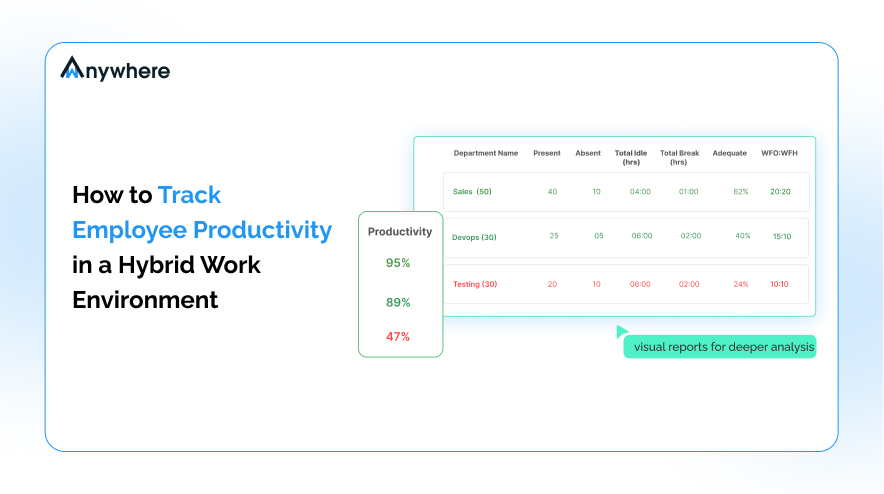
Think of this as your hybrid productivity dashboard: the data points worth reviewing on a weekly basis to stay on top of team performance across both work environments. No single metric tells the full story, but reviewed together, these give you the context you need to make informed decisions.
- Active vs idle time — per employee, per day, broken down by work location. This is the clearest indicator of whether time online translates to time working.
- App and website usage — hours spent on productive, neutral, and unproductive applications, categorised by role for accurate interpretation.
- Login and logout times — consistency across in-office and remote days. Irregular patterns can indicate scheduling issues or engagement concerns.
- Task completion rate — output per week or month measured against established role-specific benchmarks.
- Attendance rate — days present versus scheduled, covering both in-office and remote commitments.
- Hybrid headcount — how many employees were in-office versus remote on each working day, essential for hybrid analytics and space planning.
Productivity score — an aggregate metric combining activity levels, task output, and time worked into a single comparable figure across your team. See how to calculate this using the employee productivity formula.
Reviewing these metrics as a set gives you a full picture of hybrid work productivity that no single data point can provide. Gaps in one metric become meaningful when interpreted alongside others. Lower active time on remote days, for example, reads very differently depending on whether task completion rates are holding steady or declining alongside it.
Track all of these metrics in one dashboard. Built for hybrid teams.
What to Look for in Employee Productivity Tracking Software for Hybrid Teams
Not all productivity monitoring software is designed for hybrid environments. Many tools were built for fully remote teams and rely on assumptions that do not hold in hybrid settings. Before choosing a platform, review this guide on the best employee monitoring software to understand what capabilities matter most.
- Cross-platform support: Works across Windows, Mac, Linux, and Chrome. Essential for hybrid teams with mixed device environments.
- Single unified dashboard: Covers in-office and remote employees with no need for separate tools or manual data imports.
- Real-time activity and app usage tracking: Applied consistently across locations, not just for remote employees.
- Hybrid analytics: The ability to compare output and headcount by work location, so managers can identify patterns across in-office and remote days.
- Automated attendance and timesheet generation: No manual input required from employees or managers.
- Role-based access controls: Employees can view their own performance data without accessing team-wide or sensitive metrics.
- GDPR-compliant data handling: Clearly defined retention policies and employee data rights.
- Fast deployment: Tools that require extensive IT setup slow adoption. Look for solutions that deploy in under 5 minutes.
Tools like wAnywhere are purpose-built for hybrid environments, offering location-aware hybrid analytics and automated attendance tracking that gives managers consistent, comparable visibility across every member of their team, regardless of where they are working on any given day.
Building a Fairer Tracking System for Your Hybrid Team
Employee productivity tracking in hybrid teams requires a different approach than monitoring a single-location workforce. The seven practices covered in this guide address the specific challenges that make hybrid teams harder to manage fairly: unified tooling, output-based measurement, consistent benchmarks, work pattern analysis, equalised app visibility, automated attendance, and transparent reporting.
The underlying goal is not surveillance. It is consistency. Every employee on your team, whether they work from a desk in the office or from home, deserves to be measured by the same standard. When your tracking system treats in-office and remote staff equally, you eliminate the data gaps that drive proximity bias and give yourself the evidence needed to make better work model decisions.
If you are ready to build a fairer, data-driven tracking system for your hybrid team, wAnywhere offers a free 14-day trial with no credit card required.
Start tracking what actually matters across your hybrid team. Try wAnywhere free for 14 days.

Table of Contents
Boost productivity and compliance with wAnywhere
Read summarized version with