 Set as a preferred Google source
Aux time is one of those metrics that every contact center tracks but relatively few manage with precision. The number sits in dashboards, gets flagged during reviews, and shows up in WFM reports. But without a clear picture of what is driving it, aux time stays a symptom rather than a signal.
This guide covers the definition, the formula, the benchmarks, the causes, and the practical steps you can take to get it under control.
What Is Aux Time in a Call Center?
Aux time is the time an agent spends logged into the telephony system but unavailable to receive inbound contacts. The word itself is short for auxiliary. When an agent is in aux, they are present on shift, active in the system, but not in the queue.
How long agents spend in aux, which codes they are using, and whether those reasons match legitimate activities are three separate questions. Most centers that struggle with aux time are not tracking all three.
What Does Aux Mean in a Call Center?
Aux stands for auxiliary. The term originates from older ACD (Automatic Call Distributor) systems, where agents were either available (ready to receive calls) or in an auxiliary state (unavailable). Early systems often had only a single aux state. Agents toggled between available and not available, with no further granularity.
Modern workforce management platforms broke that single aux state into a library of codes. Instead of knowing only that an agent was unavailable, supervisors could now see why. Break, after call work, coaching, technical issue, personal time, outbound calls: each of these represents a distinct reason for being out of queue, and each carries different productivity implications.
Despite the evolution in platform sophistication, the term aux time remains the standard way to describe all non-available, non-idle agent time.
Aux Time vs Available Time vs Idle Time
These three states are often confused, and conflating them produces inaccurate workforce data.
Available time refers to periods when the agent is logged in, in queue, and ready to receive contacts. No active interaction, but the agent is accessible to the ACD.
Idle time is the gap between when one interaction ends and the next begins while the agent remains in available status. It is unoccupied available time, not a separate state.
Aux time is everything else. The agent is logged in but has moved out of available into a named aux state. The ACD will not route contacts to them until they return to available.
The distinction matters for occupancy calculations. Occupancy measures the percentage of available time agents spend on active interactions. If aux time is miscounted as available time, your occupancy looks healthier than it is. If agents are staying in available status during activities that should be coded as aux, your idle time inflates and aux looks lower than it is.
Common Aux Codes and What Each One Tracks
Aux code libraries vary by platform and center, but most operations include some version of the following:
- Break: scheduled breaks and meals
- After Call Work (ACW): time spent completing notes, dispositions, or follow-up tasks after a contact ends
- Coaching and Training: supervisor or L&D sessions during the shift
- Outbound: time allocated to outbound calling or follow-ups
- Technical Issue: system downtime, slow CRM, network drops
- Personal: unscheduled restroom breaks or brief personal time
- Meeting: team huddles, briefings, or project calls
The quality of this list directly affects the quality of your aux data. Too few codes and you lose visibility into what is actually happening. Too many and agents choose arbitrarily, which produces noise rather than insight.

What Is Your Aux Data Actually Telling You?
A single aux percentage hides more than it reveals. wAnywhere breaks it down by code, by agent, and by shift, so your supervisors can act on it while it still matters.
How to Calculate Aux Time in a Call Center (Formula + Examples)
The Aux Time Formula
Aux time is typically expressed as a percentage of total logged-in time. The formula is:
Aux Time % = (Total Aux Time ÷ Total Logged-In Time) × 100
So if an agent is logged in for 480 minutes in a shift and spends 72 minutes across all aux states, their aux time percentage is 15%.
At the team or center level, you apply the same formula using aggregate values. Total aux minutes across all agents divided by total logged-in minutes across all agents, multiplied by 100.
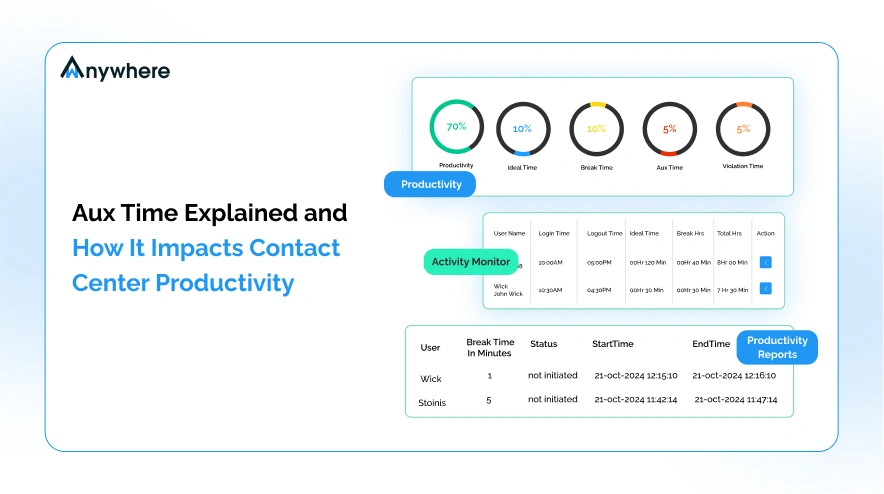
Some operations calculate aux time per code category rather than as a single aggregate. This gives a cleaner picture. An operation might have 6% ACW, 4% break, 3% training, and 2% personal aux. The total is 15%, but the breakdown tells a completely different story than the headline number alone.
What Is a Good Aux Time Percentage?
There is no universal aux time target because the right number depends on your contact type, ACW policy, break structure, and training volume. That said, most contact center operations treat 10 to 15 percent as a reasonable working range for total non-break aux time. Break time is typically separated and planned against shrinkage budgets independently.
Context matters significantly here. A center with high-complexity contacts requiring detailed after-call documentation will run higher ACW aux than a high-volume, simple inquiry environment. A center actively onboarding new agents will run higher coaching aux than a stable, fully ramped team.
The more useful benchmark question is not whether your aux rate is 12% or 18%. It is whether each code category is within the threshold your operation has defined for it, and whether the distribution across codes reflects actual agent activity.
Why High Aux Time Hurts Contact Center Performanc
High aux time does not just show up as a bad number on a report. It has direct, measurable consequences on two areas that operations teams feel every shift.
The Direct Impact on Service Level and Queue Wait Times
The relationship between aux time and service level is mechanical. When agents are in aux, they are not available to receive contacts. Queue depth increases. Average speed of answer rises. Customers who would have been connected in 15 seconds are now waiting 90 seconds or longer.
The 80/20 service level standard, meaning 80% of inbound contacts answered within 20 seconds, is the most widely used benchmark in the industry. Hitting that target requires enough agents in available status at any given interval. If aux time is running significantly above plan, your effective staffing at the queue level is lower than your headcount suggests. The gap between scheduled agents and available agents is where service level targets get missed.
In high-volume BPO environments and large contact centers, even a 3 to 5 percentage point increase in aux beyond the planned rate can produce measurable degradation in contact center productivity within the same interval.
How Inaccurate Aux Data Breaks Workforce Scheduling
Workforce management forecasts are built on historical data. If your aux codes are inaccurate, your shrinkage calculations are inaccurate. If your shrinkage calculations are wrong, your staffing models are wrong. You will consistently staff either too lean or too heavy because your inputs are distorted.
The staffing math compounds quickly: a contact center running 30% shrinkage needs to schedule roughly 43% more agents than its base requirement just to maintain target service levels, according to workforce management benchmarking data.
The problem compounds over time. Planners adjust for what they see, which embeds the inaccuracy into the model. New hires are scheduled against a baseline that does not reflect actual agent behavior. The center runs chronically short during peak periods and overstaffed during troughs, not because the forecast model is poor but because the underlying aux data feeding it is unreliable.
Accurate aux data is not a reporting nicety. It is a prerequisite for functional workforce planning.
Read More – Why Workforce Compliance Fails in Large BPO Operations
5 Reasons Aux Time Climbs in Contact Centers
Too Few Aux Codes, or Codes That Are Too Generic
When agents have limited code options, they make judgment calls on the closest match. Personal time gets coded as break. System downtime gets coded as personal. Unplanned coaching sessions get coded as available. The result is a single inflated number that tells you nothing actionable.
The fix is not simply adding more codes. It is building a code library that matches the actual activities in your operation, communicating what each code is for, and reinforcing correct usage in QA and coaching.
After Call Work (ACW) Running Beyond Policy
ACW is necessary. Agents need time to complete dispositions, update the CRM, add case notes, and flag follow-ups. But ACW that consistently runs beyond the operation’s defined threshold is one of the most common sources of excess aux time.
Extended ACW is often a signal of something else: an agent who has not mastered the CRM workflow, a case type that requires more documentation than the ACW budget allows, or a policy that sets an unrealistic ceiling for the actual work involved. The aux data tells you there is a problem. The root cause requires a separate investigation.
Unplanned Training and Coaching Landing in Generic Codes
Supervisors pull agents for ad-hoc coaching, product briefings, or system walkthroughs during the shift. If those sessions are not coded correctly, they disappear into whatever catch-all code the agent selects. The training happens, the productivity impact is real, but the data does not capture it.
This distorts planning. Your training aux budget looks underspent. Your break or personal aux looks inflated. When you try to model future capacity, you are working with a miscategorized picture of how agent time is actually being used.
System Downtime Miscoded as Personal Aux
When the CRM is slow, the VoIP connection drops, or the screen application freezes, agents cannot work. They move to aux. But if there is no technical issue code, or if agents are not trained to use it consistently, downtime lands in personal or another available code. The operational impact of system reliability never shows up in reports. Leadership cannot distinguish between an agent taking a long break and an entire team waiting for the system to recover.
A distinct technical issue code is not just useful for aux analysis. It is also a real-time visibility tool for IT and operations to correlate system events with productivity impact.
Uneven Call Distribution Pushing Agents Out of Queue
Call routing inefficiencies create frustration. Agents who consistently receive the highest volume or the most complex contact types may be more likely to take unscheduled aux breaks to recover. Routing problems also create periods where some agents are overloaded and others are idle in available, which can lead to informal aux use as a way to self-regulate workload.
If your aux analysis shows specific agents or specific shifts running consistently higher aux, uneven distribution is worth investigating alongside behavioral factors.
Stop Reviewing Aux Time. Start Managing It.
By the time yesterday’s aux report lands, the queue has already paid for it. wAnywhere puts live agent status, per-code breakdowns, and threshold alerts on every supervisor’s dashboard, exactly when they can still act on it.
How to Reduce Aux Time and Improve Contact Center Productivity
Build a Granular Aux Code Library
Start by auditing your current code list against the actual activities in your operation. Interview supervisors and team leads. Look at where generic codes are absorbing time that should be categorized elsewhere. Then build a code library that matches what actually happens on the floor.
Granularity is only useful if agents use the codes correctly. Pair the new library with clear definitions, practical examples for each code, and regular reinforcement during team briefings. Reviewing aux code accuracy as part of QA scoring gives it the same operational weight as handle time or first contact resolution.
Set Per-Code Thresholds and Track Against Them
A single total aux time target is too blunt to act on. Break your aux reporting down by code and set a separate threshold for each one. ACW might be 5 minutes per contact on average. Break aux might be 45 minutes per shift. Coaching aux might have a weekly budget of 30 minutes per agent.
With per-code thresholds, your supervisors can identify exactly where the variance is coming from rather than trying to manage a single aggregate. An agent at 18% total aux might be perfectly within threshold for break and personal but running double the expected ACW. That is a coaching conversation, not a policy enforcement issue.
Replace Spot-Checks With Real-Time Aux Visibility
Periodic reports show you what happened. They do not help you act while it is still happening. If a team is running high aux during a peak interval, knowing about it in the next day’s report is not useful. Supervisors need to see aux status across their team as it develops, not after the service level target has already been missed.
Real-time aux visibility at the supervisor level changes how teams manage live performance. Instead of reactive reviews and post-shift conversations, supervisors using real-time aux visibility can intervene in the moment: checking in with an agent who has been in an aux state longer than expected, identifying a cluster of technical issue codes that might indicate a system event, or redistributing workload when one team is running light on available agents.
Reduce ACW With Better Disposition Workflows
If ACW is consistently your largest aux category, the solution is rarely to just tell agents to work faster. It is to look at what they are actually doing during ACW and remove the friction.
Common interventions include simplifying CRM disposition screens, pre-populating fields based on the contact type, creating saved note templates for high-frequency contact reasons, and integrating call classification into the ACW workflow so agents are not manually categorizing contacts they have already handled. Reducing the mechanical effort involved in ACW usually has a faster and more durable impact than policy pressure alone.
Read More – BPO Compliance Gaps: Why Problems Are Detected Too Late
How wAnywhere Helps Contact Centers Manage Aux Time in Real Time
wAnywhere includes a dedicated AUX Management module built for contact center operations teams who need more than end-of-day reports. The visibility is live, granular, and actionable.
Real-Time Aux Status Across Every Agent
The wAnywhere supervisor dashboard displays current aux status for every logged-in agent, updated in real time. Supervisors see who is in queue, who is in aux, and which code they are using, without navigating between reports or waiting for a refresh cycle. During peak hours, that live view is the difference between catching an aux issue before it affects service level and reviewing it after the queue has already backed up.
Per-Code Reporting and Shift Trend Analysis
wAnywhere tracks aux time at the code level, not just as a total. Operations teams can pull shift-level or interval-level reports that break down exactly how agent time was distributed across each aux category. This makes it straightforward to compare ACW performance against policy, identify which agents or teams are running high on specific codes, and give supervisors the precise data they need for coaching conversations. The shift trend analysis also helps WFM teams refine their shrinkage calculations using actual code-level data rather than aggregate assumptions.
Threshold Alerts That Reach Supervisors in Real Time
Supervisors can configure threshold alerts for any aux code. When an agent exceeds the defined duration in a specific state, the supervisor receives an alert immediately. This moves aux management from a review function to a live operational tool.
Aux Time Is a Signal — Are You Reading It Correctly?
Most contact centers are not losing productivity to a single, obvious problem. They are losing it in small increments across shifts, intervals, and agent cohorts. Aux time is one of the most precise instruments available for finding those increments. A 2% reduction in unplanned aux across a team of 50 agents can recover meaningful capacity without any additional headcount.
The centers that manage aux well do three things consistently. They maintain a code library that reflects actual agent activity. They set thresholds by code rather than managing a single total. And they give supervisors live visibility rather than post-shift reports. None of it requires a complex technology investment. It requires treating aux data as operational intelligence rather than a compliance metric. Try wAnywhere Today!
Frequently Asked Questions
What Is a Good Aux Time Percentage?
Most contact center operations use a working range of 10 to 15 percent for non-break aux time as a general reference point. The right target depends on your contact type, ACW policy, training volume, and break structure. Break time is usually planned separately as part of overall shrinkage budgeting. The more meaningful benchmark is tracking each aux code individually against its own threshold rather than managing total aux as a single number.
How Do You Calculate Aux Time?
The formula is: Aux Time % = (Total Aux Time ÷ Total Logged-In Time) × 100. For an individual agent, divide the total minutes spent in any aux state by the total minutes logged in, then multiply by 100. At the team or center level, use aggregate totals for both values. Many operations calculate aux separately by code category to get a more actionable view of where non-available time is being spent.
How Do You Reduce Aux Time in a Contact Center?
The most effective approach combines four actions: build a granular aux code library with clear definitions so agent time is coded accurately; set individual thresholds by code category rather than managing a single total; give supervisors real-time aux visibility so they can act during the shift rather than reviewing data after the fact; and reduce ACW duration by simplifying CRM disposition workflows and removing manual steps from the post-call process.

Table of Contents
Boost productivity and compliance with wAnywhere
Read summarized version with