 Set as a preferred Google source
When a breach happens, the real damage rarely starts at the moment of intrusion. It starts in the gap between when a breach is detected and when someone actually acts on it. For a security team watching dashboards during business hours, that gap might be minutes. For a remote employee working late on an unattended laptop, or a hybrid worker switching between a home network and a coffee shop hotspot, that gap can stretch into hours or days. Automated breach response closes that gap by removing the person from the critical first move. Instead of waiting for an analyst to notice, verify, and escalate, incident response automation acts the instant a threat signal appears, before the damage compounds.
What automated breach response actually means
Automated breach response is the practice of using pre-configured rules and triggers, rather than waiting on human judgment, to detect a threat signal and act on it immediately. It turns incident response from a series of manual decisions into a system that reacts on its own the moment a defined condition is met, without a person needing to be watching, awake, or even at their desk.
Manual response and why it falls short
In a manual setup, an alert shows up in a monitoring tool, an analyst reviews it, escalates it to whoever owns that decision, and waits for sign off before any containment step happens. Every one of those handoffs adds delay. On a distributed team, the person who should see the alert first might be asleep, in a meeting, or without access to the system that would let them act. The process depends entirely on a human being available at the exact moment it matters.
How automated breach response works
Automated systems define trigger conditions in advance, an unusual login pattern, a device tampering attempt, an unauthorized copy action, a disconnected camera, an unrecognized second monitor. When one of these conditions is met, the platform executes a predefined response on its own, locking the screen, logging the user out, or firing an alert, without waiting for a human to click anything first.
Why response speed decides the cost of a breach
Once an intruder or a policy violation is inside a system, speed of containment is one of the few variables a security team can actually control. The longer a threat goes unaddressed, the more time it has to move across systems, touch more data, and turn a contained incident into a full scale breach.
The gap between detection and action
This is the exact gap automated breach response is built to close. A rule based system does not wait for a person to notice a dashboard alert between meetings. It reacts the moment a defined condition is triggered, cutting out the delay that sits between detection and the first containment action. According to IBM’s 2025 Cost of a Data Breach Report, organizations took a mean of 241 days to identify and contain a breach in 2025, the shortest this figure has been in nine years, and still long enough for damage to compound well before anyone acts.
What faster containment protects
Faster containment protects more than the immediate system. It limits how much customer data, source code, or financial information an attacker or a careless action can reach before it is shut down. It also protects an organization’s compliance standing, since most data protection frameworks weigh how quickly a company responded to an incident, not just whether one occurred. And it protects trust, since a breach that is caught and closed in minutes tells a very different story to customers and partners than one that runs undetected for weeks.

Monitoring isn’t response
See how wAnywhere responds to a breach in real time.
Why automated breach response matters more for remote teams
Remote work removes a layer of physical oversight that IT teams used to take for granted. There is no one walking the floor, no one who can glance at a screen or unplug a cable the moment something looks wrong.
No IT on site when something goes wrong
In an office, a security incident on someone’s desk can be physically isolated in seconds. A remote employee’s laptop sits in a home office or a shared room with nobody nearby who understands what is happening or what to do about it. If the response depends on a person noticing and acting, remote work removes that person entirely.
Unattended and shared home devices
A laptop left open on a kitchen table, a work device shared briefly with a family member, a camera left uncovered during a break, all of these create exposure that would never happen inside a monitored office. Without an automated layer watching for tampering, unauthorized copying, or unrecognized access, these moments go unnoticed until well after the fact.
Consistent response across time zones and shifts
Teams that run across shifts and time zones, particularly BPO and ITES operations working around the clock, cannot rely on any one shift being more alert or better staffed than another. An automated response behaves identically at three in the morning as it does at three in the afternoon, regardless of which team is on duty or how experienced the analyst on shift happens to be.
Why hybrid teams create their own breach response gaps
Hybrid work adds a different kind of unpredictability. The same device moves between office networks, home networks, and public wifi, sometimes within a single day, and each context carries a different level of risk.
Devices that move between trusted and untrusted networks
A device that sits safely behind office security controls in the morning might be connected to an unsecured cafe network by the afternoon. Static, network based rules that assume a device is always inside a trusted perimeter cannot keep up with that kind of movement. Automated response has to work at the device and behavior level, not just the network level, to stay consistent regardless of where someone is working from.
Inconsistent policy enforcement across locations
When policy enforcement depends on a person remembering to check something, it gets applied differently depending on who is watching that day and how busy they are. Automated enforcement applies the same policy every time, in the office, at home, or anywhere in between, with no variation based on human attention.
Audit ready evidence wherever work happens
Every automated trigger and every action taken in response gets logged as it happens. That creates a running, timestamped record that stands up to an audit without anyone needing to reconstruct what happened after the fact, which matters a great deal when a compliance team or a regulator asks exactly when an incident was detected and what was done about it.
Also Read More Prevent Data Breaches in Real Time
Core automated breach response actions to look for
When evaluating whether a platform actually delivers automated breach response, rather than just alerting, look for whether it can trigger these actions on its own, without a person needing to approve each one in the moment.
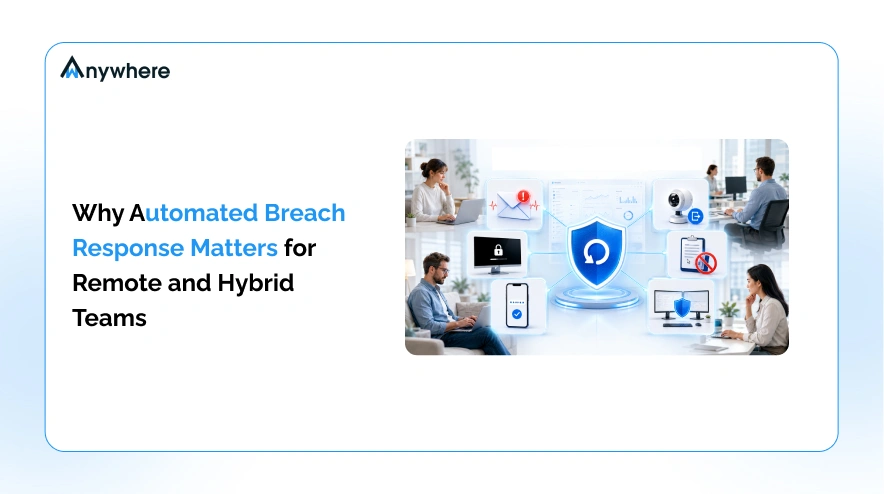
Instant breach alert email notifications
The moment a defined trigger condition is met, the right person or team should receive an alert automatically, with enough detail to understand what happened without needing to dig through logs first.
Automatic lock screen and black screen response
A suspicious action, such as an unrecognized device connection or an unauthorized access attempt, should be able to trigger an immediate screen lock or a black screen response, cutting off visibility and access before anyone needs to step in.
OTP verification on breach
Requiring a one time password the moment a risk trigger fires adds a verification step that confirms the person at the device is who they should be, without waiting for IT to manually challenge the session.
Camera disconnection detection and automatic logout
If a device’s camera is disconnected or blocked during a session where it should be active, that is worth flagging on its own. Pairing that detection with an automatic logout closes the session before it can be misused.
Copy paste detection and prevention
Unauthorized copying of sensitive data, whether to an external drive, a personal account, or an unapproved application, should be detectable and blockable in real time, not discovered afterward in a log review.
Dual monitor detection and environment controls
An unrecognized second monitor connected during a sensitive task can indicate an attempt to capture or share information outside approved channels. Automated detection flags this the moment it happens, rather than relying on someone noticing during a spot check.
Also Read More How to Monitor Remote BPO Agents Across Shifts and Time Zones
How wAnywhere automates breach response
wAnywhere brings each of these actions together in one system rather than as separate tools that need to be manually connected. Alerts, lock screen and black screen triggers, OTP verification, camera and dual monitor detection, and copy paste prevention all run on the same platform, watching every device the same way whether it is sitting in an office, a home, or moving between networks during a hybrid workday. Every trigger and every automated action feeds into a single dashboard, so a security or IT lead sees exactly what happened, when, and what the system did about it, without needing to piece the story together from multiple tools after the fact.
Building an automated breach response setup that holds up
Getting to a setup that actually works starts with an honest audit of where the current gaps are. Look at how many of today’s response steps depend on a person noticing something in real time, and how long that typically takes. From there, define the specific trigger conditions that matter for your environment, unrecognized devices, copy attempts, camera tampering, unusual login behavior, and decide what the default automated action should be for each one. Test the setup with a tabletop exercise before relying on it in a real incident, and review the logs regularly, since the value of an automated system depends on the rules staying current as work patterns change.
Every unwatched minute costs you
See automated breach response in action
Conclusion
Whether a team is fully remote, hybrid, or split across shifts and time zones, the underlying problem is the same one. A response that depends on a person being present, alert, and available the moment something goes wrong will always have a gap in it. Automated breach response removes that dependency, acting the instant a threat is detected instead of waiting for someone to be on site or awake to see it. Start your free trial.
Frequently asked questions
Why is automated incident response important for remote and hybrid teams?
Remote and hybrid teams do not have the physical IT oversight an office provides, and devices often move between trusted and untrusted networks throughout the day. Automation replaces the person who would otherwise need to notice and act, keeping response consistent regardless of who is working, where, or when.
How does automated breach response reduce the cost of a breach?
It shortens the time between detection and containment, which limits how much data or access an attacker or a policy violation can reach before it is shut down, and reduces the manual investigation time a security team would otherwise spend piecing events together after the fact.
What is the difference between breach detection and breach response?
Detection is identifying that something suspicious or unauthorized has happened. Response is what happens next, containing it, alerting the right people, and stopping further damage. A platform can detect an issue without automating the response, which is where the delay this article describes usually comes from.

Table of Contents
Boost productivity and compliance with wAnywhere
Read summarized version with