 Set as a preferred Google source
Remote work has quietly created a blind spot that most IT teams have never had to manage before. An employee opens a laptop at home, at a co-working space, or at an airport gate, and the moment they connect, they are working on a network the company did not choose, did not configure, and cannot see. VPNs encrypt the tunnel once a connection is made, but they were never designed to answer a more basic question: what network is this device actually sitting on right now. That gap is exactly where remote work security starts to break down, and it is the gap SSID detection is built to close.
What Is an SSID and Why It Matters for Security
An SSID, or service set identifier, is simply the name of a wifi network. It is the label a device sees in its list of available networks, whether that is Home_Wifi_5G, Airport_Free_Wifi, or the name of a coffee shop’s guest network. Every time a laptop or phone connects to wifi, it connects through a specific SSID, and that name is broadcast and logged at the device level.
On its own, an SSID is a harmless piece of network metadata. But for a company managing a distributed workforce, it is one of the few reliable signals of where an employee’s device physically sits at any given moment. A device connected to a named home network behaves very differently, from a risk standpoint, than the same device connected to an open, unnamed hotspot at a train station. This is why ssid, despite being a basic technical term, sits at the center of how modern IT teams think about remote access risk.
How SSID Detection Works
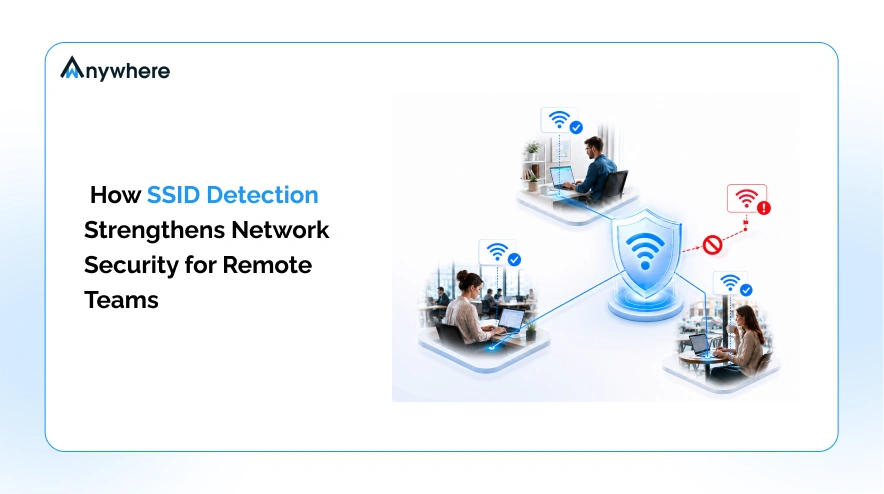
SSID detection is the process by which a monitoring or security platform identifies, logs, and evaluates the wifi network a managed device is connected to. In practice, this means the platform reads the network name each time a device connects or changes networks, timestamps that event, and compares it against a list of networks the organization has approved or flagged.
This is different from full network traffic inspection. SSID detection is not reading what an employee is doing on the network. It is answering a narrower, more useful question for IT: is this device on a network we trust. That distinction matters for both security and for how the practice is positioned to employees. A platform doing SSID detection can immediately reveal when a device moves from an approved home network to an unrecognized public hotspot, which gives IT a real-time signal without requiring deep packet inspection or invasive monitoring of browsing activity.
Also Read More Device Security Check, What It Is and How to Complete It
Why Remote Teams Are a Network Security Risk
Remote and hybrid teams work from environments IT never designed. A home router bought five years ago and never updated. A shared wifi network at a co-working space with dozens of unknown devices on it. A hotel or airport hotspot with no encryption and no way to verify who else is on it. Each of these environments sits outside the perimeter that traditional network security was built to protect.
The scale of this shift is significant. Work-from-home days accounted for about 25% of all paid full days in the US as of May 2026, and over the past year, 12% of full-time employees worked fully remote while another 26% worked a hybrid arrangement, according to Stanford’s Survey of Working Arrangements and Attitudes (SWAA). That means more than a third of the full-time workforce is regularly connecting to company systems from networks IT does not manage, and every one of those connections is a potential entry point.
The threat data backs this up. According to Verizon’s 2026 Data Breach Investigations Report, which analyzed more than 22,000 confirmed breaches across 145 countries, exploitation of software vulnerabilities has overtaken stolen credentials as the leading way attackers gain initial access, now accounting for 31% of breaches, while nearly half of all breaches, 48%, now involve ransomware. Unmanaged home routers and public hotspots are exactly the kind of unpatched, loosely configured entry points this shift favors, since they sit outside the vulnerability management programs that protect office networks. The FBI has separately warned that hotel wifi networks pose a greater security risk than home networks, since hotel networks are often built favoring guest convenience over robust security practices, making them an easy target for anyone hoping to intercept unencrypted traffic or plant a rogue access point.
This is the core of remote workforce security risk: it is not that remote employees are careless. It is that IT has almost no visibility into the network layer their devices depend on every single day. A device can pass every endpoint check, run approved software, and still be sitting on a network with no encryption, an outdated router, or a name spoofed to look like a trusted hotspot, and none of that would show up in a standard device audit.

Curious how compliant your endpoints really are?
See how wAnywhere’s IT system audit tools give security teams a complete picture of device and network activity.
How SSID Detection Strengthens Security
SSID detection addresses this blind spot directly, and it does so in a handful of concrete ways that matter to security teams managing distributed employees.
Confirm Employees Are on Approved Networks
Instead of assuming a device is on a safe connection, IT can verify it. Approved home networks, verified office locations, and known co-working spaces can all be whitelisted, giving security teams a factual record rather than a guess.
Flag Connections to Unknown or Unsafe SSIDs
When a device connects to an unrecognized network, whether that is an open hotspot or a network with a suspicious or spoofed name, the platform can flag it immediately, so IT is not finding out about the exposure after the fact.
Support Conditional Access Based on Network Trust
Once network identity is known, it can become a policy input. Access to sensitive systems can be tightened or restricted when a device is on an unverified network and restored once it reconnects to an approved one, without requiring the employee to do anything differently.
Complement VPN and Zero Trust Rather Than Replace Them
SSID detection does not encrypt traffic and it is not an access control system on its own. It sits alongside those tools, giving them a piece of context, the physical network layer, that they cannot see on their own.
Give IT an Audit Trail of Where Work Actually Happens
For secure remote access and compliance reporting, having a logged history of which networks were used, and when, turns a vague policy about using approved networks into something that can actually be verified.
Taken together, these capabilities support the broader goal of network access control for a distributed workforce: making sure access decisions are based on real signals about the environment a device is in, not assumptions about it.
Also Read More wAnywhere Free Workforce System Audit Tool
Where SSID Detection Fits Alongside VPN and Access Control
SSID detection is not a replacement for the controls IT already runs. A VPN still encrypts traffic in transit. Zero trust architecture still verifies identity and device posture before granting access. What SSID detection adds is a layer these tools were never built to provide: a factual record of the physical network context a device connects from.
Think of it as the visibility layer that sits underneath everything else. VPN and zero trust answer the question of who is connecting and whether their traffic is protected. SSID detection answers a different question: where is this connection actually happening, and is that location one the organization has reason to trust. For companies trying to strengthen network access control without piling on more VPN infrastructure or forcing every remote employee through heavier connection overhead, SSID detection offers a lightweight way to close that visibility gap.
How wAnywhere Uses SSID Detection
wAnywhere brings SSID detection into a single view for IT and security teams managing hybrid and remote employees. Instead of relying on employees to self-report where they are working from, or discovering an unsafe connection only after something goes wrong, wAnywhere logs the network identity behind every device connection and lets IT set clear rules for what counts as approved. Managers are alerted the moment a device’s SSID changes, so a shift from an approved network to an unrecognized one surfaces immediately instead of sitting unnoticed in a log.
The outcome for security leaders is straightforward: fewer blind spots in the remote workforce, a verifiable record of network activity for audits and compliance, and a way to enforce secure network use without adding friction for employees who are already working the way the business needs them to. It is one part of a broader approach to workforce visibility that treats network trust as something to verify, not assume.
For CISOs and IT admins evaluating tooling, the practical value shows up in day-to-day operations rather than in a single dramatic catch. It shows up when an auditor asks for proof that a policy on approved networks was actually followed, when a security review needs a clean history of device activity instead of a gap, and when an IT team can rule out the network layer in minutes while investigating an incident instead of chasing it down manually.
Conclusion
Knowing where an employee’s device is actually connecting from is a foundation of remote security, not an afterthought. As hybrid and remote work stay the norm rather than the exception, the organizations that hold up under pressure will be the ones that can answer a simple question with certainty: is this device on a network we trust. SSID detection gives IT teams that answer, in real time, without adding complexity for the people doing the work.
If your team is managing a distributed workforce without full visibility into the networks employees connect from, it is worth seeing what that visibility actually looks like in practice. Start Free Trial Today.
See SSID detection in action
Explore how wAnywhere verifies approved networks, flags unsafe connections, and gives IT a full audit trail for remote and hybrid teams.

Table of Contents
Boost productivity and compliance with wAnywhere
Read summarized version with