 Set as a preferred Google source
As BPOs and remote-first organisations increase in numbers, establishing the performance of people working in the field has become essential to business operations. Aux time is an essential tool to assist in creating a level playing field when it comes to establishing who is being productive, who is not, and what they are doing all day.
Tracking aux time will provide a business with the necessary tools to track those types of activities that would normally be classified as not generating any revenue (i.e., non-call activity such as after-call work, training, or internal communications) and establish whether each agent is, in fact, busy or not. This ensures that agents have the same level of performance during normal work hours.
If aux time is never monitored or poorly defined, then the unintended consequence could be decreased performance/productivity, inaccurate billing, decreased service levels, and decreased levels of compliance.
Tracking aux time accurately allows a business to see workforce performance levels, reduce the potential for the misappropriation of resources, and create a transparent operation, but still provide the employee with the ability to perform their job, without micromanagement.
What Is AUX in BPO?
In the BPOs, AUX or Auxiliary is used to categorize an agent who is logged into the system but has not taken or handled calls or interacted with customers for a certain length of time.
AUX Meaning in BPO and Call Centers
Aux meaning in BPO industry indicates non-call time or productive time spent on an activity that supports customer service but does not involve live customer interactions. When agents are performing a task that is in direct support of customer service but does not involve any live customer calls, they will often switch to AUX (Auxiliary) status.
Common AUX Status Codes
Examples of common AUX status codes are:
- After Call Work (ACW)
- Training
- Internal Meetings
- System Issues
- Coaching / QA Review
- Email / Ticket Handling / etc.
AUX Time vs Idle Time
Another topic that tends to create much confusion in the BPOs is the difference between idle time and AUX time.
- AUX time indicates that the agent is working but not handling calls.
- Idle time indicates that the agent is inactive or not working for a valid reason.
By properly defining AUX statuses, organizations can make a very clear and concise distinction between “legitimate work” and downtime.
What Is Aux Time?
Aux time is the authorization for work that is not related to calls. This is considered a non-call work activity and contributes to overall productivity, the level of service quality, or operational efficiency.
Aux Time in BPOs
The usage of aux time in the BPO industry includes:
- Documentation after calls
- Customer relationship management (CRM) updates
- Customer follow-ups
- Quality reviews
- Training sessions
Aux Time in Non-BPOs
For virtual teams in areas other than the BPO sector, aux time includes activities such as:
- Internal meetings
- Making presentations
- Performing research/analysis
- Collaborating with team members and utilizing tools such as Slack and email
Effective tracking of auxiliary time can help ensure that these activities are viewed as being productive forms of work.
What Is Aux Jump? Aux Jump Meaning in Call Centers
Aux jump meaning in call centres refers to the act of agents continually changing their AUX status, generally for no noticeable reason (like avoiding calls or inflating productive hours).
What Are Aux Jumps in BPOs?
An aux jump can occur when:
- Agents enter, then immediately exit, AUX after completing a call
- Agents exit AUX after the amount of time required to complete an AUX log
- Agents repeatedly switch AUX status codes to circumvent monitoring
Legitimate aux time is structured, measurable, and tracked, whereas aux jumping time is generally unstructured (no specific reason), excessive, and not tracked or hidden from monitoring.
Aux Jumping in BPOs & Call Centers
Aux Jumping typically occurs if:
- There is no strict definition of Aux Codes
- Execution times of Aux Codes are not defined
- Managers do not have the ability to closely monitor performance in real-time
- Remote Agents are not effectively monitored in the same way as agents working in the office
Common Aux Jumping BPO Scenarios
Aux Jumping is happening more frequently in BPOs for several reasons:
- Agents are spending longer in After Call Work (ACW) than is allowed
- Frequent switching back and forth between Auxiliary and Break Codes for training
- Will not queue for peak-hour call volume
How Unmonitored Aux Time Leads to Aux Jumping
When an organisation does not monitor or audit Aux Time, it creates a loophole. Over time, the effect is that the organisation negatively impacts SLAs, Agent Utilisation, and Customer Experience.
Challenges in Managing Aux Time for Remote Employees & Agents
As working from home develops into a larger practice, so does managing aux time without structured visibility and control methods.
Difficulty in Tracking Aux Time in a Remote Environment:
We as managers do not have a true physical presence when managing remote employees; therefore, we cannot adequately verify whether the aux time is actually being spent on legitimate tasks, such as ACW or training. Basic login information does not paint a complete picture of an employee’s true work status, leaving all levels of visibility and accountability as huge gaps in the workforce.
Lack of Visibility and Real-time Alerts
When there is no live dashboard or alerts, excessive aux duration often goes unnoticed. The manager’s only opportunity to identify issues would come at the time that Service Levels begin to drop. The times when a manager does not have a way to monitor employees’ aux time in real-time, or be able to prevent aux jumping or enforce aux time limits, are difficult to accomplish.
Potential for Decreased Productivity and Misuse of Aux Time
Unmanaged aux time can compromise the number of calls an employee is handling and cause the overall amount of productive hours reported to be inflated. The higher the number of times an employee switches between aux groups, or incorrectly designates idle time as aux, the greater the amount of productivity leakage. This leads to incorrect billing and operational inefficiency for both BPOs and remote teams. According to the WorkTime 2026 global report, nearly half of a typical employee’s computer time is classified as idle, highlighting the gap between logged hours and productive activity when time isn’t tracked properly. This underscores the importance of structured aux time visibility for remote teams.
How wAnywhere Helps Manage Aux Time for Remote Teams & BPO Agents
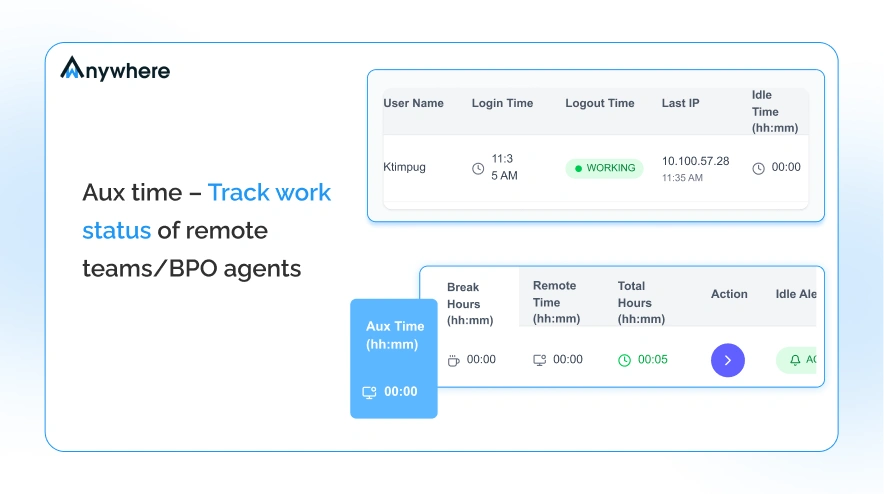
wAnywhere aux time tracking software was developed with the remote team and BPO industry in mind. The solution allows managers to monitor AUX status in real-time for teams across the organization. With the tool, managers will have the capability to view current AUX distribution, monitor time spent in each AUX status, and evaluate historical AUX data, giving them total visibility into agent work behavior, independent from call metrics.
Defining Aux Time Allocation and Utilization
With wAnywhere, organizations can create and define AUX codes, establish maximum durations for each AUX code, and assign AUX types based on department or campaign. Once these codes have been created and assigned, organizations will be able to confirm that AUX time is being utilized for approved tasks and increase the precision of their workforce planning and utilization.
Transparency without Micromanagement
wAnywhere promotes accountability through data, not through surveillance. By having a clear policy for AUX time usage, along with duration limits and notifications for misuse, wAnywhere enables managers to maintain employee trust while minimizing AUX misuse. wAnywhere gives managers a clear understanding of how their operations function without having to constantly oversee or monitor employees in an intrusive manner.
Read More: Idle Time Tracking – Monitor active & inactive time of remote teams
Configure Aux Time Metrics Using wAnywhere
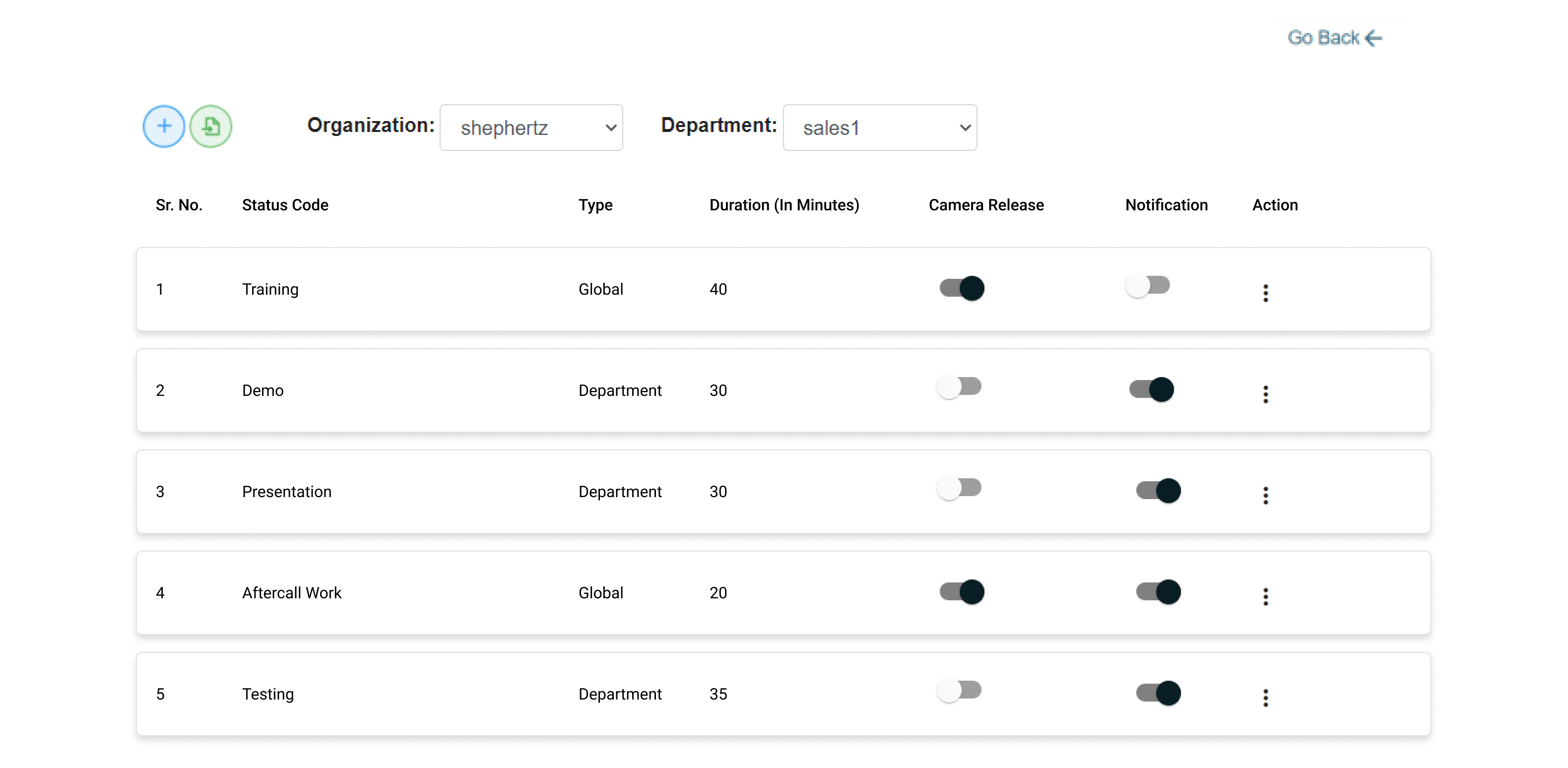
With the wAnywhere platform we provide, organizations have the ability to customize AUX adult time tracking by creating their own workflow process for operation and compliance purposes.
Aux Time Configuration Parameters:
Status Codes (ACW, Training, Demo, Campaign)
You can set up standardized aux codes, e.g., ACW, training, demo, and campaign, which enables consistent reporting of aux status across all areas of the business.
Organizational or department-specific aux types
Build either global “aux” categories or create unique aux types by departments, processes, or by client campaign in order to align with your organizational structure.
Daily Time Maximums
Set a maximum amount of time for each aux status per day to avoid the misuse of aux time by agents, thereby reducing the chance of agents jumping from aux to aux.
Camera Release Settings
Option (when approved) to turn off camera recording while on aux to allow for both security and productivity tracking policies to work together.
Manager Alerts for Exceeding Aux Time
Ability to configure an automated e-mail notification that notifies managers (supervisors) when agents exceed their daily aux time allowed. This allows for riskier occurrences to be addressed quickly.
Create & Control Aux Codes for Remote Workforce & BPO Agents
Through the use of wAnywhere, teams can do things like:
- Create worldwide or location-based aux codes
- Edit and delete aux status as the process flow continues to change and improve upon itself
- Customise aux duration based on work intensity
This flexibility provides teams with the ability to align auxiliary usage with their equipment-related operational requirements.
Benefits of Managing Aux Time for Remote Workforce & BPO Agents
Structured aux time management improves visibility, operational efficiency, and accountability across distributed teams.
Track Employee / Agent Aux Time
Monitoring aux time gives managers clear insight into how agents allocate their non-call work hours.
Visibility into demo, training, and ACW time
Organizations can accurately track time spent on after-call work, training sessions, demos, or campaign-related tasks, ensuring productive activities are documented and measurable.
Accurate billing and hour estimation
Precise aux tracking helps validate billable hours, support payroll accuracy, and provide transparent utilization reports for clients and internal stakeholders.
Monitor Live Aux Time Utilization
Real-time aux visibility enables proactive workforce management rather than reactive correction.
Real-time tracking of aux usage
Managers can monitor current aux distribution across teams, ensuring balanced workload allocation and minimizing unnecessary downtime.
Identify productivity gaps
By analyzing aux trends, leaders can detect patterns of excessive aux usage and address workflow inefficiencies before they impact service levels.
Detect Exceeding Aux Time
Controlled aux policies reduce misuse and strengthen accountability.
Alerts for overuse
Automated notifications flag when agents exceed predefined aux limits, allowing supervisors to intervene promptly.
Insights into aux time misuse
Data-backed reporting highlights recurring patterns of aux jumping or extended non-call activity, supporting fair performance evaluation and compliance monitoring.
Read More: wAnywhere Break & Aux Time Management
Visualization & Reporting of Aux Time Utilization
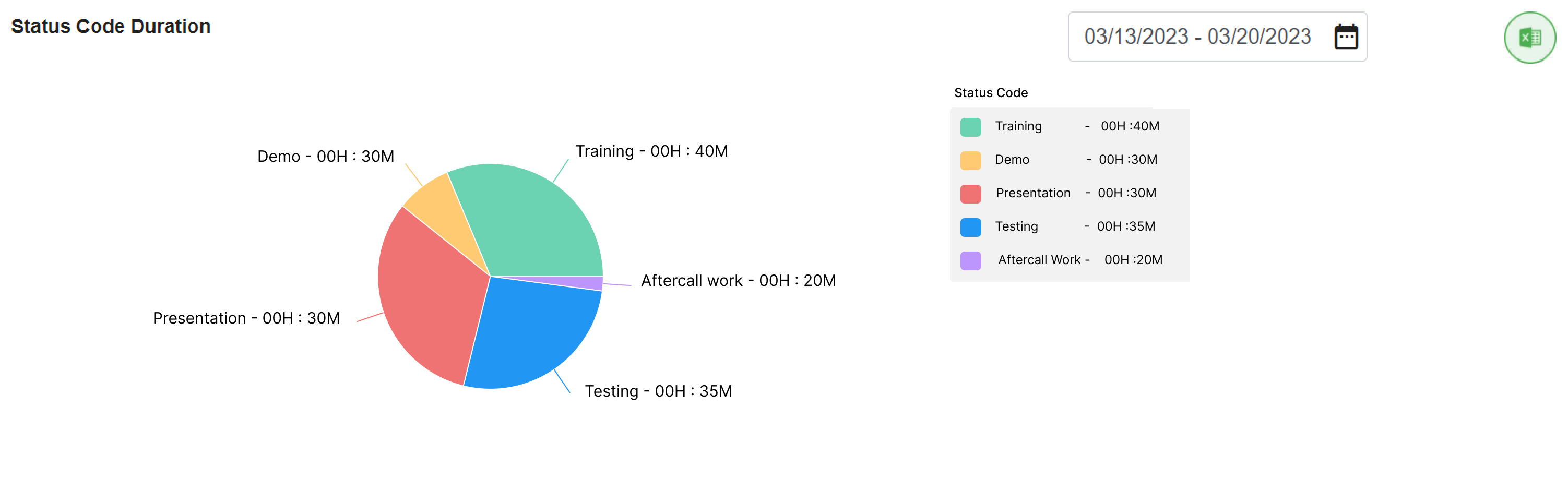
Aux Time utilization dashboard showing visualization and reporting for remote teams
Analytics Dashboards for Aux Time
Interactive dashboards provide a real-time overview of aux distribution across teams, departments, and campaigns. Managers can instantly view trends, compare aux usage patterns, and identify anomalies that may indicate excessive aux time or potential aux jumping.
Detailed Reports for Workforce Planning
Comprehensive aux time reports help workforce managers analyze historical usage, forecast staffing needs, and optimize scheduling. These insights support better capacity planning, balanced workloads, and improved SLA adherence across remote teams and BPO agents.
Compliance-Ready Data Logs
Structured aux data logs create an auditable record of agent activity. Organizations can generate documentation for client reporting, payroll validation, and regulatory audits that will ensure transparency, accountability, and policy compliance at all times.
How Aux Time Monitoring Prevents Aux Jumping
Structured aux monitoring will eliminate the grey areas that lead to misuse and inefficiencies through a remote/BPO environment.
Visibility Eliminates Aux Misuse
With the manager’s ability to view AUX status in real time, agents are less likely to misuse AUX codes. Having sufficient visibility gives agents no reason to switch their status unnecessarily; therefore, it helps mitigate the chance of jumping aux in call center operations.
Prevent Aux Jumping with Duration Controls
Setting specific limits of time for specific AUX categories helps mitigate excessive or repeated status changes. Such controls will directly minimize jumping aux situations when performed by BPO, because they ensure that the use of aux is consistent with operational needs.
Accountability with Data
Detailed reports and activity logs provide measurable accountability. By providing a clear view of the call center behaviour of agents jumping aux, clients can address misuse with data-driven discussions rather than with baseless assumptions.
Conclusion
Unstructured aux time is the actual issue, not simply aux time.
By developing clearly defined, accurate systems to track and report on auxiliary usage, businesses can improve productivity, enhance billing accuracy, strengthen compliance, and improve employee trust.
With wAnywhere, BPOs and remote-first teams can manage auxiliary use transparently, stop aux jumping, and maintain operational authority without needing to micromanage.
Schedule a demo with wAnywhere to learn more about compliance-driven tracking of aux usage in real-world BPOs and remote working environments. Start your free trial today!
How to improve time management for call agents?
wAnywhere employee monitoring software tracks call agents’ login/logout, active/idle, break/aux, and total work hours. It provides you actionable insights into how BPO agents perform and with what efficiency so you can know what productive and unproductive time they spend.
How to manage Auxiliary or unavailable time?
With wAnywhere monitoring software, you can define Aux codes and duration to track the status of BPO agents so you can know the reason for their ‘unavailable time’. Also, you can manage agents’ Aux time by alerting them against exceeding Aux duration to keep them focused.
What are the benefits of managing Aux time for remote teams/BPO agents?
You can gain the following advantages using wAnywhere monitoring software:
- Track Aux time to measure work hour utilization of remote teams and BPO agents
- Alert against exceeding Aux time than the defined duration to optimize work hours
- Identify what BPO agents are unavailable for calls to manage the call flow
- Know what remote teams are doing demo, training, presentation, etc.
How wAnywhere helps monitor Aux time for remote teams/call agents?
wAnywhere helps managers define Aux codes and duration to track the Aux status of call agents/remote teams and alert them against exceeding Aux time to keep them focused at work and perform efficiently.

Table of Contents
Boost productivity and compliance with wAnywhere
Read summarized version with