

 Set as a preferred Google source
Table of Contents
Employee activity tracking software has become a non-negotiable security control for distributed teams. But CISOs deploying it now sit at the intersection of three competing pressures: the security team needs telemetry to detect insider threats, HR needs to preserve employee trust, and Legal needs documented compliance with GDPR, ECPA, and state-level statutes. Most deployments fail at least one of those three. Some collect activity data the DPIA cannot justify. Others trigger works council disputes that delay rollout for months. A few create audit gaps that surface during the next SOC 2 review.
The pattern is consistent. Programmes that succeed share a structured deployment framework. Programmes that fail, skip it. What follows is a 12-point checklist for deploying employee activity tracking software across pre-deployment, technical configuration, and operational controls — written for security leaders who need a defensible programme rather than a feature list.
Tracking Employee Productivity: The Security Case CISOs Must Make to the Board
The hybrid work shift dissolved perimeter security as a concept. Endpoints now sit in coffee shops, home offices, and family laptops outside any controlled network. The 2024 IBM Cost of a Data Breach Report places the average cost of an insider-driven incident at $4.99 million, with detection times exceeding 290 days when no behavioural baseline exists. Activity data closes that gap by giving SOC teams a behavioural signal layer that perimeter tools cannot produce.
Three drivers justify the programme to the board:
- Insider threat reduction. Gartner reports that around 60% of data exfiltration involves authorised users, where activity data is often the only forensic trail.
- Compliance evidence. SOC 2 CC7.2, ISO 27001 Annex A.8.16, and NIS2 Article 21 each require monitoring of user activity on systems processing regulated data.
- Productivity baseline. Anomalies in activity patterns frequently precede both security incidents and burnout, so the same data set serves detection and workforce planning.
Skipping the framework carries its own cost. GDPR fines for disproportionate monitoring have reached the tens of millions under Article 83(5). Beyond regulators, the operational damage includes union grievances, works council blocks, and the reputational fallout of leaked stories about staff feeling watched. This is where most employee monitoring software deployments come apart — not in the technology layer.
How to Track Employee Productivity Without Invading Privacy
Three principles separate ethical employee monitoring from the failure modes:
- Transparent. Employees know exactly what is captured, why, and which roles can access it. Hidden capture creates legal exposure and destroys trust the moment it surfaces.
- Proportionate. Data collected matches the stated business purpose. If the purpose is detecting credential misuse, keystroke capture is excessive.
- Time-limited. Activity data is deleted on a defined retention schedule, not held indefinitely on the theory it might be useful later.
How to Monitor Employee Computer Activity: Legal Requirements by Region
Before any agent is deployed, three legal artefacts need to exist. None are optional in regulated industries.
Written Acceptable Use Policy (AUP). The AUP defines the scope of monitoring: which categories of activity data are captured, which devices fall in scope, and which do not. The policy needs to be specific. A clause stating that “the company may monitor IT systems” will not survive a GDPR challenge. Name the categories: application usage, URL metadata, idle time, screenshots if applicable.
Employee notice. Notice has to be delivered in plain language before monitoring begins, not buried in an updated handbook. It should reference the AUP, name the legal basis, and explain the retention period.
DPIA under Article 35. Systematic monitoring of employees triggers the mandatory Data Protection Impact Assessment requirement under GDPR Article 35(3)(c). The DPIA documents necessity, proportionality, risks to data subjects, and mitigations. Auditors will ask for it. Without one, the programme is indefensible.
GDPR also introduces a specific trap on a lawful basis: consent under Article 6(1)(a) is not viable in the employment context, because the European Data Protection Board has ruled that the power imbalance vitiates free consent. The correct basis when you monitor employee computer activity is legitimate interests under Article 6(1)(f), supported by a documented legitimate interests assessment.
How to Track Productivity of Employee Working from Home: Jurisdiction-Specific Rules
Knowing how to track remote employee productivity compliantly means layering your DPIA to cover home-network endpoints explicitly. Working out how to track productivity of employee working from home adds a layer that office-only programmes never had to handle: the device may move across state and national borders, and the home is generally a higher privacy expectation than the office.
US federal
The Electronic Communications Privacy Act (ECPA) permits employer monitoring of company devices with notice. State law layers add requirements. Connecticut (§31-48d), Delaware (§19-7-705), and New York (§52-c) each require written notice on hiring or before monitoring begins. The CCPA was amended in 2023 to include employee personal information, adding access and deletion rights for California staff.
EU
Member states retain co-determination rules. In Germany, monitoring software falls under §87(1) BetrVG, requiring a negotiated works agreement with the works council. France and the Netherlands have parallel structures. Skipping this step has stopped deployments mid-rollout.
3 documents required before go-live
- The AUP with monitoring scope defined.
- Signed employee acknowledgement of receipt.
- DPIA reviewed and signed off by the Data Protection Officer and Legal.
Tracking employee computer activity without these three on file creates personal liability for the controller, not just for the company.

wAnywhere Free Trial
See compliant employee activity tracking in action — free for 14 days.
Employee Activity Tracking Software: A 3-Phase Deployment Framework
This is the operational core of the programme. The 12 items below map to three phases. Each item is a deliverable, not a recommendation.
Phase 1: Pre-Deployment (Items 1 to 4)
Item 1: Define and document monitoring scope in writing
Scope creep is the most common cause of programme failure. Before procurement, document exactly which categories of activity data will be captured (application usage, web domains visited, idle and active time, screenshots, file operations) and which will not (keystroke content, webcam, microphone). Match each category to a stated security or compliance purpose. Anything without a documented purpose comes off the list. This document becomes evidence in the DPIA and the AUP.
Item 2: Complete a Data Protection Impact Assessment (DPIA)
The DPIA is the artefact regulators ask for first. It needs sections on the nature of processing, the necessity and proportionality test, a risk assessment for data subjects, and mitigations. The proportionality test is where most DPIAs are weakest. State explicitly why less invasive measures (network telemetry alone, sampling rather than continuous capture) do not meet the stated security objective. Without that argument, the DPIA fails on Article 35(7)(b).
Item 3: Align HR, Legal, and IT Security before software is installed
Three stakeholders, one decision. HR owns employee communication and grievance routes. Legal owns the DPIA, AUP, and notice template. IT Security owns the technical scope and data handling. Schedule a single working session before procurement and produce a one-page memorandum of understanding signed by all three. Programmes that skip this step routinely stall when one function discovers another has made commitments it cannot support.
Item 4: Notify employees formally and document receipt
Notice is the legal hinge. Deliver it in writing, in plain language, with a signed or system-logged acknowledgement of receipt for each employee in scope. Include: which categories of activity data are captured, the lawful basis, the retention period, who can access the data, and the route for raising a Subject Access Request. Without documented receipt, you cannot prove notice was given — and ECPA, US state notice laws, and GDPR Article 13 all require it.
Phase 2: Technical Configuration (Items 5 to 9)
Item 5: Enable PII masking on all screenshot and screen recording captures
Where the configured capture includes screen content, PII masking needs to be applied at the agent layer, before data leaves the endpoint. The masking should redact card numbers, national identifiers, health record fields, and customer PII patterns. This is a hard requirement under GDPR data minimisation (Article 5(1)(c)) when the monitoring purpose does not need the underlying PII. Vendors that treat masking as a paid add-on or a post-processing step do not meet the data minimisation standard.
Item 6: Configure role-based access controls (RBAC) on monitoring data
Monitoring data is itself a high-value target. Configure RBAC so that only named roles can view activity records, with separation between aggregate dashboards (manager view) and raw records (security investigations only). The principle: the smallest possible number of people with access to the most restricted data set. Document who has which access level and review it quarterly.
Item 7: Set data retention limits and automate deletion
Retention is the area auditors find the most violations. Define a retention period per data category in the DPIA, then enforce it through automated deletion in the platform configuration. Typical defensible periods: 30 days for screen captures, 90 days for application metadata, 12 months for aggregated productivity reports. Indefinite retention is not defensible under Article 5(1)(e).
Item 8: Activate tamper-proof audit logging for all monitoring events
Every access to monitoring data needs to be logged in an append-only audit trail software record, with cryptographic integrity controls so the log itself cannot be edited. This protects the programme in two directions: it gives the security team forensic evidence in an insider investigation, and it gives employees and regulators evidence that the monitoring data has not been misused. SOC 2 CC4.1 and ISO 27001 A.12.4 both require it.
Item 9: Run a pilot with a consenting team before full rollout
Pilot with one team, ideally inside IT or Security, for 30 to 60 days. The pilot validates three things: that the technical configuration matches the documented scope, that the data produced is genuinely useful to the SOC and to managers, and that the communication plan does not generate grievances. Document findings and revise before broader rollout.
Phase 3: Operational Controls (Items 10 to 12)
Item 10: Create a transparent employee communication plan
Notice (Item 4) is the legal minimum. The communication plan goes further. Publish an internal page explaining what is monitored, what is not, who to contact with questions, and how to file a privacy concern. Hold open Q&A sessions before rollout. Programmes that treat communication as a checkbox generate ongoing grievances. Programmes that treat it as a transparency exercise generally do not.
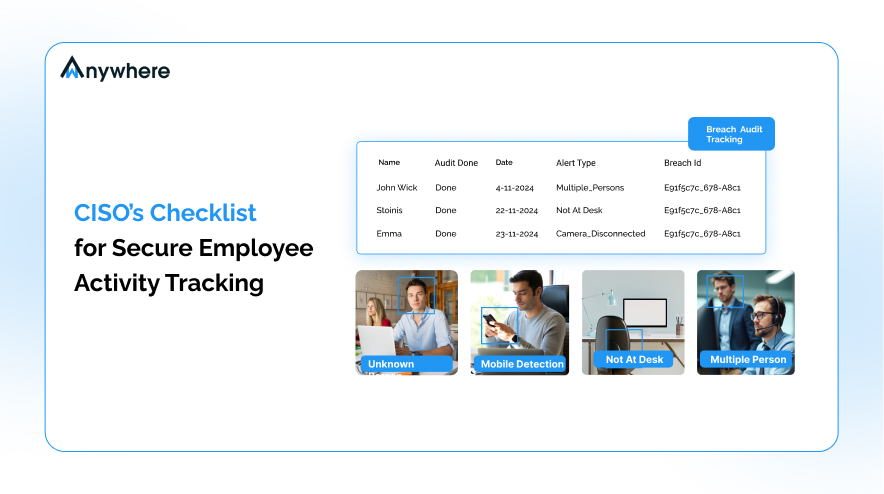
Item 11: Define alert thresholds: monitor for signals, not everything
Screen monitoring software and activity data become noise without thresholds. Define what triggers a review (sustained anomalous file access, repeated policy violations, evidence of credential sharing) and what does not (a single late start, a quiet afternoon). The goal is signal, not theatre. Untriaged alerts create both privacy harm and analyst fatigue.
Item 12: Schedule and document quarterly programme reviews
The programme is not a deployment — it is a control under continuous review. Schedule quarterly reviews covering: DPIA still accurate, retention being enforced, RBAC still appropriate, alert thresholds tuned, employee feedback considered. Document each review. The review log itself becomes evidence of programme maturity in the next audit cycle.
What to Look for in Employee Work Tracking Software
Procurement criteria for monitoring platforms differ from standard SaaS criteria. The evaluation needs to test the controls the programme depends on, not the marketing surface. The right employee work tracking software consolidates productivity metrics and security telemetry into a single agent — a split toolset creates DPIA complexity and coverage gaps.
Evaluate vendors against these seven criteria:
- Built-in PII masking, not a paid add-on. Masking applied at the agent layer is a baseline GDPR requirement, not an enterprise tier feature. If masking sits behind a paywall, the platform’s default configuration is non-compliant.
- Tamper-proof audit trail on the monitoring data itself. The platform should log every access to activity records with cryptographic integrity. Vendors that log only system events, not data access events, do not meet SOC 2 CC4.1.
- Role-based access controls with role separation. Manager-tier and investigator-tier access should be cleanly separable, with the ability to scope access by team, region, or data category.
- Unified coverage for remote and in-office employees. The agent should produce consistent data regardless of network location. Separate platforms for in-office and remote staff create gaps and complicate the DPIA.
- GDPR-compliant data residency options. EU customer data should reside in EU infrastructure with documented sub-processor lists. Article 28 requires it.
- Configurable retention and auto-deletion. Retention must be configurable per data category and enforced automatically, not by manual purge.
- Deployment under one hour per endpoint. Slow rollout extends the period during which scope is inconsistent across the estate.
Test these criteria against your shortlist with a structured proof of concept. Most platforms pass three or four. Production-grade employee activity tracking software needs to pass all seven.
Ready to deploy?
Run the full 12-point checklist inside wAnywhere — free for 14 days, no card required.
Deploy Employee Activity Tracking Software With Confidence
The three-phase framework — pre-deployment foundations, technical configuration with PII masking and audit trails, operational controls under quarterly review — gives the CISO a defensible programme that satisfies Security, HR, and Legal simultaneously. Programmes built this way survive regulator scrutiny, works council negotiation, and employee challenge. Programmes built without it do not.
Run the 12-point checklist against your current deployment, or against your vendor shortlist. Where you find gaps, start a 14-day wAnywhere trial and test the controls in your own environment before commitment.
Frequently Asked Questions
What does employee activity tracking software monitor?
Configurable, but typically: active and idle time, application usage, URL metadata (domain level, not full content), file operations, and optionally screenshots at intervals. Ethical deployments exclude keystroke content, webcam, and microphone capture unless a specific investigative cause justifies it under the DPIA.
How do you track employee productivity without micromanaging?
Aggregate and trend — do not track individual minute-by-minute behaviour. Define output-based metrics and use activity data to identify systemic patterns (tooling friction, meeting overload) rather than to police individuals. Restrict raw-record access to security investigations only, not to line managers.
What is the difference between employee monitoring and surveillance?
Monitoring is bounded, transparent, proportionate, and serves a documented purpose. Surveillance is unbounded, covert, or disproportionate to its stated purpose. The DPIA and AUP are what separate the two in regulatory terms.
How do you track remote employee productivity compliantly?
The same principles apply whether staff are in-office or remote: measure output, not activity. Use employee work tracking software configured to surface aggregate trends — application time, project focus, meeting load — rather than minute-by-minute timelines. Restrict raw-record access to security investigations. For how to track remote employee productivity compliantly, the key addition is confirming that your DPIA covers home-based device use and that your AUP explicitly names remote endpoints in scope.
What is the difference between employee work tracking software and employee monitoring software?
The terms are often used interchangeably. In practice, employee work tracking software typically refers to tools focused on productivity metrics and project visibility, while employee monitoring software emphasises security telemetry and compliance logging. Production-grade platforms serve both functions from a single agent, which simplifies the DPIA and avoids the audit gaps that come from running parallel tools.

Read summarized version with