 Set as a preferred Google source
Every organization now runs on a growing web of laptops, servers, cloud tools and remote endpoints. Each device carries its own operating system version, patch status, storage load and security configuration, and any one of these can quietly drift out of shape. An outdated OS, a missed security patch, a nearly full hard drive or an unmonitored network setting rarely looks urgent on its own. Left unchecked, though, these small gaps compound into slow systems, failed compliance checks and open doors for attackers. A regular IT system audit is how organizations catch these issues before they turn into downtime or a breach. This article explains what a system audit is, why it matters, and how to run one in minutes.
What is a system audit
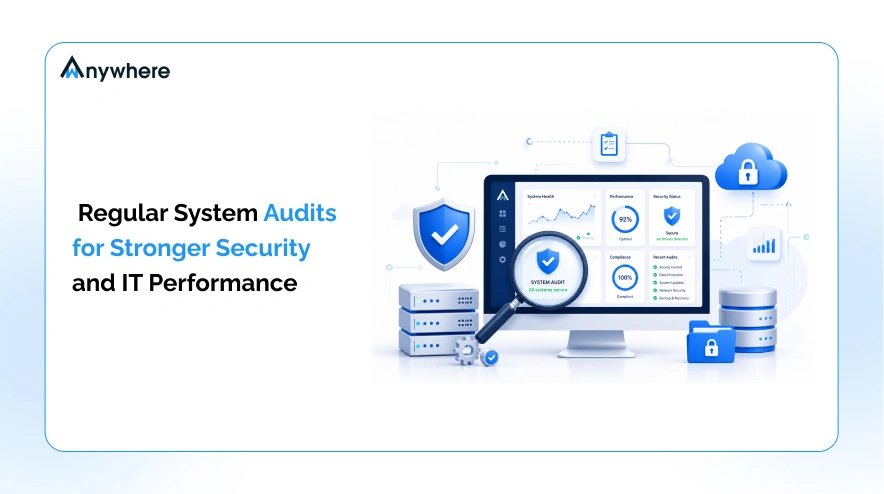
An IT system audit is a structured review of a device’s hardware, software, operating system, network configuration and security status, carried out to confirm everything is current, compliant and functioning as it should. It looks at what a machine is running, what it is missing and where it stands exposed.
Traditionally, this kind of review meant IT staff manually checking device settings one machine at a time, a process that does not scale once a fleet grows past a few dozen endpoints. Modern audit tools automate the process instead. They scan hardware specifications, installed updates, security patch status and network configuration, and return a readable report in minutes rather than days. For IT and security teams managing hybrid or remote fleets, that speed is what makes regular auditing realistic rather than aspirational.
Why regular system audits matter
Every unmaintained endpoint is a potential entry point. A laptop running an old OS build, a desktop missing a critical patch, or a server with a misconfigured network setting can sit quietly for months until someone tries to use it, and by then attackers may have already found it first.
This risk is not theoretical. Verizon’s 2026 Data Breach Investigations Report found that 31% of confirmed breaches in 2025 began with attackers exploiting an unpatched software vulnerability, overtaking stolen credentials as the leading way attackers get in for the first time in the report’s 19-year history. A routine system audit that surfaces missing security patches closes exactly this gap before it can be used against you.
A system audit typically detects:
- Outdated operating systems and pending version upgrades
- Missing security updates and patches
- Hardware specifications nearing end of useful life
- Storage utilization approaching capacity
- Network configuration issues
- Weak or inactive endpoint security settings
- Rising IT support load tied to unresolved device issues
- Gaps against internal or regulatory compliance policies

Run a free system audit and spot risks in minutes
Key benefits of using a system audit tool
Running audits on a schedule, rather than only after something breaks, turns IT from reactive firefighting into proactive management. Here is what that shift delivers in practice.
Strengthen endpoint security
Audits flag missing patches and outdated security configurations before attackers can use them, closing the exposure window on every device in the fleet.
Improve device performance
Identifying storage limits, outdated drivers and resource-heavy configurations early keeps machines running at the speed employees need, instead of waiting for a slowdown complaint to trigger a fix.
Simplify IT asset management
A 2026 Ponemon Institute study on cyber asset and exposure management found that only 48% of organizations are highly confident they have a comprehensive, up-to-date list of all their hardware, software and data assets, and just 30% reconcile their asset inventories daily or monthly. Regular system audits fill exactly this visibility gap, giving IT teams a current, accurate picture of every device on the network instead of a spreadsheet that goes stale within weeks.
Reduce downtime
According to Uptime Institute’s Annual Outage Analysis 2025, more than half of organizations, 54%, say their most recent significant outage cost more than $100,000, and one in five say it exceeded $1 million. Catching failing hardware, storage limits and misconfigurations through routine audits is far cheaper than absorbing the cost of an outage after the fact.
Support compliance initiatives
Documented, repeatable audits give IT and security leaders the evidence they need for internal reviews and external compliance requirements, without scrambling to assemble records after an auditor asks.
Check every endpoint’s health with wAnywhere, free
What a system audit checks
A thorough system audit covers a consistent set of parameters across every device, so IT teams can compare fleet-wide health at a glance:
- Operating system information and version status
- Hardware specifications, including processor, memory and storage
- Installed updates and patch history
- Security patch status and known vulnerabilities
- Network information and configuration
- Storage details and available capacity
- Overall device configuration against policy
Also Read: How Bluetooth and USB Detection and Prevention Helps Organizations Strengthen Endpoint Security
Who benefits from system audits
IT administrators get a fast, fleet-wide view of device health without manually checking machines one at a time, freeing up time for higher-value work.
Security teams gain visibility into unpatched vulnerabilities and misconfigurations that would otherwise sit undetected until an incident forces the issue.
Business and IT leaders get evidence-backed reporting to justify security investments and demonstrate due diligence to boards, auditors and regulators.
Managed service providers (MSPs) can standardize audits across every client environment, catching issues before they become support tickets or, worse, breach notifications.
Also Read Strengthen Your BPO Security and Gain Control Over Emerging Threats
Best practices for effective system auditing
Getting value from system audits depends less on the tool and more on the habits built around it. Audit regularly rather than only when a problem surfaces, since the point of an audit is to catch issues before they cause pain. Review reports promptly instead of letting them sit in an inbox, and assign clear ownership for closing out the fixes an audit uncovers. Apply missing updates as soon as they are flagged, and plan for hardware replacement before aging devices become a liability rather than after. Finally, pair periodic audits with continuous endpoint monitoring and AI-powered security, so the gaps between audits do not become blind spots of their own.
Also Read How Workforce Intelligence Helps Scale GCC Operations Efficiently
Introducing the free wAnywhere System Audit Tool
wAnywhere’s free System Audit Tool gives IT and security teams exactly what this article describes, without the manual legwork. It analyzes operating system information, hardware specifications, installed updates, security patch status, network configuration and storage details across every connected device, then returns a clear, actionable report in minutes.
There is no complex deployment involved. The tool scales from a handful of laptops to fleets of thousands of endpoints, making it equally useful for a small IT team and an enterprise security function managing a hybrid, distributed workforce.
Free system audit tool, no setup required
Conclusion
Proactive system health checks reduce security risk, improve performance and support compliance, all before small issues become expensive ones. Running a system audit is not a one-time fix but a habit that keeps every endpoint accountable. Try System Audit Tool Today.
Frequently asked questions
How often should you run a system audit?
Most IT and security teams benefit from running audits on a regular schedule, such as monthly or quarterly, rather than only after a problem appears, since the goal is to catch issues early.
What does a system audit check?
It checks operating system version, hardware specifications, installed updates, security patch status, network configuration and storage utilization, among other parameters.
Is the wAnywhere System Audit Tool free?
Yes, wAnywhere's System Audit Tool is free to use and requires no complex deployment to get started.
Who needs a system audit?
IT administrators, security teams, business and IT leaders, and MSPs responsible for endpoint health and compliance across hybrid or remote fleets all benefit from regular system audits.

Table of Contents
Boost productivity and compliance with wAnywhere
Read summarized version with