


 Set as a preferred Google source
Every growing company hits the same wall. Leaders want visibility into how work gets done, and employees worry that visibility means being watched. The instinct to install monitoring software often runs into a very real fear, that oversight will slide into control. This tension is not really about the software itself. It is about how monitoring is introduced, explained, and used once it is live. Done poorly, productivity monitoring software becomes a symbol of distrust, something that gets talked about in hushed tones at all-hands meetings. Done well, it becomes a shared reference point that helps managers coach fairly and helps employees understand what is expected of them. The difference between the two outcomes has less to do with features and more to do with implementation.
Why micromanagement is the real risk, not monitoring itself
Most of the anxiety around productivity monitoring software gets pointed at the wrong target. It is rarely the data collection itself that damages trust. It is what managers do with that data afterward.
Monitoring vs. micromanagement: drawing the line
Monitoring means collecting information, such as time spent in applications, project completion rates, or general activity patterns, so leaders can see how work is actually flowing across a team. Micromanagement is something else entirely. It is using that information, or the mere possibility of it, to control the exact sequence of someone’s day. A manager reviewing a weekly productivity trend is monitoring. A manager messaging someone the moment their status shows idle for ten minutes is micromanaging. The software involved can be identical in both cases. The behavior around it is what differs.
Why employees resist being watched, not measured
Employees rarely object to being evaluated on outcomes. Performance reviews and KPIs are old news. What creates resistance is the feeling of being watched in real time, without context and without a say in it. That reaction is not irrational. It reflects a reasonable concern that ambiguous data will be misread and used against them rather than to support them. Employee sentiment research backs this up consistently: people accept oversight more readily when it feels fair, limited, and clearly explained, and they push back hardest when monitoring feels open-ended or covert. The lesson for HR and ops leaders evaluating tools is that the software rarely creates the trust problem on its own. The policy wrapped around it does. One in six U.S. employees say they would consider quitting their job over workplace surveillance, according to a 2025 ExpressVPN survey of 1,500 U.S. employers and 1,500 employees.
Also Read: What Can Employee Monitoring Software Actually Do?
What productivity monitoring software actually does
Before deciding how to roll monitoring out responsibly, it helps to be clear about what the software is actually measuring. A lot of the fear around these tools stems from imagining capabilities that go well beyond what most platforms do.
Core capabilities
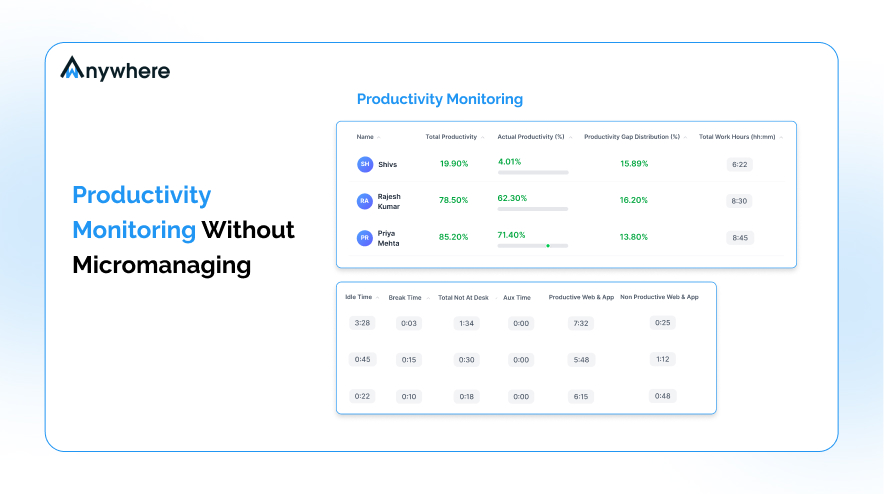
Modern platforms typically track time spent in applications and websites, overall activity levels, and progress against project or task benchmarks. Some tools also generate a productivity score based on patterns of engaged time. None of this requires reading someone’s private messages or logging every keystroke. It is closer to a dashboard of how work hours are being spent than a transcript of someone’s day. For IT and operations buyers building a case internally, this distinction matters: it is the difference between a workforce analytics tool and a surveillance system, and it is usually the first question a skeptical stakeholder will ask.
Patterns over surveillance
The real value shows up at the pattern level, not the individual, second-by-second level. A manager does not need to know that someone stepped away from their desk for six minutes in the early afternoon. What is useful is knowing that a team’s focused work hours have trended down over the past month, or that one project is consistently under-resourced relative to its deadline. Treated this way, monitoring software functions less like a camera and more like a weather report for the team: it describes overall conditions, not any one person’s every move.
Also Read: How to Choose the Best Employee Monitoring Software
Principles for monitoring without micromanaging
The gap between monitoring and micromanaging is closed through a handful of consistent practices, not by picking the “right” software. Four principles in particular determine whether monitoring builds trust or erodes it.
Be transparent about what’s tracked and why
Employees should know, before monitoring starts, exactly what is being measured and why it matters to the business. This means publishing a plain-language policy that is actively communicated, not a line buried in the employee handbook that nobody reads.
Focus on outcomes, not keystrokes
The most trust-preserving monitoring programs measure what was delivered, not how many keys were pressed to deliver it. A salesperson who closes their pipeline in four focused hours should not be flagged for “low activity” compared with a colleague who spreads the same work across eight.
Look at aggregate trends, not individual surveillance
Set the default view at the team level. Individual-level data should be a drill-down used sparingly, for specific performance conversations, rather than a dashboard a manager scrolls through every morning looking for something to flag.
Give employees access to their own data
Self-visibility, where employees can see their own activity data the same way their manager can, does more to build trust than almost any policy statement. When people can see exactly what is being recorded about them, monitoring stops feeling like something happening to them and starts feeling like a tool they can also use.

Give your team clarity, not surveillance. See how Wanywhere builds trust into monitoring.
How to roll out monitoring software the right way
The principles above only work if the rollout itself is handled deliberately. How monitoring software is introduced often matters as much as the software’s actual feature set.
Communicate the why before the what
Before announcing which tool is being used, explain the business problem it solves, whether that is understanding workload balance, supporting a hybrid team, or spotting burnout early. Framing the rollout around a shared goal, rather than opening with a list of tracked metrics, changes how employees receive the news. It also gives managers a consistent answer when someone asks why this is happening now, instead of leaving them to improvise a justification on the spot.
Set outcome-based benchmarks with managers
Bring managers into the benchmark-setting process early. Benchmarks handed down without manager input tend to feel arbitrary to the teams that have to meet them, and managers end up defending numbers they do not fully understand themselves.
Start with a pilot team
Roll monitoring out to one team first, gather feedback on what felt useful and what felt intrusive, and adjust before a company-wide launch. A pilot also gives HR and IT a chance to catch policy gaps while the stakes are still small, and it gives the business a concrete story to tell the rest of the company: here is what we tracked, here is what we learned, and here is what we changed based on feedback before rolling this out to everyone else.
Review and adjust scope quarterly
What made sense to track at launch may not make sense six months later. Building in a quarterly review, where the scope of monitoring is revisited against actual business need, signals that monitoring is a working tool rather than a permanent fixture.
Track what matters, not every move. Try wAnywhere free for 14 days.
Signs your monitoring has tipped into micromanagement
Even well-intentioned monitoring programs can drift toward micromanagement over time. A few warning signs tend to show up before trust actually breaks.
Red flags to watch for
- Screenshot frequency or real-time tracking that goes well beyond what the original policy described
- Idle time being flagged or penalized without any context for what caused it
- Employees having no way to see their own recorded activity
- Managers opening a dashboard instead of opening a conversation when something looks off
Any one of these on its own might be a rollout mistake worth correcting. Several appearing together usually means the program has quietly shifted from visibility into control, and it is worth pausing to reset expectations before the shift becomes the culture.
Also Read: How to Enforce a Clean Desk Policy in Your Business
Conclusion
The goal of productivity monitoring software was never to catch people doing something wrong. It is to give leaders enough visibility to support their teams, spot workload problems early, and make fair, informed decisions, all without turning every workday into something that feels supervised. Transparency, outcome-based measurement, and giving employees access to their own data are what keep monitoring on the right side of that line. Get any one of these wrong, and even well-meaning monitoring software starts to feel like surveillance. Get them right, and the same tool becomes a way to build trust rather than erode it. wAnywhere is built around this balance: transparency-first monitoring that gives managers the insight they need without the surveillance-heavy features that erode trust. If you are evaluating monitoring software for your team, see how wAnywhere.com balances productivity insights with employee trust and book a demo.

Table of Contents
Boost productivity and compliance with wAnywhere
Read summarized version with


