 Set as a preferred Google source
TL;DR
- A call center handling protected health information for a covered entity is a business associate and is directly liable under HIPAA, including for failures at a home based seat.
- The Security Rule has three safeguard categories. The physical safeguards, covering workstation use and workstation security, are the ones remote work broke.
- Most PHI exposure in a remote seat is visual or physical rather than digital, so it produces no download, no file transfer and no anomalous login.
- Seven seat level controls cover identity, presence, recording devices, automatic logoff, minimum necessary, transfer restriction and audit evidence.
- Covered entities increasingly audit the evidence trail rather than the policy document, so records that cannot be edited after an incident matter more than written procedure.
A patient calls a healthcare support line at four in the afternoon. The agent who answers is working from a second bedroom, confirms the caller identity, opens the record and reads back a recent procedure and a prescription. The call is encrypted, the login was clean and the recording is retained exactly as the policy says.
None of that addresses the person who walked into the room thirty seconds earlier and can see the screen.
HIPAA has always cared about that person. The Security Rule asks for physical safeguards over workstations, not only technical safeguards over systems, and it asks a business associate to show that those safeguards were operating. On a hospital floor or a locked delivery bay, most of that was satisfied by the building. In a remote or hybrid seat the building is gone, which is why insider threat prevention at the workstation has become a HIPAA question rather than only a security one.
This guide covers what the rule actually requires of a call center, why remote seats changed the exposure, the seven controls that carry the load, and what a covered entity will ask you to evidence when it audits you.
What Does HIPAA Require From A Call Center
HIPAA requires a call center handling protected health information to apply administrative, physical and technical safeguards to that information, to limit access to the minimum necessary for the task, to log and review access, and to be able to demonstrate that those controls were operating. The obligation applies to every seat, including seats in an employee home.
Where Call Centers Sit Under HIPAA
Most outsourced healthcare support operations are business associates rather than covered entities. A covered entity is typically the provider, health plan or clearinghouse. A business associate is an organisation that creates, receives, maintains or transmits protected health information on behalf of that entity, which describes almost any call center taking patient calls, handling claims, running appointment lines or supporting prior authorisation.
The practical consequence is often underestimated. Since the HITECH amendments, business associates carry direct liability for Security Rule compliance. A breach at a home based seat is not a covered entity problem that the provider absorbs. It is the call center problem, governed by the business associate agreement that was signed before the contract started.
What Protected Health Information Looks Like On A Support Floor
PHI is broader than clinical notes. A name tied to an appointment, a member identifier, a claim number, a prescription, a billing address linked to treatment, a recorded call discussing a condition and a screenshot of a patient record are all protected. In a support environment that means PHI is on screen almost continuously, which is precisely why the screen is the control surface that matters most.

HIPAA Did Not Move The Seat. You Did.
wAnywhere applies identity, presence, device and screen controls at every agent seat and leaves the timestamped evidence a covered entity asks for.
Why Remote And Hybrid Seats Changed HIPAA Exposure
Remote seats changed HIPAA exposure because the safeguards that failed are physical rather than technical, and physical failures leave no trace in the systems that compliance teams usually review. Encryption, access logs and call recording all continue working perfectly while PHI is exposed to a person standing behind the agent.
The Workstation Moved Outside A Controlled Facility
Facility access controls assume a facility. Workstation security assumes the organisation can govern where a workstation sits and who can approach it. When the seat is a desk in a shared flat, neither assumption holds, yet the requirement in the rule does not soften to match. The provider still has to show that it restricted physical access to PHI.
Screen Exposure Is The Hardest Disclosure To Evidence
An impermissible disclosure under HIPAA does not require a file to move. It requires PHI to be made available to someone not permitted to receive it, and a visible screen does that silently. This is the exposure class that data loss prevention tooling was never built to catch, because nothing leaves the system.
Minimum Necessary Is Harder To Enforce Without Sightlines
The minimum necessary standard limits use and disclosure to what is needed for the task. On a managed floor, team leaders reinforced it in person and spot checks caught drift. Remotely, it has to be enforced at the application and screen level, and the enforcement has to be recorded, because nobody is walking the aisle to observe it.
The Three HIPAA Safeguards And What They Demand At The Seat
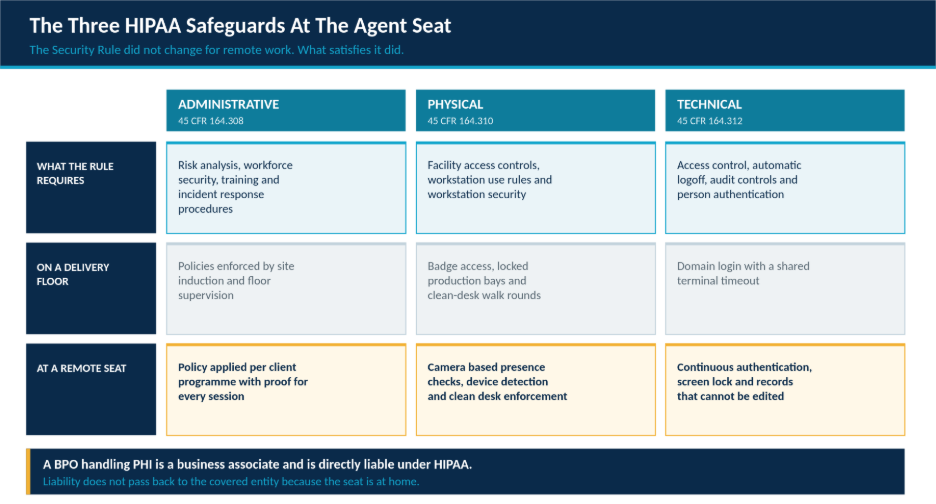
The Security Rule groups requirements into three categories. The table below maps each to the control that satisfied it on a traditional delivery floor and the control that has to replace it when the seat is remote.
| Safeguard | Core Requirement | What It Needs At A Remote Seat |
| Administrative | Risk analysis, workforce security, training, incident response | Policy applied per client programme, with proof it ran for each session |
| Physical | Facility access, workstation use, workstation security, device controls | Presence checks, recording device detection and clean desk enforcement |
| Technical | Access control, automatic logoff, audit controls, authentication | Continuous authentication, screen lock and records that cannot be edited |
Administrative and technical safeguards usually survive the move to remote work with configuration changes. Physical safeguards do not survive it at all, because they were satisfied by a building that no longer exists in the delivery model.
Also Read: 7 Most Pressing Challenges And Solutions For BPOs In Remote Work
7 Controls For HIPAA Compliance In A Remote Call Center
These seven controls address the safeguard gaps that remote delivery creates. None replaces encryption, access management or your business associate agreement. They sit underneath those and cover the physical ground none of them reach.
1. Workstation Identity Verification
Person or entity authentication is a technical safeguard, but a login satisfies it only at the moment it happens. Continuous verification through AI powered facial authentication checks that the authorised agent is still the person at the keyboard throughout the session, which is what closes credential sharing and informal handovers between colleagues.
2. Unauthorised Presence Control
A second person in view of a patient record is an impermissible disclosure waiting to be documented. Seat level unknown person detection flags an unrecognised face, while multiple person detection flags an additional viewer who may be perfectly welcome in the room but is not permitted to see PHI.
3. Recording Device And Clean Desk Control
A phone camera is the simplest route from a patient record to an uncontrolled copy, and it leaves no digital trace whatsoever. Mobile detection addresses the capture route, and clean desk enforcement covers handwritten patient details, printed material and secondary screens, which together account for a large share of physical safeguard findings.
4. Automatic Logoff And Screen Controls
Automatic logoff is named directly in the Security Rule and is routinely configured too loosely for a home environment. Pairing a short timeout with not at desk detection, screen blackout and operating system lock shrinks the unattended window, and these work alongside data breach security controls rather than duplicating them.
5. Minimum Necessary Enforcement At The Screen
Restricting what an agent can see is more defensible than trusting them not to look. Masking fields that the task does not require, limiting record access by queue and hiding full identifiers unless verification demands them turn the minimum necessary standard into a technical control rather than a training message.
6. Transfer And Copy Restriction
Copy and paste, removable storage, printing, screen capture and personal cloud uploads are the common routes by which PHI leaves an approved environment. Restricting these per client programme matters in mixed operations, because an action permitted on a non healthcare contract may be prohibited the moment the same agent joins a patient queue.
7. Audit Controls And Evidence Capture
Audit controls are an explicit Security Rule requirement, and they are where most remote programmes fall short. Every control above needs to produce a timestamped record of the event, the policy breached, the response that followed and the reviewer who closed it. Without that chain the provider can describe its safeguards but cannot demonstrate them.
Give Your Covered Entity Evidence, Not Assurances
Detect PHI exposure at the seat, respond automatically and hand your client a timestamped record for every healthcare programme you run.
Where PHI Actually Leaks In A Remote Seat
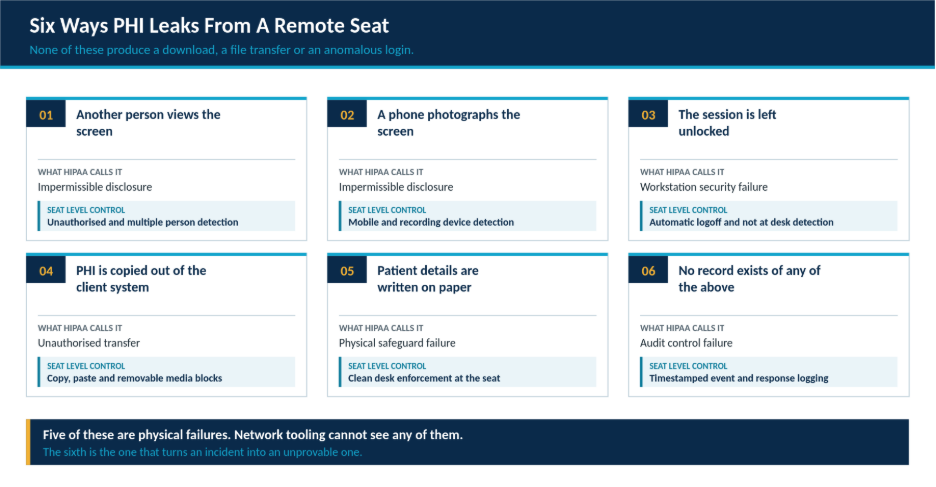
Breach reporting tends to focus on systems, but the exposure routes in a support environment are mostly human and physical. The six below cover the majority of what goes wrong at a home based healthcare seat, and five of them produce no digital signal at all.
How To Evidence HIPAA Compliance To A Covered Entity
Covered entities have moved past asking whether a provider has a policy. They sample incidents and follow them end to end, so the evidence a provider can produce matters more than the procedure it wrote. Five artefacts carry most of a healthcare audit.
| Artefact | What It Has To Show |
| Risk analysis | That remote and hybrid seats were assessed specifically, not folded into a generic site assessment |
| Control coverage | That safeguards applied to every seat on the programme rather than a sample of them |
| Incident records | The event, the automated or manual response, the reviewer and the time to closure |
| Record integrity | That event records cannot be altered after an incident has been raised |
| Workforce evidence | Training completion, sanction policy application and access reviews tied to named individuals |
A provider that can walk a client through all five for one real incident usually passes. A provider that can show only a policy document and a dashboard usually does not, however capable the underlying platform is.
Common HIPAA Mistakes In Remote Call Center Operations
Four failure patterns come up repeatedly when healthcare programmes move to remote delivery, and all four are avoidable.
- Treating the business associate agreement as the control rather than as the obligation that the controls have to satisfy.
- Running one global security policy across healthcare and non healthcare programmes, so the stricter requirement is diluted to the looser one.
- Carrying over an office automatic logoff timeout into home environments where the unattended risk is considerably higher.
- Collecting detection events without a defined review and closure workflow, which establishes that the provider knew about an exposure and did nothing with it.
Why The Last One Is The Most Expensive
An unreviewed alert is worse than no alert in an enforcement context, because it demonstrates awareness without action. Any programme that turns on seat level detection should turn on the review workflow in the same week, not as a later phase.
Also Read : Strengthen Your BPO Security And Gain Control Over Emerging Threats
Privacy And Workforce Considerations
Camera based controls in a healthcare support environment sit in a difficult position. They protect patients, and they also monitor employees in their homes. The balance holds only when the deployment is scoped tightly.
- Tie every control to a documented HIPAA safeguard rather than to general productivity or behaviour tracking.
- Apply role-based access so only named compliance reviewers can open event records or captured images.
- Set retention to the investigation and reporting window rather than keeping detection data indefinitely.
- Tell agents clearly what is monitored, when it applies and what happens after a trigger, before go live.
- Review the configuration against state law and employment requirements in every location you deliver from, since these vary widely and HIPAA is a floor rather than a ceiling.
This article describes common practice rather than legal advice. Confirm your own position with counsel and with the covered entity before you finalise a programme design.
How wAnywhere Supports Call Center HIPAA Compliance
wAnywhere brings the physical and workstation safeguards into one platform instead of leaving them spread across separate tools. It combines facial authentication, unrecognised person detection, multiple person detection, not at desk detection, mobile detection, screen controls, transfer restriction, compliance reporting and automated remediation.
Each detection feeds the same reporting and remediation workflow, so an event raised at a home seat and an event raised on a production floor arrive in the same queue with the same record structure. For a provider running healthcare alongside other programmes, that consistency is what lets a covered entity audit one incident end to end instead of reassembling it from several systems.
Conclusion
HIPAA did not get easier or harder when healthcare support moved into homes. It got harder to prove. The administrative and technical safeguards travelled across with configuration changes. The physical safeguards, which were quietly satisfied by badge readers, locked bays and a supervisor with a clear line of sight, stopped existing overnight while the obligation behind them stayed exactly where it was.
Rebuilding those safeguards at the seat is the work. Evidencing them is what the covered entity will actually audit. The providers that keep healthcare contracts will be the ones that can show, for any seat on any day, who was present, what was visible and what happened next.
Frequently asked questions
Is A Call Center A Covered Entity Or A Business Associate
Almost always a business associate. It handles protected health information on behalf of a provider or health plan, which means it signs a business associate agreement and carries direct liability under the Security Rule.
What Are HIPAA Requirements For A Remote Call Center Agent
The same requirements as an onsite agent. Restricted physical access to the workstation, controlled screen visibility, automatic logoff, minimum necessary access, device restrictions and audit records covering every session.
Does HIPAA Allow Call Center Agents To Work From Home
Yes. HIPAA does not prohibit remote work. It requires equivalent safeguards wherever the seat sits, which means the provider must replace facility based physical controls with controls that travel with the workstation.
What Counts As A HIPAA Breach In A Call Center
Any impermissible acquisition, access, use or disclosure of protected health information. In a support setting that includes an unauthorised person viewing a screen, a photographed record or an unattended session someone else uses.
What Is Minimum Necessary In A Call Center Context
Agents should see only the protected health information required for the task. Enforce it by masking fields, limiting record access by queue and hiding full identifiers unless verification genuinely requires them.
What Evidence Do Covered Entities Ask BPOs For
A risk analysis covering remote seats, proof that controls applied to every seat rather than a sample, incident records showing response and closure, evidence that records cannot be edited, and workforce training records.
Does Compliance Software Make A Call Center HIPAA Compliant
No. It supports specific safeguards, particularly physical and workstation controls and audit evidence. Compliance also needs a business associate agreement, risk analysis, trained workforce, policies and incident response.

Table of Contents
Boost productivity and compliance with wAnywhere
Read summarized version with