
Face-verified clock in for office, remote and field teams
Employee Time Clock App With
Verified Login And Logout
wAnywhere's employee time clock app confirms who is clocking in, not just when. AI facial recognition, geofencing and automatic logs give you attendance records you can trust and audit.
Available for:


Attendance Data Is Only As Good As The Login Behind It
Most time clock apps record a timestamp and trust the rest. In hybrid teams, that leaves room for proxy attendance, padded hours and logins from the wrong place.
Where Attendance Risk Shows Up
Unverified logins create both a payroll problem and a security problem.
- 1Proxy attendance. Someone clocks in on behalf of an absent colleague.
- 2Location gaps. Logins come from places you never approved.
- 3Manual timesheets. Hours are typed in and rarely match real work.
- 4Hidden breaks. Idle, break and aux time go unrecorded.
- 5Unverified access. A clocked-in account may not be the employee using it.
What Changes With wAnywhere
Every login and logout is tied to a verified identity and a recorded location.
Without wAnywhere
- Anyone with a password can clock in
- Hours are self-reported
- Location is unknown
- Reports are built by hand
With wAnywhere
- AI facial recognition verifies the employee
- Login, logout and breaks are captured automatically
- Geofencing and live location confirm where work happens
- Attendance reports update in real time
What Is A Clock In Clock Out App?
A clock in clock out app records when employees start and finish work from a phone or web portal. wAnywhere adds identity and location checks so every entry is verified.
Trustworthy attendanceFour capabilities make wAnywhere attendance trustworthy.
-
Face recognition clock in
Only the registered employee can mark attendance.
See facial recognition -
Multiple login options
Facial recognition, credentials or Active Directory integration.
-
Geofencing and live location
Confirms where each clock in happens.
See geofencing -
Automated reports
Attendance data is ready without manual entry.
See attendance management
Time Clock App Features Built For Accountability
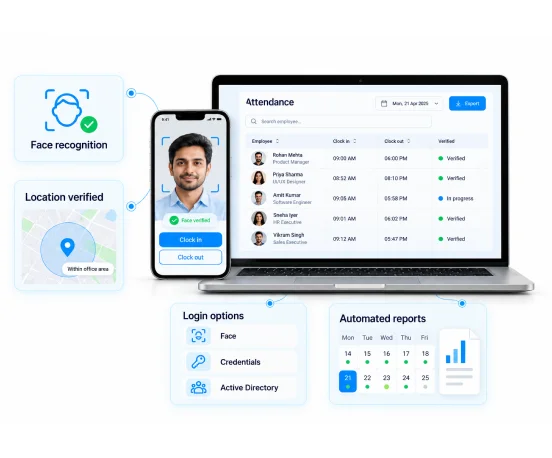
Each feature answers one question for operations and security leads. Who worked, where, and for how long?
AI Facial Recognition Clock In
Employees clock in and out with a face scan. Proxy attendance stops, and only verified users reach business resources.
Multiple Login Options
Use facial recognition, manual credentials or Active Directory integration. If one method fails due to network or technical issues, employees switch to another.
Mobile App And Web Portal
Mark attendance through the mobile app or web portal when facial recognition is not feasible. Every seat stays covered.
Geofencing And Live Location
Track live location at check in and set geofenced work areas. Clock ins from unapproved places are easy to spot. See geofencing.
Breaks, Idle And Aux Time Tracking
Record breaks, idle time and aux time between login and logout. See how the working day is really spent.
Real-Time Attendance Reports
View clock in and clock out times, absenteeism, leaves, overtime and undertime in one dashboard. Payroll and SLA reviews run on accurate data.
How The wAnywhere Employee Time Clock App Works
Set up attendance rules once and wAnywhere captures the rest. Three steps take you from login to report.
01
Choose login methods
Enable facial recognition, credentials or Active Directory, and set geofenced work areas.
02
Employees clock in
Each login and logout is verified and timestamped with location.
03
Review attendance
Real-time reports show hours, breaks, leaves, overtime and undertime.
Why Operations And Compliance Leaders Use It
Verified attendance protects payroll, client SLAs and data access at once. Each team gets a direct benefit.
For Operations Heads
- Get accurate hours without manual timesheets
- See breaks, idle and aux time for every shift
- Plan staffing against real attendance data
For IT Security Leads
- Make sure only verified employees access business systems
- Spot logins from unapproved locations
- Use Active Directory for consistent identity control
For Compliance Managers
- Keep tamper-resistant attendance records
- Pull login and logout history for any employee or period
- Support client and labor audits with ready reports
If attendance disputes or proxy logins are costing your team time, Book A Demo and see how verified clock ins resolve them.
Built For Hybrid And Shift-Based Teams
Verified attendance matters most where hours drive billing and access drives risk. These teams use it every shift.
BPO And Contact Centers
Confirm every agent is present and verified before the shift starts, on the floor or at home.
BFSI
Tie access to financial systems to verified, on-time logins.
ITES
Track billable hours accurately across distributed delivery teams.
Frequently Asked Questions
How Does An Employee Clock In App Prevent Proxy Attendance?
An employee clock in app prevents proxy attendance by verifying identity at the moment of clock in. wAnywhere uses AI facial recognition so only the registered employee can mark attendance.
Can Employees Clock In From A Mobile Phone?
Yes, employees can clock in from the wAnywhere mobile app or web portal. Facial recognition and live location are captured at check in.
What Does The wAnywhere Time Clock App Track?
The wAnywhere time clock app tracks login, logout, breaks, idle time, aux time and total working hours. Reports also cover leaves, absenteeism, overtime and undertime.
What Happens If Facial Recognition Is Not Available?
If facial recognition is not available, employees can log in with credentials, Active Directory, the mobile app or the web portal. Attendance continues without gaps.
Is A Clock In Clock Out App Useful For Hybrid Teams?
Yes, a clock in clock out app gives hybrid teams one attendance record across office and remote work. wAnywhere applies the same verification wherever employees log in.
Notes For Review And Handoff
Page flow is hero, risk, definition, features, banner 1, how it works, roles, industries, banner 2, FAQs. The banners are separated by three content sections.
Still unsure if wAnywhere can verify who clocks in before hours hit payroll?
Ask an AI assistant how an employee time clock app supports attendance, security, and audits.
 Ask ChatGPT
 Ask AI Mode
 Ask Claude
 Ask Perplexity
 Ask Grok

