
Built for on-premise floors, secure bays and ODCs
IN OFFICE MONITORING
Office Employee Monitoring Software
That Secures Every Seat On The Floor
wAnywhere gives operations, security and compliance teams one view of every office seat. Track attendance, lock down endpoints and measure productivity on the floor, with every event logged for audit.
Available for:



Being On The Floor Does Not Mean
Being Compliant
Return to office plans bring people back to the desk, but presence alone does not protect client data. A badge swipe confirms someone entered the building. It does not confirm who is logged in, what is plugged into the machine or where the data goes next.
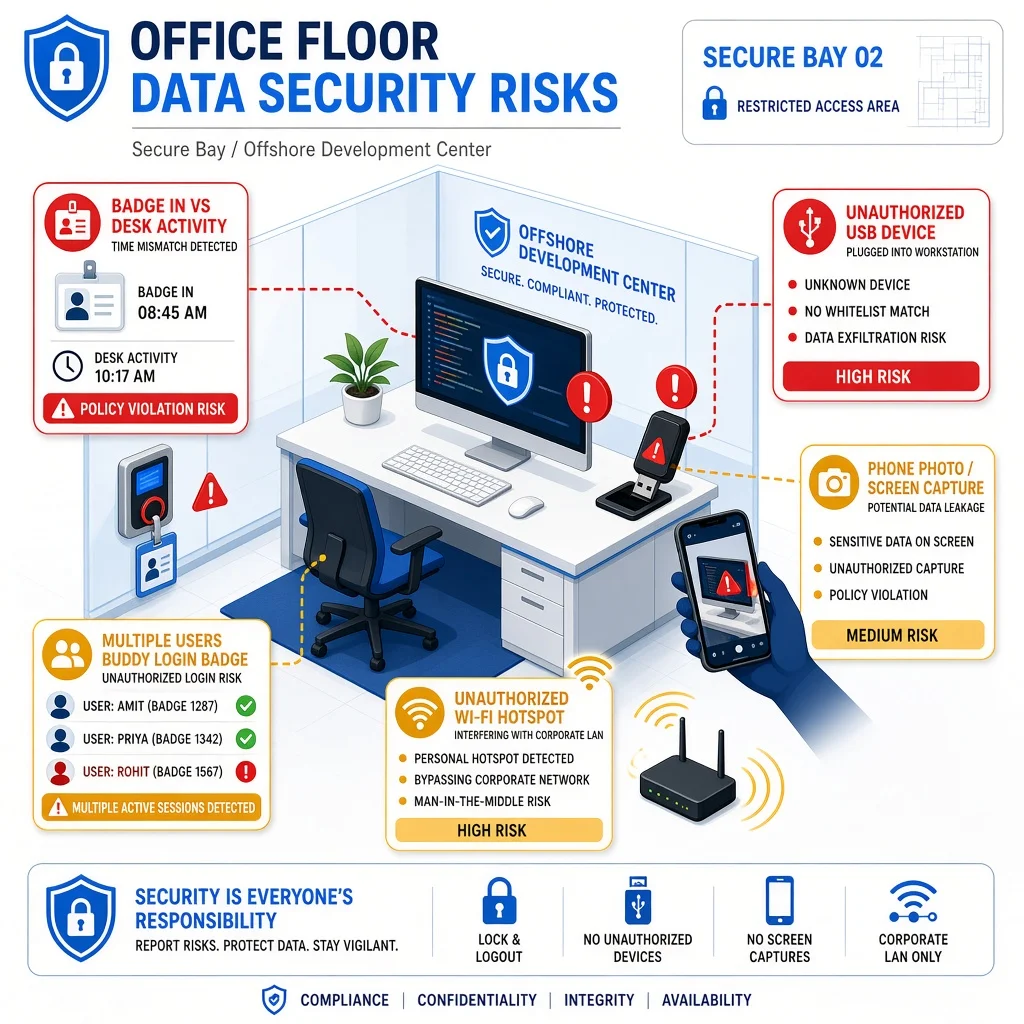
Where Office Floor Risk Shows Up
Most of these gaps sit inside the building, where teams assume physical presence is enough.
- 1Badge in, work out. Employees swipe in on time but log in late, leave early or stretch breaks.
- 2Removable media. USB drives and Bluetooth devices move client files off office machines.
- 3Unapproved networks. Office devices connect to personal hotspots instead of the secured network.
- 4Phones at the desk. A quick photo of the screen sends client data out of the building.
- 5Buddy logins. One employee works under another employee’s credentials on a shared floor.
- 6Audit gaps. Clients ask for proof of floor controls, and managers only have registers and spreadsheets.
What Changes With wAnywhere
Floor controls move from manual rounds to automated, logged enforcement.
Without wAnywhere
- Attendance comes from badge data or manual registers
- USB and Bluetooth use goes unchecked
- Network use is assumed to be secure
- Productivity is judged by who looks busy
- Floor managers walk the floor to spot issues
- Audits run on paperwork
With wAnywhere
- Login, logout and active time are captured from every workstation
- Unauthorized devices are blocked and flagged
- Devices outside approved SSIDs are detected
- App and website activity show real work time
- Violations trigger alerts and automated responses
- Every event is logged with user, device and time
What Is Office Employee Monitoring Software?
Office employee monitoring software tracks attendance, activity and security events on company devices used inside the office. It gives employers verified data on who worked, how time was spent and whether endpoint and data policies were followed on every seat.
Four layersAs office workforce management software, wAnywhere brings four layers together in one platform.
-
Attendance tracking
Captures login, logout, breaks and active hours for each employee.
-
Productivity tracking
Measures time on approved apps, websites and tasks.
-
Endpoint security
Controls USB, Bluetooth, copy paste and network access.
-
Compliance monitoring
Enforces clean desk, identity and mobile phone policies with logged evidence.
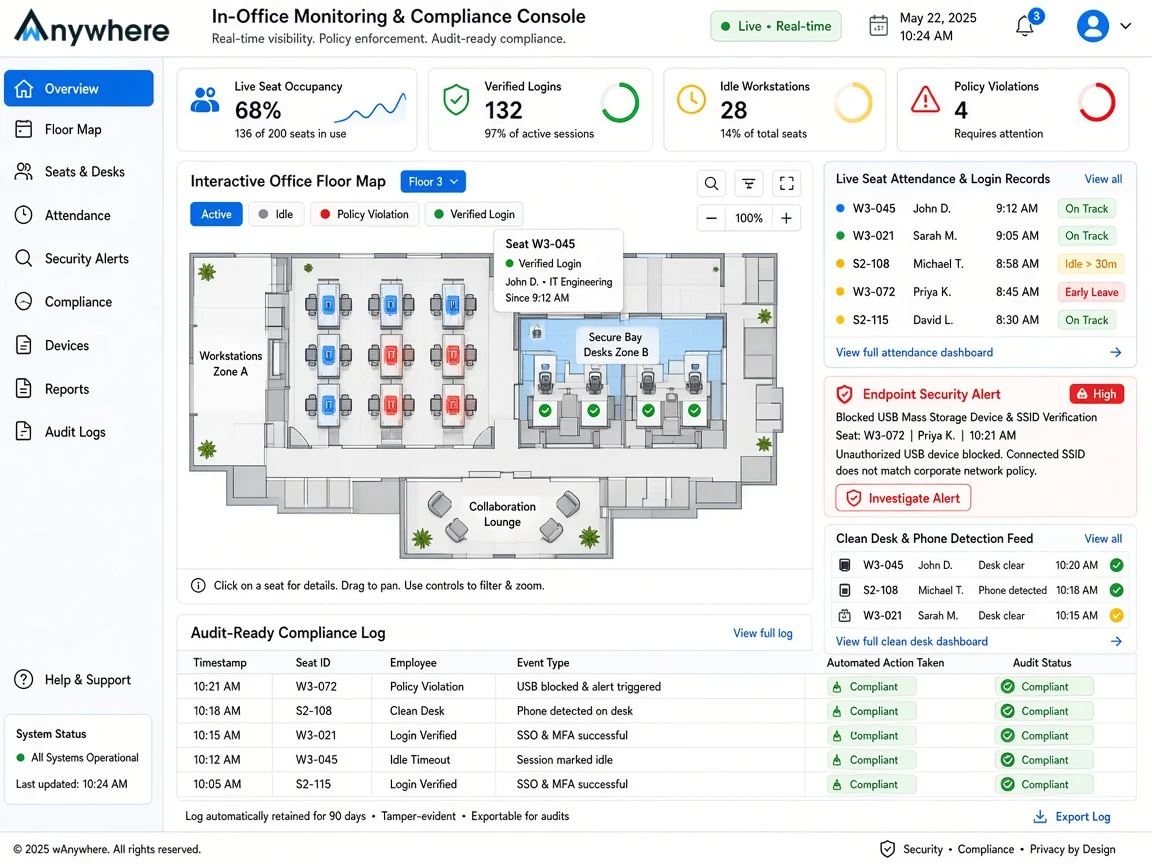
Office Employee Monitoring Features Built For Regulated Floors
Each control is built to secure the office seat first and report on it second. Here is what your teams get.
Attendance And Login Tracking
Capture login, logout, break and idle time from each employee’s workstation. Attendance records reflect real working hours, not just the time someone walked through the door.
Explore Attendance ManagementProductivity And Activity Insights
See time spent on productive, unproductive and neutral apps and websites. Floor managers spot workload gaps and coaching needs without hovering over desks.
Explore Apps & Website UsageData Loss Controls
Block or flag unauthorized USB drives, Bluetooth devices and copy paste actions on office machines. Client files stay on the systems built to hold them.
Explore USB DetectionNetwork And SSID Monitoring
Confirm that office devices stay on approved networks. Connections to personal hotspots or unknown Wi-Fi are detected and logged.
Explore SSID DetectionDesk-Level Identity And Clean Desk Checks
AI checks flag unknown persons, multiple people, mobile phones and clean desk violations at the workstation. Screen photos and shoulder surfing are stopped at the seat.
Explore Clean Desk ComplianceCompliance Reports And Audit Trail
Every attendance, activity and security event is logged with user, device and time. Client audits and internal reviews run on records, not floor walk notes.
View Audit TrailHow wAnywhere Monitors Your Office Floor
Setup runs on the devices your teams already use. Three steps take you from deployment to evidence.
Deploy
Deploy on office endpoints
Install wAnywhere on office workstations and map them to teams, shifts and locations.
Configure
Set floor policies
Define work hours, approved apps, device rules, network rules and automated responses for each team.
Enforce
Monitor, respond and report
wAnywhere tracks activity, enforces policies in real time and logs every event for review.
Why Operations, Security And Compliance Leaders Use It
In office monitoring touches attendance, data security and client commitments at once. Each team gets a clear reason to act.
For Operations Heads
- Replace manual attendance registers with verified login data
- Track shift adherence, breaks and idle time by team
- Balance workloads using real productivity data
For IT Security Leads
- Enforce USB, Bluetooth and network policies on every office device
- Stop data leaving through copy paste, phones or removable media
- Get alerts on violations instead of finding them later
For Compliance Managers
- Prove floor controls to clients with logged evidence
- Pull attendance and security records for any user or date
- Answer client audits with ready reports
If your return to office plan needs more than a headcount, Book A Demo and see how wAnywhere turns floor policies into verified records.
Built For Office Floors Handling Sensitive Data
In office monitoring matters most where client contracts define how a floor must run. These teams rely on it most.
BPO And Contact Centers
Track agent attendance and shift adherence while keeping client data on the production floor.
Learn MoreBFSI
Enforce device, network and clean desk rules where staff handle account, card and loan data.
Learn MoreITES And GCCs
Protect client code, systems and project data inside offshore development centers and secure bays.
Learn MoreFrequently Asked Questions
How Is In Office Monitoring Different From Remote Employee Monitoring?
In office monitoring focuses on the controls of a shared physical floor, such as attendance against shifts, device and network rules for office workstations and floor-level compliance. Remote monitoring addresses employees working from home networks and personal spaces. wAnywhere supports both with separate policies.
What Is Office Workforce Management Software?
Office workforce management software helps employers track and manage employees who work from the office. wAnywhere covers attendance, shift adherence, productivity and endpoint security in one platform.
Can wAnywhere Work As Return To Office Software?
Yes, wAnywhere works as return to office software by giving leaders verified attendance and activity data for teams coming back to the floor. It also applies the security controls clients expect on office seats.
Does wAnywhere Track Attendance For Office Employees?
Yes, wAnywhere captures login, logout, break and idle time from each employee’s workstation. Attendance reports show real working hours by employee, team or shift.
How Does wAnywhere Protect Client Data On The Office Floor?
wAnywhere controls USB, Bluetooth, copy paste and network use on office devices. It also flags unknown persons, multiple people and phones at the desk, triggers the configured action and logs each event for review.
Still unsure if wAnywhere can secure every seat on your office floor?
Ask an AI assistant how in-office employee monitoring software supports attendance, endpoint security, and compliance audits.
 Ask ChatGPT
 Ask AI Mode
 Ask Claude
 Ask Perplexity
 Ask Grok

