





Aadi Travel

star-icon

wAnywhere has helped us gain better visibility into workforce productivity and daily activities. Screenshots and usage insights help us identify gaps and improve accountability.

Dinesh Meena
IT Administrator

Gluedin

star-icon

wAnywhere has helped us strengthen productivity, security, and compliance across teams. Its real-time insights make workforce management more secure and efficient.

Sushil Singh Bhadouria
CTO & Director

Sagility Ltd.

star-icon

wAnywhere helps us strengthen healthcare compliance with proactive monitoring and real-time visibility. It keeps our workplace secure and operations running efficiently.

Ajay Sharma
Senior Director – EAM

+52%

Increase Team Performance

+95%

Increased Productivity

+15%

Improved Attendance

+67%

Increase Security using wAnywhere

Core Geofencing Authentication Features

Authentication ID Login Handshake

When an employee logs in to the wAnywhere Agent with their username and password, the agent generates a unique Authentication ID on screen. The employee enters this ID into the wAnywhere Mobile Authenticator app on their registered phone, linking the desktop session to a verified mobile device before access is granted.

Real-Time GPS Capture

Once the Authentication ID is entered, the mobile app retrieves the phone's live GPS coordinates, along with location accuracy and a timestamp, and sends this along with the user's identity and device information to the wAnywhere server for verification.

Geofence Policy Enforcement

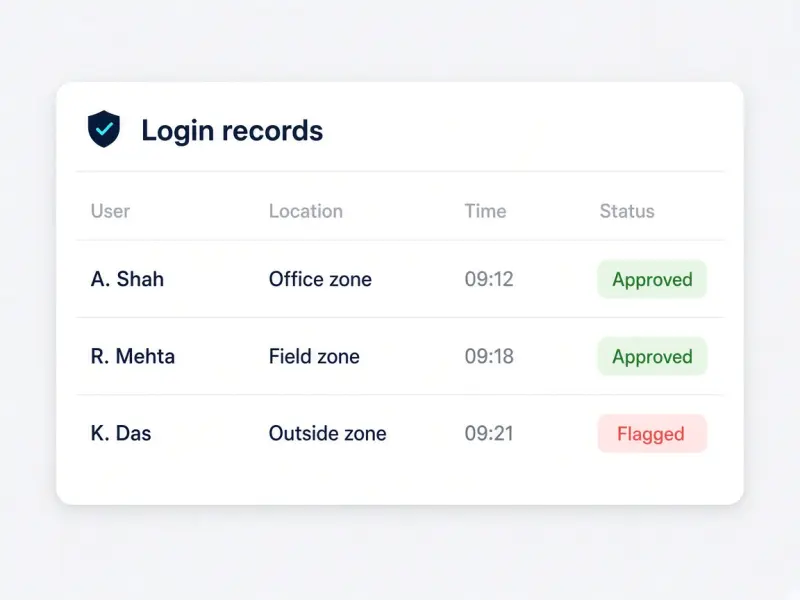
Organizations can configure approved zones for login. The server checks the submitted GPS location against these geofencing policies before approving access, so a login attempt from outside an approved zone can be flagged or blocked rather than silently allowed. The result is location based access control at the exact moment of login.

Audit-Ready Login And Location Records

Every login event is recorded with its verified GPS location, timestamp, and authentication details, giving compliance and HR teams a documented trail for attendance verification and audits without any manual reporting.

Benefits Of Geofencing Authentication

Confirm Logins Are Happening From Approved Locations

Get certainty that an employee's desktop session and physical location match, instead of relying on self-reported attendance or IP address alone.

Reduce Credential Sharing And Buddy Punching

Tying login approval to a registered mobile device and its GPS location makes it harder for one person to log in on another's behalf.

Strengthen Field And Hybrid Workforce Accountability

For distributed and field teams, geofencing gives a verifiable record of where work is actually happening, alongside the productivity data your team already tracks. It fits naturally into wider hybrid workforce management.

Support Attendance, Compliance, And Audit Requirements

Every authentication event is logged with location and timestamp data, turning each login into a geofencing attendance record and giving compliance officers a ready-made record for internal policy checks and external audits.

Who Geofencing Authentication Is For

IT And Security Teams

Add location based authentication as a second factor to desktop login and reduce the risk of unauthorized or off-site access.

HR And Compliance Officers

Get a documented, timestamped location record for every login to support attendance verification and audit requirements.

Field And Hybrid Workforce Managers

Confirm employees are logging in from approved work zones without adding manual check-in steps. Each verified login works as a geofence time clock, so there is no separate punch in step.

See Geofencing Authentication In Action

Watch a desktop login get verified against an approved zone in real time.

How Geofencing Authentication Works

An employee logs in to the wAnywhere Agent on their laptop or desktop with their username and password. Once credentials are verified, the agent displays a unique Authentication ID. The employee opens the wAnywhere Mobile Authenticator app on their registered phone and enters this ID, which triggers the app to capture the device's real-time GPS location, accuracy, and timestamp.

This data, along with the user's identity and device information, is sent securely to the wAnywhere server. The server validates the Authentication ID, confirms the user's identity, and checks the GPS location against the organization's configured geofencing policy. If everything checks out, the server sends an approval back to the desktop agent, which completes the login and grants access.

The full login event, including the verified location and authentication details, is recorded for attendance, compliance, and reporting purposes. Geofence authentication is designed to work alongside your existing login and endpoint security controls, adding location verification rather than replacing them.

  1. Desktop login The employee signs in to the wAnywhere Agent with a username and password.
  2. Authentication ID The agent shows a unique ID. The registered phone app captures GPS, accuracy, and time.
  3. Server check Identity, device, and location are sent securely and matched to the geofence policy.
  4. Access granted Approval returns to the desktop agent and the login is completed.
  5. Audit record Location and authentication details are saved for attendance, compliance, and reporting.

Geofencing Authentication Security And Compliance

Audit-ready geofence login records with location and timestamp

Geofencing security starts with how the data itself is handled. Authentication and GPS data are stored securely, connections between the mobile app, desktop agent, and server are protected, and access to location records is role based, so only authorized personnel can view login and geofencing data.

Verification is scoped to registered devices tied to a verified user identity and used for legitimate attendance, security, and compliance purposes. That makes it relevant for organizations in regulated industries such as BPOs, BFSI, and healthcare, where documented location verification supports both internal policy and external audit requirements.

Enterprise-Grade Security Ensured

We protect your data with controls aligned to leading security and privacy standards.

SOC 2 Type 2, ISO 27001, HIPAA and GDPR compliance badges

Still unsure if wAnywhere is the right solution for your organization?

Ask an AI assistant how geofencing authentication supports security, privacy, and compliance.

How wAnywhere's Geofencing Authentication Stands Out

For All Work Environments

Used by in-office, hybrid, remote, and field teams across all business sizes.

Deploy Your Way

Supports cloud, on-premise, and other custom setups.

Flexible Setup

Compatible with Windows, macOS, and Chrome for desktop, plus Android and iOS for the Mobile Authenticator app. Unlike standalone geofencing software, it runs through the same wAnywhere Agent your team already uses.

Start In Seconds

Install and pair the Authenticator app in just a few steps.

Start Verifying Login Locations With Your Team Today

Confirm every login is happening from an approved location, cut down on credential sharing, and give your compliance team an audit-ready attendance record, all through the wAnywhere Mobile Authenticator app.

Frequently Asked Questions

After entering their desktop credentials, the employee enters the Authentication ID shown on screen into the Mobile Authenticator app, which captures their phone's GPS location and sends it to the wAnywhere server for verification. 

Yes. Organizations can configure geofencing policies, and the server checks each login's GPS location against these zones before approving access. 

No. It adds a location-verified layer on top of existing credential checks rather than replacing them.

Yes. Every login event, along with its verified location, timestamp, and authentication details, is recorded for attendance, compliance, auditing, and reporting. 

Yes. Login approval is tied to the employee's registered phone and its live GPS location, so one person cannot easily log in on another's behalf from a different place. 

Yes. It is built for hybrid, remote, and field teams who need location-verified attendance without manual check-ins, so geofencing attendance records are created automatically at every login.

The server checks the submitted GPS location against the configured geofencing policy, so out-of-zone attempts can be flagged rather than automatically approved.

No. GPS location is captured only during the authentication handshake, not continuously. Unlike broader geofencing employee tracking, it checks location at the moment of login and nowhere else.

wAnywhere chatbot
wAnywhere ai-chatbot

wAnywhere ChatBot

Online

chatbot Close button icon
Chat AI icon

Hi there! 👋 How can I help you today?