
Is our data safe?
Endpoint controls flag unknown people, unapproved devices and data leaving the desk.
A hospital billing team, a BPO floor and a five-person startup face very different risks. wAnywhere brings work intelligence to each of them, combining endpoint security, compliance controls and productivity insight that adapt to the data your people handle every day.



Aadi Travel

wAnywhere has helped us gain better visibility into workforce productivity and daily activities. Screenshots and usage insights help us identify gaps and improve accountability.

Gluedin
wAnywhere has helped us strengthen productivity, security, and compliance across teams. Its real-time insights make workforce management more secure and efficient.

Sagility Ltd.
wAnywhere helps us strengthen healthcare compliance with proactive monitoring and real-time visibility. It keeps our workplace secure and operations running efficiently.

Jetking Infotrain Ltd.
wAnywhere has improved our workforce visibility and productivity. Its compliance insights help employees stay accountable and follow organizational policies effectively.

Accord Innovations
wAnywhere has significantly improved our team's productivity with real-time insights. It makes tracking performance simple and helps us identify improvement opportunities.

Markiverse Media
wAnywhere has streamlined our ticket management with automated workflows and real-time updates. It improves response times and enhances overall client satisfaction.
Virtual Staffing
wAnywhere gives our remote teams real-time productivity insights and reporting. It improves efficiency while helping us maintain compliance and data security.

Funnl
wAnywhere is a great tool that helps us understand workforce productivity and chip in to address specific issues.
Trust RPO
wAnywhere is a fantastic tool for our business to boost and regulate productivity. It was the right way to go.
+52%
Increase Team Performance
+95%
Increased Productivity
+15%
Improved Attendance
+67%
Increase Security using wAnywhere
Work intelligence is the clear, real-time understanding of how work happens across your organisation. It answers three questions every leader asks. wAnywhere turns activity from every endpoint into that understanding, so operations, IT security and compliance teams act on facts instead of assumptions.
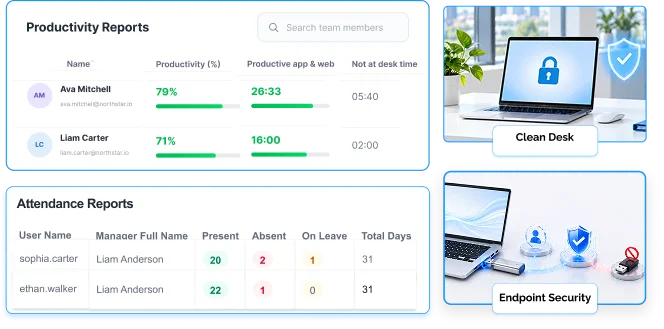
Endpoint controls flag unknown people, unapproved devices and data leaving the desk.
Clean desk, login and location rules become evidence compliance teams can show.
Task, attendance and productivity reports show effort by person, team and project.
Every sector protects a different kind of data and answers to different stakeholders. Patient records, client accounts, source code and contractor hours all need different controls. Work intelligence lets you apply the right ones in the right place, from a single platform.
Healthcare teams need masking, identity checks and an access trail for every record they open.
BPO and call centre floors protect someone else’s customers, so one incident hits two relationships.
IT teams hold credentials and client environments that must stay on trusted devices and networks.
Freelance and startup teams need verified time records and a boundary around client data.
Below is how wAnywhere applies work intelligence to the sectors it serves most. Each industry has a dedicated guide with deeper detail.

Billing, coding, claims and patient support teams view protected health information all day, often from remote desks. Unknown person detection, copy paste restriction and USB detection keep records on approved systems, while login and logout tracking creates the access trail compliance reviews require.
Read the healthcare guide
Loan processing, KYC, collections, claims and customer support teams handle account details and identity documents all day, often from home. PII masking, face recognition and audit trails keep customer financial data on approved systems and ready for every review.
Read the BFSI guide
A BPO protects its clients’ customer data, so one incident can damage two relationships at once. Work intelligence gives you endpoint controls, clean desk compliance and verified attendance, plus audit-ready reports that answer client security questionnaires with evidence instead of promises.
Read the BPO guide
Agents see payment and account details on every call, across floor and home shifts. Call centre screen monitoring, copy paste restriction and unknown person detection protect that data, while productivity reporting and login tracking support adherence and early coaching.
Read the call centre guide
IT teams hold source code, credentials and access to client environments. USB and Bluetooth detection and SSID monitoring keep that access on trusted devices and networks, task time tracking shows effort by project for billing, and Assist Anywhere lets support resolve endpoint issues remotely.
Read the IT guide
Global capability centres must meet their parent company’s security standards across sites and hybrid teams. Geofence-based mobile authentication, SSID monitoring and consistent endpoint policies give headquarters the same visibility everywhere, and hybrid workforce management unifies attendance and productivity.
Read the GCC guide
Startups grow headcount quickly, often before they have a security team. wAnywhere deploys core controls without a dedicated hire, gives founders visibility into distributed work and produces the reports enterprise customers ask for during security reviews.
Read the startup guide
Contract talent uses personal devices and bills by the hour. Task time tracking creates verified, project-level time records, while copy paste restriction and USB detection keep client data inside approved environments, so both security and invoices rest on evidence.
Read the freelancer guideThe platform is the same across sectors, but priorities differ. This view shows where each industry usually begins.
Many organisations span more than one category, such as a healthcare BPO or a GCC with an IT support desk. Because wAnywhere sets policies by role, team, location and network, each group gets the controls it needs without separate tools.

The fastest path to value is to switch on the controls your customers, auditors or headquarters already ask about, then expand from there.
Identify your most sensitive data and the teams that handle it.
Enable the starting controls for your industry from the list above.
Review weekly reports with operations, IT security and compliance.
Expand coverage to other teams once policies are proven.
A short pilot on one team shows the impact quickly. Book a demo to see work intelligence for your industry running on live endpoints.
Yes. GCCs and large BPOs use it to enforce enterprise policies across sites, while startups and freelance teams use the same controls in a lighter setup.
Yes. Policies can be set by role, team, location and network, so a claims team and a sales team in the same company can run different controls.
It is generally defensible when limited to work devices, tied to a clear business purpose and disclosed in company policy. Requirements vary by country and sector, so confirm your setup with legal counsel.
Ask an AI assistant how work intelligence supports your sector's security, audit, and workforce visibility requirements.

wAnywhere ChatBot
Online

 Ask ChatGPT
 Ask AI Mode
 Ask Claude
 Ask Perplexity
 Ask Grok
