

 Set as a preferred Google source
Table of Contents
Remote work has gone from being a novelty to becoming a default operating model for many BPOs, IT businesses, and distributed teams. But one of the challenges associated with flexibility is visibility.
Some questions that managers may have include:
- How can we be sure that work is actually being done?
- How do we measure productivity without micromanaging employees?
- How do we remain in compliance while also protecting employee privacy?
The answer is through the use of employee screenshot monitoring software as a practical solution that is also compliant. With employee screenshot monitoring, companies are able to get visual proof of the work that their employees do that can be time-stamped and used for accountability, security, and productivity improvement purposes.
The ability to use screenshot monitoring software in a proper manner for BPOs and organizations with a remote-first culture can produce measurable improvements without losing trust from employees.
What Is Screenshot Monitoring in Remote Work?
Screenshot monitoring is software that takes periodic screenshots of an employee’s screen during work hours at pre-defined intervals. These screenshots are stored securely, and authorized managers can review them, audit them, or analyze productivity data by accessing the stored screenshots.
It is by far the most widely used method for managing remote teams, especially in industries where documentation, proof of service delivered, and compliance oversight are needed.
How to Use Screenshot Monitoring in Remote and Hybrid Teams
When working remotely or within a hybrid environment, employees utilize company laptops or desktop computers that connect to the monitoring agent.
The monitoring system will:
- Take screenshots at regular intervals based on the schedule set by the administrator (every 60–120 seconds).
- Record timestamps for each screenshot taken.
- Save each screenshot in a secure manner on the administrator’s dashboard.
- Allow the administrator to filter out screenshots for specific employees, teams, or dates.
By utilizing the above-mentioned methodology, employee screenshot monitoring provides structured, policy-based employee monitoring instead of simply being an intrusive method.
Screenshots vs Screen Recording vs Time Tracking
Understanding the difference helps businesses choose the right monitoring strategy:
| Monitoring Type | What It Does | Best Use Case |
| Screenshot Monitoring | Captures periodic images | Balanced oversight |
| Screen Recording | Records continuous activity | High-risk environments |
| Time Tracking | Logs work hours only | Payroll & attendance |
Screenshot monitoring offers a middle ground, more context than time tracking, but less intrusive than full-screen recording.
Why Screenshot Monitoring Is Critical in Distributed Teams
When working with a distributed team, it’s difficult for managers to physically check in on their staff. There are a number of issues when monitoring your remote staff without a structured approach:
- Increased Idle Time
- Time Theft Difficult to Measure
- Compliance Gaps Amplified
- Quality Assurance of Completed Work
A remote team monitoring software that is properly utilized will allow for accountability in the employees’ work without needing to monitor every employee all day, every day.
Why Businesses Use Screenshot Monitoring for Remote Employees
Here are the reasons why businesses use screenshot monitoring for remote employees:
Facilitating Transparency in Productivity
With the use of screenshot monitoring, management has an abundance of knowledge about what their employees are working on by providing them insight into their employees’ activity during their work hours.
In fact, a 2023 report by Gartner found that 49% of managers struggles to accurately measure productivity in remote environments. This visibility gap is one of the primary reasons organizations invest in structured monitoring tools.
For instance, if they provide customer support through a BPO, they have an opportunity to determine if their agents are utilizing CRM tools during their shift or if they are browsing unrelated content online.
Having this level of access helps managers track productivity more efficiently with remote employees and gain greater operational clarity at the same time.
Reducing Idle Time & Time Theft
Several reports can be found that state that on average, remote work teams misplace between 20-30% of their productive hours due to being distracted or idle at work when they are not being monitored properly.
Once a business knows how to appropriately monitor their remote workforce, it is likely to see a reduction in idle activity and will feel naturally accountable for what they perform at work; no longer having the luxury of acting impulsively.
Holding Staff Accountable Without Micromanaging
Some individuals believe that by using screenshot monitoring, an employer will somehow spy on their employees while they work.
On the contrary, screenshot monitoring will provide the following:
- Evidence of work
- A reduction of unnecessary check-ins
- An understanding of employee performance reviews that are unbiased by emotion
By creating this type of accountability for employees, the elimination of micromanagement and enhanced insight into performance will result in increased accountability at work.
Encouraging Better Data Security & Compliance
BPO and IT industries usually handle extremely sensitive information for their customers.
Through screenshot monitoring, companies can do the following:
- Identify unauthorized applications
- Detect risky/unauthorized browsing habits
- Maintain documentation for auditing purposes
When used in conjunction with other forms of compliance monitoring software, screenshot monitoring will improve governance standards and reduce regulatory risk for an organization.
How Screenshot Monitoring Works in wAnywhere (Step-by-Step Setup Guide)
The instructions provided in this section will show you how to activate screenshot monitoring via the wAnywhere platform.
Step 1: Logging into the wAnywhere Admin Dashboard
First, log in and access the wAnywhere Admin console.

From there, proceed to the Configuration option.

Select the Screen Grab Settings option.

This is where you will be able to set up your screenshot policies.
Setting Up Screenshot Capture Intervals
Choose how often the software captures screenshots (e.g., every 60-120 seconds).

Configure the capture intervals to ensure a proper balance of visibility and privacy.
It is also best practice to choose conservative screenshot capture intervals, as excessive aggression may violate employee trust.
How Employers Can View Screenshots
Follow these simple steps to access and review employee screenshots in wAnywhere:
Step 1: Log in to the Admin Dashboard
Sign in to your wAnywhere Admin panel using your authorized credentials.
Step 2: Navigate to Compliance
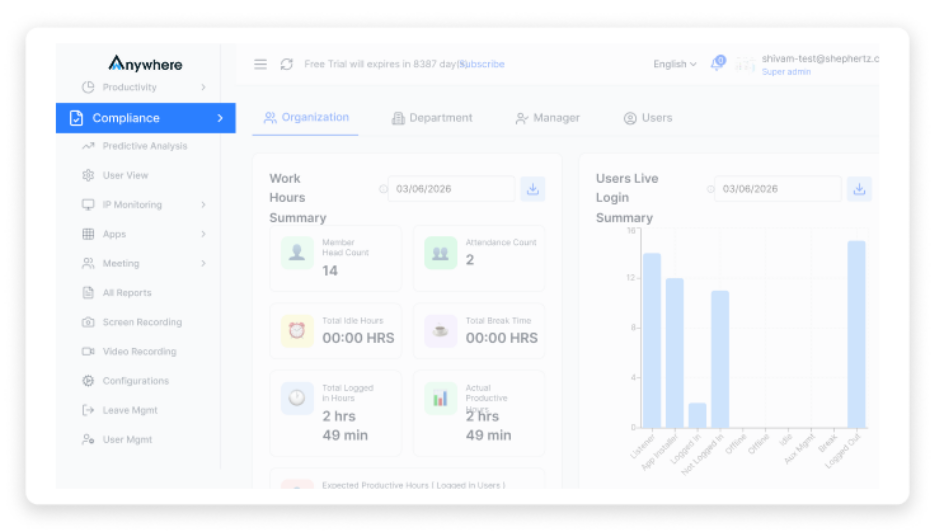
From the main dashboard menu, click on Compliance to access monitoring and governance settings.
Step 3: Open “Screenshot”

Under the Compliance section, select Screenshot to view all recorded screenshots.
Step 4: Filter by Employee
Use the search or filter option to find screenshots by entering the employee’s email ID.
Step 5: Filter by Date

Select a specific date or date range to review screenshots captured during that period.
Step 6: Filter by Department

You can also narrow results by selecting a specific department to review team-level activity.
These filters help employers quickly locate relevant screenshots while maintaining structured and compliant oversight.
Key Features of wAnywhere Screenshot Monitoring
When you’re looking for the right software for capturing screenshots, the features you’ll want are:
- Automated screenshot capturing: This includes being able to schedule when the software captures screenshots of your active desktop.
- Activity-based screenshot capturing: These captures only screenshots that are taken while you are actively using your computer.
- Time-stamped screenshot records: Each screenshot will have a time and date stamp to provide an easy way to review them.
- Secure screenshot storage: Screenshots will be securely stored to comply with office and company policy.
- Role-based access control: Only managers designated by the administrator will have access to view the captured screenshots.
- Productivity analysis dashboard: You will be able to track time and productivity history through your dashboard.
- Integration with timekeeping and activity reports: You will be able to integrate your screenshots with your attendance records and work activity logs.
With these factors, wAnywhere ranks among the top employee monitoring Software for companies with multiple locations or remote workers.
Benefits of Using wAnywhere for Screenshot Monitoring
The screenshot monitoring provided by wAnywhere is explicitly built to provide a weighted balance of visibility and accountability, along with providing compliance for employees. wAnywhere provides structured documentation as a means for the employer to manage a distributed workforce without having an intrusive method of monitoring. The following provides specific evidence of the core benefits.
Automatically Capturing Screen Shots
After initially configuring the system, the screen grab capture operates within the background without any manual processes performed by a manager or the IT department. Through periodic capture of the screenshots, they can be stored in a secure location along with the date and time. Therefore, there is a consistent documentation of work activity throughout the organization. The use of automated screen grab capturing eliminates the need for continuous follow-ups from managers to their direct reports and establishes a reliable digital audit trail to support continued reviews, invoicing/billing validation, and end-of-year audit review.
Actual Knowledge of Remote Employee Work Activity
By use of periodic screenshots along with activity monitoring, the manager has instant knowledge of what his/her off-site employees are doing during normal business hours. This will also reduce the need for repeated follow-ups and/or telephone calls inquiring about the completion of work. Instead of guessing whether the employee is performing at a desired level, the manager can simply view the captured shot of what has been accomplished to date. This provides BPO and IT managers with increased capabilities for managing a remote workforce by providing the ability for their employees to work independently while eliminating the concerns of not having visibility of their performance.
Eliminate Disputes Using Proof of Work
Screenshot documentation provides objective evidence to resolve disagreements. Clients can dispute billable hours, employers can dispute an employee’s productivity or compliance, and employers can pursue their compliance obligations using screenshots as visual evidence.
A time-stamped screenshot adds to the robustness of monitoring employee performance/compliance software, enhancing the ability of employers to use objective data for decisions versus using subjective data to make those same decisions.
Best Practices for Ethical Screenshot Monitoring
Ethics is a critical component of establishing an employee’s trust and ensuring compliance. To the extent that organizations utilize screenshot monitoring appropriately, the result will be that screenshot monitoring enables organizations to boost productivity, not restrict productivity.
Organizations should communicate with employees regarding the organization’s monitoring policy, the length of time the organization will be monitoring employees’ screenshots, and how the organization intends to utilize the data collected from screenshots. Fastidious attention should be paid to the frequency of monitoring to avoid excessive intrusiveness on the employee’s part. Monitoring should focus on performance enhancement, workflow improvement, and security, not micromanagement of employees. Organizations should align their policies with applicable compliance frameworks and data protection laws. Evaluating screenshots and productivity metrics will provide an organization with an objective and balanced means of evaluating employees so that the evaluation leads to employee development, equity, and accountability.
Read More: Violation Detection – Ensure clean desk compliance in remote work
Who Should Use Screenshot Monitoring?
Screenshot Monitoring is targeted toward industries with a need for an open operational view, documented operations, and compliance; thus it is most beneficial for industries where remote teams interface or manage sensitive data for their clients.
BPO Companies
BPO companies are responsible for providing high volumes of support to clients across a variety of time zones. As a result, BPO companies have obligations related to strict compliance with service level agreements (SLAs), and it is necessary for BPO organizations to be able to substantiate their delivery of services to clients. Screenshot Monitoring provides evidence that employees are actively working to deliver services, ensures that agents are utilizing approved systems, and establishes audit-ready documentation that BPOs maintain an accountable organizational stature to their clients. Furthermore, Screenshot Monitoring reinforces the presence of accountability at scale, enhances operational integrity, and improves the relationship that BPOs have with their clients.
IT & Software Teams,
Remote developers, testers, and support engineers often work on client-related projects that require transparency around billing and security of data. Structured Screenshot Monitoring provides the necessary level of support for productivity tracking through the process of utilizing structured activities, without disrupting their activity levels. In addition, Screenshot Monitoring provides a measurement of unauthorized tools or risky behavior in client-related environments. Screenshot Monitoring provides IT organizations with the ability to achieve a balance between providing flexibility to clients, transparency to clients, and compliance with government regulations.
Conclusion
Screenshot monitoring is a method of gaining structured visibility, not simply a method of employee surveillance.
When implemented properly, screenshot monitoring will:
- Increase the level of transparency within the organisation
- Cut down the amount of time employees spend not working
- Increase the level of compliance among employees
- Provide employees with accountability
If you are looking for a screenshot monitoring solution that will provide you with the benefits of increased productivity while respecting your employees’ right to privacy, wAnywhere provides a compliance-first solution specifically designed for remote and outsourced businesses (BPO).
To see how wAnywhere screenshot monitoring can increase transparency in your organisation, request a demo today and continue to provide your employees with the same level of transparency.
Is screenshot monitoring legal?
Yes, when implemented transparently with employee consent and aligned with local labor and data protection laws.
How can I take automated screenshots?
By using dedicated employee screenshot monitoring tools like wAnywhere, which automatically capture screenshots based on configured intervals.
How to use wAnywhere Screenshot feature?
Log in to the admin dashboard, configure screen grab settings, assign policies to users, and activate the monitoring agent.
Can screenshots detect security risks?
Yes. They can help identify unauthorized applications, risky browsing behavior, or potential policy violations.
Does wAnywhere store screenshots securely?
Yes. Screenshots are stored with secure access controls and role-based permissions to maintain compliance and confidentiality.

Read summarized version with