 Set as a preferred Google source
Your agents are logged in. Your dashboards are green. Your reports say utilisation is at 82%. Yet SLAs are slipping, CSAT scores are dipping, and your best team leads cannot explain where the hours are going. This is the central paradox of BPO productivity: the losses that hurt you most are the ones that never show up in your standard reports.
BPO productivity does not erode all at once. It drains in small, invisible ways. Time spent on the wrong tasks. Messages that stall instead of resolve. Tools that slow agents down instead of speeding them up. A log-in status that means nothing. Over weeks and quarters, these gaps compound into missed targets and churned clients.
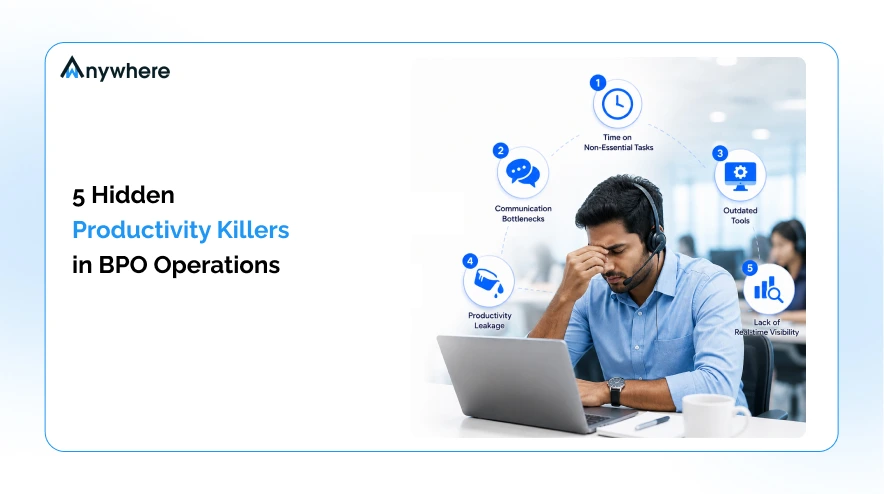
This post breaks down five specific, non-obvious productivity killers that are quietly costing your BPO operation and shows you how to close each one using the right monitoring and management approach.
Killer 1: Time Spent on Non-Essential Tasks
What It Looks Like in a BPO
Not all activities are productive activities. In a busy BPO environment, agents regularly fill their shifts with tasks that feel legitimate but contribute little to the core metrics your clients care about: call resolution, ticket closure, and CSAT. Sorting inboxes without responding. Reformatting internal reports no one reads. Attending non-mandatory standups that are overrun. Manually updating spreadsheets instead of using your CRM.
The problem is that these tasks are not malicious. They are habitual. Agents default to low-friction work when higher-value tasks feel ambiguous or overwhelming. At a 300-seat BPO, if each agent loses 20 minutes per shift to non-essential tasks, you are hemorrhaging over 100 agent hours every single day.
Scenario : A team of 50 chat agents spends an average of 22 minutes per shift reformatting escalation notes before handing them off. That is 18+ hours of billable capacity lost daily to a process problem, not a people problem.
How to Fix It
The first step is visibility. You cannot redesign a workflow you cannot see. Track how agents actually spend their active time across tasks, tools, and time blocks to identify where productive hours are leaking into low-value work. Once you have the data, you can set clearer task hierarchies, automate the repetitive steps, and give team leads the context to coach agents toward higher-impact work. Activity tracking gives you this visibility at the agent and team level.
Killer 2: Communication Bottlenecks That Kill Throughput
How Internal Delays Drain Agent Capacity
Communication bottlenecks are one of the least visible productivity killers in BPO operations because they masquerade as normal workflow. An agent pauses on a ticket, waiting for a supervisor to approve a resolution. A team lead cannot get a quick answer from QA, so they hold three agents in limbo. A Slack thread that should have been resolved in five minutes is still open two hours later, blocking wrap-up time on six live interactions.
In contact center environments, idle wait caused by internal communication delays is often logged as AUX time or wrap-up time, making it invisible in performance dashboards. The agent is technically in a valid status. But the cause of the delay is internal friction, not client interaction itself.
Scenario : In a 100-seat customer support BPO, 15 agents are waiting on supervisor approval for refund exceptions at any given time during peak hours. Average wait: 8 minutes per approval. That is 120 minutes of dead agent time per hour, logged as wrap-up.
How to Fix It
Reducing communication bottlenecks requires mapping where approvals, escalations, and inter-team dependencies are creating delays. Manage AUX codes effectively to separate genuine client interaction time from internal wait time, so team leads can see exactly where throughput is being choked and by which workflows. Pair this with clearer escalation paths and defined SLAs for internal response times.
Killer 3: Outdated Tools That Slow Agents Down
The Hidden Cost of Tool Friction in BPO Environments
Legacy software, clunky CRMs, and disconnected systems are a quiet but consistent drain on BPO productivity. When an agent has to toggle between four applications to resolve one ticket, every second of switching adds up. When the timesheet system crashes twice a week, agents either skip logging or manually reconstruct hours at the end of the shift, introducing errors that cost you in payroll, billing, and compliance.
Tool friction also affects morale. Agents who fight their systems every shift become disengaged faster. Disengaged agents have lower first-call resolution rates, higher wrap-up times, and shorter tenures. The cost of outdated tools is not just operational. It compounds through attrition, training, and quality degradation.
Scenario: A billing support team uses a legacy ticketing system that requires manual data re-entry from a telephony platform. Each ticket takes 4 additional minutes to close. Across 200 tickets per day, that is 13+ hours of rework that a proper integration would eliminate overnight.
How to Fix It
Start by identifying which tools agents use most, how much time is spent in each, and where switching or manual workarounds are creating the biggest drag. Automate BPO timesheets to eliminate one of the most common sources of manual rework and data error. Then use application usage data to build a case for tool consolidation or integration investments that have a measurable impact on agent throughput.
Killer 4: Productivity Leakage Through App and Web Misuse
Why This Is a Bigger Problem in Remote BPO Teams
Productivity leakage through non-work application and website usage is one of the most common and most underreported drains in BPO operations, particularly in remote and hybrid delivery models. When agents work from home or distributed hubs, the absence of a physical floor creates natural opportunities for off-task browser usage, personal messaging, and streaming platforms to fill idle moments during shifts.
The challenge is not just the time lost. It is unpredictable. An agent who spends 25 minutes per shift on non-work websites introduces variation into your capacity planning that cannot be absorbed by standard scheduling models. At scale, this leakage erodes your effective seat utilisation without ever appearing as a discrete line item in your operations reports.
Scenario : Across a 200-agent remote BPO team, monitoring data reveals an average of 18 minutes per shift spent on non-work applications. That is 60 agent-hours per day of capacity that is scheduled but not delivered.
How to Fix It
Classifying applications and websites into productive and unproductive categories gives you the baseline you need to identify patterns, set appropriate usage policies, and coach agents with data rather than assumptions. Monitor app and website usage at the team and agent level so that remote BPO managers have the same visibility into actual work activity that an on-floor supervisor would have naturally. This is not about surveillance. It is about closing the accountability gap that remote work creates.
Killer 5: Lack of Real-Time Visibility Into Who Is Actually Working
The Difference Between Logged In and Actually Working
Logged in is not the same as working. This is one of the most important distinctions in BPO workforce management and one that most standard attendance systems completely ignore. An agent can be clocked in, showing as available in your contact center platform, and yet be away from their desk, handling a personal errand, or simply idle with no screen activity for 40 minutes.
Without real-time visibility into active versus passive time, your operations reports reflect a version of your workforce that does not exist. Scheduling decisions are made on phantom availability. Client SLAs are calculated against a headcount that is physically present but operationally absent. When performance gaps appear, team leads have no data to trace the cause.
Scenario: During a critical peak window, a 30-agent team is showing 100% logged-in availability. Real-time not-at-desk detection reveals 9 agents are inactive. Effective capacity is 70%, not 100%. The SLA breach that follows was entirely predictable with the right data.
How to Fix It
Closing the visibility gap requires moving beyond login data to real-time activity monitoring that reflects what agents are actually doing at any given moment. Track attendance and login time alongside live activity signals so team leads can identify idle periods and intervene in real time. Combined with not-at-desk detection and shift adherence monitoring, this gives you the ground truth your workforce planning decisions actually need.
Fix the Leaks Before They Sink Your SLA
These five productivity killers share a common thread: they are all invisible under standard BPO reporting. Non-essential task time hides inside utilisation percentages. Communication bottlenecks get absorbed into AUX codes. Tool friction compounds silently through attrition and rework. Application misuse never surfaces without monitoring. And logged-in status tells you nothing about actual working time.
The BPO operations that consistently hit their SLAs and protect their margins are not the ones with the most agents. They are the ones with the clearest picture of what their agents are actually doing.
wAnywhere gives you that picture. From real-time activity tracking and AUX code management to automated timesheets, app usage monitoring, and attendance analytics, it is built specifically for the visibility challenges that BPO and contact center operations face. Whether your teams are on-floor, remote, or hybrid, wAnywhere closes the gap between what your dashboards show and what is actually happening on the floor.

See exactly where your BPO productivity is leaking.
Book a demo and let your operations team build a business case with real data.

Table of Contents
Boost productivity and compliance with wAnywhere
Read summarized version with