 Set as a preferred Google source
The hardest breaches to detect are not the ones at the perimeter. They are the ones already inside it. By the time most security teams identify a malicious or negligent insider, the data has moved, the credentials have been reused, and the forensic trail has degraded. Industry research now puts the average dwell time for insider incidents at well over two months, a window long enough for a single misuse event to escalate into a regulated disclosure.
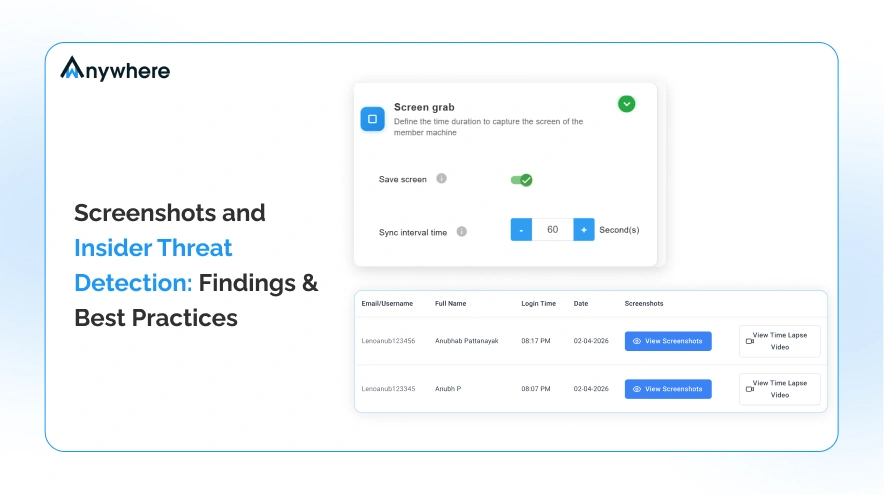
This post examines one specific control that security teams are increasingly deploying as part of layered insider threat detection: periodic screenshot capture on endpoints. It is not a replacement for SIEM, DLP, or UEBA. It is a visual evidence layer that compresses investigation time and corroborates what other tools only infer. The findings below draw on published breach research, peer-reviewed insider threat studies, and operational practice from organisations running formal insider risk programmes. The goal is not to advocate for monitoring. It is to quantify what screenshot evidence contributes to dwell time reduction and where it does not.
| $4.99M Average cost of malicious insider breach IBM Cost of Data Breach 2024 | 85 days Average containment time for malicious Ponemon Institute 2023 | 57% Of insider incidents involve privilege misuse Verizon DBIR 2024 |
Why Insider Threat Detection Fails, and What Dwell Time Actually Costs
Dwell time, in the insider threat context, is the interval between when malicious or negligent activity begins and when a control identifies it. Unlike external intrusions, where dwell time has fallen sharply over the past decade, insider dwell time has barely moved. The data tells a consistent story.
The IBM Cost of a Data Breach Report 2024 found that breaches caused by malicious insiders cost an average of $4.99 million, approximately 9.5 percent higher than breaches initiated by external threat actors. The cost differential is driven primarily by detection latency: insiders already hold valid credentials, so their actions generate fewer of the anomalies that perimeter and endpoint tools are tuned to flag.
The Ponemon Institute 2023 Cost of Insider Risks Global Report quantified that latency directly. The average time to contain a malicious insider incident was 85 days. For negligent insiders (employees who mishandled data without malicious intent), containment averaged 77 days. Both figures represent meaningful investigation windows during which exfiltration, lateral movement, or regulatory exposure compound.
The Verizon 2024 Data Breach Investigations Report added a structural dimension: 57 percent of insider-related incidents involved privilege misuse, where users accessed data or systems within their entitlement envelope but outside the scope of their legitimate work. Privilege misuse is rarely caught by access controls; by definition, the user is authorised. It is typically discovered after the fact, during forensic review prompted by some downstream event.
Why Traditional Controls Miss Insider Threat
The detection gap is not a tooling gap in the sense of missing logs. SIEM, DLP, and identity platforms generate ample telemetry. The gap is contextual. Logs record that a user opened a file, accessed a database, or transferred bytes, but they do not record what was on screen, what the user was reading, or what application chain led to the action.
The three most cited behavioural insider threat indicators, namely after-hours access to sensitive systems, bulk downloads from internal repositories, and unusual application usage such as personal cloud storage clients on managed endpoints, all produce log entries. The problem is that each one, in isolation, produces too many false positives for analysts to triage at scale. Dwell time extends because investigators cannot prioritise without visual context.
Logs record what a user did in system terms. Screenshots record what the user saw and did in human terms. Only together do they answer both questions every insider investigation requires: did the action occur, and did the user knowingly perform it?
Where Screenshot Monitoring Sits in an Insider Threat Program
A formal insider threat program typically layers four categories of control: identity and access governance, data-centric controls such as DLP and classification, behavioural analytics such as UEBA, and user activity monitoring. Screenshot capture belongs in the fourth category. It is a passive recording control that produces forensic artefacts, not real-time alerts.
The distinction matters. Security leaders sometimes evaluate screenshot monitoring against detection tools and conclude it is redundant because it does not generate signals on its own. That comparison misses the function. Screenshots do not detect; they document. They convert ambiguous log events into reviewable evidence, which is what compresses investigation cycles.
In mature programmes, screenshot capture is deployed alongside audit trail software and endpoint telemetry. The audit trail records what happened in system terms. The screenshots record what the user saw and did in human terms. Together they answer the two questions every insider investigation eventually asks: did the action occur, and did the user knowingly perform it?
The 3 Insider Threat Scenarios Where Screenshots Catch What Logs Miss
Three scenarios recur in published insider incident retrospectives where log data alone produced an incomplete picture.
Scenario 1: Intellectual Property Exfiltration via Screen Capture or Photography
When an employee photographs a monitor with a personal phone, no DLP control on the endpoint can intercept the data. Screenshot evidence of the document being open at the time of suspected exfiltration, correlated with badge logs showing the employee alone in a workspace, becomes the primary forensic record.
Scenario 2: Misuse of Legitimate Access for Non-Work Purposes
A privileged user querying customer records they have authority to view, but for a personal or competitive reason, generates clean access logs. Screenshots reveal the query patterns, the search terms, and the records actually viewed.
Scenario 3: Negligent Handling of Sensitive Data
Sharing credentials in chat applications, opening confidential files in unsecured browsers, or pasting regulated information into AI tools. These actions often fail to trigger DLP rules because they do not involve file transfer. Visual evidence is frequently the only artefact that survives.
Read More : Idle Time Tracking: How to Monitor Active & Inactive Remote Teams
Insider Threat Detection Tools and the Screenshot Evidence Layer
When security teams evaluate insider threat detection tools, the comparison typically focuses on detection breadth: how many event types the platform recognises, how many correlation rules ship out of the box, how the platform integrates with identity providers. Screenshot capture rarely competes on those terms, and should not. The evaluation criterion that matters for screenshot monitoring is time-to-evidence: once an alert fires from another control, how quickly can an investigator establish what the user was doing?
Research published by the Carnegie Mellon CERT Insider Threat Center has repeatedly emphasised that insider investigations are bottlenecked at the evidence-gathering stage, not the alerting stage. Logs identify candidate incidents in hours. Building a defensible case from those candidates sufficient to support termination, prosecution, or regulatory disclosure typically takes weeks. Visual evidence collapses that interval because it does not require interpretation. A screenshot of a confidential design document open on a personal email tab is not an inference. It is a record.
Interval Frequency and Detection Speed: What the Evidence Suggests
Practitioners deploying screen monitoring software face an immediate configuration question: how frequently should screenshots be captured? The published guidance is convergent but not absolute.
Capture intervals of every 3 to 10 minutes appear to be the operational range cited in most insider threat programme documentation reviewed for this analysis. Shorter intervals (under 2 minutes) produce storage and review overhead disproportionate to the evidentiary gain. Longer intervals (above 15 minutes) create gaps wide enough that a user can complete a full exfiltration action between captures, defeating the purpose. A 5-minute default, with the option to increase frequency for users on heightened watch, is the most common configuration in mature deployments.
Crucially, the value of employee screenshot monitoring scales non-linearly with interval frequency. Doubling capture frequency does not double evidentiary value, because most insider incidents unfold over minutes-to-hours, not seconds. The right question is not how often to capture, but how to ensure captures are correlated with other telemetry (DLP events, badge entries, VPN sessions) so that an investigator can reconstruct a timeline rather than scrub through screenshots.
The Dwell Time Reduction Mechanism: How Screenshots Accelerate Investigation
The dwell time reduction mechanism is specifically post-alert. Screenshots do not shorten time-to-alert; that work is done by UEBA, DLP, and access controls. What screenshots shorten is time-from-alert-to-confirmed-incident.
In organisations that have published metrics on this transition, the difference is material. Investigations supported by visual evidence typically close within days rather than the weeks required when investigators must reconstruct activity from logs alone. That compression matters because dwell time, as measured by the Ponemon report, is heavily weighted by post-detection investigation, not pre-detection blindness. Cut the investigation phase from three weeks to three days, and the 85-day average compresses meaningfully without changing any upstream control.
This is the mechanism. Insider threat detection in a layered programme produces signals; screenshot evidence converts those signals into closed incidents. Removing the evidence layer does not eliminate detection, but it does extend the dwell time tail considerably.
Key Finding: Dwell Time Reduction : Cut the investigation phase from three weeks to three days, and the 85-day average dwell time compresses meaningfully — without changing any upstream detection control. Evidence, not alerting, is where dwell time lives.
Insider Threat Prevention Best Practices: Implementing Screenshot Monitoring Properly
Deploying screenshot capture without operational discipline produces noise, legal exposure, and employee distrust. The following practices, drawn from published insider threat programme guidance and operational experience, address the most common implementation failures.
1. Define the policy before deploying the technology
Capture intervals, retention periods, access controls on the screenshot repository, and review triggers should be written into formal policy and approved by legal, HR, and works councils where applicable. Technology deployed ahead of policy creates compliance risk that exceeds the insider risk it is meant to mitigate.
2. Disclose the control to all monitored users
Covert capture is both legally fragile in most jurisdictions and operationally counterproductive; discovery of undisclosed monitoring damages programme legitimacy. Disclosure also has a documented deterrent effect on negligent behaviour, which is the larger share of insider incidents.
3. Scope by role and risk, not by default-on for the entire workforce
Privileged users, contractors, finance personnel handling regulated data, and employees on performance or termination watch warrant monitoring. Indiscriminate deployment across all knowledge workers produces low-value capture volume and elevates legal exposure unnecessarily.
4. Integrate screenshot evidence with your alerting stack, not in isolation
Screenshots reviewed without correlated DLP, identity, and access events produce false confidence and slow investigations. The objective is a single investigative timeline. Teams evaluating this approach can begin with a time tracker with screenshots that exports to existing SIEM pipelines.
5. Restrict access to the screenshot repository under the principle of least privilege
Screenshots are sensitive artefacts. Access should be limited to designated investigators, logged, and time-bound. Repository compromise turns a defensive control into an offensive asset for an attacker.
6. Apply jurisdictional review before activation
Screenshot monitoring legality varies significantly. GDPR jurisdictions, certain US states, and countries with strong workplace privacy statutes impose specific notice, proportionality, and data minimisation requirements. This best practice should be reviewed by legal counsel before any deployment.
7. Set retention to match investigation horizons, not maximum storage capacity
Most insider incidents are detected within 90 days. Retention beyond 6-12 months rarely supports an open investigation and frequently creates discovery liability in unrelated litigation.
8. Audit the programme itself
Insider threat controls are themselves a privilege concentration. The team running the programme should be subject to documented oversight, periodic review, and separation of duties between configuration, review, and escalation.

Start Your 14-Day Trial
Test screenshot monitoring integration against your existing investigation workflow before committing to a full programme rollout.
Closing the Dwell Time Gap with Screenshot-Based Insider Threat Detection
The core finding is straightforward. Periodic screenshots do not reduce the time required to detect insider threat. They reduce the time required to confirm it. In a control stack where alerting is mature but post-alert investigation drags out for weeks, that distinction is where dwell time actually lives, and where it can be most efficiently reduced.
Screenshot monitoring is not a replacement for SIEM, DLP, or UEBA. It is the evidence layer that makes the rest of the stack actionable. Without it, investigators reconstruct activity from logs and inference, and dwell time stretches. With it, the same signals close into confirmed incidents in a fraction of the time. For CISOs evaluating where to invest the next increment of insider threat detection budget, the question is whether the alerting layer or the evidence layer is the binding constraint, and for most organisations, evidence is the longer pole in the tent.
If you are evaluating this control, a time tracker with screenshots is the most direct way to test the integration against your existing investigation workflow. Start your 14-day trial to measure the effect on your own time-to-closed-incident metrics before committing to a full programme deployment.
Frequently Asked Questions
How often should screenshots be captured for insider threat detection?
Published programme documentation generally converges on a 3-10 minute interval, with 5 minutes a common default. Frequency below 2 minutes adds storage and review burden without proportional evidentiary gain; above 15 minutes leaves gaps wide enough for complete exfiltration actions.
Is screenshot monitoring legal for insider threat programs?
Legality varies by jurisdiction and is conditional on disclosure, proportionality, scope, and retention practices. GDPR jurisdictions and several US states impose specific notice and minimisation requirements. Legal review before deployment is non-optional. See best practice 6 above.
How is screenshot monitoring different from other insider threat detection tools?
Other tools (UEBA, DLP, identity analytics) generate alerts based on signals. Screenshot monitoring generates evidence that supports investigation of those alerts. It is a complementary layer, not a substitute for behavioural detection. Reviewing it as employee monitoring software understates its role in a security context; in an insider threat programme it functions as a forensic record.

Table of Contents
Boost productivity and compliance with wAnywhere
Read summarized version with