 Set as a preferred Google source
The emergence of remote and hybrid work has altered how organizations function now. Businesses ranging from start-ups to multinational corporations work together across different time zones, on multiple types of devices, in addition to working according to their schedule constraints and working flexibility.
However, flexibility has introduced a new problem: Fake activity (working) monitoring.
To determine employees’ productivity, many companies are tracking productivity with job performance metrics more than in the past. Because of this increase in tracking, some employees have begun employing “mouse jigglers” (tools to keep the computer mouse active) to give the appearance of working when they are actually not working. The increased use of such devices raises legitimate challenges regarding employee productivity and trust, data security and integrity, as well as employee workplace culture.
That is why finding mouse jiggler detection is necessary.
In this blog post, we will discuss the definition of “mouse jigglers”, why employees use them, and most importantly, how to legitimately, ethically, and simply detect their presence in the workplace without implementing toxic surveillance of employees.
What Is a Mouse Jiggler?
Mouse jigglers (aka “mouse movers”) simulate mouse movement, artificially moving the cursor to avoid the PC going idle. Artificially generate cursor movement, using random patterns (small & large) to make the user appear as if they are still active.
How They Simulate Activity
Most mouse jigglers:
- Generate small amounts of movement (1-5px) every few seconds
- Create micro-movements in set intervals
- Creating auto-clicks at defined intervals (like every 5 seconds)
Disallow systems from marking as “Away” or “Idle.”
Legitimate vs. Unethical Use Cases
Not every use is malicious. Legitimate uses may include:
- To keep from locking the screen due to inactivity while waiting for a large file to download or system updates.
- To keep the screen active during a presentation.
- To keep active when performing a test within a specific timeframe.
Uncontrolled Use
- Avoid time tracking for idle time
- To prevent productivity monitoring
- Creating fake active hours in remote jobs
Use of mouse movers/jigglers in a way that is detrimental to a person’s productivity creates a problem with performance measures.
Types of Mouse Jigglers You Should Know
Mice jiggler detection strategies can be improved by knowing about different types of mouse jiggles.
Hardware Devices (USB Mouse Jigglers)
A USB mouse jiggler is a small device that connects directly to the computer and acts as a physical mouse.
Main characteristics:
- It requires no software installation.
- It operates at a hardware level.
- It is often marketed as “undetectable mouse jiggler” devices.
- They work by mimicking human-like movements.
They behave as legitimate human interface devices (HIDs) and so can be difficult to identify through basic software monitoring tools, although there are better ways to do so.
Software Mouse Jiggler Apps
Software mouse jiggler applications run in the background and use software to imitate mouse movement.
The most common types of software mouse jiggler applications are:
- Background scripts
- Auto-clickers
- Other automation tools
- Lightweight applications (installed locally)
Software mouse jigglers can be more widely deployed, and in many instances, easier to detect if there is monitoring of installed applications and background processes.
Browser-Based Extensions & DIY Scripts
Some users use the following types of browser-based or do-it-yourself (DIY) scripts to simulate activity within browser-based work-related applications.
- Chrome or Edge extensions
- Custom Python scripts.
- AutoHotkey automation scripts
DIY mouse jiggler tools may be less likely to be flagged if a company does not have proper endpoint visibility.
Why Employees Use Mouse Jigglers
A lot of organizations are aware that employees use mouse jigglers, but do they know why? The answer to this question requires organizations to look at the underlying cause, not just the symptoms.
Excessive Monitoring Culture
When organizations are overly strict in their monitoring of employees’ activities (by using some sort of time tracking software), employees feel that they are being micromanaged and will find ways to “beat the system.”
Fear Of Being Penalized For Inactive Time
Some organizations penalize people for being idle for no reason at all. Research work (such as writing or project planning) counts as idle time.
Long-Term Research Work or Creative Efforts
Many writers, designers, strategists, and developers will do research or use their brains to create or develop materials without touching their typing devices.
Employee Burnout and Low Morale
When employees lose engagement, they tend to focus on looking busy rather than producing.
Detection is important, but the culture of an organization is even more so.
How to Detect Mouse Jiggler Activity
Effective mouse jiggler detection requires behavior-based monitoring rather than simple activity counts.
Analyze Mouse & Keyboard Behavior
Evidence can be found by examining mouse and keyboard usage. Look for mouse movements consisting of repetitive, evenly spaced moving arrows with no random or natural variations.
For example, a human does not use a mouse moving at evenly spaced intervals (i.e., at equal distances). Look for low mouse usage ratios to keyboard data when there has been a high volume of mouse use with little to no data created from that mouse usage.
Monitor System & Device Logs
Investigate the USB history for instances of unknown Human Interface Devices (HIDs), which may indicate activity when the device is connected. Evaluate and look for possible distractions created by unnecessary processes, applications, or installed programs, and browser extensions, which can indicate automation tools installed and potentially create fake activity.
Track Application & Work Patterns
Compare cursor movements versus outputs. If the cursor is showing a high volume of activity on an inactive window without producing any documents, and very few files are created with long periods of alleged active time, then it could indicate that the user is creating fake activity. Productivity will produce other traces in addition to mouse movements.
Use AI-Powered Monitoring Tools
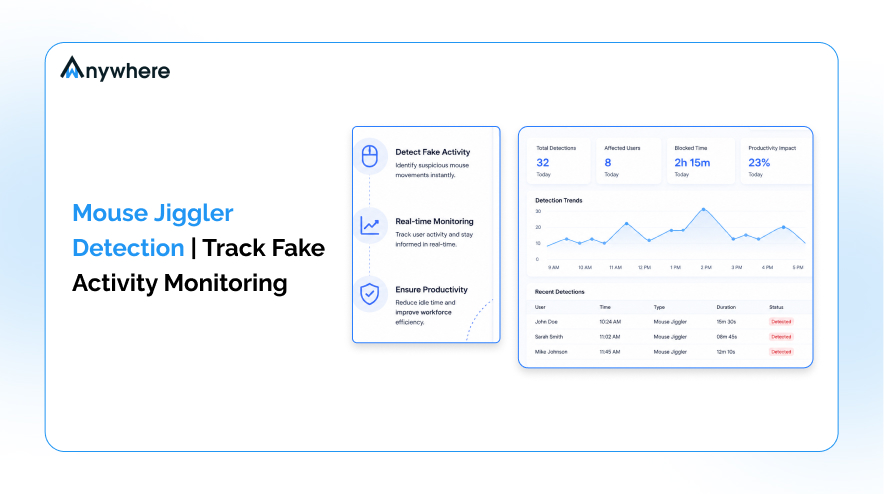
AI Monitoring systems can automatically analyze activity and look for unusual patterns or rhythms and flag them as signs of artificial behavior. Unlike basic click counting, the AI systems take into account the context of the activity and the amount of activity, and based on that, produce a better overall absolute determination of whether or not a mouse activity jiggler is being used without having to use only fixed activity limits.
AI-based systems can differentiate between natural human inconsistency and automated patterns typical of an undetectable mouse jiggler.
Conclusion: Build Productivity Without Surveillance Abuse
Detecting mouse jiggler devices is not about catching employees; it is about protecting the integrity, productivity, and data security of an organization.
There are several strategies organizations can use to be more successful in balancing the need for monitoring and maintaining a culture of trust: they can use data effectively, focus on results rather than just activities, foster accountability, and invest in a healthy work environment.
In addition, technology like AI-powered mouse jiggler detection systems provides the ability to identify suspicious patterns associated with work activity while maintaining transparency and leadership.
An intelligent solution like wAnywhere provides a more intelligent approach to monitoring employees by utilizing behavior analytics, productivity analytics, and contextual tracking while correlating mouse-moving to application usage, output data, and work patterns, ensuring results and reducing false-positive error rates and unnecessary pressure to perform under surveillance.
By combining sophisticated technology with a culture of support, progressive companies are able to manage and reduce the risk of employee performance manipulation without creating an atmosphere of mistrust.
The ultimate measure of employee performance is trust, so utilizing an advanced monitoring solution that respects their privacy will help to foster a culture of productivity more than traditional tracking methods ever will.

Don’t wait for a compliance breach to happen
With wAnywhere, get real-time alerts, identify unauthorized users, and ensure your remote or hybrid teams are secure.

Table of Contents
Boost productivity and compliance with wAnywhere
Read summarized version with