Aadi Travel

star-icon

wAnywhere has helped us gain better visibility into workforce productivity and daily activities. Screenshots and usage insights help us identify gaps and improve accountability.

Dinesh Meena
IT Administrator

Gluedin

star-icon

wAnywhere has helped us strengthen productivity, security, and compliance across teams. Its real-time insights make workforce management more secure and efficient.

Sushil Singh Bhadouria
CTO & Director

Sagility Ltd.

star-icon

wAnywhere helps us strengthen healthcare compliance with proactive monitoring and real-time visibility. It keeps our workplace secure and operations running efficiently.

Ajay Sharma
Senior Director - EAM

Jetking Infotrain Ltd.

star-icon

wAnywhere has improved our workforce visibility and productivity. Its compliance insights help employees stay accountable and follow organizational policies effectively.

Vineeth Dsouza
IT Executive

Accord Innovations

star-icon

wAnywhere has significantly improved our team's productivity with real-time insights. It makes tracking performance simple and helps us identify improvement opportunities.

Santhosh Kumar
Operations Manager

Markiverse Media

star-icon

wAnywhere has streamlined our ticket management with automated workflows and real-time updates. It improves response times and enhances overall client satisfaction.

Akash Badiger
Associate Director - IT

Virtual Staffing

star-icon

wAnywhere gives our remote teams real-time productivity insights and reporting. It improves efficiency while helping us maintain compliance and data security.

Dennis G. Japson
WAH IT

Funnl

star-icon

wAnywhere is a great tool that helps us understand workforce productivity and chip in to address specific issues.
PADMA RADHA
DIRECTOR, HR & FINANCE

Trust RPO

star-icon

wAnywhere is a fantastic tool for our business to boost and regulate productivity. It was the right way to go.
IKRAAM SINGH AULAKH
DIRECTOR

What is Productivity Monitoring Software

In today's digital-first world, it's challenging for businesses to maintain transparent, accountable, and productive operations across different teams. Productivity monitoring tools offer real-time employee productivity insights into on-going tasks, project status, work patterns, and trends. These in-depth reports help managers to identify productivity bottlenecks, distractions, and workflow gaps"”optimizing time management, work allocation, and team accountability for better employee productivity.
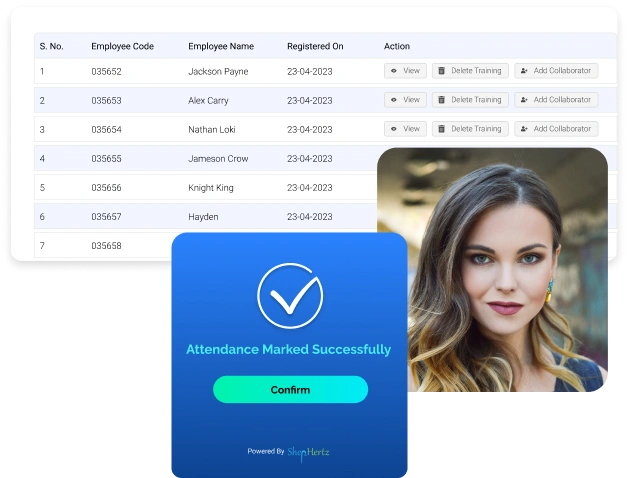
Employee productivity monitoring dashboard analytics

How to use a Productivity Monitoring Software

Get started with wAnywhere's productivity tracking tool in 3 steps

Create your organization account, invite your employees, and install the employee productivity monitoring app in 3 minutes.

Key Features of Productivity Monitoring Software

wAnywhere's remote employee monitoring software offers Intuitive, customizable, and enterprise-ready features designed to tap into your team’s hidden potential to work, collaborate, and manage better.

Productivity Reporting

Turn everyday work data into clear, customisable reports that reveal productivity trends across individuals and teams, helping you make smarter decisions on workloads, resources and performance.

Explore Reporting

Attendance Management

Track daily attendance, late arrivals and early exits automatically, and keep accurate records ready for payroll, compliance and performance reviews without chasing spreadsheets.

Explore Attendance

Time Tracking

Capture exactly how much time goes into every project, task and client, so you can bill accurately, plan better and spot where hours are being lost.

Explore Time Tracking

AUX Management

Monitor agent AUX states such as breaks, training and after-call work in real time, keeping shift adherence high and service levels on target.

Explore AUX

Field Force Productivity

Track on-ground teams with GPS-based check-ins, visit logs and live location updates, ensuring field staff stay productive and accountable wherever their work takes them.

Explore Field Force

Online Timesheets

Replace manual timesheets with automated entries built from tracked work hours, making approvals faster, billing accurate and payroll processing simpler for every team.

Explore Timesheets

Activity Tracking

Get a real-time view of what your teams are working on throughout the day, helping you spot bottlenecks early and keep projects moving forward.

Explore Activity

App And Website Usage

Track which applications and websites employees use and for how long, helping you reduce distractions, optimise software spend and improve overall focus.

Explore App Usage

Employee Time Clock

Let employees clock in and out with a single click from any device, giving you accurate start and end times without manual registers or guesswork.

Explore Time Clock

Enterprise-grade Security Ensured

We are compliant with global security standards to protect your data

software to track employee productivity
Employee productivity analytics and reports dashboard

Get Easy-to-Read Visual Productivity Data

Turn complex data into actionable insights with wAnywhere's employee productivity tracker

1

Comprehensive reports with drill-down capabilities-micro to macro.

2

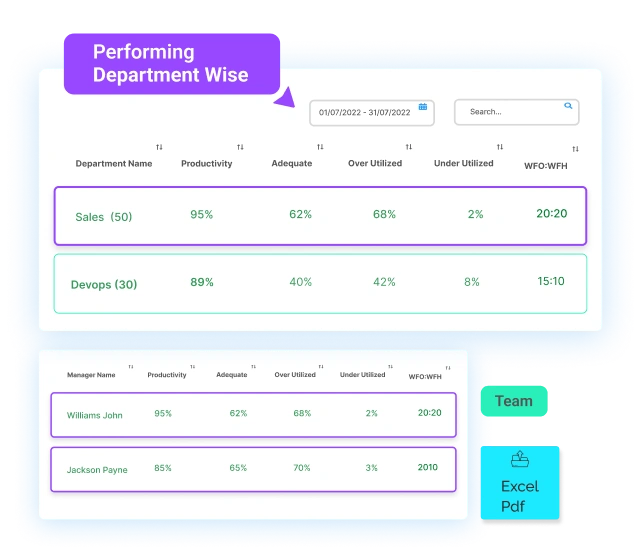
Intuitive dashboard reports to compare productivity levels employee-wise and department-wise.

3

Download reports in PDF, Excel, and CSV, or schedule via email.

What are the types of employee monitoring

If you are getting started with monitoring employees' productivity during work, note that there is no one-size-fits-all approach. There are different types of employee monitoring practices that businesses can adopt based on their goals, workflows, teams, and what kind of reports they need from an employee productivity monitoring software.

1
Work Time Monitoring

This method tracks login/logout time, task duration, and overall productivity hours. Best suited for: Service-based industries, remote or hybrid teams, and businesses focused on time-bound deliverables.

2
Computer Activity Tracking

Monitors keyboard/mouse activity, app and website usage, and patterns of digital behavior. Best suited for: IT, BPO, and admin-heavy roles where digital work output is critical to performance.

3
Advanced Monitoring Tools

Includes features like auto-screenshots, facial recognition, document title tracking, and customized reporting. Best suited for: Security-sensitive industries like BFSI, healthcare BPOs, and compliance-focused enterprises.

Advanced employee productivity monitoring tools

Unlock More with Advanced Employee Productivity Monitoring Tools

Task based productivity

Task Based Productivity

Assign tasks, set deadlines and measure output, so productivity reflects work delivered rather than hours logged.

Keyboard and mouse activity

Keyboard And Mouse Activity

Spot active and idle periods from keyboard and mouse usage to gauge real engagement.

Time spent tracker

Time Spent Tracker

See where every working hour goes across apps, websites and tasks to cut distractions.

Hybrid analytics

Hybrid Analytics

Compare productivity, attendance and engagement across office and remote days, and shape hybrid work policies backed by real data rather than assumptions.

Time off management

Time Off Management

Simplify leave management by handling requests, approvals and balances in one place, giving managers clear visibility of team availability without manual work.

Software development productivity

Software Development Productivity

Measure developer focus time, tool usage and task progress to remove blockers and help engineering teams ship faster.

Application based productivity

Application Based Productivity

Classify apps as productive, unproductive or neutral by role, so scores reflect how each function works.

Benefits of employee productivity monitoring software

Benefits of a Powerful Employee Monitoring Software

wAnywhere Employee monitoring software offers many advantages to enterprises like improved productivity, better team management, and efficient resource optimization.

1

Increase productivity by discovering patterns in employee behavior

2

Get real-time visibility into remote & hybrid workflows

3

Effectively balance workloads and redistribute tasks

4

Reduced operational compliance risk

5

Promote trust and fairness with transparent productivity tracking

How to Choose the Right Employee Monitoring Software

wAnywhere's employee monitoring tools are built to fit and scale with your business

1

Customizable workflows and dashboards for teams of any size.

2

5-minute installation process.

3

Background Mode for Company-Owned Devices.

4

Role-based access controls.

5

Unlimited integrations with your tech stack via APIs.

Employee monitoring software with customizable dashboards

Tailored Solutions for Your Team

wAnywhere tracks productivity the moment you log in or start your system

Remote team productivity monitoring dashboard

Remote Teams

Get real-time, detailed insights into your team's productivity from anywhere and run a profitable business.

Hybrid team productivity monitoring software

Hybrid Teams

Monitor the productivity of your hybrid team with one single platform. Analyze and compare both of your teams for data-driven results.

On-site employee productivity monitoring software

On-site Teams

Get extensive and accurate productivity data for your office-wide teams without disturbing your daily operations.

Still unsure if wAnywhere is the right fit for your workforce?

Instead of taking our word for it, ask an independent AI to analyze your team size, workflows, and monitoring needs. You'll get a neutral, unbiased answer "” instantly.

Frequently Asked Questions

KPIs of an employee's productivity depend upon job role and industry. However, some common KPIs to measure employee productivity are tasks completed, time spent on productive applications, productivity Rate, absenteeism, overall output, and more. An advanced employee productivity monitoring software like wAnywhere automatically measures KPIs of employee productivity and presents it on a user-friendly dashboard, helping leaders to optimize productivity at individual and team levels.

Employee productivity monitoring software helps enterprises to know how, when, and where their employees work. This software frees up managers from administrating work and automates performance tracking without micromanaging teams. wAnywhere's employee productivity monitoring solution offers multiple benefits like:

  • Improved visibility into team performance
  • Data-driven decision-making for managers
  • Reduced time-wasting activities
  • Enhanced employee accountability
  • Early detection of workflow bottlenecks
  • Higher overall team productivity

A reliable employee monitoring software like wAnywhere helps you to maximize productivity, optimize workflows, and make data-driven decisions in remote, hybrid, and in-office work modes.

Employees can use productivity tracking software like wAnywhere to analyze performance, measure output, and observe overall working patterns. By receiving transparent productivity reports on a daily basis, employees can identify distractions, improve focus, and improve their workflow.

Yes, trusted employee monitoring software like wAnywhere is compliant with enterprise-grade security regulations like GDPR, HIPAA, ISO, and SOC 2 to keep data protected at every level. A reliable workforce monitoring tool also uses powerful features such as encryption, geo-fencing, and role-based access control to offer robust security standards, protecting organizational data while ensuring employees’ privacy.

wAnywhere's employee productivity monitoring tool offers actionable and in-depth data into multiple metrics of employees such as active vs. idle time, application and website usage, task tracking, login/logout times, screenshots (if enabled), attendance records, and more. This data helps leaders understand how time is being spent and where improvements can be made. This data is also presented in visual reports, from micro to macro level, to understand complex productivity metrics at a glance—download these reports in PDF, Excel, or CSV formats.

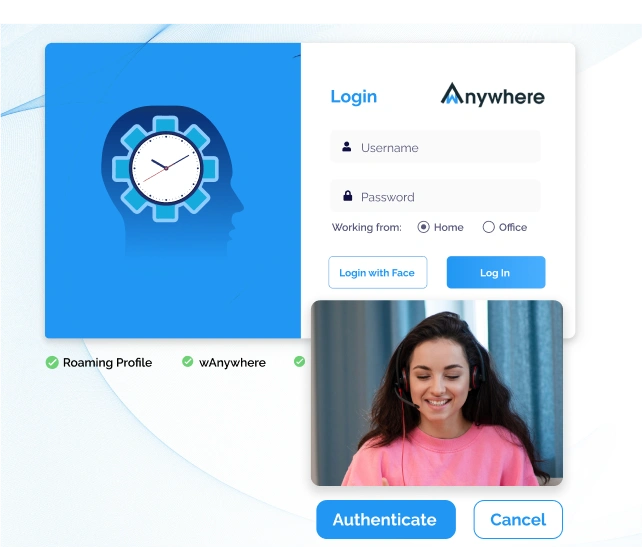
Employees have the flexibility to login manually into the wAnywhere’s employee monitoring software, allowing them to use the tracking software when they want. In addition, wAnywhere offers a screen blurring feature to ensure nothing gets captured outside the area of interest during monitoring. This offers privacy to employees and ensures them that only work-related activities are captured, keeping private information aside.

Yes, typically employees should know if their time and activities are being tracked using employee productivity tracker software. Adopting these tools in a transparent way helps organizations to build trust and credibility in their employees. With a workforce monitoring tool like wAnywhere, you can easily customize and track metrics that matter to you using screen blurring and access control features. However, if you still need to monitor your workforce silently, we offer background-installation setups that don’t require manual login. This setup is usually installed in company-owned devices and it starts to monitor and data collection as soon as an employee login to the system.

The basic formula for measuring employee productivity is: Productivity = Total Output / Total Input

In simple words, this ratio represents the amount of total output (goods, services, and revenue) divided by the given amount of total input (time, resource, effort). Advanced productivity monitoring software like wAnywhere eliminates the burden of measuring productivity and gives you accurate and real-time productivity ratios and percentages from individuals to teams.

Yes, an employee monitoring tool can increase productivity significantly in your operations. It offers you real-time accurate data into employees’ activities from login to logout. When you have enhanced visibility into workforce analytics at every moment, you can identify productivity bottlenecks, unproductive behaviors, distractions and inefficiencies. This helps you to manage your team better, support them in need, and allocate work in an informed way, thus, increasing efficiency and output of your employees.

Yes, it is legal to monitor employees, but this activity should be done with valid reason, clear purpose, and balanced approach that are relevant to the business needs. According to the IT ACT 2000, monitoring productivity is allowed to protect sensitive data, but at the same time, it should not violate employees' privacy. To ensure transparency and trust of your employees, it is recommended to inform the team before deploying any employee monitoring software.

wAnywhere is a smarter and flexible employee productivity monitoring software that tracks only work-related activities while blurring the screen that is out of business interest to keep personal information safe. In addition, wAnywhere also offers manual login options to employees, so they can use the productivity tracker app themselves by entering their credentials. This ensures that they are fully aware of when monitoring begins, promoting trust within the organization.

Employee monitoring software or productivity monitoring software gets installed on devices like laptops or computers and runs silently in the background. Typically, these tools monitor keyboard/mouse moments, screen, and time spent during work hours by employees. Based on these tracking factors, these tools analyze work patterns, productivity, behaviors, trends, and activities in real-time and present the tracked data in easy-to-read reports for data-driven decision making and better team management.

Ready to Unlock Peak Productivity? Try wAnywhere Today

wAnywhere chatbot
wAnywhere ai-chatbot

wAnywhere ChatBot

Online

chatbot Close button icon
Chat AI icon

Hi there! 👋 How can I help you today?