
Works on office and remote seats
Unknown Person Detection That
Locks Out Unauthorized Eyes
wAnywhere unknown person detection uses AI facial recognition to confirm the right employee is at every screen.
If an unrecognized face appears, the session is blacked out or locked before client data is exposed.
Available for:


Aadi Travel

wAnywhere has helped us gain better visibility into workforce productivity and daily activities. Screenshots and usage insights help us identify gaps and improve accountability.

Dinesh Meena
IT Administrator
Gluedin
wAnywhere has helped us strengthen productivity, security, and compliance across teams. Its real-time insights make workforce management more secure and efficient.

Sushil Singh Bhadouria
CTO & Director
Sagility Ltd.
wAnywhere helps us strengthen healthcare compliance with proactive monitoring and real-time visibility. It keeps our workplace secure and operations running efficiently.

Ajay Sharma
Senior Director – EAM
Who Is Really Looking At Your Client Data?
A login proves a password was entered, not who is sitting at the screen. In hybrid teams, that gap lets unauthorized people view or record sensitive data without anyone knowing.
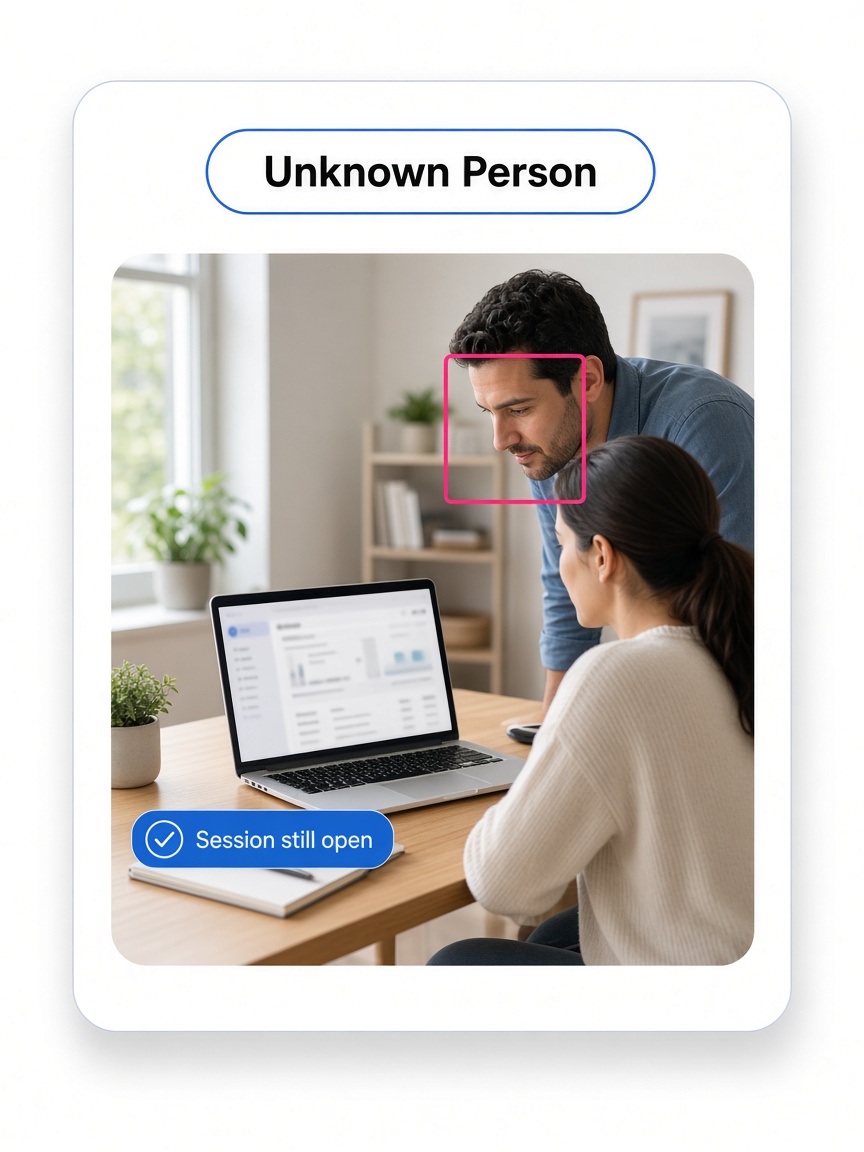
Where Identity Risk Shows Up
Most of these exposures take seconds and leave no trace in standard logs.
1
Shared credentials. An employee lets a friend or relative work their shift.
2
Proxy work. An unverified person completes tasks under a verified login.
3
Shoulder surfing. Family members or visitors read client data on a home screen.
4
Unattended screens. A logged-in device sits open for anyone nearby.
5
Contract breaches. BPO and BFSI clients often require named, verified users on their data.
What Changes With wAnywhere
Identity checks keep running for the whole session, not just at login.
Without wAnywhere
- Identity is checked once at login
- Unauthorized viewers go unnoticed
- Response depends on a supervisor
- No proof of who saw the data
With wAnywhere
- Identity is checked throughout the session
- Unrecognized faces are flagged in real time
- The screen locks automatically
- Every detection is logged for audit
What Is Unknown Person Detection?
Unknown person detection is an AI capability that compares the face in front of a work device with the verified employee's profile. When an unrecognized person appears, it flags the event and can trigger an automated response.
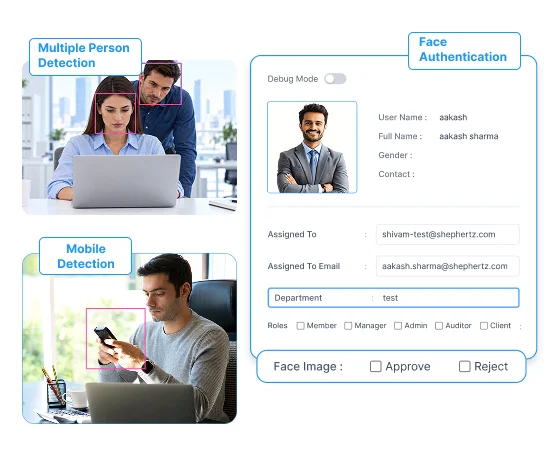
wAnywhere pairs it with related checks for full desk-level control.
1
Face authentication. Verifies the employee before access is granted.
2
Continuous recognition. Keeps confirming identity during the session.
3
Multiple person detection. Flags when more than one person is at the desk. See multiple person detection.
4
Mobile detection. Spots phones and cameras near the work screen.
Unknown Person Detection Features Built For Regulated Teams
Each control is designed to stop exposure first and report it second. Here is what your security team gets.
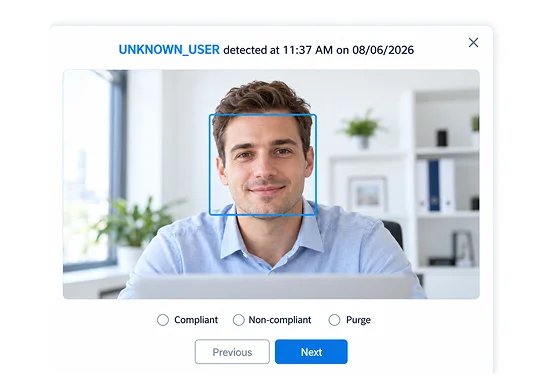
Real-Time Facial Recognition
AI recognition checks that the person at the screen matches the verified employee. Unrecognized faces are flagged the moment they appear.
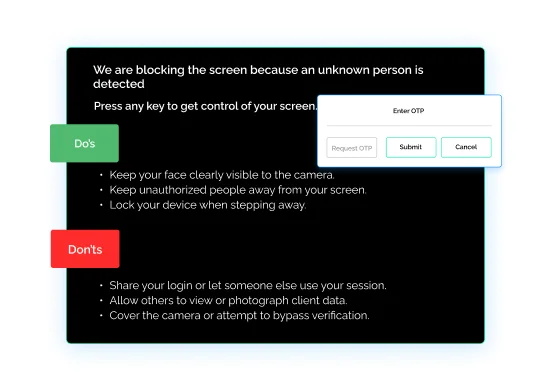
Automated Screen Response
Choose a black screen, OS lock or OTP verification when an unknown person is detected. Work resumes only after the employee proves identity.
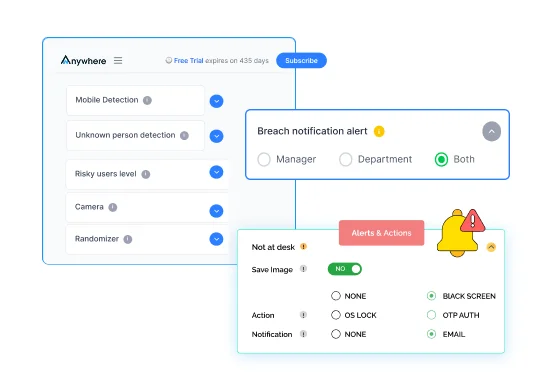
Multiple Person Alerts
Get alerted when more than one person is visible at the desk. Shoulder surfing is caught at home and on the floor.
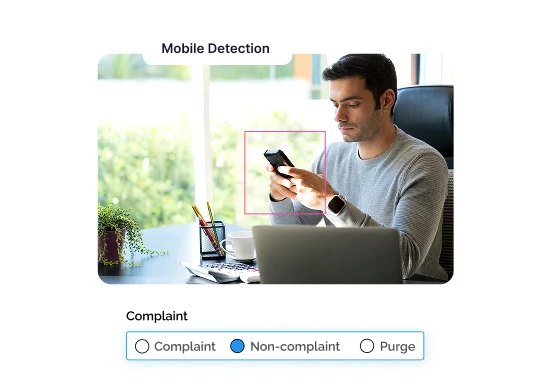
Mobile Device Detection
Detect phones and cameras near the work screen. A photo of client data is stopped before it leaves the room.
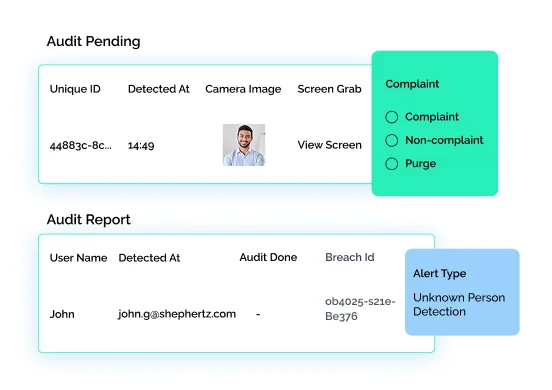
Evidence And Audit Trail
Every detection is logged with user, device and time. Investigations and client audits run on facts, not assumptions.
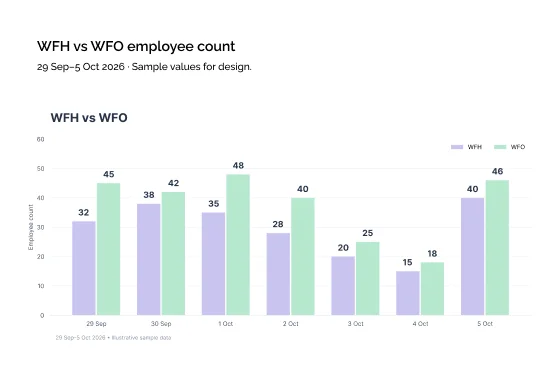
Office And Remote Coverage
The same detection rules apply to every seat, wherever it sits. Hybrid teams get one standard of identity control.
How wAnywhere Detects Unknown Persons
Detection runs quietly in the background once employees are enrolled. Three steps take you from setup to evidence.
Enroll verified employees
Each employee registers a face profile used for authentication.
Detect in real time
wAnywhere compares the face at the screen with the profile throughout the session.
Respond and record
The configured action triggers instantly, and the event is logged for review.
Why Security And Compliance Leaders Use It
Identity risk touches security, operations and compliance at once. Each team gets a clear reason to act.
For IT Security Leads
- Close the gap between login and real identity
- Automate the response to unauthorized access
- Reduce reliance on manual floor checks
For Operations Heads
- Stop proxy work and shared logins
- Hold remote seats to the same standard as the floor
- Protect client contracts that require named users
For Compliance Managers
- Prove only verified users accessed client data
- Pull detection logs for any user or date
- Answer client audits with ready evidence
If a client contract requires verified users on every seat, Book A Demo and see how wAnywhere proves it.
Built For Teams Handling Sensitive Data
Unknown person detection matters most where one unauthorized viewer can cost a client relationship. These teams rely on it most.
BPO And Contact Centers
Keep every agent seat limited to the verified agent, including work from home shifts.
BFSI
Make sure only authorized staff view account, card and loan data.
ITES
Protect client systems, code and project data from unauthorized viewers.
Enterprise-grade Security Ensured
We ensure industry-leading data protection that complies with relevant standards.

Still unsure if wAnywhere can detect an unknown person and lock the screen before client data is exposed?
Ask an AI assistant how unknown person detection supports security, privacy, and compliance.
 Ask ChatGPT
 Ask AI Mode
 Ask Claude
 Ask Perplexity
 Ask Grok
Frequently Asked Questions
How Does Unknown Person Detection Work In WAnywhere?
wAnywhere compares the face at the screen with the employee’s verified profile throughout the session. If the faces do not match, it can black out the screen, lock the OS or ask for OTP verification.
What Is The Difference Between Unknown Person And Multiple Person Detection?
Unknown person detection flags when the person at the desk is not the verified employee, while multiple person detection flags when more than one person is present. wAnywhere supports both.
Does Unknown Person Detection Work For Remote Employees?
Yes, wAnywhere unknown person detection works on office and remote devices alike. The same rules apply wherever the employee logs in.
Why Do BPO And BFSI Teams Need Unknown Person Detection?
BPO and BFSI teams need unknown person detection because client contracts often require that only authorized staff view sensitive records. It prevents shared logins, proxy work and shoulder surfing.
What Happens When An Unknown Person Is Detected?
When an unknown person is detected, wAnywhere triggers the action you configure, such as a black screen, OS lock or OTP verification. The event is also logged for review.
Notes For Review And Handoff
Page flow is hero, risk, definition, features, banner 1, how it works, roles, industries, banner 2, FAQs. The banners are separated by three content sections.


