Unknown Person at the Desk
Unknown person detection checks that the face at the screen belongs to the employee who logged in. If it doesn’t, the session can lock immediately.
Data breach security software is a set of tools that detects and stops sensitive data from leaving an organization, whether through networks, files or the people looking at a screen. wAnywhere focuses on the desk itself, using AI to spot phones, unknown faces and onlookers, then locking the screen before data is exposed.




Aadi Travel

wAnywhere has helped us gain better visibility into workforce productivity and daily activities. Screenshots and usage insights help us identify gaps and improve accountability.

Gluedin
wAnywhere has helped us strengthen productivity, security, and compliance across teams. Its real-time insights make workforce management more secure and efficient.

Sagility Ltd.
wAnywhere helps us strengthen healthcare compliance with proactive monitoring and real-time visibility. It keeps our workplace secure and operations running efficiently.
Jetking Infotrain Ltd.
wAnywhere has improved our workforce visibility and productivity. Its compliance insights help employees stay accountable and follow organizational policies effectively.

Accord Innovations
wAnywhere has significantly improved our team's productivity with real-time insights. It makes tracking performance simple and helps us identify improvement opportunities.

Markiverse Media
wAnywhere has streamlined our ticket management with automated workflows and real-time updates. It improves response times and enhances overall client satisfaction.
Virtual Staffing
wAnywhere gives our remote teams real-time productivity insights and reporting. It improves efficiency while helping us maintain compliance and data security.

Funnl
wAnywhere is a great tool that helps us understand workforce productivity and chip in to address specific issues.
Trust RPO
wAnywhere is a fantastic tool for our business to boost and regulate productivity. It was the right way to go.
+52%
Increase Team Performance
+95%
Increased Productivity
+15%
Improved Attendance
+67%
Increase Security using wAnywhere
Data breach security software finds and blocks the ways sensitive data can leak, then records what happened for investigation. Most tools watch servers, email and file transfers. Far fewer watch the one place every piece of data eventually ends up, which is an employee’s screen.
That gap matters. A firewall won’t notice a phone held up to a monitor, and a DLP rule won’t fire when a stranger reads over an agent’s shoulder. wAnywhere’s data breach detection software is built for that blind spot. It watches the camera and the screen during work sessions, catches risky situations as they happen and responds automatically.
wAnywhere’s agent watches the webcam and screen during a work session, and its AI flags anything that breaks your policy. The manager is alerted, the screen can lock, and the incident is logged for audit.
Here’s the full sequence.
The wAnywhere agent captures the webcam view and screen activity while the employee is logged in.
The AI detects a policy event, such as a phone, an unknown face, a second person or an empty desk.
The manager gets an email or in-app alert within moments.
The screen blacks out or locks, depending on the policy you’ve set.
Only a manager can unlock it, with permission or a password.
The incident is logged with user, device and time in the audit trail.
Visual hacking means reading or photographing sensitive information straight off a screen or desk. It works far more often than most security teams expect. In a 2016 study across eight countries, Ponemon Institute found that sensitive information was captured in 91% of visual hacking attempts, and 52% of what was captured came from employee computer screens (3M, 2016).
Those tests took place in offices with badges and colleagues nearby. A home desk has neither. When an agent works from a shared flat, the person looking over their shoulder or the phone pointed at their monitor never shows up in a network log. Most competitors cover files and networks. wAnywhere covers the person in front of the screen, which is where a lot of this risk actually sits.
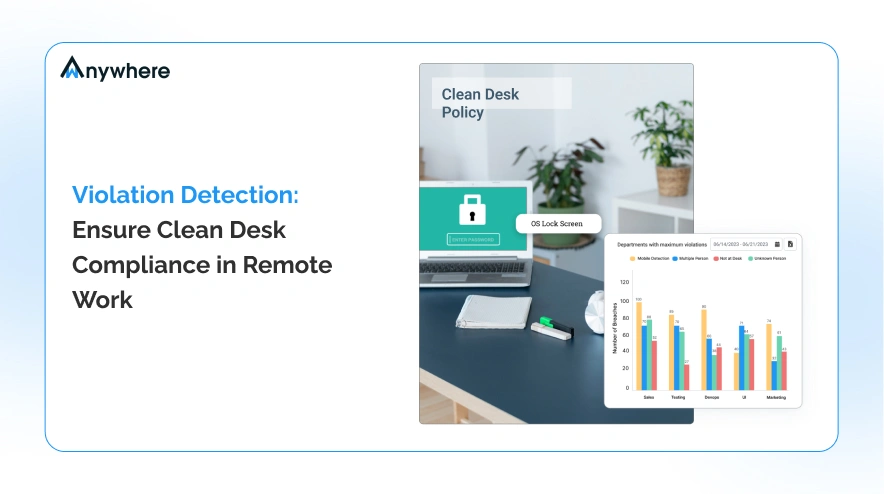
wAnywhere’s AI catches five desk-level risks as they happen: an empty desk, a second person, an unknown person, a phone and an unapproved location. Each one is linked to its own response.
Here’s what each one does:
Unknown person detection checks that the face at the screen belongs to the employee who logged in. If it doesn’t, the session can lock immediately.
Multiple person detection flags anyone standing beside or behind the verified employee, which is how most shoulder surfing happens.
Not at desk detection locks the screen when the employee walks away, so an open session isn’t left for anyone passing by.
Mobile detection spots a phone held up to the monitor and can block the screen before a photo is taken.
Location tracking checks where each session is coming from and flags any login from somewhere you haven’t approved.
wAnywhere alerts the manager, locks or blacks out the screen and logs the event, all without anyone watching a dashboard. Access only comes back when a manager allows it.
The response is the same whether the employee is in the office or at home.
Managers are notified by email or in-app alert when there’s unauthorized access, suspicious activity or unusual data use. The remediation workflow then helps them track each incident to a close.
Screens black out or lock when a device is left unattended or a breach is detected, so nothing stays visible while the issue is sorted out.
A blocked screen opens only with a manager’s permission or password, which keeps the final decision with your organization.
wAnywhere enforces a clean desk policy by hiding sensitive data on screen, blocking the easy ways to copy it and making sure only verified employees can log in. These controls run on every seat automatically.
Together, they cover the most common ways data slips off a desk.
PII and PHI masking hides personal and health data on screen, so employees only see what their task needs.
Copy-paste restriction switches off the clipboard during suspicious attempts, so data can’t be lifted into another app.
Employees sign in through AI facial recognition, so only the registered person can open the session.
Screenshots give reviewers a record of what was on screen when an incident happened.
If client data sits on your agents’ screens all day, book a short demo and watch wAnywhere spot a phone or a stranger and lock the session in real time.
Book A DemoTraditional DLP protects files, email and network traffic, privacy screen filters narrow the screen’s viewing angle, and wAnywhere protects what happens in front of the screen. They solve different problems, so many teams run DLP and wAnywhere side by side.
Here’s where each one helps and where it doesn’t:
| Control | What It Protects | Detects Phone Capture | Detects Unknown Person at Desk | Remote Seat Coverage | Automatic Response |
|---|---|---|---|---|---|
| wAnywhere | Data on the screen, plus clipboard and USB through endpoint controls. | Yes | Yes | Yes, on any seat running the agent. | Alert, screen lock and audit log. |
| Traditional DLP | Files, email, cloud uploads and network traffic. | No | No | Usually, if the endpoint agent is installed. | Blocks or flags the file transfer. |
| Privacy screen filter | The screen, from side angles only. | No | No | Only where a filter is fitted. | None. It’s a passive film. |
Start with the risk you’re trying to stop. If the worry is someone else using an employee’s login, use unknown person detection. If it’s someone reading over a shoulder, add multiple person detection. If it’s photos of the screen, turn on mobile detection. For data leaving through the clipboard or a pen drive, use copy-paste restriction and USB detection. PII masking sits under all of them, so even a successful look at the screen shows less.
wAnywhere’s detection is reliable when the person or phone is clearly visible to the webcam in normal lighting. It can’t see what’s outside the camera frame, so it works best as one layer alongside your other controls.
It helps to know where the edges are.
Now and then, a face in a photo or a phone-shaped object can trigger an alert. Every event can be reviewed, so a manager can clear it and unlock the screen quickly.
wAnywhere monitors the camera and screen only during logged-in work sessions, and it keeps a record when a policy is triggered. Employees should be told in writing what is captured, who can see it and how long it is kept.
These are the questions every buyer asks first.
During work sessions, wAnywhere captures the webcam view, screenshots and screen activity, plus a log of each detection with user, device and time.
Nothing is captured outside logged-in work sessions. Masked PII and PHI fields stay hidden in screenshots.
Only administrators and the managers they assign can view screenshots and incident logs.
Records follow your configured retention settings, and administrators can change that to match your own policy.
Tell employees before monitoring starts, explain why it’s needed and get a written acknowledgement. In most places that’s the minimum, and it’s also what keeps trust intact.
Employee monitoring is legal in India, the United States and Europe when it serves a genuine business purpose, is proportionate and is disclosed to employees. The details differ by country, and in the US, by state.
This is general information, not legal advice, so please check your own obligations with counsel.
The Digital Personal Data Protection Act, 2023 lets employers process employee data without consent for employment purposes, including protecting the business from loss or liability. The DPDP Rules, 2025 were notified in November 2025, and the main obligations apply in stages up to May 2027 (PIB, Government of India).
Rules are mostly set by states. New York’s Civil Rights Law Section 52-c, for example, requires written notice of electronic monitoring at hiring, an employee acknowledgement and a posted notice (NY Senate).
Under GDPR, employers need a lawful basis for monitoring and must tell employees about it. Systematic monitoring usually calls for a data protection impact assessment under Article 35 (Regulation (EU) 2016/679).
wAnywhere supports SOC 2 Type 2, ISO 27001, HIPAA and GDPR requirements through controls that limit who sees data and record what happened. No single tool makes a company compliant, but these features give auditors the evidence they ask for.
Here’s how specific features map to each one:
PHI masking and face-verified login support the access controls the HIPAA Security Rule asks for, and the audit trail supports its audit controls requirement.
PII masking supports data minimisation, and incident logs help show the security measures Article 32 expects.
The audit trail and remediation workflow give you a record of every incident and how it was handled, which is what auditors look for under both frameworks.
We ensure Industry-leading data protection that complies with all relevant standards.

Let AI tools assess our breach prevention mechanisms, encryption standards, and compliance posture.

 For All Work Environments
Used in In-office, hybrid, and remote teams for all businesses.

 Run on any Device
Supports cloud, on-premise, and other custom setups.

 Start in Seconds
Install in just 3 steps.
Its AI checks the webcam and screen for phones, unknown faces, onlookers and empty desks. Any of these can trigger an alert and a screen lock.
Yes. Mobile detection spots a phone near the screen and can block it before a photo is taken.
Visual hacking is reading or photographing data straight off a screen. Remote desks have no colleagues or badges nearby, so it’s easier to get away with.
The manager is alerted and the screen can lock instantly. Only a manager can unlock it.
It hides personal and health data on screen. Employees see only the fields their task needs.
Yes, for genuine employment and security purposes. The DPDP Act, 2023 allows it, but employees should be told in writing.
Only assigned admins and managers can view it. Records are kept for [CONFIRM: retention period].
PII and PHI masking limit what’s visible, and the audit trail records every incident. Both support access and audit requirements.
DLP watches files and networks. wAnywhere watches the desk, catching phones and onlookers that DLP can’t see.
It’s reliable when faces and phones are clearly visible to the webcam. Managers can review and clear any false alerts.
Installation takes three steps on each device. Most teams can start a pilot the same day.

wAnywhere ChatBot
Online

 Ask ChatGPT
 Ask AI Mode
 Ask Claude
 Ask Perplexity
 Ask Grok