 Set as a preferred Google source
TL;DR
Multiple person detection software uses AI webcam analysis to count the people in front of a work screen and alert security teams when anyone other than the authorized user appears. It runs face and person detection on sampled frames, tracks faces over time, verifies the logged-in employee, and applies policy rules such as blurring the screen or locking the session. For BPO, BFSI, and healthcare teams, AI multiple person detection for safe access closes the gap that passwords and MFA leave open, which is who is actually looking at the data.
A remote agent logs in from home. Their credentials pass, MFA clears, and the session looks perfectly normal on every dashboard. What the security stack cannot see is the second person sitting just behind the agent, reading each customer record as it loads.
Identity controls answer one question well, which is whether the right person signed in. They say nothing about who is watching the screen for the next eight hours. That gap is exactly what multiple person detection software is built to close.
This guide breaks down how the technology works, why one authorized user per screen matters, where AI multiple person detection for safe access delivers the most value, and how to deploy it responsibly.
What Is Multiple Person Detection Software
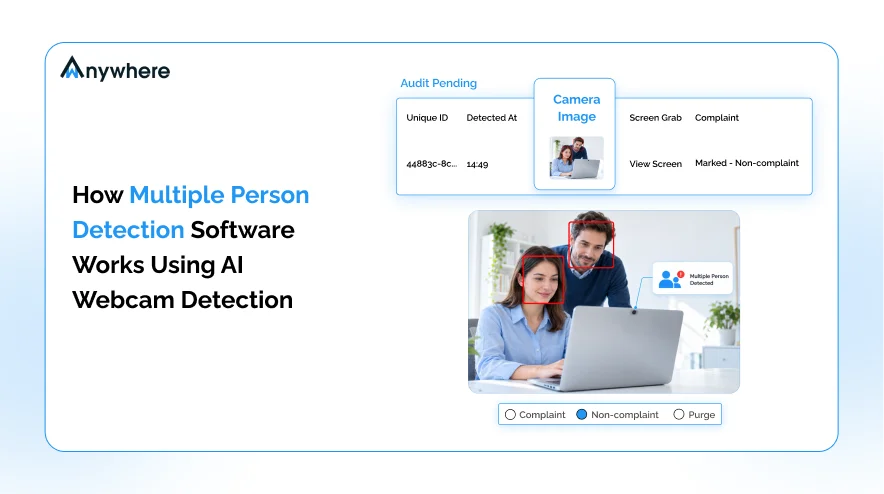
Multiple person detection software is an endpoint security control that uses the work device’s webcam and computer vision to determine how many people are present in front of a screen. When the count rises above one, or when the person present is not the authorized user, it raises an alert and can trigger an automatic response.
How It Differs From Face Recognition
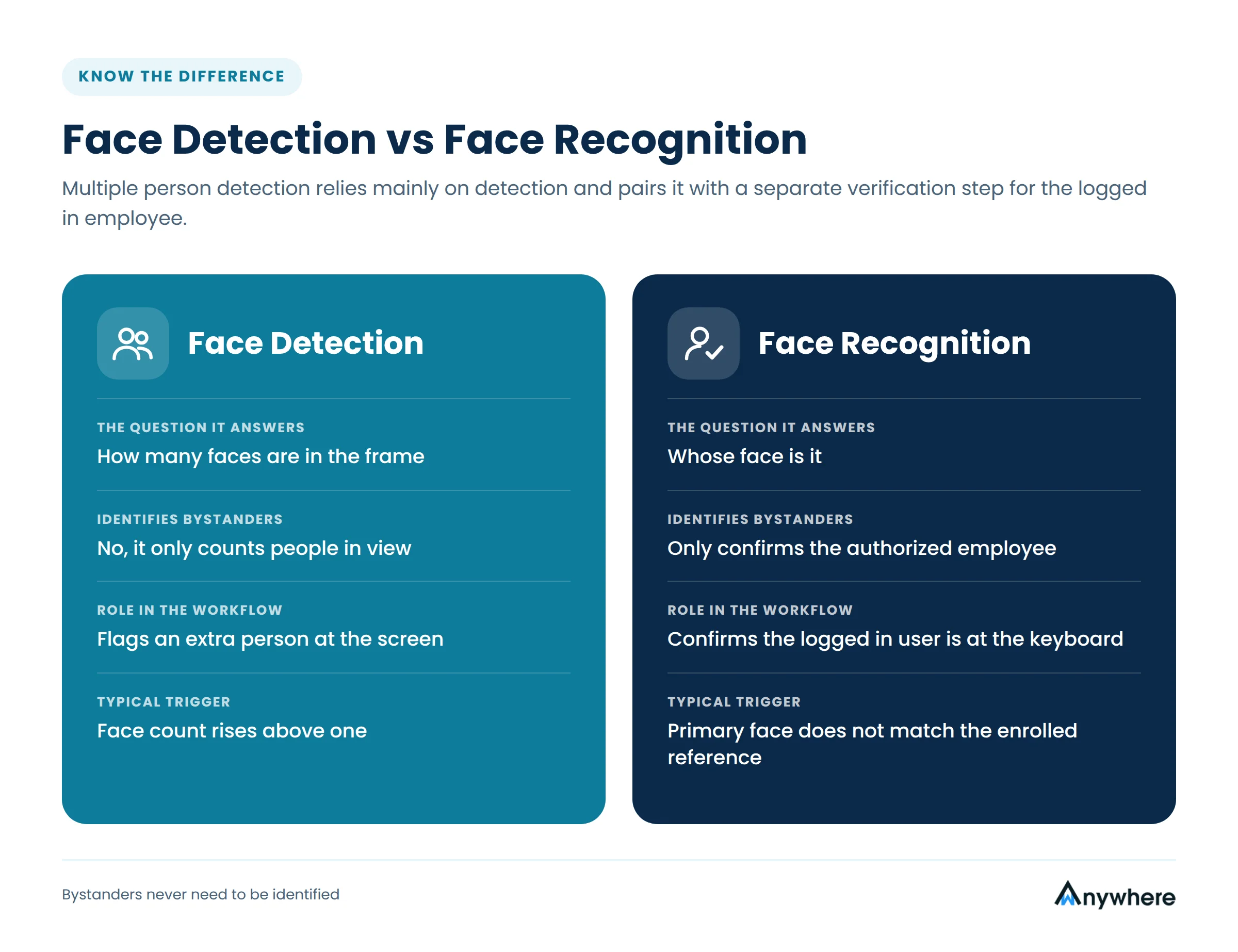
Face detection and face recognition are often confused. Detection answers how many faces are in the frame. Recognition answers whose face it is. Multiple person detection relies mainly on detection, which counts people without needing to identify bystanders, and is usually paired with a separate verification step that confirms the logged in employee is the one at the keyboard.
Where It Fits in the Security Stack
Think of it as continuous, physical-world access control. Passwords, MFA, and VPNs secure the digital entry point. Multiple person detection extends that protection into the room, checking throughout the session that only the right pair of eyes is on sensitive data.
Also Read: How wAnywhere Leverages AI to Maintain Security and Compliance Across Your Remote Work Environment
Why One Authorized User per Screen Matters
Remote and hybrid work removed the physical barriers that offices took for granted, such as badge-controlled floors, supervised workstations, and visitor logs. In a home setting, anyone in the house can walk into the frame.
Shoulder Surfing and Casual Exposure
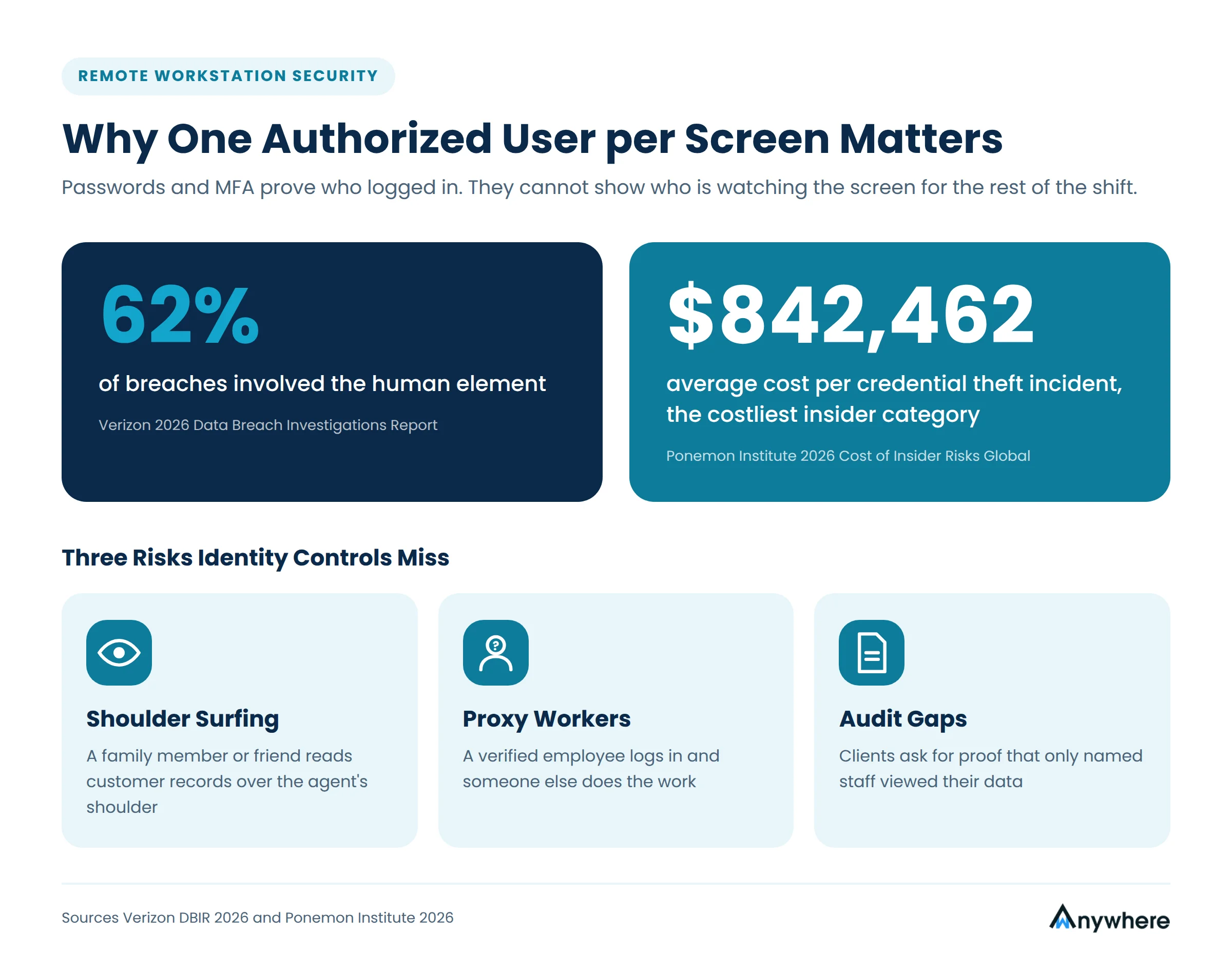
Most exposure is unintentional. A family member watches over a shoulder, a friend sits nearby during a shift, or an agent works from a shared space. Each moment exposes data the organization is contractually bound to protect. People sit at the center of most breaches, and the Verizon 2026 Data Breach Investigations Report found that the human element was involved in 62 percent of breaches. Controls that account for human behavior, not just systems, matter more than ever.
Proxy Workers and Identity Substitution
A more deliberate risk is substitution, where a verified employee logs in and someone else does the work, or an outsider sits alongside to read and record data. The Ponemon Institute’s 2026 Cost of Insider Risks Global study counts this kind of imposter risk within credential theft incidents, which averaged $842,462 per incident and remained the costliest insider category. Continuous visual verification makes substitution far harder to sustain.
Client Contracts and Audit Expectations
For outsourcing providers, the pressure also comes from clients. Many service agreements require that only named, background-checked staff can view client data, and auditors increasingly ask how that promise is kept outside the office. Without visual verification, the honest answer is often that it cannot be proven. Multiple person detection software turns a policy statement into evidence, with timestamped logs showing that each session stayed limited to the assigned employee.

One Login, One Person, Every Time
wAnywhere’s AI multiple person detection spots extra faces at remote workstations in real time, so sensitive data stays in front of the right eyes only.
How AI Webcam Detection Counts People in Real Time
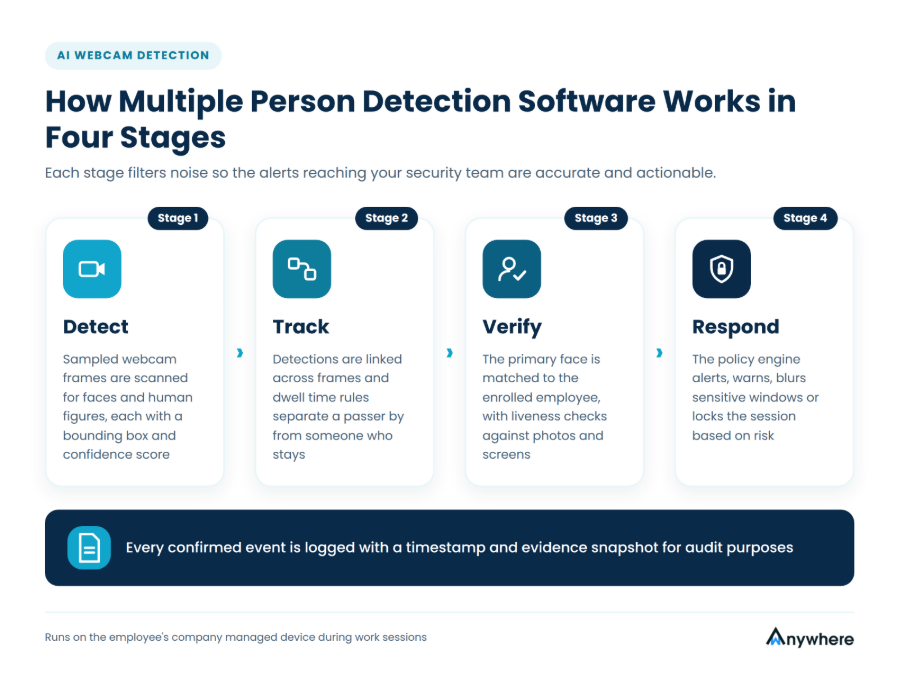
Under the hood, multiple person detection software runs a four stage pipeline on the employee’s device. Each stage reduces noise so that the alerts reaching your team are accurate and actionable.
Face and Person Detection Models
The agent samples webcam frames at regular intervals during work sessions. A deep learning model scans each frame for faces and human figures, drawing a bounding box around each one and assigning a confidence score. Combining face detection with body or head detection helps the system count people who are turned sideways, partly out of frame, or standing behind the user.
Tracking Faces Across Frames
A single frame can mislead. Tracking links detections across consecutive frames so the system knows whether a second person appeared for a split second or has been present for several minutes. Dwell-time rules then decide what counts as a genuine event rather than someone briefly passing behind the chair.
Verifying the Authorized User
Counting is half the job. The system also compares the primary face against the employee’s enrolled reference to confirm that the person at the keyboard is the one who logged in. Liveness checks help reject printed photos, screens, and other spoofing attempts.
Policy Engine and Response Actions
Once an event is confirmed, a policy engine applies the response that fits the risk. Options include a real-time alert to a supervisor, an on-screen warning to the employee, blurring sensitive windows, or locking the session until only the authorized user remains. Every event is logged with a timestamp and evidence snapshot for audit purposes.
Also Read : 7 Most Pressing Challenges and Solutions for BPOs in Remote Work
AI Multiple Person Detection for Safe Access in Practice
The value of AI multiple person detection for safe access is clearest in teams that handle regulated or client-owned data outside a controlled office. These are the settings where it pays off fastest.
BPO and Customer Support
In BPO and call center operations, agents see payment details, addresses, and account histories on every interaction. Clients increasingly expect work from home setups to match production floor controls, and multiple person detection provides auditable proof that only the assigned agent viewed their customers’ data.
Banking, Insurance, and Financial Operations
Loan processing, KYC verification, and claims handling involve documents that must not be seen by unauthorized individuals. Visual access control supports internal data handling policies and the expectations of regulators and auditors. Pairing it with PII masking keeps account numbers and personal identifiers hidden even when a screen is in view.
Healthcare and Remote IT Support
In healthcare, medical coders and billing teams work with patient information that must stay confidential, and IT engineers with privileged access to client systems carry the same responsibility. Session-level verification reduces the risk of patient data or admin credentials being exposed to an onlooker.
How Multiple Person Detection Works With Other Visual Controls
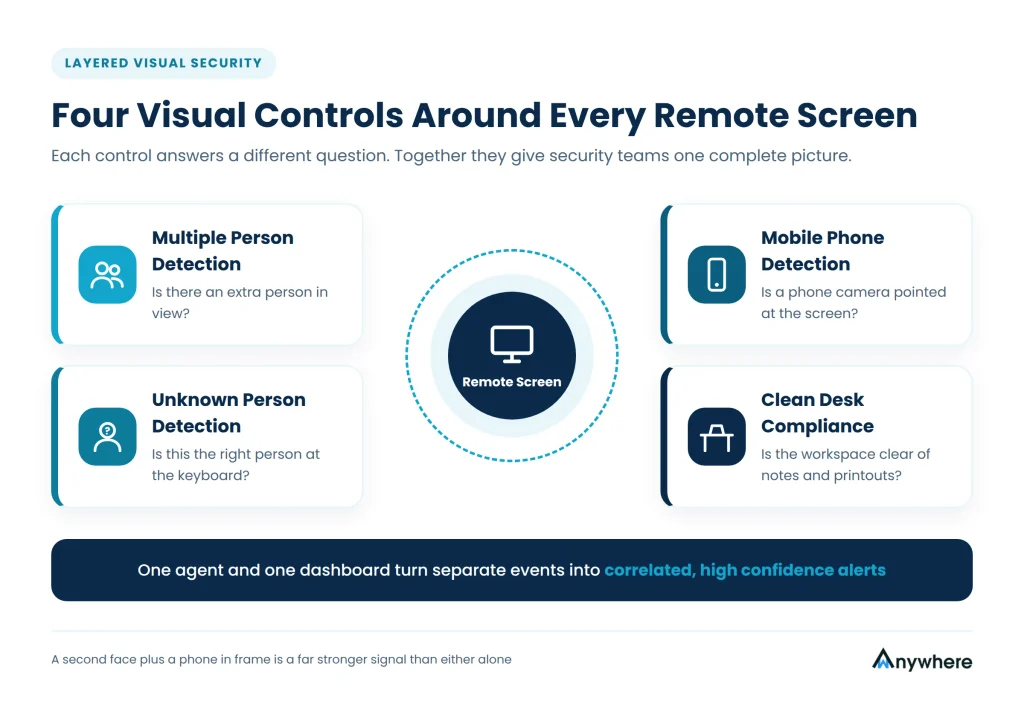
Multiple person detection is most effective as one layer in a broader visual security model. Each companion control answers a different question about what is happening at a remote workstation, and together they give security teams a complete picture instead of fragments.
Unknown Person Detection
Where multiple person detection counts the faces in view, unknown person detection focuses on whether the single face at the keyboard belongs to the authorized employee. It is the control that catches substitution, when a verified user steps away and someone else takes over the session. Running both means you are protected whether the risk comes from an extra person or a different person.
Mobile Phone Detection
An onlooker is not the only way data leaves a screen. A phone camera pointed at the display can capture an entire customer record in a second. Mobile phone detection uses the same webcam pipeline to recognize phones in the frame, closing the gap that file-based DLP tools cannot see.
Clean Desk and Workspace Compliance
Notebooks, sticky notes, and printed documents on a home desk create their own exposure. Clean desk compliance checks help ensure the workspace around the screen meets the same standard as the screen itself, so sensitive details are not copied by hand and left lying in a shared room.
When these controls share one agent and one dashboard, alerts can be correlated. A second face appearing at the same moment a phone enters the frame is a far stronger signal than either event alone, and it lets reviewers focus on the incidents that genuinely matter.
Know Exactly Who Is in Front of Every Screen
Protect client data at every remote desk with wAnywhere’s AI multiple person detection, identity verification, and real-time alerts, all in one platform.
Handling False Alerts and Edge Cases
A detection system is only as useful as its signal-to-noise ratio. Mature multiple person detection software is designed around the realities of home environments, where a perfectly empty background is rare.
Photos, Posters, and Reflections
Family photos on a shelf, faces on a TV, or a reflection in a window can look like extra people. Liveness analysis and motion cues help the model ignore static or two-dimensional faces, while background calibration at setup teaches the system what belongs in the room.
Someone Walking Past the Desk
A child crossing the room for two seconds is not a breach. Dwell-time thresholds and distance cues let administrators ignore brief passers-by while still flagging anyone who stays in view of the screen.
Covered Cameras and Poor Lighting
A blocked lens or a dark room can hide extra people as easily as it hides the authorized user. Good tools treat an unusable frame as an event in its own right, prompting the employee to fix the setup before work continues.
Also Read : AI in the Workplace Boost Compliance Governance in Data Sensitive Environments
Privacy-First Deployment Practices
Visual monitoring touches personal spaces, so how you deploy it matters as much as what it detects. A privacy-first approach protects employees and strengthens the program’s legitimacy.
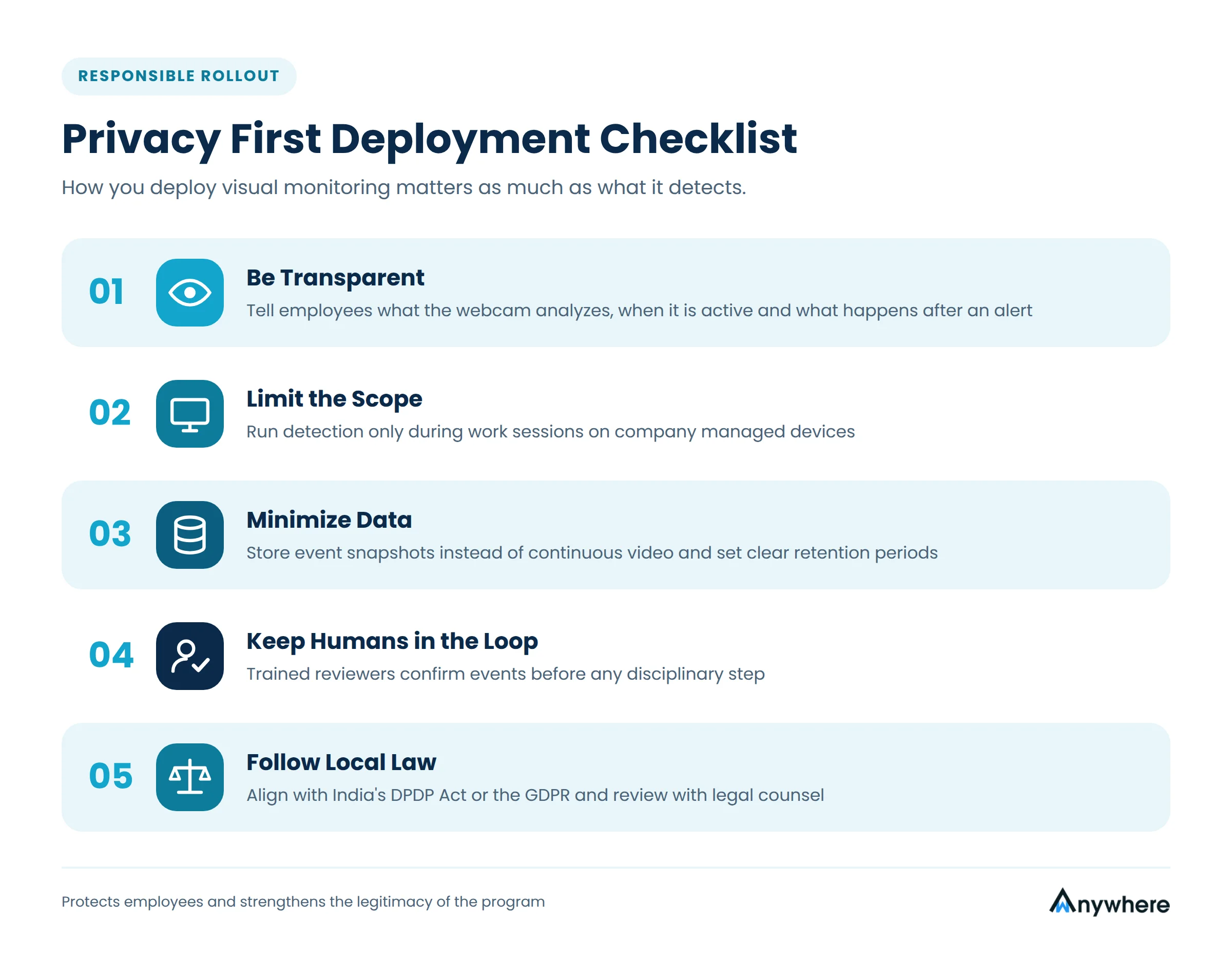
- Be transparent. Tell employees what the webcam analyzes, when it is active, and what happens after an alert.
- Limit the scope. Run detection only during work sessions on company-managed devices.
- Minimize data. Store event snapshots instead of continuous video, and set clear retention periods.
- Keep humans in the loop. Have trained reviewers confirm events before any disciplinary step.
- Follow local law. Align the program with frameworks such as India’s Digital Personal Data Protection Act or the GDPR, and review it with legal counsel.
What to Look for in Multiple Person Detection Software
When comparing vendors, test each tool in real home conditions rather than in a demo room. These criteria separate dependable platforms from basic face counters.
- Accurate counting for side profiles, partial faces, and people standing behind the user.
- Identity verification with liveness checks against photos and screens.
- Configurable dwell times, thresholds, and response actions for each team or workflow.
- Real-time alerts with timestamped evidence and audit-ready reports.
- A light agent that does not slow down calling, CRM, or core business applications.
- Integration with related controls such as mobile phone detection, USB and Bluetooth monitoring, and network checks.
wAnywhere was built for this layered model. Its AI multiple person detection works alongside unknown person detection, mobile phone detection, and endpoint controls, giving security and compliance leaders one view of who is at each remote workstation and what is happening around the screen.
Conclusion
Authentication proves who logged in. Multiple person detection software proves who is still watching. As sensitive work spreads across homes and shared spaces, that distinction has become central to data protection. By combining real-time face detection, user verification, sensible thresholds, and privacy-first policies, AI multiple person detection for safe access lets organizations extend office-grade controls to every remote desk without slowing their people down. Book a demo today!
Frequently Asked Questions
How Does AI Multiple Person Detection for Safe Access Work?
It samples webcam frames, detects faces and figures with deep learning models, tracks them over time to filter out brief movements, verifies the primary user against an enrolled reference, and applies policy actions when a rule is broken.
Is Multiple Person Detection the Same as Facial Recognition?
No. Detection counts faces without identifying them. Recognition or verification is used only to confirm the authorized employee, so bystanders do not need to be identified.
Can a Photo or Video Fool the System?
Liveness checks look for depth, motion, and other signs of a real person, which makes printed photos and on-screen faces far less effective at spoofing well-built systems.
Will a Family Member Walking Past Trigger an Alert?
Not when dwell-time thresholds are configured. Brief appearances are ignored, while anyone who remains in view of the screen beyond the set limit is flagged.
Is Webcam-Based Monitoring Legal for Remote Employees?
In many jurisdictions it can be lawful when it is transparent, limited to work sessions on company devices, proportionate, and supported by notice or consent. Rules vary by location, so involve legal counsel before rollout.

Table of Contents
Boost productivity and compliance with wAnywhere
Read summarized version with