 Set as a preferred Google source
The average knowledge worker opens more than nine applications a day, and IT has full visibility into perhaps half of them. The rest are personal cloud accounts used to share client files, free SaaS trials that never reached procurement, browser extensions installed without an admin password, and consumer messaging apps standing in for sanctioned tools. Some are productive. Some are wasted licence spend. Some are a breach waiting to happen.
Application usage monitoring is the control that closes that visibility gap, but only if configured correctly, deployed proportionately, and aligned with data protection law from day one. Roll it out badly and you create an HR grievance, a works council dispute, or an ICO complaint before you ever realise productivity gains.
This guide is for IT managers, IT directors, and heads of IT operations responsible for endpoint management, software licensing, and AUP enforcement. It covers what to track, what to block, what GDPR requires before you switch anything on, and how to evaluate employee monitoring software against criteria that hold up under scrutiny.
Why IT Managers Are Deploying Application Usage Monitoring Now
Three drivers explain the shift from “nice to have” to board-level priority in the past two years.
Productivity: Closing the Visibility Gap Across 9+ Daily Apps
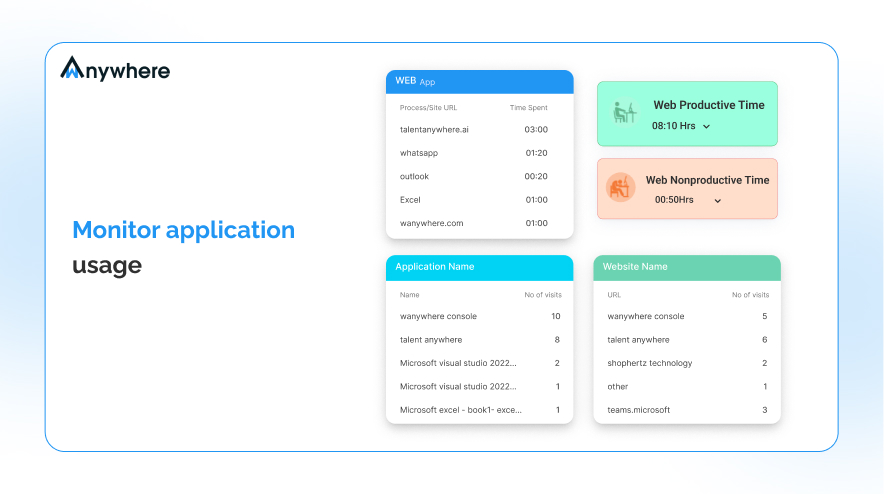
The Okta Businesses at Work 2024 report puts average employee usage at 9.4 distinct applications per workday across desktop, browser, and mobile, with the largest customers hitting 211 apps in active use. Without monitoring, IT has no way to distinguish the apps that drive output from the ones that fragment attention. Use app and website usage monitoring to close the gap across your entire estate.
Security: Shadow IT as the Leading Unauthorised App Vector
Gartner estimates that 41% of employees acquired or modified technology outside IT’s visibility in 2022, and forecasts that figure will reach 75% by 2027. Every unsanctioned app is a potential exfiltration path that bypasses your DLP, your CASB, and your conditional access policy.
License Compliance: Recovering $18M in Wasted SaaS Spend
Flexera’s 2024 State of ITAM report finds that organisations waste an average of $18 million per year on unused or underused SaaS subscriptions. Usage data — login frequency, active time, idle sessions — is the only way to right-size the estate. Procurement will sign off on a renewal cut the moment IT can show that 40% of seats have not been touched in 90 days. An employee activity tracker gives you exactly that signal.
To monitor application usage effectively, capture all three signals from one data source. They are the same telemetry, viewed through different lenses.

See How wAnywhere Monitors Every App in Your Estate
Get a personalised 30-minute demo. We’ll show you shadow IT detection, GDPR-ready controls, and role-based reporting — configured for your org size.
Application Usage Monitoring vs Application Performance Monitoring: Key Differences
A search for “application monitoring” returns two completely different product categories. Application Performance Monitoring (APM) — the category Dynatrace, New Relic, Datadog, and Riverbed compete in — tracks how well an application performs. Uptime, latency, error rates, and transaction tracing. It is a DevOps and SRE tool, and the buyer is engineering.
The category covered in this guide is a different beast for a different buyer. It tracks which apps employees use, for how long, on which devices, and against what policy. The buyer is IT operations, security, and HR.
What to Track: Building Your Application Monitoring Scope
Effective software usage tracking covers four distinct application categories. Each has a different purpose, a different risk profile, and a different reporting cadence.
Category 1: Approved Productivity Applications
Microsoft 365, Google Workspace, Slack, Zoom, your ERP, and your CRM. Track active usage time, login frequency, idle-versus-active sessions, and per-feature engagement where the platform exposes it. The data answers two operational questions: which licences are underused (procurement input), and which teams are underutilising tools they were trained on (L&D input). This category overlaps with what a basic employee activity tracker gives you: usage time per app, per user, per day.
Category 2: Browser and Web Usage Monitoring
Websites visited, time on non-work domains, and category breakdowns (social, news, streaming, gambling, shopping). Aggregate by department before drilling into individuals. Distraction is usually concentrated in a handful of users, and team-wide averages punish the focus. Pair browser data with screen monitoring software where forensic context is required for high-risk incidents.
Category 3: Unauthorised and Shadow IT Applications
Personal cloud storage (consumer Dropbox, personal Google Drive, iCloud Drive), unmanaged messaging (WhatsApp Web, Telegram Desktop, Signal Desktop), and unapproved SaaS accessed in-browser. Track installation events, executable launches, and active usage duration. Use copy-paste detection alongside to catch data exfiltration attempts that shadow apps facilitate.
Category 4: Generative AI and LLM Tools
ChatGPT, Claude, Gemini, Microsoft Copilot, Perplexity, and the long tail of vertical AI products. Track these as their own category — not under “productivity” and not under “shadow IT” — because the data exposure profile is unique. An employee pasting client information into a free-tier AI chat is a regulatory incident regardless of whether the tool is on your allow list.
Shadow IT Monitoring: Finding Apps You Did Not Know Existed
Modern monitoring agents log every executable that runs on the endpoint, not just the apps on a predefined list. That is what makes shadow IT monitoring possible. In mid-market deployments, the first 30 days typically surface 15 to 25 unapproved applications IT was not aware of.
When shadow IT shows up in your logs, categorise before you act:
Low risk (a free PDF utility, a screen-recording tool with no data egress): tolerate and document.
Medium risk (a personal task manager syncing to a consumer cloud): notify the user, log it, monitor it.
High risk (a personal file-sync client running in the background, an unmanaged AI tool processing client data): block, investigate, and check for data exfiltration in your SIEM.
Shadow IT is rarely malicious. Employees use unapproved tools because the approved toolset has a gap. The monitoring data tells you where those gaps are. Treat it as a product backlog for IT, not a list of disciplinary cases.
Try wAnywhere Free for 14 Days — No Card Required
Deploy to 500 endpoints in under a day. Full app and website usage monitoring, built-in GDPR controls, and real-time policy enforcement from day one.
What to Block: Building a Proportionate Application Block Policy
To monitor web and application usage well, IT managers have to answer three questions at once: what to block outright, what to monitor without blocking, and where the line sits. Block too much and you create shadow IT: employees tether to mobile data and bypass corporate Wi-Fi entirely, defeating the monitoring. Block too little and you have no enforcement. A proportionate policy distinguishes between threats, distractions, and personal use, and applies a different response to each.
Tier 1: Always Block — Malware, Phishing, and Proxies
Malware distribution sites, known phishing domains, command-and-control infrastructure, dark web proxies, illegal content. Block silently at DNS or firewall level. No employee notification needed because there is no legitimate use case. Feed the block list from a reputable threat intelligence provider and update daily.
Tier 2: Block by Role — Social Media, Streaming, Shopping
Personal social media, online shopping, video streaming. Block for finance, customer service, and clinical roles where distraction maps to compliance or safety risk. Allow for marketing, communications, and social customer service teams where these platforms are work tools. Document the policy per role in your AUP so the variance is defensible if challenged.
Tier 3: Monitor and Warn — Graduated Enforcement
Gaming sites, sports streaming, online auctions. First incident triggers an automated warning to the user. Second incident notifies their line manager. Third triggers a temporary block. This graduated approach is more defensible at an employment tribunal than silent blocking because the employee is on notice before any disciplinary action is taken.
What Not to Block: Three Decisions That Create More Problems
Three blocking decisions create more problems than they solve.
- Blocking too broadly forces shadow IT: When employees cannot reach legitimate personal services from corporate Wi-Fi, they tether to their phones. Your monitoring sees nothing.
- Blocking sensitive personal services creates legal risk: Mental health apps, personal banking, news during break times — restricting these is hard to justify under UK and German employment law, and the human cost is real.
- The rule of thumb: if you cannot articulate the business reason for a block in one sentence, the activity should be monitored, not blocked.
Read More: How User Behavior Analytics Helps Ensure Compliance at Work
How to Stay GDPR Compliant with Application Usage Monitoring
GDPR applies to any organisation processing the personal data of people in the EU or UK, regardless of headquarters location. Application usage data is personal data under GDPR Article 4(1). The moment you collect it, you are processing personal data under the regulation. Read our guide on how to ensure ethical use of employee monitoring software before you deploy.
Choosing the Right Lawful Basis: Why Not to Use Consent
The lawful basis question is the most common mistake. Do not use consent. The European Data Protection Board has been explicit that consent in an employment context is rarely freely given — the power imbalance vitiates it — and an employee can withdraw it at any time, forcing you to stop monitoring that individual. Use legitimate interests under Article 6(1)(f) instead. The three-part test is:
- Purpose: a clearly defined business interest (productivity, security, licence compliance).
- Necessity: is monitoring the least intrusive way to achieve the purpose?
- Balancing: does your interest outweigh the employee’s reasonable expectation of privacy?
Document the test in a Legitimate Interests Assessment. The ICO will ask for it.
Six-Point GDPR Compliance Checklist for IT Managers
1. Document your lawful basis in writing before monitoring begins.
Record the purpose, the necessity argument, and the balancing test in a Legitimate Interests Assessment (LIA) and store it in your records of processing.
2. Issue a privacy notice to all employees.
It must detail which applications are monitored, why, how long data is retained, who has access, and how to exercise GDPR rights. Send it before monitoring is enabled, not after.
3. Complete a DPIA if monitoring is systematic and at scale.
Article 35 makes this mandatory for the kind of monitoring most enterprises deploy. The DPIA forces you to consider less intrusive alternatives and document why you rejected them.
4. Set and enforce a data retention policy.
Application usage logs should not be kept indefinitely. 30 to 90 days is standard for routine monitoring. See our full guide on endpoint data loss prevention for retention frameworks in high-risk environments.
5. Configure role-based access on monitoring data.
Only named managers, HR, and authorised security personnel should be able to view individual usage reports. Aggregate department-level reports can be wider. The principle of least privilege applies to the monitoring tool itself.
6. Define a clear position on BYOD and non-work hours.
If personal devices are in scope, the policy must explain how personal use outside work hours is protected. Most enterprises solve this by limiting collection to a corporate work profile and disabling monitoring outside scheduled work hours.
See How wAnywhere Monitors Every App in Your Estate
Get a personalised 30-minute demo. We’ll show you shadow IT detection, GDPR-ready controls, and role-based reporting — configured for your org size.
CCPA and US State Laws: What US IT Managers Need to Know
There is no federal US law restricting employer application monitoring on company-owned devices. ECPA permits it with notice or a legitimate business interest. State law is where the obligations sit.
- California (CCPA, post-2023 amendments): employee monitoring data is personal information. A privacy notice naming the categories collected, the purposes, and the retention period is mandatory.
- Connecticut, Delaware, New York: written notice of electronic monitoring is required before any monitoring begins. New York additionally requires written employee acknowledgement.
The defensible position in any jurisdiction is the same: notify before you monitor. It is legally safer, more defensible at tribunal, and does not materially change behaviour in functional teams.
How to Evaluate Employee Monitoring Software: Eight Criteria
Once the policy framework and compliance groundwork are in place, vendor selection is straightforward. Score shortlisted vendors — see our roundup of the 10 best employee monitoring software tools for 2026 — against the following eight criteria.
1. Breadth of coverage: Does the platform track every executable that runs on the endpoint, or only a predefined list? Full executable coverage is non-negotiable for shadow IT detection.
2. Web and application in a single dashboard: Combined visibility into browser activity and native applications from a single agent reduces admin overhead and gives you correlated data.
3. GDPR-compliant data controls: Configurable retention windows, role-based access, EU data residency for European customers, and exportable audit logs of who viewed what.
4. Real-time visibility and scheduled reporting: Real-time alerts for security incidents and scheduled reporting for licence reviews, AUP enforcement, and HR cycles — use reporting and drill-down dashboards to cover both.
5. Native policy enforcement: The platform should be able to block applications and URLs directly, not just report them. A reporting-only tool forces you to run a separate web filter alongside.
6. Integration with ITSM and HR systems: Native connectors into ServiceNow, Jira, Workday, BambooHR, and Okta mean incidents and usage data flow into the systems your teams already use. Pair with screen monitoring software where forensic context is required.
7. Deployment overhead: From procurement signature to 500 endpoints monitored should take less than a day. If a vendor quotes professional services for a standard deployment, that is a red flag.
8. Evidence-grade audit trail: Usage logs must be tamper-evident and exportable in a format that holds up in tribunal or regulator review. Mature audit trail software is built into the better platforms rather than bolted on.
Read More: 7 Best User Activity Monitoring Tools for Enterprises (2026)
Application Usage Monitoring Done Right: Track, Block, Comply
A defensible application usage monitoring deployment rests on three pillars: a clear tracking scope across the four categories, a proportionate three-tier block framework, and a documented six-point GDPR compliance posture. The technical configuration is the easy part. The policy, the lawful basis, and the privacy notice are what make the monitoring legally defensible and operationally sustainable.
If you are ready to put the framework into practice, start a 14-day trial of wAnywhere and configure it against the criteria in this guide, or take a deeper product tour of app and website usage monitoring to see how the controls fit together.
Try wAnywhere Free for 14 Days — No Card Required
Deploy to 500 endpoints in under a day. Full app and website usage monitoring, built-in GDPR controls, and real-time policy enforcement from day one.
Frequently Asked Questions
Is it legal to monitor employee application usage?
Yes, in every major jurisdiction, with the right preconditions. In the EU and UK, GDPR permits monitoring under the legitimate interests lawful basis, provided you issue a privacy notice, document a legitimate interests assessment, and complete a DPIA if the monitoring is systematic and at scale. In the US, ECPA permits monitoring on company devices with notice. California, Connecticut, Delaware, and New York have specific notice requirements. The common rule everywhere: tell employees before you monitor.
What apps should I block for employees?
Block three categories without exception: malware and phishing infrastructure, illegal content, and anonymising proxies that bypass your security controls. Block by role for personal social media, streaming, and online shopping — restrict for compliance-sensitive roles, allow where these platforms are work tools. For everything else, monitor and warn rather than block. The test: if you cannot articulate the business reason for a block in one sentence, the activity should be monitored, not blocked.
How long should application usage monitoring data be retained under GDPR?
There is no fixed limit in the regulation, but the storage limitation principle in Article 5(1)(e) requires retention to be proportionate to the purpose. For routine monitoring — productivity reporting, licence reviews, AUP enforcement — 30 to 90 days is the defensible standard. For active investigations, retention can extend, but the extension must be documented, time-limited, and reviewed. Keep logs beyond 12 months only with a clear, documented purpose and a corresponding update to your privacy notice.

Table of Contents
Boost productivity and compliance with wAnywhere
Read summarized version with