 Set as a preferred Google source
TL;DR
Screen recording gives security teams visual evidence of how sensitive data was handled on screen, something logs alone cannot show. It is most useful for investigating incidents, reviewing compliance, and confirming whether exposure actually occurred. It does not block data movement by itself, so it works best alongside DLP, copy-paste restriction, and access controls. Deploy it with a defined purpose, clear employee notice, restricted access, minimal capture, and purpose-based retention, and confirm the legal requirements for your jurisdiction before rollout.
A claims processor at an insurance BPO has a customer’s medical file open. Minutes later, a block of policy details has been pasted into a personal notes app, and nobody is sure why. Was it a shortcut, a mistake, or something more serious?
Traditional security tools may log the file access or flag the clipboard event. An investigation, however, usually needs more context: what was on the screen, and what was the employee doing at that moment?
That is where employee screen recording software comes in. It captures visual records of activity on employees’ computer screens, helping authorized teams review workflows, investigate suspected security incidents, and verify compliance with workplace policies.
This guide covers how recording works, how it supports data protection, which features matter, how to implement it responsibly, and where it fits within a broader security strategy. One point runs throughout: recording provides visibility, not a guarantee against every data leak.
What Is Employee Screen Recording Software?
Employee screen recording software is a tool that captures on-screen activity on work devices during defined work periods or sessions, so authorized teams can review it later. It is used to investigate security incidents, support quality assurance and compliance checks, and add visual context to logs, alerts, and access records.
How Does Screen Recording Work?
Screen recording works by capturing activity on work devices according to a defined policy, storing it securely, and making it available to authorized reviewers when needed. Most deployments follow five steps:
- The organization defines a monitoring policy and a specific purpose.
- The software captures screen activity according to configured settings.
- Recordings are stored securely with access restrictions.
- Authorized reviewers inspect relevant footage when needed.
- Findings are documented and used to investigate incidents or improve controls.
Features differ by product. Some tools capture periodic screenshots, while others record continuous or event-triggered video.
Screen Recording Vs Screenshots Vs Activity Logs
Screen recording captures a continuous sequence of on-screen activity, screenshots capture individual moments, and activity logs record system events such as logins and file access. In short, recordings show how something happened, screenshots show what was visible at one point in time, and logs show that it happened.
| Method | What it provides | Security value |
| Screen recording | A sequence of visual activity | Context for reviewing an incident |
| Screenshots | Individual screen snapshots | Evidence of what was visible at a particular time |
| Activity logs | Events such as logins, application use, or access attempts | Searchable records of system activity |
| DLP tools | Rules and controls around sensitive data movement | Can detect or restrict certain risky transfers |
These methods complement one another rather than replace one another.
Why Screen Recording Matters For Sensitive Data Protection
Screen recording matters for sensitive data protection because it shows exactly how confidential information was viewed, handled, or exposed on screen, context that logs and alerts alone cannot provide. It helps teams investigate faster and confirm whether data was actually at risk.
The information most often at risk includes:
- Customer names, addresses, and account details
- Financial and payment information
- Healthcare and other regulated records
- Proprietary documents, source code, and business plans
- Client information handled by BPOs and outsourced teams
Risk can come from accidental disclosure, policy violations, misuse of authorized access, or deliberate data theft, and the cost of getting it wrong is rising. IBM’s 2026 Cost of a Data Breach Report found that the global average cost of a data breach reached a record $4.99 million. Screen-level visibility is what separates screen recording employee monitoring from log-based tools.
The Security Gaps Screen Recording Can Help Investigate
Screen recording can help investigate security gaps that other tools only partly capture, including:
- Sensitive information displayed on an unattended screen
- Unusual activity in business applications
- Information copied or transferred through an unauthorized workflow
- Repeated deviations from approved procedures
- Disputes about what occurred during a reported incident
Recordings provide evidence in these situations but do not detect them automatically.
Also Read : A Security Checklist For Remote BPO Operations
7 Ways Employee Screen Recording Software Helps Protect Sensitive Data
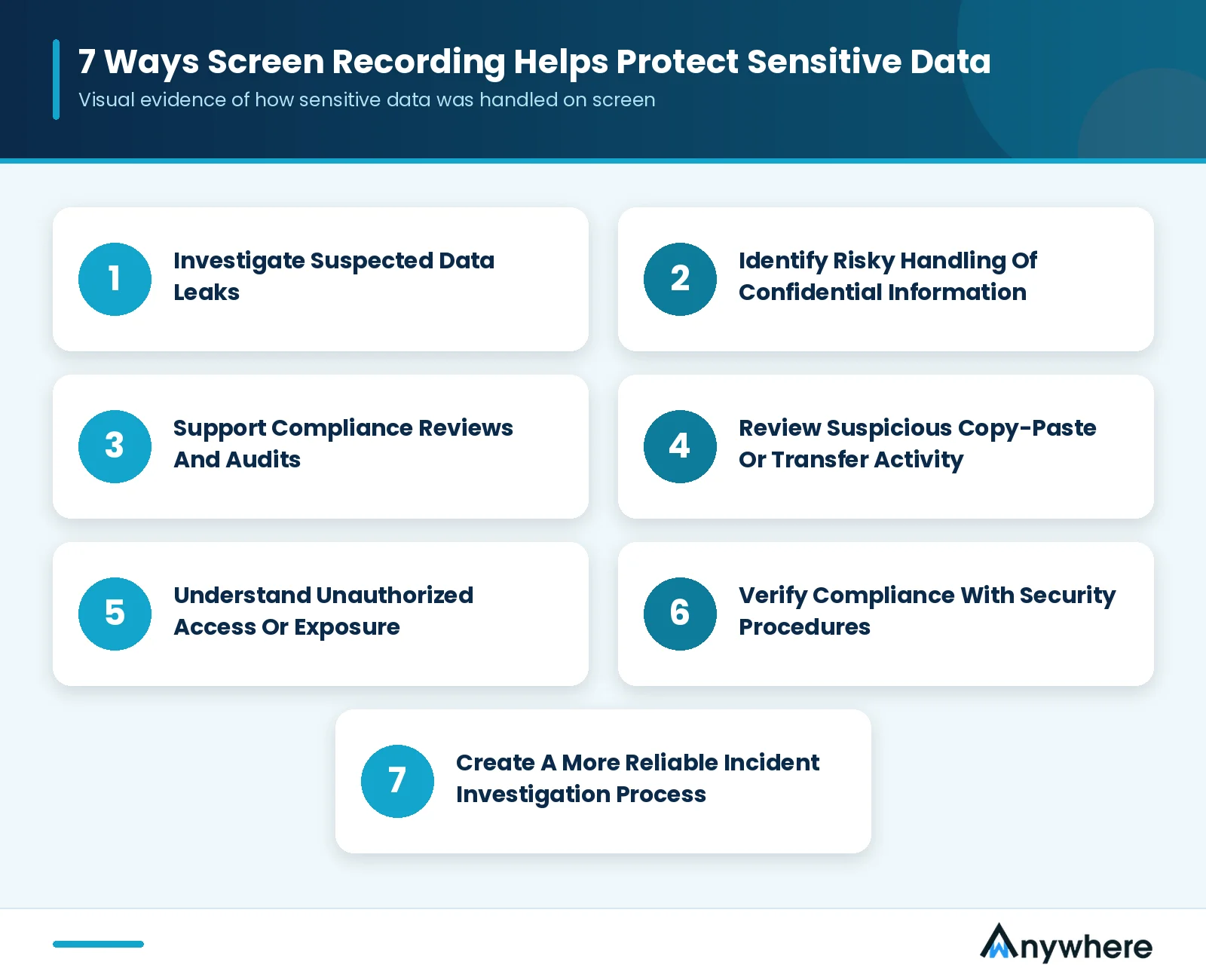
Screen recording helps protect sensitive data in seven main ways: it supports leak investigations, reveals risky data handling, strengthens compliance audits, adds context to copy-paste and transfer alerts, clarifies unauthorized access, verifies security procedures, and makes incident investigations more reliable.
1. Investigate Suspected Data Leaks
Screen recording helps investigate suspected data leaks by letting authorized security teams reconstruct activity before, during, and after the event. For example, if an alert flags unusual access to customer records, a reviewer can examine the footage alongside access logs to see the sequence of actions. Recordings support the investigation, but they do not independently prove intent or establish the full cause of a breach.
2. Identify Risky Handling Of Confidential Information
Recordings help identify risky handling by showing whether employees followed approved procedures when viewing or processing sensitive data. Examples include accessing restricted records, using unapproved workflows, or exposing information to unauthorized viewers. Recording does not automatically identify every sensitive data element, so reviews should be guided by clear policies and targeted alerts.
3. Support Compliance Reviews And Audits
Recordings support compliance reviews and audits by showing how specific workflows were carried out, supplementing audit trails in regulated environments such as finance, healthcare, insurance, and BPO operations. Recordings alone, however, do not establish compliance with any regulation or certification.
4. Review Suspicious Copy-Paste Or Transfer Activity
Recordings help review suspicious copy-paste or transfer activity by showing the on-screen context around the moment sensitive data moved between approved and unapproved destinations. They are most useful when reviewed alongside DLP alerts, clipboard controls, application logs, or USB activity records. Screen recording does not block copy-paste actions on its own, which is why copy-paste restriction works as a separate prevention layer.
5. Understand Unauthorized Access Or Exposure
Recordings help explain unauthorized access or exposure by showing what was accessed and what was visible on screen at the time, for example when an employee leaves a session open or sensitive data is visible to someone nearby. Identity verification, access controls, and unknown person detection add further protection.
6. Verify Compliance With Security Procedures
Recordings verify compliance with security procedures by confirming whether employees completed required steps, such as verifying a caller before sharing account details or handling payment data only in approved applications. Review should be targeted and policy-based, not blanket.
7. Create A More Reliable Incident Investigation Process
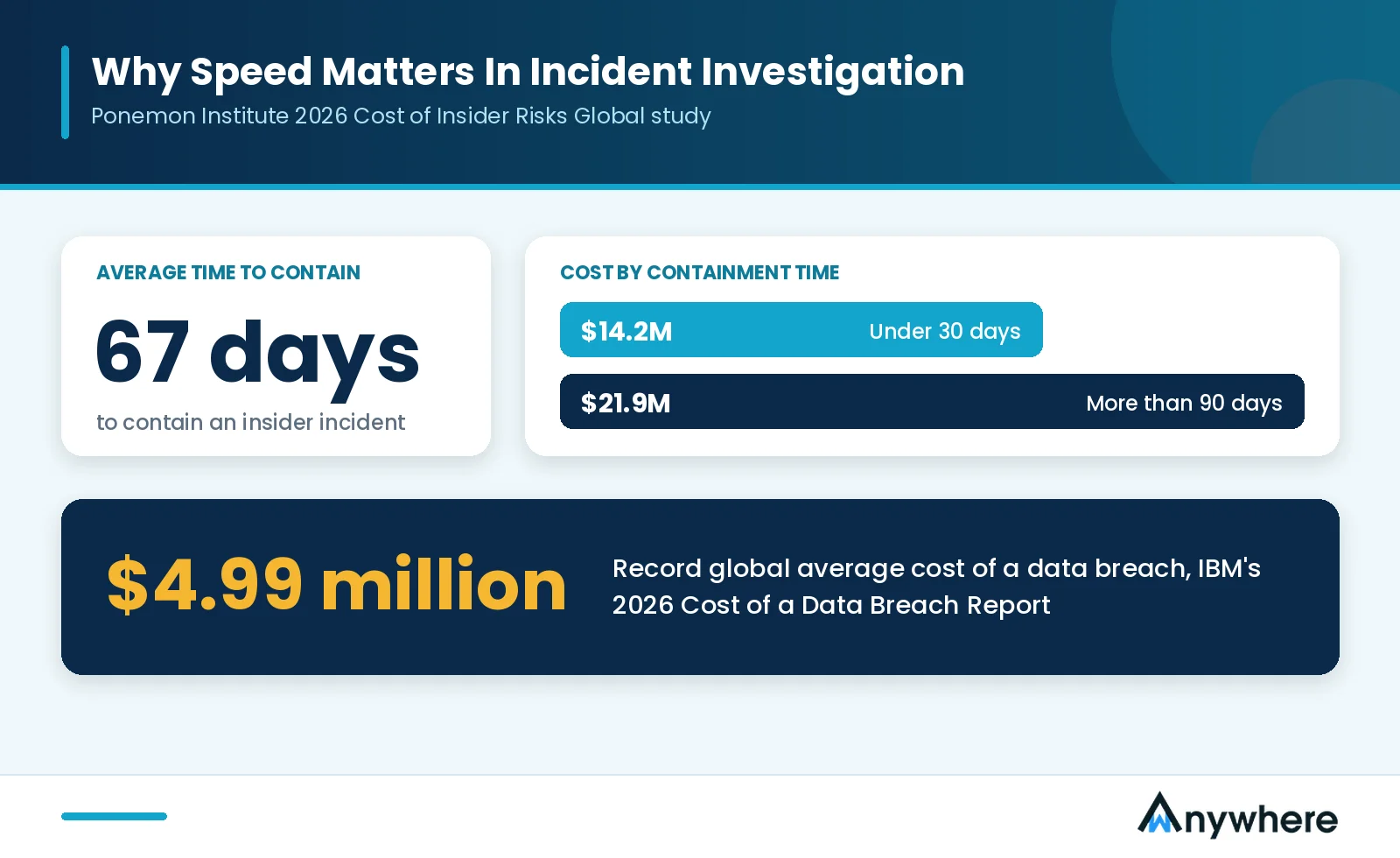
Screen recording makes incident investigations more reliable by combining with timestamps, access logs, and security alerts to build a clearer incident timeline. Speed matters here. The Ponemon Institute’s 2026 Cost of Insider Risks Global study found that organizations took an average of 67 days to contain an insider incident. Those that contained incidents in under 30 days had an average cost of $14.2 million, compared with $21.9 million when containment took more than 90 days.
A reliable process depends on consistent timestamps, restricted access to evidence, documented investigation procedures, appropriate retention periods, and careful handling of exported recordings. No recording should be assumed to be automatically admissible in legal proceedings or tamper-proof.

Turn Security Alerts Into Clear Visual Evidence
Review screen activity in context, restrict playback to authorized reviewers, and close investigations faster with wAnywhere.
Which Features Should You Look For In Employee Screen Recording Software?
The most important features to look for are configurable recording, secure storage with restricted access, searchable timestamps, retention and deletion controls, and integration with other security controls. The right mix depends on your threat model.
Configurable Recording
Configurable recording lets you define when recording occurs, which devices or teams are covered, and what triggers a capture. It supports proportionality and keeps storage manageable.
Secure Storage And Restricted Access
Secure storage and restricted access protect recordings through encryption, role-based permissions, and controls over playback, downloads, and sharing. PII masking can also reduce what recordings expose.
Searchable Timestamps And Incident Context
Searchable timestamps let reviewers jump to the relevant period quickly and correlate recordings with system logs or alerts, instead of scrolling through hours of footage.
Retention And Deletion Controls
Retention and deletion controls ensure recordings are not kept indefinitely by default. Retention should be tied to the purpose, security needs, contractual obligations, and applicable law.
Integration With Other Security Controls
Integration connects recording to DLP, endpoint security, access management, USB controls, and audit logs, so a flagged event leads a reviewer straight to the relevant session.
Screen Recording Vs Data Loss Prevention (DLP)
The main difference is that screen recording provides visual evidence of what happened on screen, while data loss prevention (DLP) detects and, where configured, restricts the movement of sensitive data.
DLP is a set of technologies and policies designed to identify, monitor, and restrict the unauthorized movement or exposure of sensitive information. Here is how the two compare:
| Feature | Screen Recording | Data Loss Prevention (DLP) |
| Primary Target | What appears on the screen, including applications, records, and on-screen actions | Files, structured and unstructured data, and data transfers across endpoints, email, networks, and cloud apps |
| Data State Covered | Data in use, specifically information being viewed or handled on screen | Data in motion and at rest, plus selected endpoint actions |
| How It Works | Continuous, scheduled, or event-triggered capture of screen sessions | Content inspection through pattern matching, data fingerprinting, and policy rules that alert, block, or encrypt |
| Main Output | Visual evidence of a sequence of on-screen actions | Alerts, event records, and enforcement actions |
| Main Blind Spot | Does not classify data or block transfers through USB, email, or cloud uploads on its own | Cannot see what a user reads on screen and retypes elsewhere or photographs with a phone |
In short, DLP watches the data itself, while screen recording shows what the user did with it. Each covers the other’s blind spot, which is why they work best together.
Why Organizations May Need Both
Organizations often need both because each control covers a gap the other leaves open:
- DLP can detect or restrict certain risky transfers.
- Screen recordings help reviewers understand the surrounding on-screen activity.
- Access controls limit who can view or use sensitive information.
- Endpoint security helps protect devices from other threats.
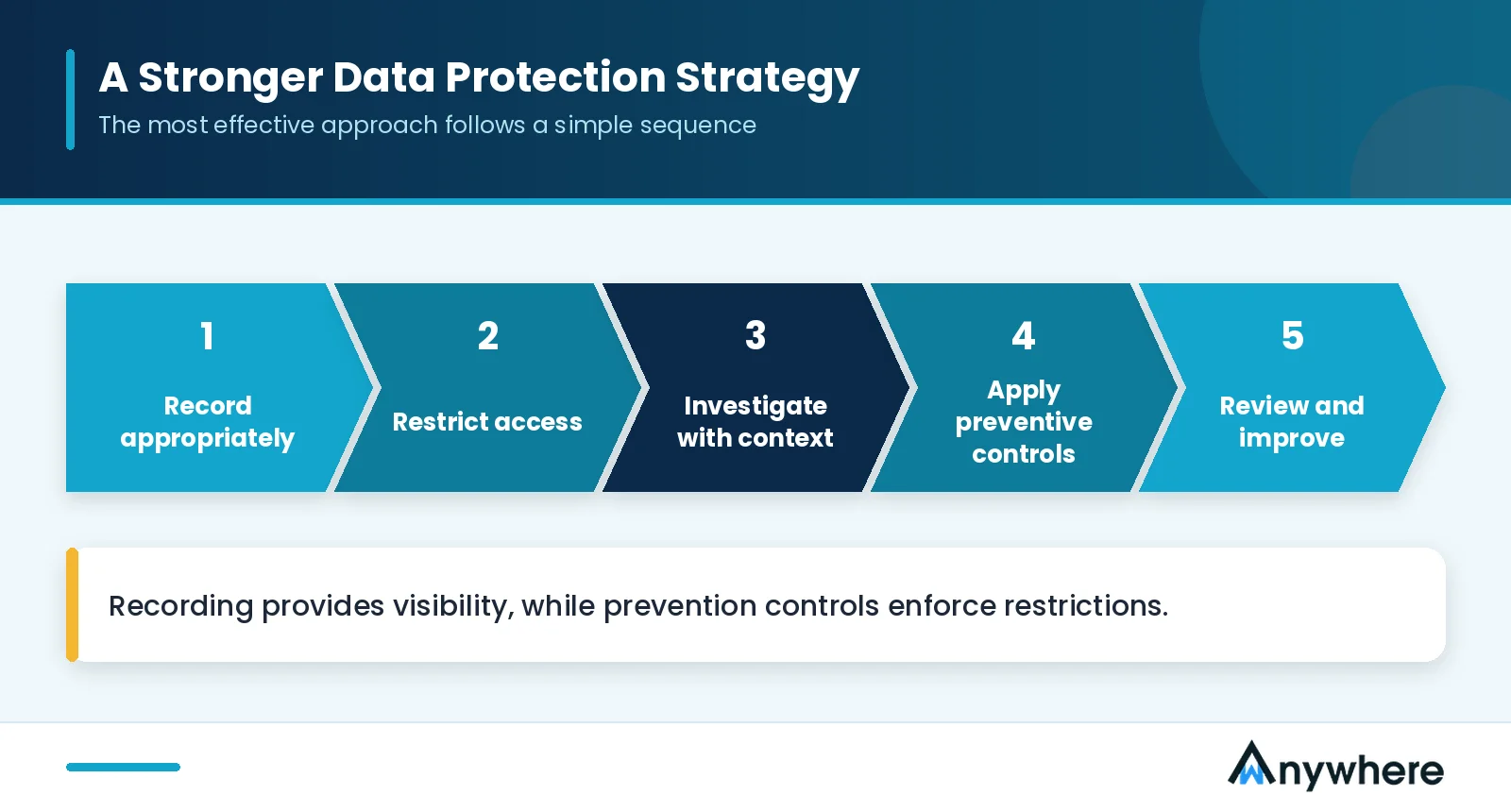
Recording provides visibility, while prevention controls enforce restrictions. The strongest approach uses the right combination for your organization’s risks.
Also Read: How To Choose Security Compliance Software
How To Implement Employee Screen Recording Without Undermining Trust
To implement screen recording without undermining trust, define a specific security purpose, inform employees about the policy, limit access to authorized reviewers, minimize unnecessary capture, and review retention and legal requirements.
How screen recording employee monitoring is introduced matters as much as the tool itself. The UK Information Commissioner’s Office (ICO) cautions that excessive monitoring can intrude on workers’ privacy and erode trust. Its guidance on monitoring workers calls for proportionate measures, a clearly defined purpose, and strong protection for the information collected.
1. Define A Specific Security Purpose
Document the risk you are addressing, such as incident investigation, client contract obligations, or compliance review.
2. Inform Employees About The Monitoring Policy
Tell employees what is captured, when recording happens, who can access it, why it is used, and how long it is kept. Clear notice turns monitoring from a hidden control into a known safeguard.
3. Limit Access To Authorized Reviewers
Restrict playback and exports to the people who need them for a legitimate business purpose, and log every access.
4. Minimize Unnecessary Capture
Ask whether continuous recording is truly needed. Event-based capture, recording limited to high-risk roles, or other less intrusive methods can often meet the same goal.
5. Review Retention And Legal Requirements
Monitoring rules differ by country, sector, and circumstance, so confirm your obligations with legal counsel before rollout. Where monitoring is likely to pose a high risk to employees, a privacy or data protection impact assessment is a sensible step.
Also Read: Why Workforce Compliance Fails In Large BPO Operations
Which Industries Can Benefit From Employee Screen Recording?
The industries that benefit most from screen recording are BPOs and call centers, banking and financial services, healthcare and insurance, and IT and knowledge-based organizations. They share regulated or client-owned data, large distributed teams, and a high cost of exposure.
Needs and permissible practices still vary by role, client contract, risk, and applicable law.
BPOs And Call Centers
BPOs and call centers benefit because agents handle customer records, payment details, and client contracts inside standardized workflows, often from remote seats. Recordings help verify process adherence and investigate exposure across large teams, as part of a wider approach to BPO security.
Banking And Financial Services
Banks and financial services firms benefit because financial data and high-value transactions demand reliable evidence. Recordings support targeted investigations into suspicious account access or irregular transaction handling.
Healthcare And Insurance
Healthcare and insurance organizations benefit because patient information and claims data require tightly controlled access. Recordings help confirm who viewed sensitive records and whether that access matched an approved purpose, supporting obligations covered in our guide to data security in BPO under GDPR and HIPAA.
IT And Knowledge-Based Organizations
IT and knowledge-based organizations benefit because source code, proprietary documents, and intellectual property are frequent targets of insider risk. Recordings provide evidence when confidential material appears to leave approved environments.
Also Read : How wAnywhere Uses AI For Remote Work Security And Compliance
How wAnywhere Supports Screen-Level Security And Compliance
wAnywhere supports screen-level security and compliance by combining screen recording from login to logout with preventive controls such as copy-paste restriction, AI-powered person and mobile detection, Clean Desk Compliance, screen lock, and audit trails. It is built for BPO, BFSI, healthcare, and ITES teams that handle sensitive data.
In practice, screen and person monitoring provides the visual evidence, AI detections flag unknown persons, multiple people, or mobile phones near a workstation, and Clean Desk Compliance helps enforce desk policies.
A personalized wAnywhere demo shows how these controls map to your own environment.
Use Screen Recording As Part Of A Stronger Data Protection Strategy
The best way to use employee screen recording software is as one layer of a broader data protection strategy, not as a standalone control. It helps organizations investigate suspicious activity, review how sensitive information is handled, and support compliance processes, but its effectiveness depends on how it is configured and how the evidence is used.
The most effective approach follows a simple sequence.
Record appropriately → Restrict access → Investigate with context → Apply preventive controls → Review and improve
Screen recording delivers its strongest results alongside DLP, access controls, endpoint security, employee awareness, and transparent monitoring policies. A free wAnywhere trial lets you see screen-level visibility and preventive controls working together across your teams.
Strengthen Your Workforce Security With wAnywhere
Pair screen recording with copy-paste restriction, AI detections, and audit trails across office, hybrid, and remote teams.
Frequently Asked Questions
How Does Screen Recording Help Protect Sensitive Data?
Screen recording helps protect sensitive data by giving reviewers visual context when investigating incidents, reviewing security procedures, or identifying potential exposure. Used with other security controls, recordings help teams respond faster.
Can Screen Recording Prevent Data Leaks?
No, screen recording cannot prevent data leaks on its own because it mainly provides visibility and evidence. Blocking data movement generally requires separate controls such as DLP, access restrictions, or copy-paste prevention, with recordings supporting the investigation when something is flagged.
Is Screen Recording The Same As Employee Monitoring?
No. Screen recording employee monitoring is one specific form within a broader category. Employee monitoring tools may also cover attendance, application usage, activity logs, and other features, depending on the platform.
Is It Legal To Record Employee Screens?
Recording employee screens can be legal, but legality depends on jurisdiction, purpose, how monitoring is implemented, employee notice, data protection requirements, and the circumstances. Organizations should seek appropriate legal advice before deploying screen recording.
How Long Should Screen Recordings Be Stored?
Screen recordings should be stored only as long as the defined purpose requires. Retention should reflect that purpose, security needs, contractual obligations, and applicable law, since keeping recordings indefinitely adds privacy and security risk.
What Is The Difference Between Screen Recording And DLP?
The difference is that screen recording provides visual evidence of what happened on screen, while DLP tools detect, and in some cases restrict, certain types of sensitive data movement. Most organizations get the best results by using both together.

Table of Contents
Boost productivity and compliance with wAnywhere
Read summarized version with