 Set as a preferred Google source
TL;DR
- Most enterprise data now leaves through the browser, via paste, upload, screenshot, print and generative AI prompts, and controls built for email and networks rarely see those actions.
- Under DPDP, the substantive duties apply from May 2027, and Rule 6 names masking, access control, logging and one-year log retention as minimum safeguards.
- Traditional tools struggle inside encrypted SaaS sessions, and VDI solves the problem at a high cost for web first teams.
- A browser layer framework covers six items: which apps run in a secure browser, masking, exit route controls, AI governance, device posture checks and audit logs.
- The controls themselves process personal data, so minimise what they record, tell employees what is enforced and extend the same rules to vendors.
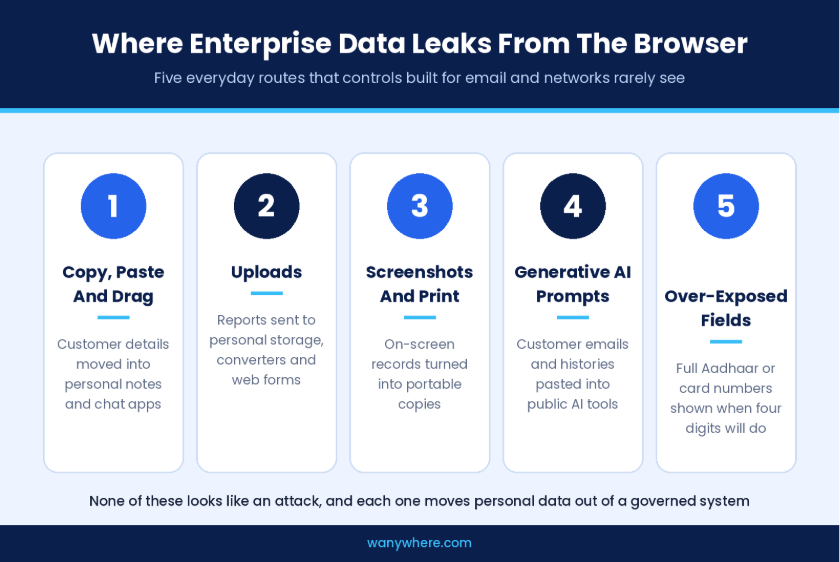
Ten years ago, sensitive data left an enterprise through email attachments, file shares and the occasional USB drive. Today most of it leaves through a browser tab. Customer records live in SaaS CRMs, ticketing tools and banking portals, and the routes out of those apps are a paste into a personal chat window, an upload to personal storage, a screenshot or a prompt typed into a public AI assistant. None of these looks like an attack, and most of them are invisible to controls built for an earlier way of working.
India’s data protection law turns that gap into a liability. The substantive duties under the DPDP Rules, including reasonable security safeguards and breach intimation, apply from May 2027. When personal data leaks through an everyday browser action, the question the Data Protection Board will ask is not whether an employee made a mistake, but what safeguards the organisation had in place to prevent it.
This guide is written for the CIOs and CISOs who have to answer that question. It treats data leakage prevention as a browser layer problem, sets out where leaks actually happen, and lays out the controls and evidence a security team needs before the deadline.

Stop Data Leaks At The Browser Tab
See how BrowseAnywhere masks personal data, restricts risky uploads and governs AI use inside every work session.
Core Compliance Requirements
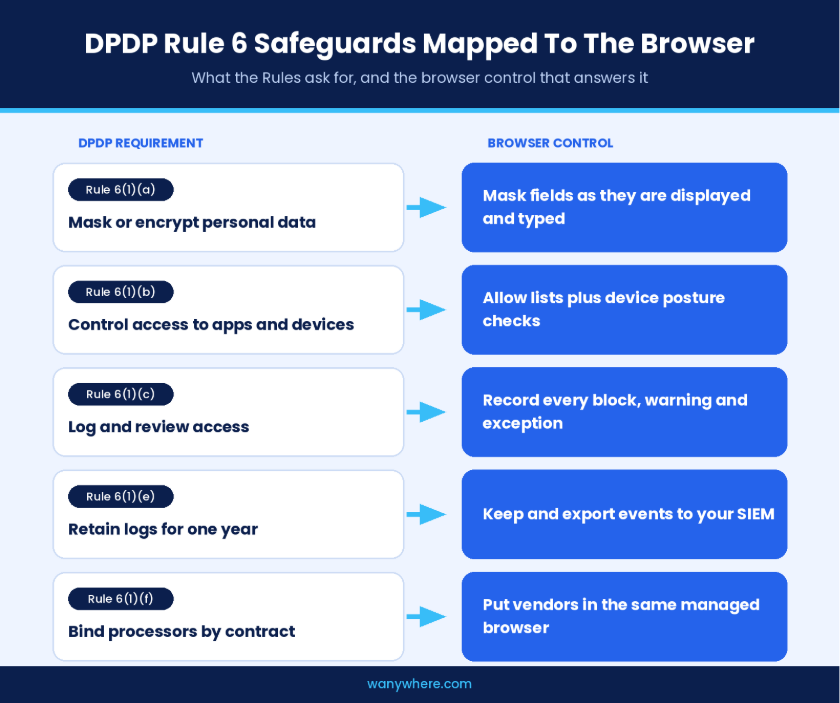
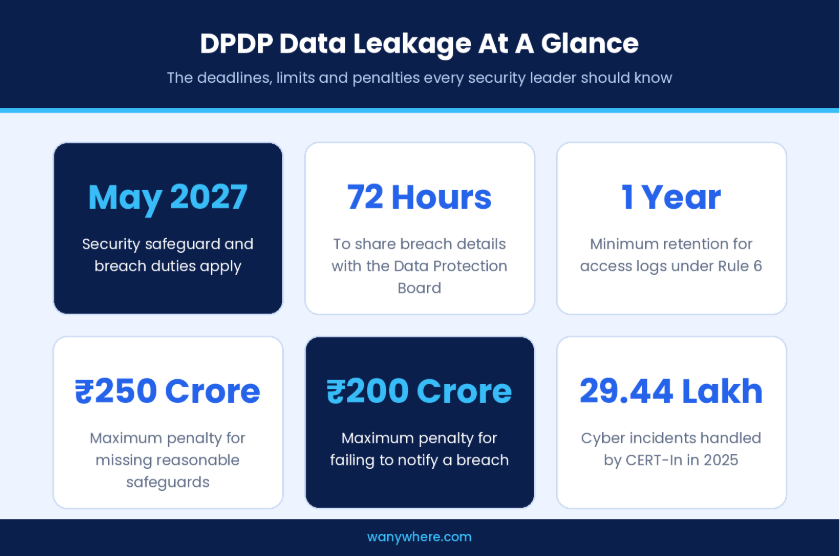
Under the DPDP Act, preventing data leakage means taking reasonable security safeguards against personal data breaches. Rule 6 sets the minimum, covering masking or encryption, access control, logging and monitoring with one-year retention, and safeguards in processor contracts. Breach details must reach the Data Protection Board within 72 hours. These duties apply from May 2027.
- Mask or encrypt personal data (Rule 6(1)(a)).
- Control access to the apps and devices that reach personal data (Rule 6(1)(b)).
- Log and review access to detect and investigate unauthorised use (Rule 6(1)(c)).
- Retain those logs for one year (Rule 6(1)(e)).
- Bind data processors to the same safeguards by contract (Rule 6(1)(f)).
- Notify affected individuals without delay and the Board within 72 hours of a breach (Rule 7).
- Give employees and customers clear notice before processing their data (Rule 3).
Why Data Leakage Is Now A DPDP Liability
Under the Digital Personal Data Protection Act 2023, every organisation that processes digital personal data in India is a Data Fiduciary, and that includes the data of its own employees as well as its customers. The Act does not list tools or technologies. It sets a duty to take reasonable security safeguards to prevent personal data breach, and the Rules describe the minimum those safeguards must include. That moves data leakage prevention out of the category of good practice and into the category of a duty an organisation will be asked to evidence.
What Rule 6 Expects From Leakage Controls
Rule 6 of the DPDP Rules reads closely to a leakage control framework. It names masking, obfuscation, encryption and virtual tokens as examples of data security measures. It asks for appropriate controls on access to the computer resources a Data Fiduciary uses, and for visibility on access to personal data through logs, monitoring and review, so that unauthorised access can be detected, investigated and prevented from recurring. It also requires those logs to be retained for one year.
For a security leader, three of those clauses map directly to the browser. Masking decides what an employee can see on screen. Access control decides which apps an employee can reach and from which device. Logging and review decide whether you can reconstruct what happened when a record turns up where it should not.
What A Leak Costs Under The Act
The Schedule to the Act sets penalties of up to ₹250 crore for failing to take reasonable security safeguards and up to ₹200 crore for failing to notify the Board or affected individuals of a breach. Neither ceiling is tied to the size of a leak. A single agent pasting a customer list into an unapproved tool can trigger the same scrutiny as an external attack if the organisation cannot show it had safeguards in place.
The background threat level makes that scrutiny more likely. CERT-In, India’s national incident response agency, handled more than 29.44 lakh cyber incidents in 2025, according to a government backgrounder. Every one of those incidents is a reminder that regulators and customers now expect controls to exist before something goes wrong, not after.
Where Enterprise Data Actually Leaks Today
The browser is where most knowledge work now happens, and it is also where most data leakage prevention programmes are thinnest. Leaks rarely come from a single dramatic event. They come from small, repeated actions that each look harmless. Mapping those actions is the first step towards controlling them.
Copy, Paste And Drag Into Unmanaged Destinations
An analyst copies a customer’s account details from a CRM into a personal note. An agent drags a file from a ticketing tool into a personal messaging app to share with a colleague. Each action takes a second, and each moves personal data from a governed system into one the organisation does not control.
Uploads To Personal Storage And Unapproved Sites
File upload is the most direct exit route from a browser. A report downloaded from a core system can be uploaded to personal cloud storage, a file conversion site or a web form within seconds. Without controls on which sites can receive uploads, the organisation has no record of where that file went.
Screenshots, Screen Captures And Printouts
Screen capture keys and print commands turn on-screen data into a portable copy. In BPO and BFSI operations, where agents view customer records all day, a screenshot is often the easiest way to keep a copy of something the employee should not keep.
Generative AI Prompts
Generative AI tools have created a new and fast-growing route. Employees paste customer emails, account histories and internal documents into public AI assistants to summarise, translate or draft replies. The intent is productivity, but the result is personal data sent to a third-party service outside any contract or processor agreement.
Over-Exposed Fields On Screen
Not every leak needs an action. When a support agent sees a full Aadhaar number, card number or bank account on screen when only the last four digits are needed for the task, the exposure has already happened. Anyone nearby, any screen recording and any later lapse inherits that over-exposure.
Why Traditional Data Loss Prevention Struggles In The Browser
Most enterprises already run some form of data loss prevention. Those programmes were built for an era of email gateways, network perimeters and files sitting on local drives, and they remain useful there. The browser, however, raises problems that perimeter tools were never designed to handle, which is why data leakage prevention has to be rethought for the layer where work now happens.
Network Controls Cannot See Inside The Session
Almost all browser traffic is encrypted, and much of it goes directly from the employee’s device to a SaaS provider. A network control can see that a user connected to a site, but it often cannot see what was pasted into a form, which field was copied or what a prompt contained. Inspecting that traffic at scale adds cost, latency and privacy questions of its own.
Endpoint agents see more, but they see it at the level of processes and files rather than the specific web app, field and action. That makes it hard to write a policy that says customer data may be viewed in the CRM but not pasted into anything else.
VDI Solves The Problem At A High Cost
Virtual desktop infrastructure keeps data inside a controlled environment, and for some workloads it remains the right answer. For a large agent workforce that mainly uses web apps, however, VDI adds infrastructure, licensing and latency to every session. Many enterprises adopted it because they lacked a lighter way to control what happens inside the browser.
Hybrid work sharpens the trade-off. An agent working from home on a company laptop needs the same protection as one on the office floor, and stretching VDI to every remote seat multiplies both the cost and the support burden. The question for most security teams is no longer whether to control the browser, but how to do it without rebuilding the desktop.
A Data Leakage Framework For The Browser Layer
A browser layer approach places controls at the point where personal data is displayed, copied, uploaded and typed. The six items below form a data leakage prevention framework that security teams can assign, test and evidence against Rule 6, and they apply whichever tool you choose to enforce them.
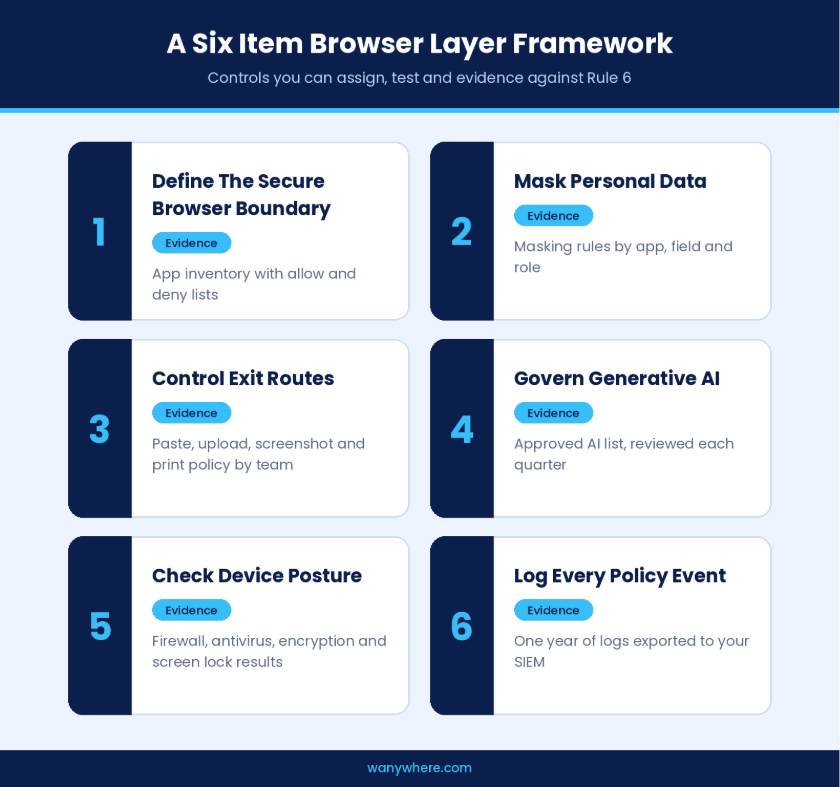
Decide Which Apps Belong In The Secure Browser
Start with an inventory of the web apps that hold personal data, such as CRMs, ticketing systems, core banking and insurance portals, HR systems and collections tools. Those apps should open only inside a managed, secure browser, with an allow list that keeps work sessions on approved sites and a deny list for known risk destinations. This single decision defines the boundary every other control depends on.
Evidence to keep the app inventory, the allow and deny lists and a record of when each was last reviewed.
Mask Personal Data Before It Reaches The Screen
Rule 6 names masking as a data security measure for a reason. If an agent only needs the last four digits of a card or account number, the full value should never appear. Masking in the browser, applied as fields are displayed and typed, reduces exposure without changing the underlying application, which matters when the app belongs to a SaaS provider you cannot modify.
Evidence to keep the masking rules for each app and field, and the roles permitted to see full values.
Control The Exit Routes Inside The Session
For each route identified earlier, decide whether it is blocked, allowed with logging or allowed freely. Sensible defaults for teams handling customer data are to restrict paste and drag out of managed apps, restrict uploads to approved destinations, block screenshot keys and either block printing or apply a visible watermark that ties any printed page to a user and a time. Exceptions should be time bound and logged.
Evidence to keep the policy for each route by team, and the exception log with expiry dates.
Govern Generative AI Use Explicitly
Banning AI outright tends to push usage onto personal devices where you have no visibility at all. A better policy names the AI services employees may use, blocks the rest and pairs the allowed services with masking, so that personal data is obscured before it can be pasted into a prompt. Revisit the list each quarter, because the market changes faster than most policy cycles.
Evidence to keep the approved list, the date of each review and the log of blocked attempts.
Check Device Posture Before Access
A secure browser running on an unprotected device is only partly secure. Before a session reaches apps holding personal data, check that the device has its firewall on, antivirus running, disk encryption enabled and screen lock configured. A device that fails the check should be limited or refused until it is fixed.
Evidence to keep posture results for every device across the period under review, not just a snapshot from today.
Make Your Leakage Controls Ready For DPDP
Record that an event happened, with its time, app and size, rather than the content itself, unless there is a documented reason and a notice that covers it. Limit who can view control logs, record every view and apply a retention period with logged deletion.
Minimise What Your Controls Record
Record that an event happened, with its time, app and size, rather than the content itself, unless there is a documented reason and a notice that covers it. Limit who can view control logs, record every view and apply a retention period with logged deletion.
Tell Employees What The Browser Enforces
Employees should know, in plain language, which apps open in the secure browser, which actions are restricted and what is logged. Clear notice reduces friction, cuts down on workaround attempts and supports the transparency the Act expects of any Data Fiduciary processing employee data.
Extend The Same Controls To Vendors And Contractors
Outsourced teams, contract agents and implementation partners often use the same web apps as employees, from devices you do not own. Rule 6 expects contracts with data processors to provide for reasonable security safeguards, and the simplest way to make that real is to require external users to work inside the same managed browser, under the same policies and logging. Keep the contract clause and the policy evidence together, because an auditor will ask for both.
Also Read : Compliance Automation For BPOs
How BrowseAnywhere Applies Data Leak Prevention In The Browser
No single tool makes an organisation compliant with the Act, and any vendor that claims otherwise deserves hard questions in procurement. What a security team needs is a way to enforce the framework above where personal data is actually handled, with evidence it can hand to an auditor.
BrowseAnywhere.ai is a secure enterprise browser built for that job. Work apps open inside it, and its policies apply within those sessions. It brings the controls in this guide into one managed browser:
- URL allow and deny lists that keep work on approved sites;
- PII masking applied as data is typed and displayed;
- paste, drag and upload controls for managed apps;
- screenshot key blocking;
- print blocking or watermarking;
- allow or block policies for popular generative AI sites;
- device posture checks for firewall, antivirus, disk encryption and screen lock before access;
- role-based admin access, with logs that export to CSV and PDF
Because these controls apply to sessions inside BrowseAnywhere, they pair naturally with endpoint controls for leak routes outside the browser, such as USB storage and Bluetooth transfers. BrowseAnywhere helps meet the Act’s security safeguard duty for browser based work. Decisions on notice, consent and breach reporting stay with you and your counsel.
If you are deciding how to cover browser based work before May 2027, the most useful next step is to map your highest risk web apps and walk through them in a live BrowseAnywhere session. You will see which leak routes it closes on day one and which still need another control.
Close The Browser Gap Before May 2027
The Digital Personal Data Protection Act 2023 does not ask enterprises to stop using the browser. It asks them to show that personal data inside it is protected. For CIOs and CISOs, that turns a regulatory deadline into a short, concrete programme:
- decide which apps belong in a secure browser;
- mask what people do not need to see;
- control the exit routes inside each session;
- govern AI use explicitly;
- check devices before access;
- keep a year of logs you can trust.
Do that, and leakage control stops being a policy document and becomes evidence you can show.
Cover Browser-Based Work Before May 2027
Walk through your highest-risk web apps in a live BrowseAnywhere session and see which leak routes close on day one.
Frequently Asked Questions
Does The Digital Personal Data Protection Act 2023 Require Data Leak Prevention Tools?
Not by name. Rule 6 of the DPDP Rules requires reasonable security safeguards, including masking, access control, logging and one-year log retention. Data leak prevention controls are a direct way to meet them.
How Does A Secure Enterprise Browser Differ From VDI?
VDI streams a remote desktop to the user. A secure enterprise browser runs locally and enforces policy inside web sessions, which suits teams that work mainly in web apps.
Can Employees Use Generative AI Safely Under DPDP?
Yes, if you approve specific AI services, block the rest and mask personal data before it can reach a prompt.
When Do The DPDP Security Safeguard Duties Apply?
From May 2027, eighteen months after the DPDP Rules were notified on 13 November 2025.

Table of Contents
Boost productivity and compliance with wAnywhere
Read summarized version with