 Set as a preferred Google source
TL;DR
- The substantive duties under India’s data protection rules, including reasonable security safeguards and 72-hour breach reporting, apply from May 2027, and the heaviest penalties attach to technical controls that security teams own.
- Rule 6 asks for encryption or masking, access control, logging and monitoring, backups and one-year log retention. Rule 7 asks for detailed breach facts to reach the Data Protection Board within 72 hours.
- The endpoint is where most programmes have blind spots, from personal data sitting in local files to everyday leak paths such as USB and clipboard, and device hygiene nobody can evidence.
- Your own employee monitoring processes personal data too, so it needs a notice, retention limits and access logs before an auditor looks at it.
- Audit readiness comes down to evidence. Map each safeguard to a control and a log source, keep a year of logs and rehearse the 72-hour handoff to counsel.
Most Indian enterprises have read the DPDP Act by now. Far fewer have tested whether their security stack can prove what it asks for. That gap matters more than awareness. When the Data Protection Board, a customer’s due diligence team or an internal auditor asks how personal data on employee endpoints is protected, a policy document will not settle the question. Controls, logs and evidence will.
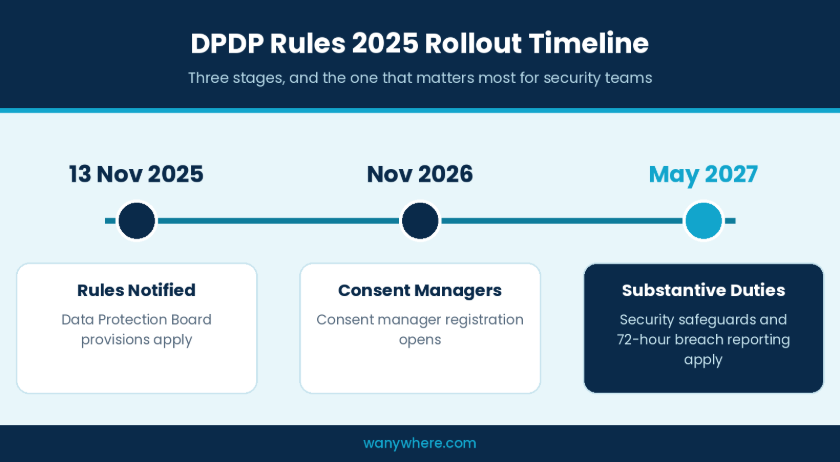
The DPDP Rules 2025 were notified on 13 November 2025. Consent manager registration opens one year later, in November 2026, and the substantive duties, including reasonable security safeguards and breach intimation, take effect eighteen months after notification, in May 2027. For security leaders, that leaves a short runway, and the final quarter before the deadline will be crowded with every other regulated enterprise chasing the same implementation partners.
This DPDP compliance checklist is written for the CIOs and CISOs who own that work. It skips the primer and concentrates on the controls, evidence and handoffs an audit will actually test, with particular attention to the endpoint, where employees handle customer and colleague data every working hour.

Find The Endpoint Gaps In Your DPDP Safeguards
See how wAnywhere detects USB and Bluetooth transfers, restricts copy-paste and flags unapproved networks across every employee device.
Core Compliance Requirements
To meet the DPDP Act’s core requirements, a Data Fiduciary must protect personal data with reasonable security safeguards, report breaches to the Data Protection Board within 72 hours, keep processing logs for at least one year, give clear notice before processing and answer data principal requests on time. The substantive duties apply from May 2027.
- Security safeguards (Rule 6): encryption or masking, access control, logging and monitoring, and backups.
- Breach intimation (Rule 7): notify affected individuals without delay and give the Board detailed facts within 72 hours.
- Log retention (Rules 6 and 8(3)): keep logs for at least one year, then erase them.
- Notice and consent (Rule 3): an itemised, plain-language notice, with withdrawal as easy as giving consent.
- Data principal rights (Rule 14): publish how to make requests and resolve grievances within 90 days.
- Processor contracts (Rule 6): bind vendors to the same security safeguards.
- Significant Data Fiduciaries (Rule 13): an annual DPIA and audit, reported to the Board.
Why DPDP Act Compliance Now Sits With Security Leadership
Every organisation that processes digital personal data in India is a Data Fiduciary, and that includes the personal data of its own employees. Legal teams rightly own notice, consent and data principal rights. The duties that carry the heaviest penalties, however, are technical, and they depend on systems that security and IT already run. That makes DPDP Act compliance a security architecture question as much as a legal one.
What The DPDP Rules 2025 Ask Of Security Teams
Rule 6 sets the minimum for reasonable security safeguards. A Data Fiduciary must secure personal data through measures such as encryption, obfuscation, masking or virtual tokens; control access to the computer resources it uses; maintain visibility on access to personal data through logs, monitoring and review, so that unauthorised access can be detected, investigated and prevented from recurring; keep processing going after a compromise, for example through backups; and retain those logs and personal data for one year. It must also write safeguard obligations into contracts with its data processors and put technical and organisational measures in place to make all of this work in practice.
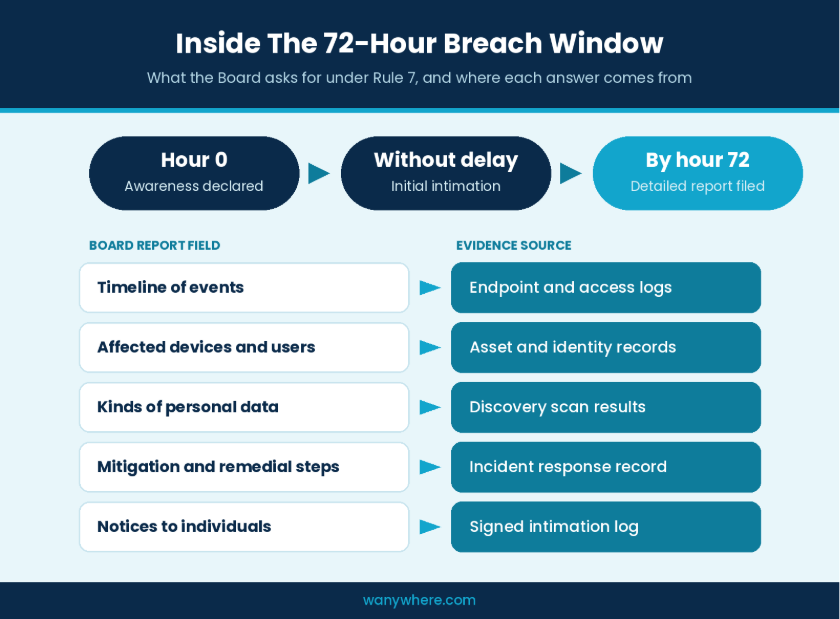
Rule 7 governs breaches. Affected individuals must be told without delay, and the Board must receive an initial description without delay, followed by detailed information within 72 hours of the organisation becoming aware of the breach. Rule 8(3) adds that personal data, associated traffic data and processing logs must be kept for at least one year from the date of processing, then erased unless another law requires longer retention.
The Penalties That Put This On The Board Agenda
The Schedule to the Act sets penalties of up to ₹250 crore for failing to take reasonable security safeguards and up to ₹200 crore for failing to notify the Board or affected individuals of a breach. Neither ceiling depends on a breach being large. Both turn on whether safeguards and notification met the standard, so the question an auditor asks is not whether you were breached but what you can show you had in place.
Also Read : A Free Workforce System Audit Tool To Check Device Health
Security Safeguards On Your DPDP Compliance Checklist
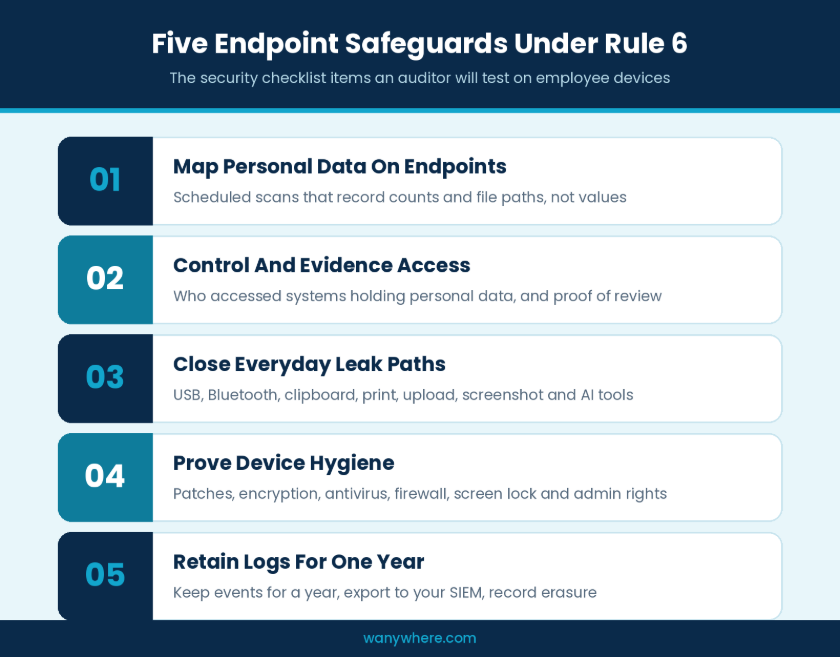
Rule 6 reads like a control framework, but it does not tell you where to apply it. Most enterprises already have strong controls around databases and core applications. The weaker ground is the endpoint, where agents and analysts download reports, copy customer records into spreadsheets and paste data into browser tabs. The five items below turn the safeguard duty into a DPDP compliance checklist that security teams can assign, test and evidence.
Map Where Personal Data Lives On Endpoints
You cannot protect what you cannot locate. Data discovery programmes usually start with databases, file shares and cloud storage, and stop short of laptops and desktops. Yet that is where exported customer lists, scanned KYC documents and screenshots of account details tend to accumulate.
The checklist question: can you show, device by device, which kinds of personal data sit in local files, such as PAN, Aadhaar, card or bank details, without copying the values themselves into another system? If the answer depends on a one off manual sweep, treat it as a gap.
A useful discovery scan reports counts and file paths rather than the values, so the inventory does not become a second copy of the data it is meant to protect. Run it on a schedule, because endpoint data changes every day.
Control And Evidence Access To Computer Resources
Rule 6 asks for appropriate access controls and visibility on access. In practice, that means role based access, strong authentication and a record of who logged in, from where and when. Location and network context matter here. A login from an approved office network or geofenced zone carries a different risk from one on an unknown Wi-Fi network.
The checklist question: can you produce, for any week, a list of who accessed systems holding personal data, along with evidence that access was reviewed? A review that happens but leaves no record will not count for much.
Close The Everyday Leak Paths
Most personal data does not leave an organisation through a sophisticated attack. It leaves through ordinary routes such as a USB drive, a Bluetooth transfer to a phone, a clipboard paste into personal email, a print job, a browser upload, a screenshot or a phone camera pointed at a screen. Generative AI tools have added a new route, as employees paste customer records into prompts to save time.
The checklist question: for each of these paths, is it blocked, allowed with logging, or simply unknown? An honest map of unknowns is more useful to a CISO than a policy that assumes every path is covered.
Prioritise by role. Start with the teams that touch the most personal data, such as collections, KYC verification and customer support, and the paths those teams actually use. A blanket USB block across an engineering team may create more exceptions than it removes, while the same control on a KYC floor is rarely controversial. Make every exception time bound and logged, so that the map stays accurate after the audit.
Prove Device Hygiene On Every Endpoint
Safeguards on a device are only as strong as the device itself. Missing patches, disabled disk encryption, an antivirus agent that stopped reporting, a switched off firewall, no screen lock and unnecessary local admin rights each weaken the rest of the stack.
The checklist question: can you show the hygiene state of every endpoint that handles personal data across the whole period under review, rather than a snapshot taken the week before the audit?
Retain Logs For One Year, Then Erase Them
Rules 6 and 8(3) both point to a one year retention period for logs. That cuts two ways. Logs must survive for at least a year, which rules out the seven-day or thirty-day rotation many tools default to, and they must be erased once the period ends unless another law requires longer. Tamper evident storage is not named in the Rules, but logs that can be shown to be unaltered carry far more weight in an investigation.
The checklist question: does every product in your endpoint stack keep its security events for a year, in a format your SIEM can ingest, with a record of when older entries were erased?
Breach Readiness Items For The 72-Hour Window
The 72-hour clock in Rule 7 starts when the organisation becomes aware of a breach, not when it finishes investigating. In most incidents, a large share of that window disappears into gathering facts from separate consoles, exporting logs by hand and reconciling timelines. These items belong on any DPDP compliance checklist because they decide whether the report reaches the Board complete and on time.
Detect Unauthorised Access Before Someone Else Does
Rule 6 links logging directly to detection. Monitoring should be tuned to the signals that suggest personal data is at risk, such as bulk downloads, removable media on machines that handle customer data, off hours access, connections from unapproved networks or an unknown person in front of a screen showing customer records. Detection that relies on a customer complaint or a social media post starts the clock with you already behind.
Prepare The Evidence The Board Will Ask For
The Rules spell out what the detailed report must contain. It covers updated information on the breach, the broad facts on the events, circumstances and reasons behind it, mitigation measures, any findings about the person who caused it, remedial steps to prevent recurrence and a report on the intimations sent to affected individuals.
Each of those fields maps to a data source. Timelines come from endpoint and access logs, affected devices and users from asset and identity records, and the kinds of personal data involved from discovery results. Build the template now and name the system behind every field, so that the incident team fills it in rather than reconstructs it under pressure
Rehearse The Handoff Between Security And Counsel
Security supplies the evidence, and counsel decides what to report and when. That division works only if both sides have practised it. Add a DPDP specific branch to your incident response plan, run a tabletop exercise against the 72-hour template and record the outcome. The record itself becomes audit evidence that the process exists.
Agree in advance who can declare that the organisation has become aware of a breach, since that moment starts the clock, and who signs off the intimations to affected individuals.
Make Your Own Employee Monitoring Ready For DPDP
Tools that watch endpoints process employee personal data themselves, including screen activity, application use, location and, in many deployments, webcam frames. Monitoring is legitimate for employment purposes, but the employer still owes security, retention limits and logs for that data. An auditor will examine the monitoring stack as closely as the systems it protects, which is why it deserves its own section on your DPDP compliance checklist. A tool that strengthens one safeguard while building an unmanaged archive of webcam images weakens your overall position.
Capture Only What The Purpose Needs
Decide which captures each role genuinely requires. A frame or screenshot that shows no violation has little security value and a real privacy cost. Facial recognition deserves particular care, since it processes biometric data, and should stay off unless there is a clear purpose and a specific notice for it.
Give Employees A Plain Language Notice And Set Retention
Employees should be told, before anything runs, what is captured, whether webcam, screen, applications or location, and why. Each kind of monitoring data then needs its own retention period, enforced by a deletion job that leaves a record. Deleting data eventually is not a retention policy.
Log Every View Of Employee Monitoring Data
Who looked at an employee’s screenshots or recordings, when and why, should be answerable for any period. The same applies to requests from employees themselves. You should be able to find, export or delete one person’s monitoring data on request, and the Rules require grievances to be answered within a period not exceeding ninety days. Hold every monitoring vendor, including any you are evaluating now, to these three standards.
Also Read: Best Practices To Monitor Remote Employees
What An Auditor Will Expect You To Show
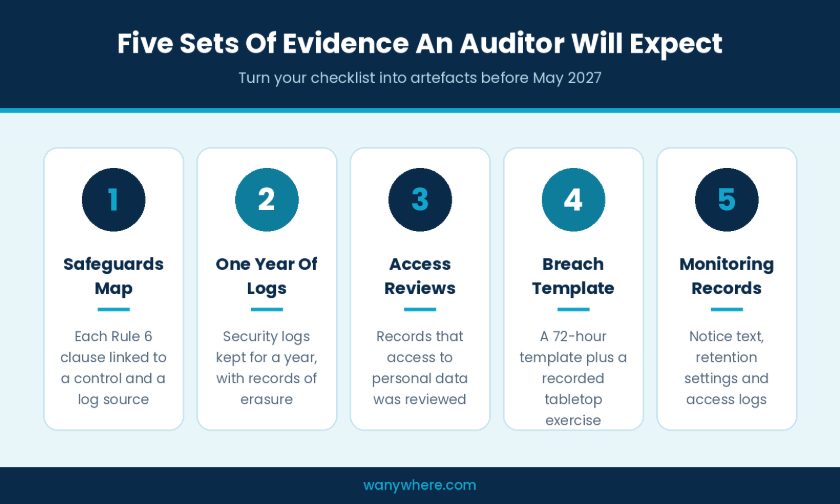
An audit does not test intentions. It tests artefacts. By the time an assessor arrives, your DPDP compliance checklist should have turned into five sets of evidence. These are a safeguards map that links each clause of Rule 6 to a named control and a log source, a year of security logs with records of erasure, access review records, a breach evidence template with the record of at least one tabletop exercise, and, for employee monitoring, the notice text, retention settings and access logs.
Organisations notified as Significant Data Fiduciaries face more. Rule 13 requires a Data Protection Impact Assessment and an audit every twelve months, with a report of significant observations furnished to the Board. Assume you may be in scope until you have confirmed otherwise.
Data processors belong in the evidence set too. Rule 6 requires contracts with processors to provide for reasonable security safeguards, and an employer that runs endpoint monitoring through a vendor is relying on that vendor’s controls. Ask each processor for its retention settings, access logs and breach notification commitments, and keep the answers alongside your own evidence.
One Evidence Trail Beats Ten Exports
Most endpoint stacks produce evidence product by product, with a CSV from one console, a PDF from another and a device report from a third. Each may be accurate, yet together they force an auditor, or your own team under a 72-hour deadline, to reconcile formats, time zones and naming by hand. Normalising events into one format and streaming them to the SIEM you already run is the single change that most reduces audit effort. Use it as a test when you assess DPDP compliance solutions or a broader DPDP compliance platform, and ask to see one employee’s activity, across every control, for one week, in one place.
Also Read: Top Remote Workforce Management Tools For BPO
Your Pre-Audit DPDP Checklist At A Glance
Every item above comes down to a question an assessor can ask and you should be able to answer with evidence. Use this list as a working sheet. Assign an owner to each line, attach the evidence, and treat any “no” or “not sure” as a gap to close before May 2027.
Security Safeguards
- ✓ We can show which kinds of personal data sit on each endpoint, from a scheduled scan that records counts and file paths, not values.
- ✓ We can list who accessed systems holding personal data in any given week, with a record that access was reviewed.
- ✓ Every leak path, including USB, Bluetooth, clipboard, print, upload, screenshot and AI tools, is marked blocked, logged or under review, by team.
- ✓ We hold hygiene results for every endpoint across the review period, covering patches, encryption, antivirus, firewall, screen lock and admin rights.
- ✓ Every endpoint tool keeps security events for one year, exports to our SIEM and records when old entries are erased.
Breach Readiness
- ✓ Detection covers bulk downloads, removable media, off hours access, unapproved networks and unknown persons at screens.
- ✓ A 72-hour evidence template names a data source for every field the Board will ask for.
- ✓ We have run a recorded tabletop exercise and named who declares awareness of a breach.
Employee Monitoring
- ✓ Each capture type is justified by role, and facial recognition stays off without a specific purpose and notice.
- ✓ Employees receive a plain language notice before monitoring starts, and each data type has an enforced retention period.
- ✓ Every view of monitoring data is logged, and one employee’s data can be found, exported or deleted on request.
Audit Evidence
- ✓ A safeguards map links each clause of Rule 6 to a control and a log source.
- ✓ Processor contracts include security safeguard clauses, with each vendor’s retention, logging and breach commitments on file.
- ✓ We know whether we may be notified as a Significant Data Fiduciary and have planned for an annual DPIA and audit if so.
How wAnywhere Supports Your DPDP Readiness Programme
No DPDP compliance platform makes an organisation compliant on its own, and any vendor that claims otherwise deserves hard questions in procurement. What security leaders need from DPDP compliance solutions is narrower and more useful, namely controls that sit where personal data is actually handled and evidence that holds up when someone asks for it.
wAnywhere works at that endpoint layer for BPO, BFSI and IT services teams that handle sensitive data. It brings screen and application monitoring, USB and Bluetooth device detection, copy paste restriction, SSID monitoring for unapproved networks, geofence based authentication, login and logout tracking, and webcam based detection of unknown persons and clean desk violations into one console. Mapped against this readiness checklist, those capabilities support the access control, leak path and detection items, and give the incident team endpoint activity records to work from inside the 72-hour window. wAnywhere helps meet the DPDP Act’s security safeguard duties at the endpoint, while decisions on notice, consent and reporting stay with you and your counsel.
If you are scoping endpoint safeguards ahead of May 2027, the most useful next step is to walk through these items against a live wAnywhere deployment and see which ones it evidences from day one and which still need another control.
Start The Checklist Before The Deadline Starts You
The first wave of DPDP compliance India audits will judge organisations less on what they wrote down and more on what they can show. For CIOs and CISOs, that turns a regulatory deadline into an engineering plan. Locate personal data on endpoints, close the everyday leak paths, keep a year of logs you can trust, pre-build the 72-hour evidence and hold your own monitoring to the same standard. Work through the DPDP Act compliance checklist in that order, and the audit becomes a review of evidence you already hold rather than a scramble to produce it.
Start Evidencing Endpoint Safeguards Before May 2027
Walk through this checklist against a live wAnywhere deployment and see which items you can evidence from day one.
Frequently Asked Questions
Does The DPDP Act Apply To Employee Data?
Yes. An employer is a Data Fiduciary for its employees’ digital personal data, so security safeguards, retention limits and breach duties apply.
What Must The 72-Hour Breach Report To The Board Include?
Rule 7 requires updated breach details, how and why it happened, mitigation measures, findings on who caused it, steps to prevent recurrence and a report on notices sent to affected individuals.
How Long Must Security Logs Be Kept Under DPDP?
At least one year from the date of processing under Rules 6 and 8(3), then erased unless another law requires longer retention.
Can A Single Tool Deliver DPDP Compliance?
No. Tools supply safeguards and evidence, while notice, consent and reporting decisions sit with the organisation and its counsel. DPDP compliance India programmes work best when security, IT and legal share one checklist.

Table of Contents
Boost productivity and compliance with wAnywhere
Read summarized version with