 Set as a preferred Google source
Every project plan opens with a number nobody checks again. A task is quoted at six hours, work begins, and by the time it wraps at eleven hours, the gap has already been absorbed into the next deadline instead of the next estimate. A task time tracker exists to close that loop. It turns every completed task into a reference point, so the next estimate is built from what actually happened rather than what felt reasonable at the time. This is what task estimation looks like when it runs on evidence instead of guesswork, and it is the difference between a plan that holds and one that quietly slips all quarter.
What task estimation is and why accuracy matters
Task estimation is the practice of predicting how long a unit of work will take before it starts, so that schedules, staffing, and client commitments can be built on something more solid than instinct. Getting it wrong in either direction has a cost, and both directions compound over a project rather than cancelling each other out.
What inaccurate estimates cost a project
Underestimation shows up fast. Deadlines slip, teams work overtime to close the gap, and the tasks scheduled after the underestimated one get pushed regardless of their own accuracy. Project estimation research backs up how common this is. Time estimation errors are one of the quieter contributors to that waste, because they rarely get flagged as their own line item.
Why overestimating is also a problem
Overestimation is the failure mode nobody names in a retrospective, because it never causes a visible miss. Padded estimates get treated as fact once approved, so teams unconsciously stretch work to fill the time allotted. Capacity gets locked up on paper before it is locked up in reality, and the organization loses the ability to take on other work with hours that were never actually needed.
Also Read: Why Time Tracking Matters to Boost Efficiency at Work
Why teams struggle with task estimation
Five causes show up again and again once you look closely at where task estimation breaks down.
No historical data to estimate against
Without a record of how long similar tasks actually took, every new estimate starts from a guess dressed up as a number.
Revisions treated as exceptions
Feedback rounds and rework are budgeted as if they are unusual, when in most workflows they are a normal part of getting to done.
Varying skill levels against a single number
A task quoted at four hours might take two for a senior team member and seven for someone newer to the work, and a single estimate cannot represent both.
Complexity compressed into one estimate
A task with several dependencies and decision points gets the same single number as a straightforward one, which erases the very complexity that made it hard to plan for.

Stop estimating in the dark
See exactly where your team’s hours go, task by task, and build your next estimate on real data instead of a guess.
How a task time tracker improves task estimation accuracy
A task time tracker fixes the underlying problem by capturing what estimation guesswork cannot, which is what actually happened at the level of the individual task.
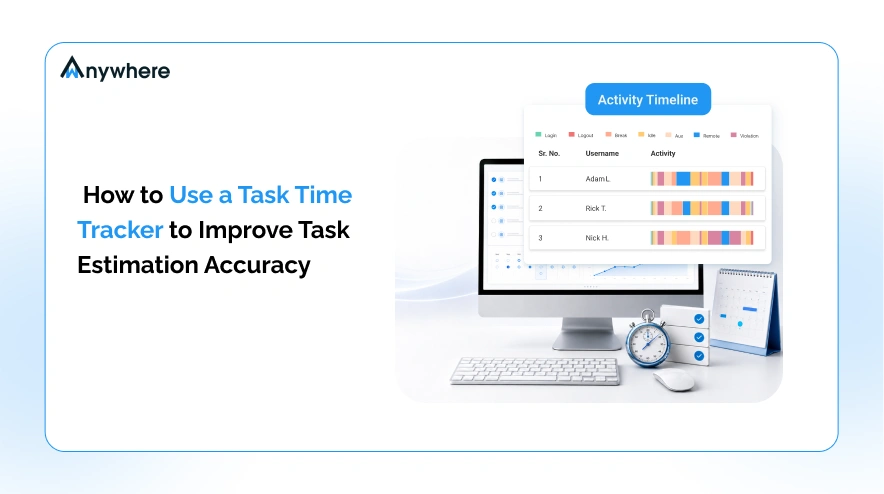
Capturing duration at the task level
Aggregate hours, the kind that show up in a weekly timesheet, say almost nothing about estimation accuracy. Knowing a person logged forty hours this week does not say whether the report task ran long or the review task ran short. Task level tracking records duration against each specific piece of work, which is the only granularity that estimation can actually learn from.
Turning patterns into a planning baseline
A single tracked task is a data point. Four to six weeks of tracked tasks of the same type is a pattern. Once that pattern exists, it becomes a baseline that feeds directly into the next estimate for similar work, replacing a guess with a number that has already been tested against reality.
Also Read: How to Track Employee Hours, 7 Effective Ways
What comparing estimated and actual time reveals
Once estimated and actual time sit side by side for the same task type, three distinct patterns tend to surface, and each one points to a different fix.
Consistent gaps point to a baseline error
If every task of a certain type runs a predictable amount over or under its estimate, the estimate itself is wrong. This is the easiest problem to solve, since the fix is a straightforward adjustment to the baseline rather than a change in how the team works.
Variable gaps point to a scope problem
If the gap swings widely from one instance of the same task type to the next, the estimate was never the real issue. The scope of what counts as that task is not held constant, so the fix belongs in how work is defined, not in the number attached to it.
A third pattern is worth watching. When a task is logged as complete close to its estimate but rework on it later appears under a different task name, the original estimate looks accurate when it was not. This usually means revisions are being tracked as new work instead of a continuation of the task they belong to.
Also Read: Top 10 Time Tracking Tools for 2026
Practical steps to improve task estimation with time tracking
Track at the task level, not the project level. Duration logged against a specific task is the only unit that produces a usable baseline, and it is the reason a spreadsheet of free timesheet templates only takes a team so far.
- Record the estimate before work starts: An estimate written down before the task begins is the only version that can be honestly compared against what actually happened.
- Compare estimated and actual time on a fixed cadence: A weekly or biweekly review keeps the gap visible instead of letting it accumulate unnoticed.
- Group gaps by task type rather than by person: Patterns in the work itself are what improve future estimates, not patterns attributed to individuals.
- Account for dependencies separately from active work time: Time lost waiting on another task or approval should not be folded into the estimate for the task doing the waiting.
- Update the baseline and actually use it: A baseline that sits in a spreadsheet nobody opens before the next estimate is a baseline that never happened.
A realistic example
Picture a five person marketing team that quotes a standard landing page build at sixteen hours. Three months of task level tracking shows the build itself is accurate, coming in at fourteen hours on average. What the estimate never accounted for is revisions, which add another nine hours, and asset gathering from stakeholders, which adds three more. The true cost of a landing page is closer to twenty six hours. Nothing about the build process was wrong. The estimate was simply missing two categories of work that were happening the entire time, just not being counted.
Sixteen hours quoted. Twenty six hours worked. Sound familiar?
Track time at the task level and know the true cost of your work before you quote it again.
Where better estimates pay off
- Project planning gets a schedule built on evidence rather than optimism.
- Resource allocation becomes easier when the actual hours a task type consumes are known in advance.
- Deadline management improves because commitments are made against realistic numbers.
- Team productivity benefits when people are not routinely working against timelines that were wrong from the start.
- Budget forecasting tightens as labor cost per task type becomes predictable rather than approximate.
- Client expectations are easier to set and meet when the estimate behind a quote reflects what the work has actually taken before.
Also Read: How to Track Employee Productivity in a Hybrid Work Environment
How wAnywhere supports task time tracking
Task duration capture in wAnywhere runs alongside application activity and project reporting, so a task’s actual time sits in the same view as the applications and workflows used to complete it. This gives teams the task level detail that estimation depends on, without a separate employee time tracking system to maintain.
Reports can be viewed by task, project, team, or individual, and exported for planning reviews or client reporting, which makes it straightforward to group gaps by task type without reconciling data from multiple tools.
Because wAnywhere works the same way across remote, hybrid, on site, and field teams, the historical record stays consistent regardless of where the work happens. That consistency matters for estimation, since a baseline built from a mix of tracking methods is only as reliable as its least consistent input. Teams that want to see how this fits their own process can book a demo or start a free trial to review it against their own task data.
Estimation improves through feedback, and feedback requires measurement. Task time tracking does not close the gap between estimated and actual time overnight, but it closes it steadily, one tracked task at a time. The alternative is to keep guessing and keep being surprised by the same overruns, quarter after quarter.
Frequently asked questions
How long before task time tracking improves estimates
Most teams need four to six weeks of consistent tracking on a given task type before a reliable pattern emerges. Less frequent task types take longer, simply because there are fewer completed instances to draw from.
What is the difference between estimated and actual time
Estimated time is the duration predicted before a task begins. Actual time is what the task took once logged and completed. Comparing the two across multiple instances of the same task type reveals whether the estimate, the scope definition, or a hidden category of work needs attention.
Does a task time tracker app work for remote and hybrid teams
Yes. A tracker that runs consistently across remote, hybrid, on site, and field work keeps the historical record comparable regardless of where a task was completed, which matters because estimation depends on comparing like with like.

Table of Contents
Boost productivity and compliance with wAnywhere
Read summarized version with