

 Set as a preferred Google source
TL;DR
- Insider leaks in healthcare come from deliberate misuse and from everyday mistakes like misdirected emails, unlocked screens and copied files.
- No single tool closes every route. Identity controls, data loss prevention (DLP), endpoint protection, workstation monitoring and audit trails each cover a different gap.
- Conventional DLP watches data moving through digital channels. It cannot see a phone camera pointed at a screen or a stranger reading over a shoulder.
- Choose tools against a risk assessment of where protected health information (PHI) lives and how it moves, then test integration, audit evidence and deployment fit.
- wAnywhere adds a workforce-level layer for office and remote seats: PHI masking, person and phone detection, copy-paste and USB controls, and audit trails.
A claims processor at a healthcare BPO opens a patient file to fix a denied claim, attaches the wrong PDF to an email and hits send. A stranger now holds someone’s diagnosis, insurance number and billing history. Nobody hacked anything. The access was legitimate; the disclosure was not.
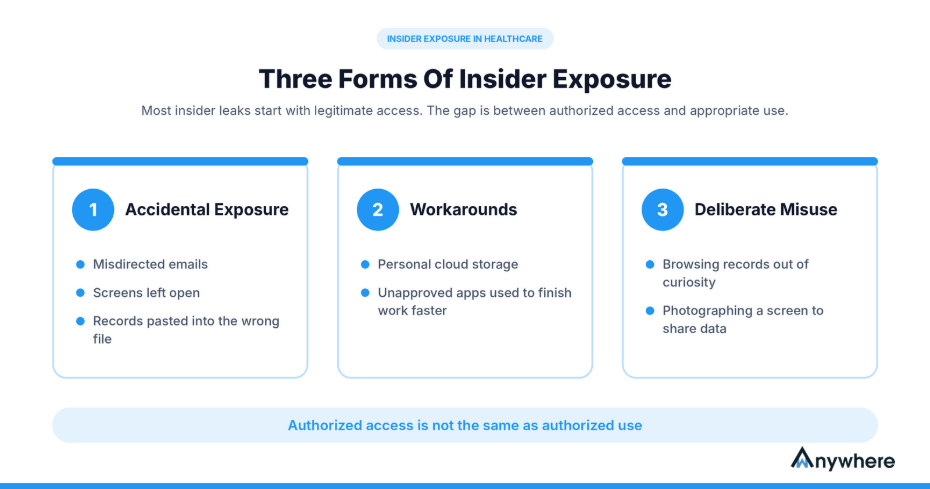
That gap between authorized access and appropriate use is where most insider exposure happens, and it usually takes one of three forms:
- Accidental exposure, such as misdirected emails, screens left open or records pasted into the wrong file
- Workarounds, such as personal cloud storage or unapproved apps used to finish work faster
- Deliberate misuse, such as browsing records out of curiosity or photographing a screen to share data
Healthcare security software reduces these risks when it combines access controls, data protection policies, workstation monitoring and audit trails. Below, we cover which controls matter, the risk each one addresses and how to build a stack that protects patients without slowing operations.

Patient Data Should Only Be Seen By The Right Eyes
Mask PHI on screen, verify who is at the desk and flag phones near patient records, in the office or at home.
Why Healthcare Organizations Are Vulnerable To Insider Data Leaks
Healthcare runs on shared access. In one shift, the same patient record may be opened by a nurse, a coder, a billing analyst and an offshore claims team. Verizon’s 2026 Data Breach Investigations Report found that internal actors were behind 19% of healthcare breaches, and that the sector’s most common errors were misdelivery, loss and misconfiguration. Outsiders still cause most breaches, but the insider share is too large to ignore.
Employees And Contractors Have Access To Sensitive Patient Information
Clinicians, coders, claims processors, front-desk staff and vendors all need some patient data, but rarely the same data. Trouble starts when permissions are granted broadly and never trimmed, so a billing executive ends up able to open full clinical notes. Authorized access is also not the same as authorized use. A nurse who looks up a neighbor’s chart is logged in legitimately and is still violating patient privacy.
Human Errors Can Expose PHI Without A Cyberattack
Plenty of leaks need no attacker at all. The usual causes are routine:
- Sending discharge summaries or claim files to the wrong email address
- Uploading records to personal cloud accounts or unapproved apps to work around a slow system
- Leaving patient data visible on an unattended screen in a shared ward or office
- Copying record details into personal notes, spreadsheets or chat tools
Remote Healthcare Teams Create Additional Security Gaps
Coding, transcription, claims and patient-support work now happens in homes and offshore delivery centers as often as in hospitals. A home desk brings risks that office policies never had to cover: a family member walking past, a phone camera within reach, a personal USB drive in the drawer. Controls that only work inside the hospital network leave these seats exposed, so policies need to follow the user, not the building.
What Is Healthcare Security Software?
Healthcare security software is the set of tools that protects patient information and the systems holding it by controlling who can access data, how that data can be used and moved, and how activity is recorded for investigation and compliance. It typically spans identity management, endpoint protection, DLP, user monitoring and audit logging. Most organizations run several products side by side.
Healthcare Cybersecurity Software Vs Healthcare Data Security Software
Healthcare cybersecurity software protects the environment: networks, servers, applications, identities, endpoints and connected medical devices. Firewalls, endpoint detection and response (EDR) and security information and event management (SIEM) platforms belong here. Data security tools focus on the information itself through classification, encryption, access policies and DLP. The two overlap heavily, and you need both, because keeping an intruder out of the electronic health record (EHR) and stopping an authorized user from emailing records to a personal account are related goals that call for different controls.
Essential Features To Look For In Healthcare Security Solutions
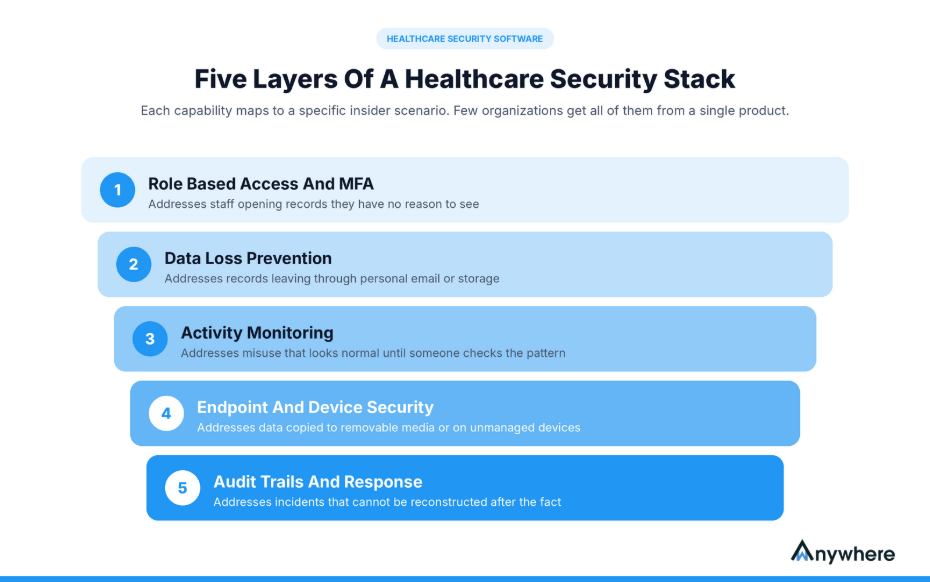
The stakes justify a careful evaluation. IBM’s Cost of a Data Breach Report 2026 puts the average healthcare breach at $6.64 million, the highest of any industry for the 13th consecutive year. Each capability below maps to a specific insider scenario, and few organizations get all of them from a single product.
Role-Based Access Control And Identity Verification
Role-based access control (RBAC) ties permissions to job functions, so a coder sees coding fields and a scheduler sees appointments. Pair it with unique user IDs, multi-factor authentication (MFA) for remote and privileged access, and a joiner-mover-leaver process that removes rights the day someone changes role or leaves. This addresses staff opening records they have no reason to see.
Data Loss Prevention And Sensitive Data Protection
DLP tools identify and classify PHI, then apply rules to how it is copied, uploaded, printed, emailed or moved to removable media. Effective data loss prevention in healthcare has to cover email, cloud apps, endpoints and USB ports together, because users simply switch channels when one is blocked. This addresses records leaving through personal email or storage.
Employee Activity Monitoring And Insider Threat Detection
Monitoring surfaces behavior that breaks policy, such as bulk record access, unusual login times or repeated attempts to bypass controls. At the workstation level, tools like wAnywhere flag policy violations in real time and notify managers by email so issues are reviewed quickly. Keep it proportionate and disclose it in written policy; transparency is a legal safeguard and tends to improve behavior on its own. This addresses misuse that looks normal until someone checks the pattern.
Endpoint And Device Security
Workstations, laptops, tablets and connected medical devices all store or display PHI. Endpoint protection, encryption and device control stop a lost laptop or unknown USB drive from becoming a reportable breach. This addresses data copied to removable media or exposed on unmanaged devices.
Audit Trails, Reporting And Incident Response
Audit trails record who accessed what, from which device and when. They turn an alert into an investigation and an investigation into documented evidence for regulators or clients. Pair them with a written incident-response process so the team knows who acts and how fast. This addresses incidents that cannot be reconstructed after the fact.
Also Read: 10 Best Data Loss Prevention (DLP) Software Tools
How Healthcare Security Software Helps Prevent Insider Data Leaks
Controls work best when each is mapped to a specific exposure route.
Prevent Unauthorized Access To Patient Records
Least-privilege access, identity verification and MFA shrink the group of people who can open any given record. Ward staff see charts for their unit only; claims processors at a healthcare BPO see only the fields needed for adjudication. Fewer open doors mean fewer chances for curiosity or error.
Stop Patient Information From Leaving Approved Systems
DLP policies, copy-paste restrictions and USB controls govern the digital exits. A billing analyst who pastes a patient list into a personal spreadsheet or plugs in a pen drive meets a block or an alert. These controls reduce unauthorized transfers on the channels they monitor. They do not guarantee that every exfiltration attempt is caught.
Detect Unauthorized Viewing And Physical Exposure
Some leaks never touch a network. An unlocked screen at a nurses’ station, a colleague reading over a shoulder or a phone photographing a claims screen all expose PHI without a file moving. Automatic screen locking and identity checks shrink the window. Camera-based detection on the workstation goes further by flagging an unknown person at the desk, more than one person in view or a phone near a screen showing patient data.
Identify Suspicious Activity And Maintain Audit Evidence
Alerts, activity logs and investigation workflows move teams from suspicion to a documented finding. A flagged event shows risky behavior. Only an investigation confirms whether patient data was actually disclosed and whether breach notification obligations apply.
Protect Remote And Hybrid Healthcare Workstations
Remote coders and support agents need the same controls as on-site staff. Tools that enforce policy on the endpoint, not the office network, keep masking, device rules, detection and logging consistent wherever an employee logs in.
The table below maps common insider risks to the control that addresses each one.
| Insider risk | Relevant security control |
| Excessive access to PHI | Role-based access and MFA |
| Unauthorized file transfers | DLP and USB controls |
| Screen photography | Mobile Detection |
| Unauthorized viewing | Face recognition and person detection |
| Accidental exposure on screen | PHI masking and screen locking |
| Difficult incident investigation | Audit trails and reporting |
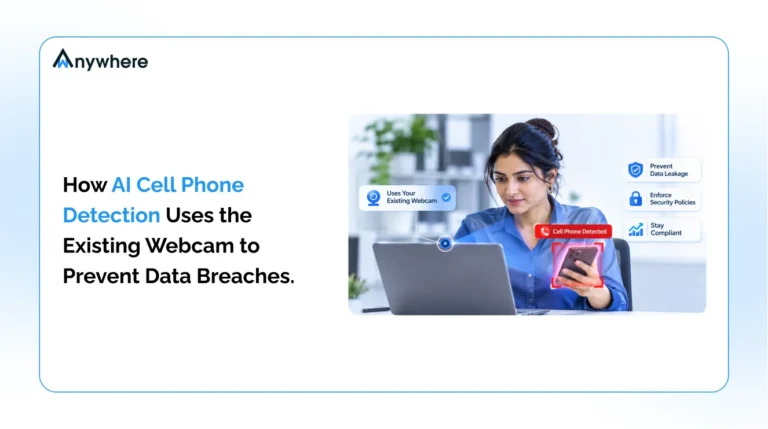
Also Read: How AI Cell Phone Detection Uses The Existing Webcam To Prevent Data Breaches
Data Loss Prevention In Healthcare And Why Traditional Controls Fall Short
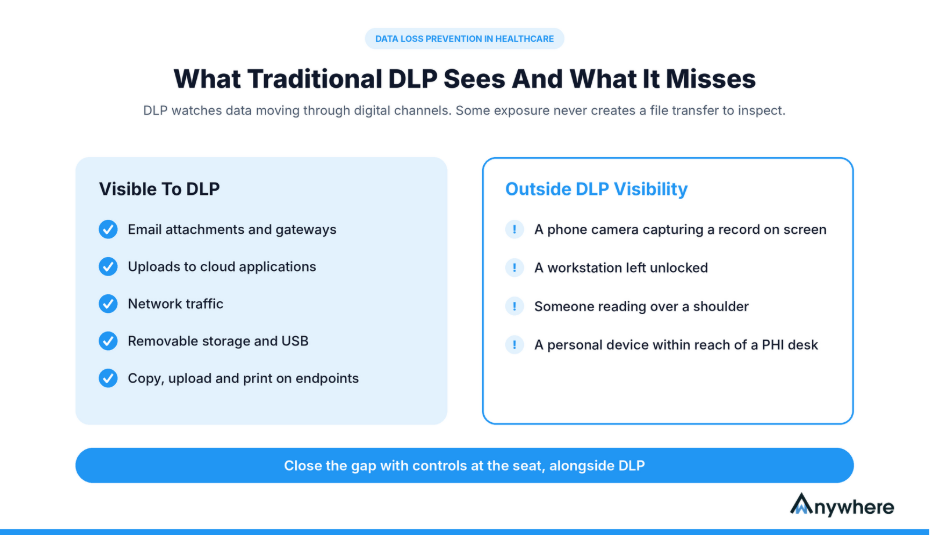
Conventional DLP is essential, but it was built to watch data in motion, not people at desks. That boundary shows where the next control belongs.
Traditional DLP Focuses On Digital Data Movement
Depending on the product, DLP inspects content and enforces policy across endpoints, email gateways, cloud applications, network traffic and removable storage. It is good at catching an attachment full of medical record numbers or a bulk upload to an unsanctioned site.
Insider Exposure Can Happen Outside Conventional Data Transfer Channels
A lot of exposure happens where DLP has no visibility:
- A phone camera capturing a patient record on screen
- A workstation left unlocked in a shared office or home
- An unauthorized person reading patient details over a staff member’s shoulder
- A personal device kept within reach of a desk that handles PHI
None of these events creates a file transfer for DLP to inspect.
Why Healthcare Organizations Need Complementary Security Controls
The answer is layering. DLP governs data movement, identity controls govern access, endpoint protection handles device threats and workstation-level security covers what happens in front of the screen. Audit systems tie the layers together into one record of events.
See What Happens In Front Of The Screen
Flag unknown people and phones near PHI, block copying and USB transfers, and keep audit trails for every incident.
How To Choose The Right Healthcare Security Software
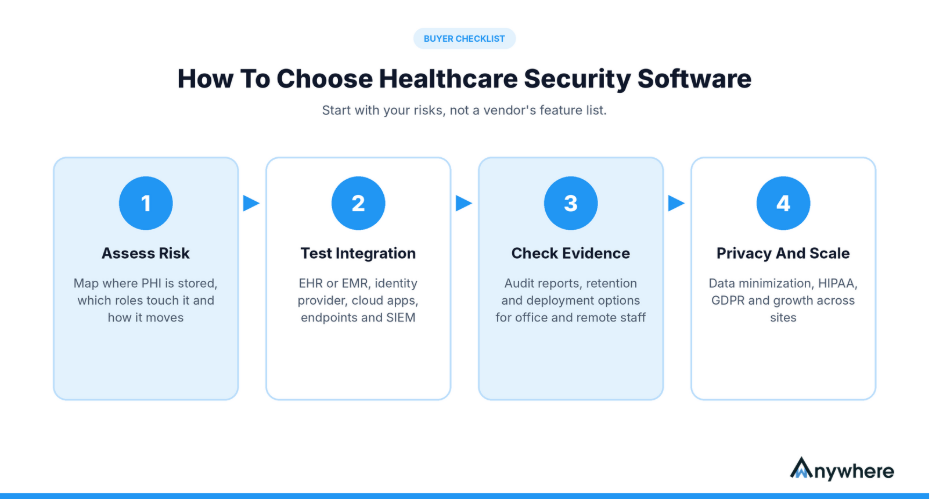
Start with your risks, not a vendor’s feature list. These four checks keep the evaluation grounded.
Start With A Healthcare-Specific Risk Assessment
Map where PHI is stored, which roles touch it and how it moves between departments, vendors and offshore partners. NIST SP 800-66 Rev. 2 offers a practical risk-assessment method built around the HIPAA Security Rule, and its structure is useful even for organizations outside the US.
Evaluate Integration With Existing Healthcare Systems
Check compatibility with your EHR or EMR platform, identity provider, cloud apps, endpoints and SIEM. Ask vendors for documented, tested integrations rather than general claims about APIs.
Check Audit, Reporting And Deployment Capabilities
Check what evidence the tool produces, how long it keeps it and whether reports satisfy auditors and client contracts. Confirm deployment options (on-premises, private cloud or SaaS) and that controls behave the same for office and remote staff.
Consider Privacy, Compliance And Scalability
Monitoring tools process employee data too, so check how they minimize collection. HIPAA applies to US covered entities and their business associates. Elsewhere, GDPR in Europe, the Philippines’ Data Privacy Act and other national laws apply, and BPOs serving US clients often answer to several at once. Confirm it scales across sites without a redesign.
Also Read: How Security Leaders Can Reduce Audit Time And Maximize Compliance ROI
How wAnywhere Helps Healthcare Organizations Protect PHI From Workforce-Level Data Leaks
wAnywhere is not a firewall, SIEM, EDR or full content-aware DLP platform, and it does not replace EHR access controls or a HIPAA compliance program. It adds a workforce-level layer covering what happens at the seat, where many of the gaps above sit. wAnywhere holds SOC 2 Type 2 and ISO 27001 certifications and is built to support HIPAA and GDPR requirements.
Mask Sensitive Patient Information On Work Screens
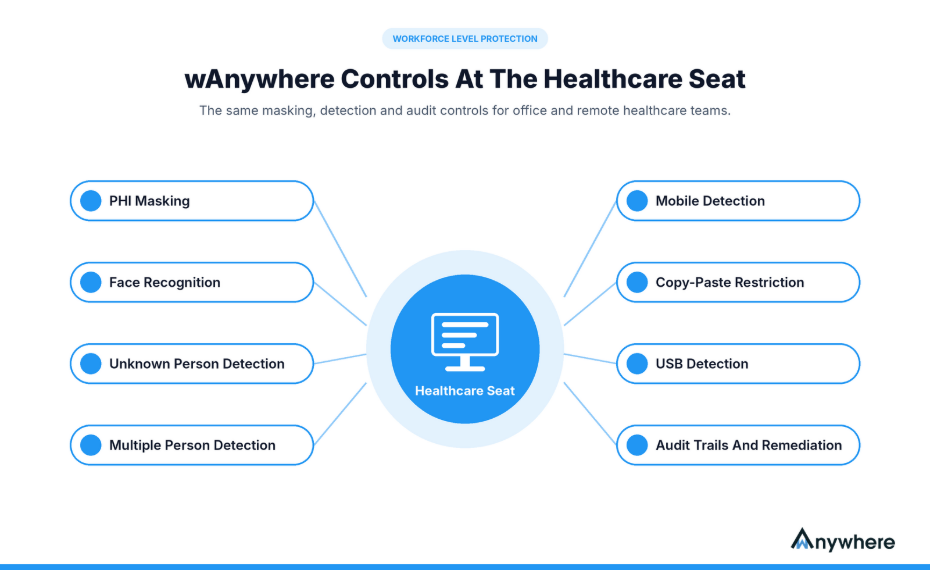
Teams can protect sensitive patient information with PHI masking that hides PHI on screen, so staff see only what each task needs. Masking stays on during email and screen sharing, and screen captures taken at defined intervals for reviews keep it applied.
Identify Unauthorized People And Mobile Phones Around Workstations
Face recognition verifies the person at the desk is the authorized employee. From there, wAnywhere can:
- Detect unauthorized people at workstations through Unknown Person Detection
- Detect multiple people around a workstation through Multiple Person Detection
- Flag unauthorized mobile phone use with Mobile Detection when a phone could photograph or record a screen showing PHI
Restrict Data Movement And Maintain Audit Records
Copy-Paste Restriction lets you restrict copying sensitive information so patient records cannot be pasted into personal files or apps, and USB Detection helps block unauthorized USB devices before data reaches removable media. wAnywhere also helps maintain security audit records of user actions and incidents by user, device and time, while remediation workflows manage each incident from detection to resolution.
Extend Consistent Controls To Remote Healthcare Teams
wAnywhere installs on-premises or in a private cloud, so monitoring data stays under your control, and rolls out remotely to staff devices without visiting each seat. Home-based billing, coding and support teams get the same masking, detection and audit controls as staff on site, and a wAnywhere demo with a pilot team shows these controls on a live seat.
Protect Patient Trust With Stronger Healthcare Security Solutions
Insider leaks come from misuse and ordinary mistakes, and perimeter defenses do little about either. Match controls to your own workflows and compliance obligations. For teams handling PHI across office and remote desks, wAnywhere adds the workforce-level layer conventional tools miss. Start with a pilot team and see what it surfaces.
Close The Workstation Gaps Your DLP Cannot See
PHI masking, person and phone detection, copy-paste and USB controls, and audit-ready logs for every healthcare seat.
Frequently Asked Questions
What Is The Best Healthcare Cybersecurity Software?
No single product is best for every organization. The right choice depends on your risks, systems and regulations. Most teams combine DLP, endpoint security, identity management, a SIEM and workforce-level security.
How Does Data Loss Prevention Work In Healthcare?
DLP scans content to identify PHI, such as medical record numbers or diagnosis codes, then applies policies that monitor, block or alert on its movement through supported channels like email, cloud apps, endpoints and removable storage.
How Can Healthcare Organizations Prevent Insider Data Leaks?
Limit access to what each role needs, train staff on everyday risks and combine DLP, endpoint controls and proportionate monitoring. Audit trails then make every incident traceable, so teams can separate a risky action from a confirmed breach.
Does Employee Monitoring Help Protect Patient Health Information?
Yes, when it is proportionate and disclosed to staff. Workstation monitoring reveals risks such as unauthorized viewers or phones near a screen, but it works best alongside access controls, DLP and clear privacy policies.
Are Security Tools Enough To Ensure HIPAA Compliance?
No. Software supports HIPAA's administrative, physical and technical safeguards for electronic PHI (ePHI) and helps document them. Compliance still requires risk analysis, policies, workforce training, business associate agreements and ongoing management.

Table of Contents
One AI Platform for Security, Compliance and Productivity
Read summarized version with