

 Set as a preferred Google source
TL;DR
Finding a security issue is the easy part. Risk only drops when the issue is ranked by real-world exposure, handed to a named owner with a deadline, fixed or formally mitigated, verified, and documented. Automation speeds up routing, tracking and approved low-risk actions. AI helps with analysis and recommendations, but people still approve high-impact changes. Judge success by verified risk reduction, not by how many tickets were closed.
Most security teams are not short on findings. Scanners, cloud tools, endpoint agents and auditors produce them every week. The harder part is what happens next. Findings sit in spreadsheets, bounce between tickets and email threads, or wait in queues nobody owns, while the exposure stays open.
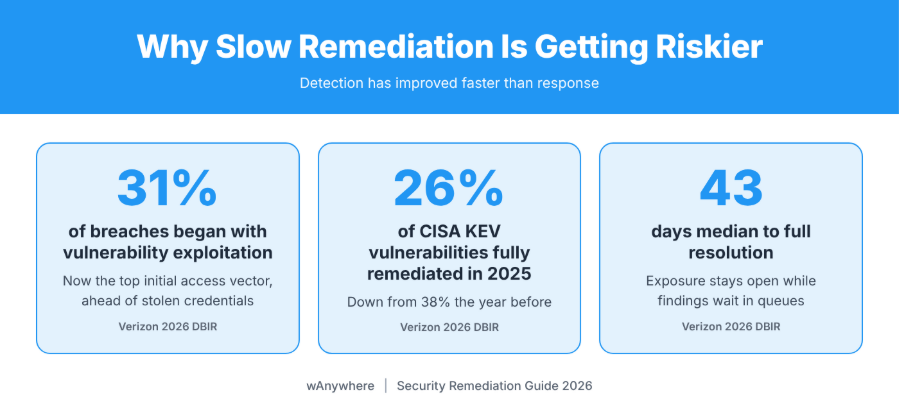
That delay is getting more expensive. In Verizon’s 2026 Data Breach Investigations Report, exploiting a vulnerability became the most common way attackers got in, accounting for 31% of breaches and overtaking stolen credentials for the first time in the report’s 19-year history.
A remediation workflow closes that gap. It turns a raw finding into an owned, time-bound corrective action that is checked before it is closed, which shortens the time to resolution and shrinks the window in which the business stays exposed.
This guide covers:
- How the process differs from incident response and vulnerability management
- Why remediation stalls in so many enterprises
- The six steps from detection to verified closure
- Where automation helps and where AI fits
- How to measure real risk reduction

Closing Tickets Is Not The Same As Closing Risk
Get clear visibility into endpoint activity, connected devices and workstation policy violations, with audit-ready evidence for every security review.
What Is A Security Remediation Workflow?
A security remediation workflow is a repeatable process that takes a security finding from identification through assessment, assignment, corrective action, validation and closure. Put simply, it answers four questions for every issue: how serious is this for us, who fixes it, by when, and how do we know it is actually fixed?
Findings can come from vulnerability scanners, endpoint tools, SIEM platforms (systems that collect and correlate security logs), cloud security tools, penetration tests, audits, incident investigations and employee reports.
Remediation Vs. Incident Response Vs. Vulnerability Management
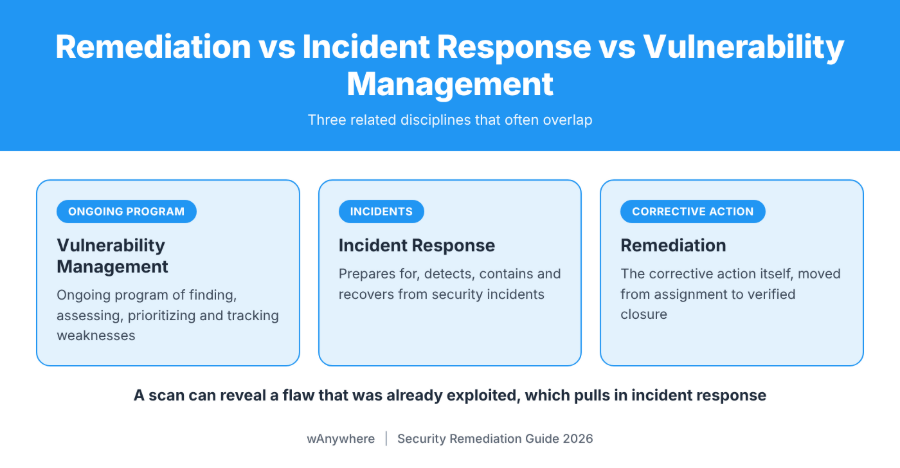
- Vulnerability management is the ongoing program of finding, assessing, prioritizing and tracking weaknesses.
- Incident response coordinates how an organization prepares for, detects, contains and recovers from incidents. NIST SP 800-61 Revision 3, finalized in April 2025, places it inside wider cybersecurity risk management, aligned with NIST CSF 2.0.
- Remediation is the corrective action itself, and the remediation process moves that action from assignment to verified closure.
They overlap often. A scan can reveal a flaw that was already exploited, which pulls in incident response.
Why Remediation Needs A Structured Process
A defined process gives you:
- One named owner for every finding
- Consistent, risk-based prioritization
- Deadlines and escalation rules that apply before an issue goes stale
- Visibility into pending and completed actions
- Verification and evidence of closure
Why Traditional Security Remediation Processes Are Often Slow
Detection has improved faster than response. The same Verizon report found that organizations fully remediated only 26% of the critical vulnerabilities in CISA’s Known Exploited Vulnerabilities (KEV) catalog during 2025, down from 38% the year before, with a median of 43 days to full resolution. Four causes explain most of the drag.
Security Findings Are Scattered Across Multiple Tools
Scanners, SIEMs, cloud tools and ticketing systems each use their own severity scales and asset names, so nobody has one reliable view of what is still open.
Unclear Ownership And Missed Deadlines
Security teams find issues; IT, cloud and application teams fix them. A finding with no named owner waits, and without a deadline, it keeps waiting.
Manual Approvals And Repetitive Tasks Create Delays
Analysts lose hours creating tickets, chasing updates, requesting approvals and collecting proof. None of it reduces risk directly.
Teams Struggle To Prioritize The Right Issues
When every high score is treated as urgent, an internet-facing server with a known exploited flaw waits behind internal systems nobody can reach.
Also Read: How AI Security And Compliance Tools Prevent Data Breaches In Real Time
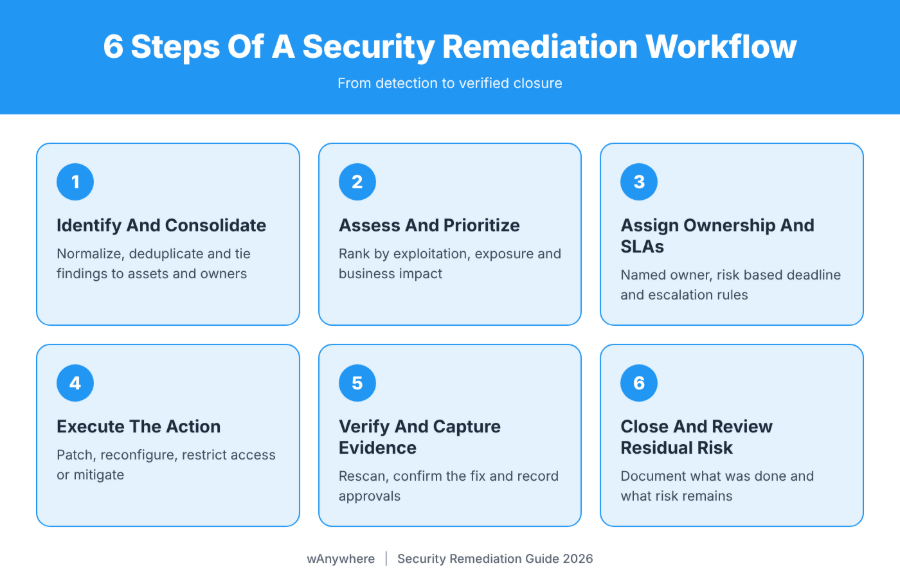
How A Security Remediation Workflow Works In 6 Essential Steps
These six steps follow a finding from detection to verified closure. They apply equally to a missing patch, a cloud misconfiguration or an endpoint alert. What changes is who acts, and how fast.
1. Identify And Consolidate Security Findings
Findings from scans, alerts, audits and penetration tests are normalized, deduplicated and tied to the affected asset and owner. The UK National Cyber Security Centre recommends consolidating findings and grouping those that need the same fix. If a scanner and a penetration tester both report the same weak TLS setting on a web server, that becomes one ticket, not two. The security operations or vulnerability management team owns this step.
2. Assess And Prioritize Findings Based On Risk
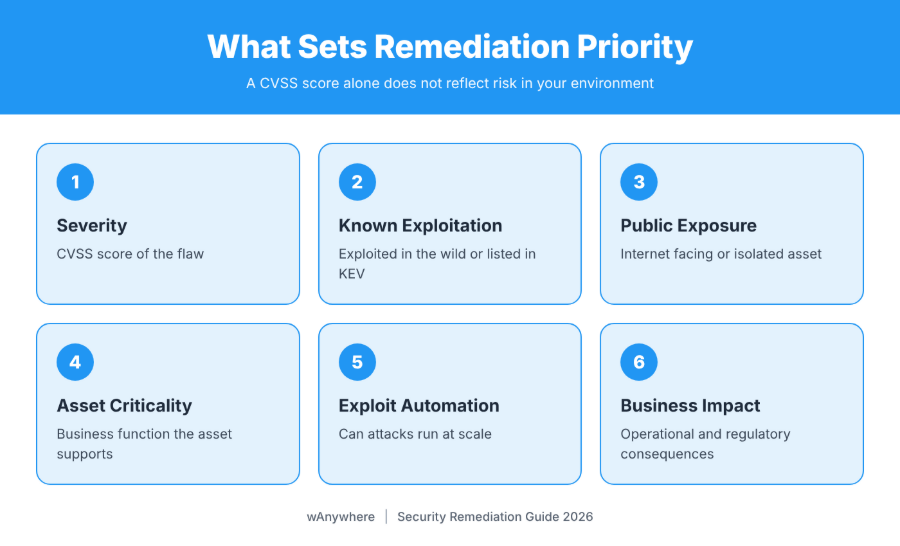
A CVSS score (the Common Vulnerability Scoring System rating) describes how severe a flaw is in theory, not how dangerous it is in your environment. Risk-based remediation weighs:
- Severity and CVSS score
- Known exploitation in the wild
- Public exposure of the asset
- Asset criticality and business function
- Exploit availability and automation
- Operational and regulatory impact
CISA’s Binding Operational Directive 26-04, issued in June 2026, sets timelines for U.S. federal civilian agencies using asset exposure, KEV status, exploit automation and technical impact. The highest-risk combinations must be patched within three days; low-risk items can wait for the next system upgrade. It binds only those agencies, though CISA encourages others to take a similar approach.
A critical flaw on an internet-facing VPN gateway listed in the KEV catalog goes straight to the top; the same score on an isolated test server can wait. Security leads, with the asset owner confirming business impact.
3. Assign Ownership And Define Remediation SLAs
Every finding should leave triage with a named owner, a responsible team, a risk-based deadline, an agreed corrective action and escalation rules. A service level agreement (SLA) here is the internal deadline for each risk tier, and tracking against it makes accountability measurable.
For example, a cloud storage bucket found open to public access goes to the cloud platform team with a 24-hour deadline and automatic escalation if it is still open the next morning.
4. Execute The Appropriate Remediation Action
Options include patching, correcting configurations, restricting access, disabling exposed services, isolating systems and applying temporary compensating controls. The right one depends on the issue and what the business can tolerate.
Here remediation and mitigation part ways. Remediation removes the weakness, such as installing the patch. Mitigation reduces risk without removing the cause, such as blocking a vulnerable port. CISA’s incident and vulnerability response playbooks accept temporary measures when a patch is unavailable or cannot be applied yet.
Picture a critical patch for a billing server that must wait two weeks for a change window because a restart would interrupt live transactions. The interim mitigation gets recorded and the permanent fix stays scheduled. An endpoint alert runs in a different order: investigate, isolate the device if confirmed, then remove the cause.
| Scenario | Typical action | Usually owned by |
| Critical flaw on an exposed server | Patch, or restrict access until patched | Infrastructure team |
| Misconfigured cloud storage | Fix access policy, review logs | Cloud platform team |
| Confirmed endpoint alert | Isolate, investigate, remove cause | SOC and endpoint team |
| Patch blocked by business continuity | Compensating control, scheduled fix | System owner, change board |
| Finding that cannot be fixed yet | Risk acceptance with review date | Risk owner, CISO |
5. Verify The Fix And Capture Evidence
A ticket marked “done” is a claim, not proof. Before closure, teams should:
- Rescan or retest the affected asset
- Confirm the issue no longer appears
- Check that temporary controls are still working
- Record approvals, evidence, timestamps and exceptions
- Reopen the finding if the issue persists
For the exposed bucket, it also means checking access logs for the period it was open. Security validates; the fixing team supplies evidence.
6. Close The Finding And Review Residual Risk
Closure records what was done, what risk remains and what was learned. Some findings, like a legacy system that cannot be patched until it is replaced, will be mitigated or formally accepted instead. NCSC guidance treats “acknowledge” as a valid triage outcome, provided the decision is documented. A sound risk acceptance names the approver, explains why the risk is tolerable and sets a review date.
How Automated Remediation Workflows Improve Security Response
An automated remediation workflow uses integrations and predefined rules to handle coordination work. It does not decide what is safe to change. It carries out what people have already approved, faster and more consistently.
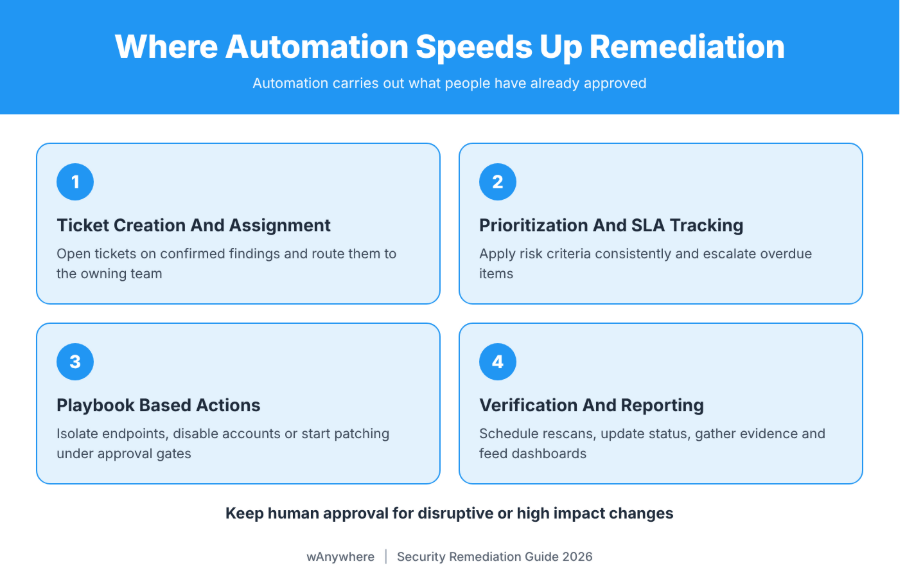
Automated Ticket Creation And Assignment
Integrations open a ticket when a finding is confirmed, attach asset details and route it to the owning team.
Automated Prioritization And SLA Tracking
Rules apply your risk criteria consistently, raising priority when a CVE joins the KEV catalog and escalating overdue items.
Playbook-Based Remediation Actions
Approved playbooks can isolate an endpoint, disable a compromised account, restrict access or start a patch deployment, each under defined permissions and with approval gates where the impact calls for one.
Automated Verification And Closure Reporting
Automation can schedule rescans, update status, gather evidence and feed dashboards.
That does not mean every fix should run unattended. An untested patch pushed to thousands of laptops can cause the outage you meant to prevent. Remediation automation suits high-volume, low-risk, well-understood tasks.
What Is An AI Remediation Workflow And How Does It Help?
Automation follows rules. AI interprets. An AI remediation workflow uses machine learning and language models to make sense of findings, connect signals, suggest next steps and summarize context. An automated remediation workflow does exactly what it was configured to do; AI produces recommendations that can be wrong.
| Automation | AI assistance | |
| What it does | Executes predefined rules and approved actions | Analyzes, correlates, recommends, summarizes |
| Output | Predictable and repeatable | Probabilistic, needs review |
| Best suited to | Routing, SLA tracking, approved low-risk fixes | Triage support, investigation, ticket drafting |
| Main risk | Over-permissioned actions | Wrong or poorly grounded advice |
AI-Assisted Risk Analysis And Prioritization
AI tools can weigh vulnerability details, asset context, threat intelligence and past findings to explain why one issue matters more. But an incomplete asset inventory produces confident, wrong priorities.
AI-Generated Remediation Recommendations
AI can summarize a finding, suggest fixes, draft the ticket and point to the right playbook, which helps most on routine issues.
Faster Investigation And Workflow Coordination
AI assistants can summarize logs, correlate alerts and draft incident timelines, cutting the manual gathering that fills the first hours of a response.
Why Human Approval And Validation Still Matter
AI can recommend the wrong fix, chase false positives, miss business context (a server that cannot restart during month-end close) and disrupt services if its advice runs unchecked. Keep human approval for consequential changes, test first, limit AI tool permissions and log what was recommended and who approved it.
Also Read: Impact Of Data Loss, Common Causes And Effective Solutions To Safeguard Your Business
Key Benefits Of An Effective Security Remediation Process
When these steps work together, the gains show up in both security outcomes and daily operations.
Reduced Mean Time To Remediation (MTTR)
Clear ownership, automated routing and steady follow-up remove idle time between steps. Define MTTR before reporting it: when the clock starts (detection or ticket creation) and when it stops (deployment or verified closure).
Lower Exposure To Exploitation
Fixing exploited, internet-facing and critical weaknesses first shortens how long your likeliest targets stay open.
Better Accountability And SLA Compliance
Named owners, deadlines and escalation paths show leaders exactly where remediation is stuck.
Stronger Audit Readiness And Reporting
Documented actions, approvals, exceptions and verification results give auditors a clear trail without a last-minute scramble.
How To Measure Remediation Performance And Risk Reduction
Track both how fast issues are resolved and whether resolution actually reduced risk.
| KPI | What it measures |
| Mean Time to Remediation (MTTR) | Average time taken to resolve findings |
| SLA Compliance Rate | Percentage of findings resolved within defined deadlines |
| Open Critical Findings | High-priority issues awaiting remediation |
| Remediation Backlog Age | How long unresolved findings remain open |
| Reopened Finding Rate | Findings that return after being marked resolved |
| Verified Closure Rate | Percentage of completed fixes that pass validation |
Closing 500 low-risk tickets looks productive while three internet-facing critical findings stay open. Pair speed metrics with risk-weighted views, such as open findings by severity and exposure.
Best Practices For Building A Reliable Remediation Process
These apply whatever your tooling.
Standardize Prioritization Criteria
Document how severity, exploitability, exposure and business impact set priority, and apply it to every finding source.
Define Clear Ownership And Escalation Paths
Map asset types to owning teams across IT, infrastructure, cloud and applications, and agree escalation contacts in advance.
Automate Repetitive Tasks, Not Every Decision
Automate routing, notifications, evidence collection and approved low-risk actions. Keep human approval for disruptive changes.
Verify Every Fix Before Closing It
Require proof that the issue is resolved or that an approved mitigation is in place. No evidence, no closure.
Review And Improve The Process Regularly
Use metrics, recurring findings, overdue tasks and incident lessons to refine policies and playbooks.
Also Read: Free Workforce System Audit Tool To Monitor Device Health And Performance
How wAnywhere Supports Workforce Security Visibility And Compliance Evidence
wAnywhere is a workforce monitoring and endpoint security platform. It is not a vulnerability scanner or patch management tool; it complements them with visibility into device use and policy compliance at the workstation:
- USB, Bluetooth and SSID detection for device and network policy risks
- Mobile phone detection in sensitive work areas
- Clean desk monitoring for workplace security policies
- Unknown person and multiple person detection at monitored workstations
- PII and PHI masking within monitoring evidence
- Screenshots, recordings, timelapse, playback and audit trails for authorized review
When a policy violation is flagged, supervisors and auditors can review the evidence and act, and those records support security reviews and audits. It is a practical way to strengthen workforce security visibility alongside your existing stack.
Turn Security Findings Into Verified Risk Reduction
Spotting a security issue is only the first step. Risk falls when a structured remediation workflow connects prioritization, ownership, corrective action, verification and reporting. Automation removes repetitive coordination and AI sharpens analysis, but people still own decisions with real business impact. Measure verified risk reduction, not closed tickets, and keep workforce visibility and compliance evidence in the picture.
Strengthen Workforce Security Visibility With wAnywhere
Detect USB, Bluetooth and mobile phone policy violations, flag unknown people at workstations, and keep PII-masked, audit-ready evidence for compliance reviews.
Frequently Asked Questions
How Does An Automated Remediation Workflow Work?
Integrations and predefined rules route tickets, set deadlines, trigger approved actions such as isolating a device, and schedule rescans to confirm fixes.
What Is An AI Remediation Workflow?
It uses AI to support risk analysis, investigation, recommendations and coordination. People review its output and keep authority over consequential decisions.
What Is The Difference Between Remediation And Mitigation?
Remediation removes the underlying weakness, for example by patching. Mitigation reduces exposure, often temporarily, without fixing the root cause.
How Does A Structured Remediation Process Reduce MTTR?
Clear ownership, risk-based priorities, automated routing and built-in verification remove the idle time between detection and resolution.
Which Metrics Should Organizations Track To Measure Remediation?
MTTR, SLA compliance rate, open critical findings, backlog age, reopened finding rate and verified closure rate, ideally weighted by risk.
Can Security Remediation Be Fully Automated?
Repetitive, low-risk actions can be. Sensitive or disruptive changes should still need human approval.

Table of Contents
Boost productivity and compliance with wAnywhere
Read summarized version with