

 Set as a preferred Google source
TL;DR
- DLP platforms find, monitor and protect sensitive data as it moves through devices, email, cloud apps, browsers and AI tools.
- No single product suits everyone. Microsoft Purview fits Microsoft 365 shops, Netskope and Zscaler fit cloud-first teams, and Netwrix Endpoint Protector fits device control.
- Map where your data lives and check channel coverage and licensing before you shortlist.
- Pair DLP with workforce visibility, such as wAnywhere, to cover desk-level risks content inspection cannot see.
Sensitive data rarely leaves a business in one dramatic moment. It slips out through a forwarded spreadsheet, a file synced to a personal drive or a customer record pasted into a chatbot to tidy up the formatting. Each action feels harmless, which is exactly why it is hard to catch.
The most common ways business data goes missing include:
- Confidential files shared with the wrong person by accident
- Work documents moved to personal laptops, phones or email accounts
- Sensitive files uploaded to unapproved cloud apps
- Customer data or intellectual property copied to USB drives
- Confidential information pasted into public AI tools
- Insider threats and compromised user accounts
The cost of getting this wrong keeps climbing. IBM’s 2026 Cost of a Data Breach Report puts the global average cost of a breach at a record USD 4.99 million, up 12% on the previous year.
Data loss prevention software helps security teams discover, classify, monitor and protect sensitive information across these channels. The right choice depends on your infrastructure, how sensitive your data is, the regulations you answer to and how you prefer to deploy security tools.
This guide compares 10 data loss prevention tools for 2027, highlighting their key capabilities, ideal use cases and the factors to weigh before you choose one.

Your DLP Reads The File. Who Watches The Desk?
wAnywhere flags USB devices, phones pointed at screens and unknown faces at workstations, so desk-level risks don’t slip past your data protection stack.
What Is Data Loss Prevention (DLP) Software?
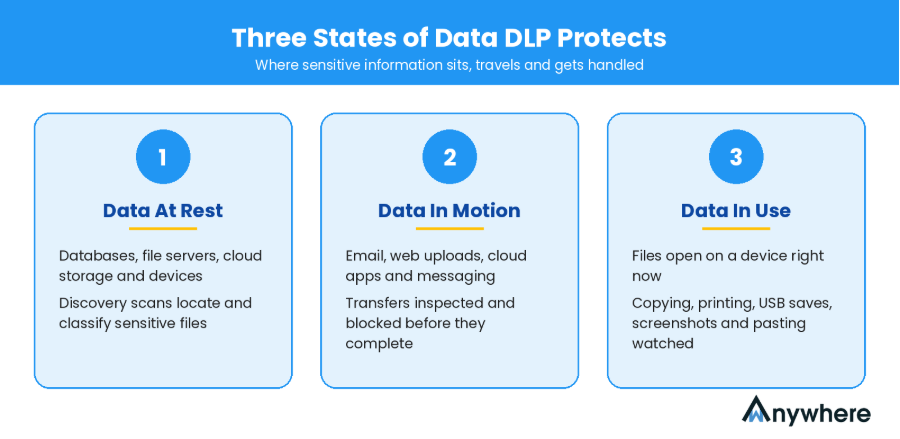
Data loss prevention software identifies sensitive information, tracks how it is used and stops it from being exposed or shared without authorisation. Policies define what counts as sensitive, such as card numbers, health records or source code, and what should happen when that data heads somewhere it shouldn’t. Most DLP tools protect information in three states.
Data At Rest
This is information stored in databases, file servers, cloud storage and employee devices. Discovery scans locate and classify sensitive files so teams know where their risk actually sits.
Data In Motion
This is data travelling through email, web uploads, cloud apps, messaging platforms and network channels. Inspection happens in transit, so a policy can flag or block a transfer before it completes.
Data In Use
This is data being handled on a device right now. Endpoint DLP watches actions such as copying, printing, saving to USB, taking screenshots or pasting content into another application.
Types Of Data Loss Prevention Solutions
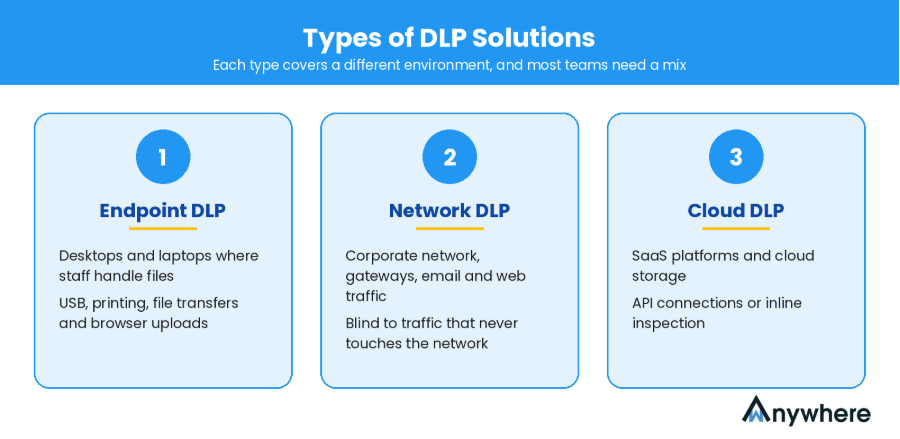
Not every DLP product protects data in the same way. Each type focuses on a different environment, and most organisations end up needing a mix.
Endpoint DLP
This protects data directly on desktops and laptops, where employees actually handle files. Typical controls cover:
- USB and removable storage
- Copy-paste actions and file transfers
- Printing and local applications
- Browser uploads and general device activity
Network DLP
Network-based tools inspect data crossing the corporate network, gateways and channels such as email and web traffic. They lose sight of traffic that never touches that network, which is common with remote staff.
Cloud DLP
Cloud-focused tools protect information stored, shared or transferred through SaaS platforms, usually through API connections or inline inspection.
These categories overlap. Many enterprise platforms now combine endpoint, network and cloud controls, so the label matters less than the channels a product actually covers in your environment.
Also Read: How GCCs Can Detect Data Leakage Across Multiple Locations
10 Best Data Loss Prevention Software Tools For 2027
The DLP tools below serve different needs. This is a curated shortlist based on product positioning and use cases, not an independently tested ranking. The right pick depends on your existing technology stack, deployment preferences and data protection priorities.
1. Microsoft Purview Data Loss Prevention
Purview is Microsoft’s umbrella for data security, governance and compliance. Its DLP capability sits in the same console as sensitivity labels, insider risk management and eDiscovery, so if your files live in SharePoint, OneDrive and Teams, policies follow them without extra connectors.
The bigger draw is shared classification. A label applied to a contract in Word is recognised by policies in Exchange, on the device and in supported browsers. Teams define what is sensitive once and enforce it in several places.
Key features and capabilities
- Policies across Exchange, SharePoint, OneDrive and Teams
- Built-in sensitive information types, trainable classifiers and exact data match
- Device-level controls for onboarded Windows and macOS machines, covering USB, printing, clipboard and uploads
- Adaptive Protection, which ties enforcement to a user’s insider risk level
- Controls for sensitive data shared with supported generative AI apps
- Activity explorer and alerts inside the Purview portal
Pricing
Microsoft Purview Suite: Rs.1000/user/month (paid yearly)
Best for: Organisations heavily invested in Microsoft 365.
2. Forcepoint DLP
Forcepoint has a long history in enterprise data protection and is often shortlisted by banks, insurers and public sector bodies. Its pitch is unified policy: write a rule once and apply it across endpoints, email, web and cloud apps.
Risk-adaptive protection is the differentiator. Instead of treating every user the same, it raises or lowers enforcement based on behaviour. A routine transfer by a low-risk user can go through, while the same action by a high-risk user is blocked.
Key features and capabilities
- Large library of pre-built policy templates and classifiers for common regulations
- Discovery across file shares, databases and cloud storage
- Coverage across endpoint, web, email, network and cloud, depending on modules
- Risk-adaptive enforcement informed by user behaviour
- OCR and fingerprinting for structured and unstructured data
- Central incident management and compliance reporting
Pricing
Contact sales
Best for: Large enterprises with complex data protection and compliance requirements
3. Broadcom Symantec Data Loss Prevention
Symantec built one of the earliest enterprise DLP suites, and Broadcom continues to develop it for large, regulated organisations. It is known for depth of content inspection rather than speed of setup.
Detection goes beyond keywords and patterns. Exact data matching checks content against structured records, indexed document matching spots fragments of sensitive files and machine learning handles content without a fixed format. Everything is managed from a central Enforce console.
Key features and capabilities
- Exact data matching, indexed document matching and machine learning detection
- Monitoring and prevention on endpoints
- Network monitoring and prevention for email and web traffic
- Discovery scans across file shares, databases and storage
- Integration with Symantec cloud security services for SaaS coverage
- Central policy and incident management through Enforce
Pricing
Contact sales
Best for: Large enterprises with established DLP programmes.
4. Netskope One Data Loss Prevention
wAnywhere approaches data protection from the workforce side. Rather than inspecting file contents, it watches the conditions in which sensitive data is handled: what is plugged into the device, which network it is on, who is sitting at the screen and whether a phone is pointed at it.
That suits operations where agents work with customer records, card data or health information all day, in the office, at home or both. Alerts, screenshots and recordings give compliance teams evidence they can take straight into an audit.
Beyond device and desk-level controls, wAnywhere brings security and compliance monitoring and productivity monitoring into the same platform. Security teams can enforce workplace policies across office, remote and hybrid setups. Operations heads can track how time and effort are spent across teams, without adding another tool to the stack.
Key features and capabilities
- USB and Bluetooth device detection
- SSID and network monitoring for remote and hybrid staff
- Unknown person detection and multiple person detection
- Mobile phone detection at the workstation
- Clean desk monitoring and copy-paste restriction
- PII and PHI masking
- Screenshots, recordings, audit trails and configurable policy alerts
Pricing
Contact sales
Best for: BPO, BFSI, ITES and hybrid teams that need desk-level security visibility alongside content-based DLP.
5. Proofpoint Enterprise DLP
Netskope started as a cloud access security broker and grew into a full Security Service Edge (SSE) platform. DLP runs in the same engine that sees web and SaaS traffic, so policies apply inline as users upload, share or download data.
It can also scan sanctioned apps through APIs to find sensitive files that are already shared too widely. That covers data sitting in the cloud as well as data on the move.
Key features and capabilities
- Inline and API-based protection for SaaS, web and IaaS
- Exact data match, fingerprinting, OCR and machine learning classifiers
- Generative AI app controls, including real-time user coaching
- Instance awareness that separates personal and corporate app accounts
- Device-level controls through the Netskope client, where licensed
- Integration with wider Netskope One security services
Pricing
Contact sales
Best for: Cloud-first organisations with heavy SaaS usage.
6. Trellix Data Loss Prevention
Proofpoint is best known for email security, and its DLP builds on that base. The platform brings email, cloud and endpoint data protection into one console, with a people-centric model that looks at who is involved as well as what data is moving.
That context helps analysts separate careless mistakes from deliberate exfiltration. Investigators can see the user activity around an incident, such as a file being renamed just before an upload, which shortens triage.
Key features and capabilities
- Email DLP with policy-based encryption and blocking
- Cloud app protection through CASB capabilities
- Endpoint visibility into user activity and data movement
- AI-assisted classification of sensitive content
- Insider threat context and user activity timelines
- Unified incident management and reporting
Pricing
Contact sales
Best for: Organisations where email exposure and insider risk are top concerns.
7. Zscaler Data Protection
Trellix formed in 2022 from McAfee Enterprise and FireEye, and its DLP line descends from McAfee’s long-running products. Components are licensed separately, including Endpoint, Device Control, Discover, Monitor and Prevent.
Most deployments are managed through Trellix ePolicy Orchestrator, which suits teams already running other Trellix products. The modular model lets you start small, often with device control, and expand as needs grow.
Key features and capabilities
- Device-level protection for Windows and macOS
- Device control for USB and removable media
- Discovery scans across file shares and repositories
- Network monitoring and prevention for email and web traffic
- Central policy management through ePolicy Orchestrator
- Incident reporting and case management
Pricing
Contact sales
Best for: Enterprises wanting modular DLP across endpoints and other channels.
8. Cyberhaven
Zscaler’s cloud proxies inspect user traffic inline, including encrypted traffic, which is where most sensitive data now travels. DLP policies run in the same pass, so there is no separate appliance to manage.
Beyond inline inspection, Zscaler offers out-of-band scanning of SaaS apps, browser isolation that lets users view sensitive apps without downloading data, and controls for generative AI tools.
Key features and capabilities
- Inline inspection of web and SaaS traffic, including SSL/TLS
- Exact data match, indexed document matching and OCR
- API-based scanning of sanctioned SaaS apps
- Browser isolation to limit downloads, copy-paste and printing
- Visibility and prompt controls for generative AI apps
- Device-level controls through Zscaler Client Connector, where licensed
Pricing
Contact sales
Best for: Enterprises adopting a cloud-delivered Zero Trust and SSE architecture.
9. Netwrix Endpoint Protector
Cyberhaven tracks the full history of a piece of data, from its origin through every copy, edit and move, an approach it calls data detection and response. Instead of judging a file only by its contents, it weighs where the data came from.
That lineage view helps with intellectual property such as source code, design files and product roadmaps, which pattern matching often misses. It also lets investigators reconstruct exactly how data left the business.
Key features and capabilities
- Data lineage across endpoints, browsers and cloud apps
- Detection based on origin and context, not just content
- Visibility into data pasted or uploaded into AI tools
- User coaching and blocking for risky actions
- Incident investigation with full movement history
Pricing
Contact sales
Best for: Organisations that need data lineage and visibility into how sensitive information moves.
10. Nightfall AI
Endpoint Protector came to Netwrix through its acquisition of CoSoSys, and it stays focused on the device. Support for Windows, macOS and Linux makes it a practical choice for mixed fleets, which are common in engineering and creative teams.
The product is split into modules for device control, content-aware protection, eDiscovery and enforced encryption. It can run on-premises as a virtual appliance or as a hosted service.
Key features and capabilities
- Device control for USB, Bluetooth and peripherals with granular allow lists
- Content-aware protection for uploads, email clients and messaging apps
- eDiscovery scans of data stored on devices
- Enforced encryption for supported USB storage
- Windows, macOS and Linux support
- On-premises or cloud deployment
Pricing
Contact sales
Best for: Organisations that need cross-platform device control.
DLP Software Comparison At A Glance
This table shows where each vendor puts its weight. It is a high-level positioning view, not a guarantee that every product supports every feature in the same way, so confirm specifics with each vendor before you buy.
| Platform | Best For | Primary Approach | Key Strength |
| Microsoft Purview | Microsoft-centric businesses | Platform-embedded DLP | Microsoft 365 integration |
| Forcepoint DLP | Large enterprises | Enterprise DLP | Risk-adaptive protection |
| Broadcom Symantec DLP | Established enterprise programmes | Enterprise DLP | Broad data protection |
| wAnywhere | BPO, BFSI and hybrid teams | Workforce and desk-level security | Device, presence and clean desk monitoring |
| Netskope One DLP | Cloud-first businesses | SSE and cloud DLP | SaaS visibility and control |
| Proofpoint Enterprise DLP | Email and insider risk | People-centric DLP | Email and user-focused protection |
| Trellix DLP | Enterprise environments | Modular DLP | Endpoint and network capabilities |
| Zscaler Data Protection | Zero Trust environments | Cloud-delivered DLP | Inline cloud security |
| Cyberhaven | IP-sensitive organisations | Data lineage and detection | Contextual data movement visibility |
| Netwrix Endpoint Protector | Mixed device fleets | Device-level protection | Device control |
Also Read: Data Breach Detection In BFSI For Audit And Regulatory Readiness In 2027
How To Choose The Best Data Loss Prevention Software For Your Business
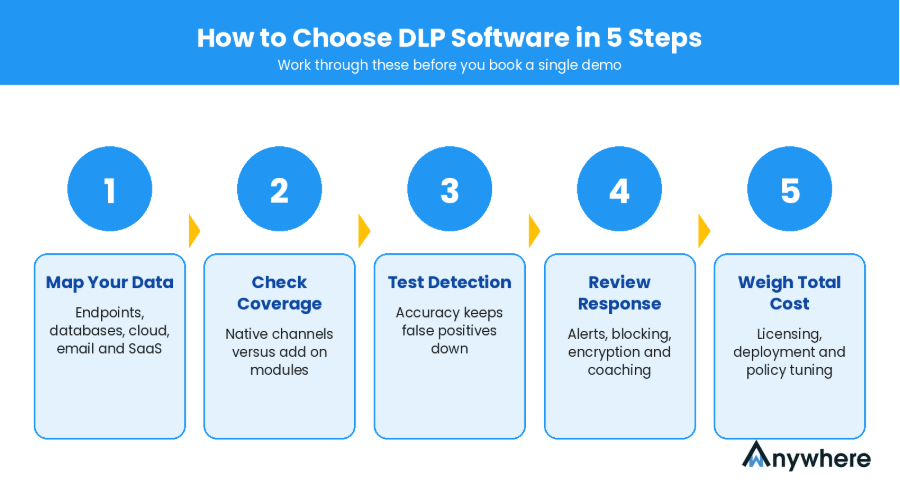
The best fit depends on your data environment, risk profile, security architecture and the people you have to run it. Work through these five factors before you book a single demo.
1. Identify Where Your Sensitive Data Lives
Map sensitive information across endpoints, databases, cloud storage, email and SaaS apps first. You cannot judge coverage until you know what needs covering.
2. Evaluate Endpoint, Network And Cloud Coverage
List the channels you must protect, then check whether each vendor covers them natively or through add-on modules. Most gaps show up here.
3. Check Data Classification And Detection Accuracy
Ask how the tool inspects content, whether through pattern matching, contextual analysis, OCR or document fingerprinting. Accuracy matters because a flood of false positives teaches analysts to ignore alerts.
4. Review Policy Enforcement And Incident Response
Look for graduated responses such as alerts, blocking, encryption, quarantine and user coaching, plus clear incident reports.
5. Consider Integration, Scalability And Total Cost
Check compatibility with your SIEM, identity provider and operating systems. Factor in licensing, deployment effort and ongoing policy tuning, since that is where many DLP solutions cost more than planned.
Emerging DLP Trends To Watch In 2027
Data protection is shifting quickly, largely because of how employees now use AI at work. Verizon’s 2026 Data Breach Investigations Report found that 45% of employees are now regular AI users on corporate systems, up from 15% a year earlier, and that 67% of users accessed AI services through non-corporate accounts on company devices.
The trends worth watching include:
- Controls that stop sensitive content being pasted into public AI tools
- Context-aware classification and behavioural analytics
- Greater device-level visibility for hybrid and remote teams
- Convergence of DLP, data security posture management (DSPM) and insider risk management
- More automated detection, investigation and remediation
Availability varies by product and licence, and data loss prevention solutions differ widely in how far they have adopted each trend.
How wAnywhere Complements A Data Loss Prevention Strategy
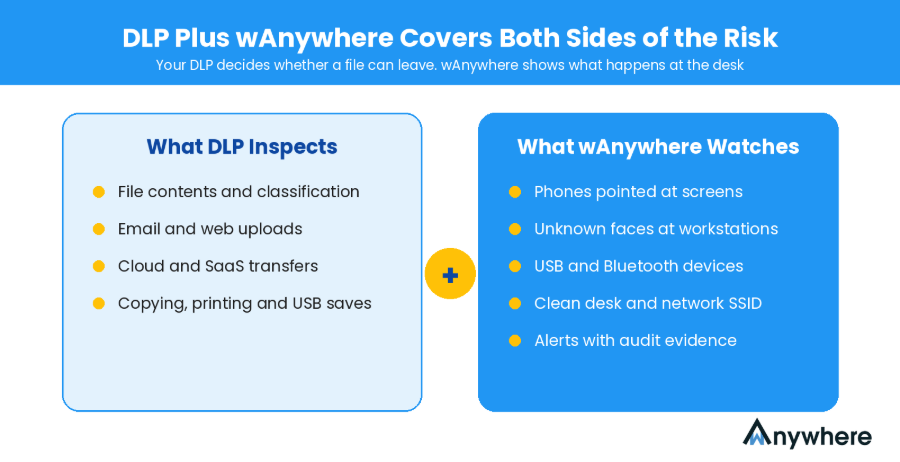
DLP platforms inspect content. They do not see a phone held up to a monitor, a stranger at an agent’s desk or a printed customer list left out overnight. Those risks sit with the workforce and the physical workspace, and they are common in BPO, BFSI and hybrid teams handling regulated data.
That is why wAnywhere, covered at number four above, works best alongside your existing DLP solutions rather than in place of them. Your DLP platform decides whether a file can leave. wAnywhere shows what is happening at the desk where that file is open, with alerts and audit-ready evidence for compliance teams.
Conclusion
Data loss prevention software has become a core part of enterprise security as data spreads across devices, SaaS apps and AI tools. Still, no single platform suits every organisation. Start with where your sensitive data lives, the channels it moves through, your compliance obligations and the architecture you already run, then shortlist the platforms that match. For the risks that sit beyond files and network traffic, see how wAnywhere can support your workforce security and compliance strategy.
Close The Gaps Content Inspection Can’t Reach
Add clean desk monitoring, PII masking and audit-ready screen evidence to your security programme with wAnywhere.
Frequently Asked Questions
What Are The Best Data Loss Prevention Tools In 2026?
Strong options include Microsoft Purview, Forcepoint, Broadcom Symantec DLP, Netskope, Proofpoint, Trellix, Zscaler, Cyberhaven, Netwrix Endpoint Protector and Nightfall AI. The best choice depends on your infrastructure, data channels and compliance needs.
What Is Endpoint DLP?
It protects sensitive information on individual devices by monitoring and controlling actions such as file transfers, USB usage, printing, copying and browser uploads.
What Is The Difference Between DLP And Endpoint Protection?
Endpoint protection defends devices against threats such as malware and exploits. DLP focuses on stopping sensitive information from being exposed or transferred without authorisation.
Can DLP Software Prevent Insider Data Leaks?
It can detect and restrict risky data movement by employees and other authorised users. How well it works depends on coverage, policy configuration and how consistently policies are enforced.
How Much Does A DLP Platform Cost?
Pricing varies by vendor, number of users or endpoints, deployment model and selected modules. Most enterprise vendors provide customised quotes rather than published prices.

Table of Contents
Boost productivity and compliance with wAnywhere
Read summarized version with