

 Set as a preferred Google source
TL;DR
- HIPAA does not certify software. A vendor’s “HIPAA compliant” label tells you nothing until you check the controls, the contract and the configuration.
- Ten capabilities deserve hands-on verification: access control, authentication, encryption, audit logging, integrity, transmission security, backup and recovery, session controls, incident detection and vendor accountability.
- Addressable specifications are not optional. You implement them or document why an equivalent alternative is reasonable.
- The January 2025 Security Rule proposal is still not final, so the current rule is what you are measured against today.
- Application security covers the software. Workforce visibility covers the people and workstations using it.
A regional health network signs off on a cloud platform for claims processing. The demo is convincing: encrypted storage, single sign-on, hosting with a major cloud provider. Three months after go-live, the CISO runs the first access review. Billing staff can open clinical notes, audit logs roll over after 30 days, and nobody can name the vendor’s subcontractors.
None of that was in the sales deck. A polished demo is not proof of HIPAA compliant software, and encryption plus secure logins is only the starting point. Real HIPAA compliance software requirements reach into who can see what, what gets recorded, how data stays accurate and who answers when something fails.
The stakes keep rising. HHS reports that from 2018 to 2023, large breach reports increased by 102 percent and the number of individuals affected rose by 1,002 percent, mostly because of hacking and ransomware.
This guide covers the safeguards to assess, ten capabilities to verify, the tools that close the remaining gaps and eight questions to put to every vendor.

Your Software Passed Review. Have Your Workstations?
Run the wAnywhere System Audit Tool to see how the endpoints handling patient data are actually configured.
What Are HIPAA Compliance Software Requirements?
HIPAA compliance software requirements are the security, privacy and operational capabilities a system needs so that a covered entity or business associate can meet its HIPAA obligations while handling protected health information. The key word is support. The legal obligation sits with your organisation, not with the product.
Two definitions carry most of the weight:
- PHI: individually identifiable information about a person’s health, healthcare or payment for healthcare, in any form.
- ePHI: PHI that is created, received, maintained or transmitted electronically. The Security Rule applies only to ePHI.
Scope follows data flows. A rostering tool that never touches patient data sits outside the Security Rule, while the same vendor’s analytics module ingesting claims files sits inside it. Map what the software actually handles before deciding how hard to scrutinise it.
There is also no official HIPAA certification for software. The Security Rule is deliberately technology-neutral, so most HIPAA software requirements describe outcomes and leave the specific controls to your risk analysis. A vendor badge is the vendor’s own claim or a third-party attestation, never an HHS endorsement.
Also Read: HIPAA Compliant Monitoring Software And Why It Matters
Which HIPAA Rules Should CISOs Consider When Evaluating Software?
Three rules shape a software evaluation:
- Privacy Rule: Governs permitted uses and disclosures of PHI. For software, that means minimum necessary access.
- Security Rule: Sets administrative, physical and technical safeguards for ePHI. Most of your verification work lives here.
- Breach Notification Rule: Sets notification duties after a breach of unsecured PHI. Encryption that meets HHS guidance renders PHI “secured”, which can decide whether an incident is notifiable at all.
A note on timing. In January 2025, HHS proposed major changes to the Security Rule, including removing the required versus addressable distinction and mandating encryption and MFA with limited exceptions. It is still a proposal, with final action now projected for July 2027. Audit against the current rule, but favour software that could already meet the proposed one.
The Three HIPAA Safeguard Categories Every Software Evaluation Must Cover
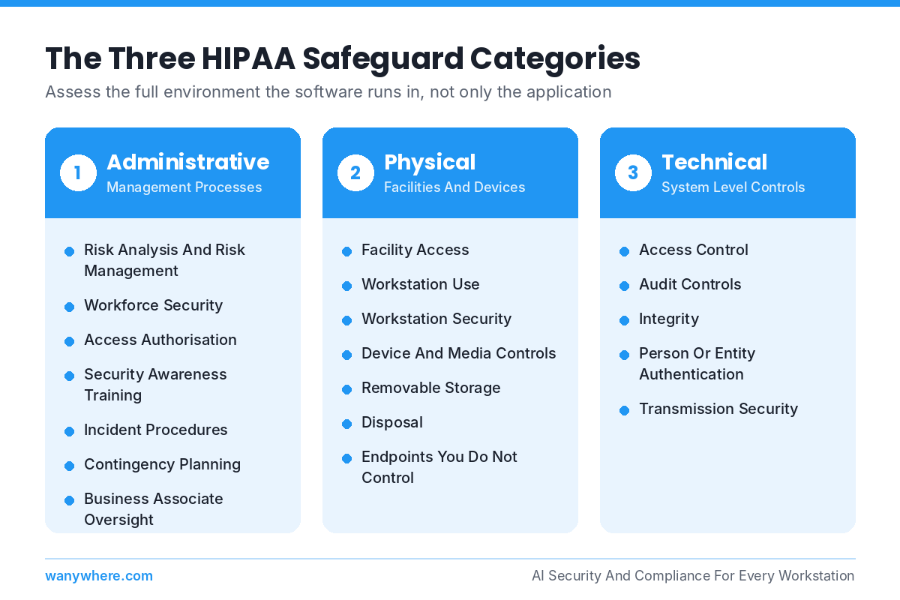
The Security Rule groups its standards into three categories. A product can be strong in one and leave you exposed in the other two, so assess the full environment the software runs in, not only the application. This is where HIPAA requirements for software stop being a feature question and become an operating question.
1. Administrative Safeguards
These are the management processes: risk analysis and risk management, workforce security, access authorisation, security awareness training, incident procedures, contingency planning and business associate oversight. Software helps through access workflows, alerting and evidence collection. It cannot write your risk analysis or assign accountability, and a weak risk analysis undermines every control that depends on it.
2. Physical Safeguards
Facility access, workstation use, workstation security, and device and media controls, including removable storage and disposal. Today they also cover a claims processor at a kitchen table, a shared nursing station or an offshore support floor working your queue. Ask how the software environment behaves on endpoints you do not physically control.
3. Technical Safeguards
Five standards apply: access control, audit controls, integrity, person or entity authentication and transmission security. They matter most for platforms that store, process or transmit ePHI, and they form the backbone of HIPAA compliant software requirements.
Also Read: How To Prevent Data Breach In Healthcare
10 Essential HIPAA Compliance Software Requirements Every CISO Should Verify
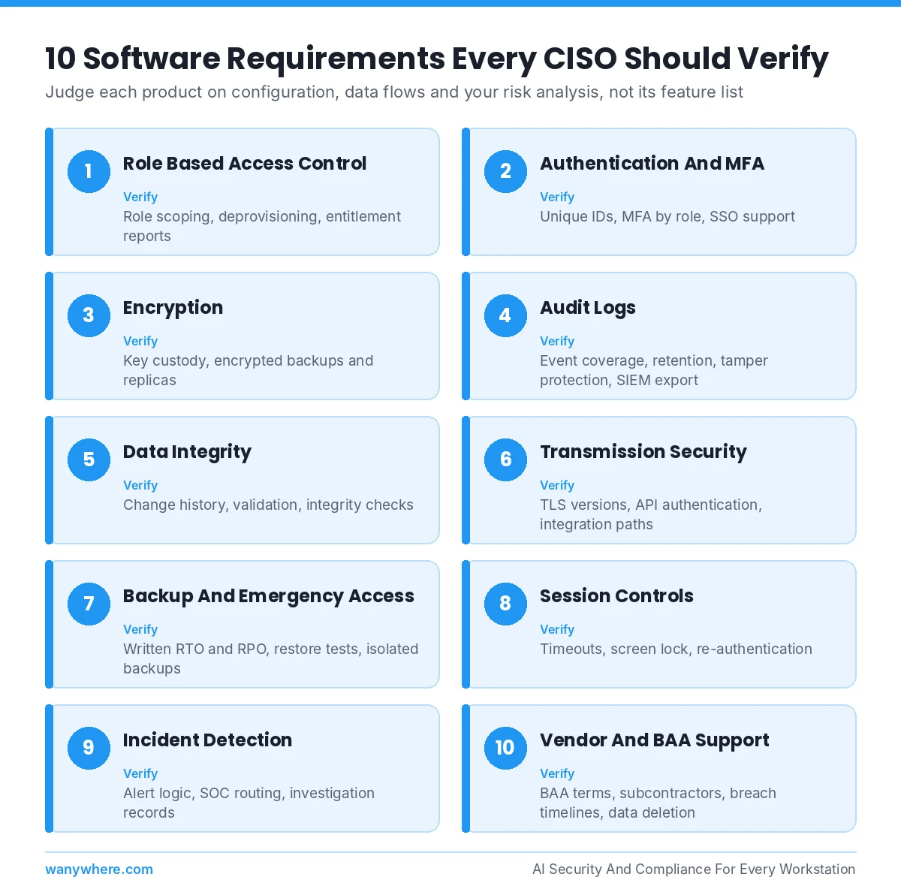
Judge each product on configuration, data flows and your risk analysis, not its feature list. A required implementation specification must be implemented. An addressable one must be assessed: implement it if it is reasonable and appropriate, or document why not and adopt an equivalent alternative where reasonable. Addressable never means optional.
Here is the working summary of HIPAA software requirements.
| Requirement | Purpose | What The CISO Should Verify |
| Role-based access control | Limit access to job need | Role scoping, deprovisioning, entitlement reports |
| Authentication and MFA | Confirm who is logging in | Unique IDs, MFA by role, SSO support |
| Encryption | Protect stored and moving data | Key custody, encrypted backups and replicas |
| Audit logs | Record who did what | Event coverage, retention, tamper protection, SIEM export |
| Data integrity | Prevent improper alteration | Change history, validation, integrity checks |
| Transmission security | Protect data in motion | TLS versions, API authentication, integration paths |
| Backup and emergency access | Keep ePHI available | Written RTO and RPO, restore tests, isolated backups |
| Session controls | Protect unattended screens | Timeouts, screen lock, re-authentication |
| Incident detection | Spot and document incidents | Alert logic, SOC routing, investigation records |
| Vendor and BAA support | Assign accountability | BAA terms, subcontractors, breach timelines, data deletion |
1. Role-Based Access Control And Least-Privilege Permissions
Permissions should map to job function, not to whoever asked for access last. Check that roles can be scoped by record type, that provisioning and deprovisioning tie into your identity source, and that the platform exports entitlement reports for periodic reviews. A billing analyst needs claims data, not psychotherapy notes.
2. Strong User Authentication And Multi-Factor Authentication
Unique user identification and an emergency access procedure are required specifications, so shared logins on a clinic workstation fail at the first test. MFA is not explicitly mandated under the current rule, yet most risk analyses will justify it for remote and privileged access. Verify SSO support, MFA enforcement by role and protection against credential stuffing and phishing.
3. Data Encryption At Rest And In Transit
Encryption is addressable today, and HIPAA does not prescribe an algorithm. Few risk analyses can credibly justify leaving ePHI unencrypted, though. Ask where keys live, who can reach them and whether backups and replicas are encrypted too.
4. Comprehensive Audit Logs And Activity Monitoring
Audit controls are a required standard. The software should record logins, record access, permission changes, exports and administrative actions, with user IDs and timestamps your SIEM can ingest. Check retention, tamper protection and whether you can search by patient or user. HIPAA sets no fixed log retention period, so align it with your investigation needs.
5. Data Integrity And Protection Against Unauthorised Changes
ePHI must not be improperly altered or destroyed. Picture an insurance ID changed so claims route to the wrong payer, or an allergy entry edited without trace. Look for change tracking, version history where it fits, input validation and checksums or comparable mechanisms that confirm stored data has not been altered.
6. Secure Data Transmission And Communication
Transmission security covers data moving between applications, devices, partners and APIs. Verify current TLS versions, authenticated API calls with scoped tokens and integrity checks on data in motion. Press hardest on integrations. A well-secured core platform with an unencrypted file export to a clearinghouse still leaves a gap.
7. Data Backup, Recovery, And Emergency Access
The contingency plan standard requires a data backup plan, a disaster recovery plan and an emergency mode operation plan. Ask for recovery time and recovery point objectives in writing, the last restore test date and whether backups are isolated from production credentials, since ransomware targets backups early. When a pharmacist cannot see a medication history, availability becomes a patient safety issue.
8. Automatic Session Controls And Workstation Security
Automatic logoff is addressable, but on shared workstations it is hard to argue against. Confirm configurable session timeouts, re-authentication for sensitive actions and screen lock enforcement at the endpoint. Call centres and remote agents add another risk: someone else at an unlocked screen.
9. Security Incident Detection And Reporting
You must identify, respond to, mitigate and document security incidents. Check what the software alerts on, whether alerts reach your SOC and how investigations are recorded. Delays are expensive. IBM’s Cost of a Data Breach Report 2026 found healthcare remained the costliest industry for breaches, at an average of $6.64 million per incident. Monitoring feeds your breach risk assessment, but it does not perform it.
10. Vendor Security, Third-Party Access, And BAA Support
A BAA is required when a vendor creates, receives, maintains or transmits PHI on your behalf. HHS cloud computing guidance applies this even to providers that store only encrypted data and hold no key. Review subcontractor flow-down, support access, breach reporting timelines and data deletion at contract end. Business associates must report breaches without unreasonable delay and within 60 days of discovery, and many organisations negotiate shorter windows. A compliance page on a website is not a BAA.
Also Read: Healthcare Security Software That Prevents Insider Data Leaks
HIPAA Compliance Tools And What A CISO Should Include In The Security Stack
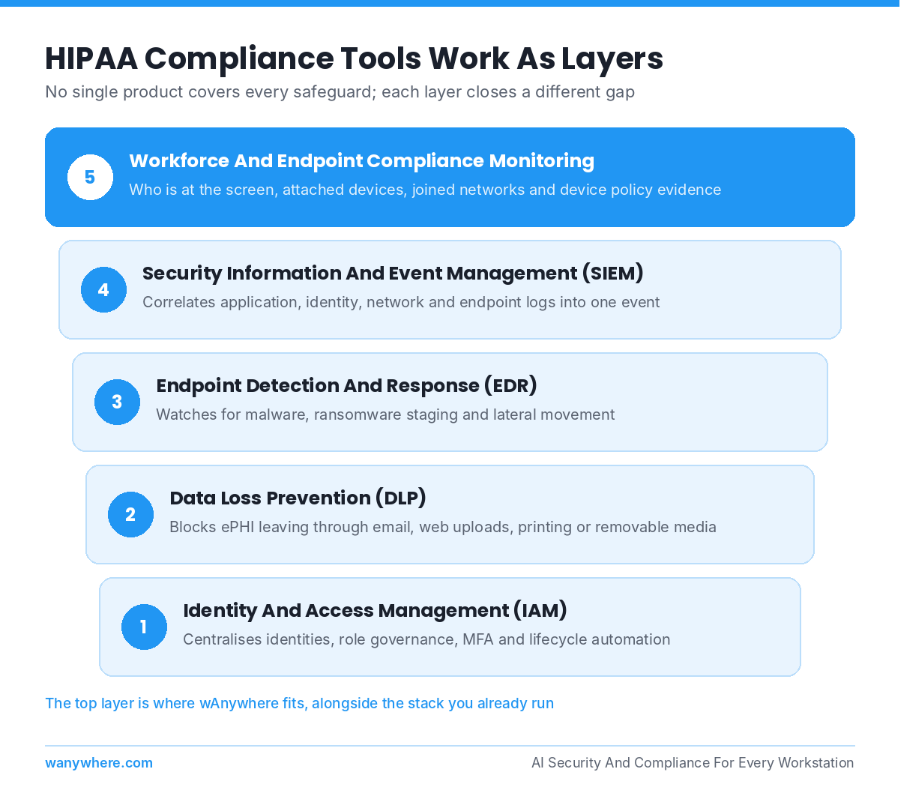
No single product covers every safeguard. HIPAA compliance tools work as layers, and the right combination depends on your risk analysis and architecture.
Identity And Access Management (IAM)
IAM centralises identities, role governance, MFA and lifecycle automation, so deprovisioning happens once and takes effect everywhere.
Data Loss Prevention (DLP)
DLP detects and blocks ePHI leaving through email, web uploads, printing or removable media.
Endpoint Detection And Response (EDR)
EDR watches endpoint behaviour for malware, ransomware staging and lateral movement, and gives responders the forensic detail to scope an incident.
Security Information And Event Management (SIEM)
SIEM correlates logs from applications, identity, network and endpoints so that a suspicious pattern shows up as one event rather than five disconnected ones.
Workforce And Endpoint Compliance Monitoring
This layer covers what the others miss: the workstation itself. Who is at the screen, which devices are attached, which network the machine joined and whether staff follow device policies. Used alongside HIPAA compliance tools such as IAM and EDR, it turns physical safeguard policies into verifiable evidence.
Also Read: AI Compliance Software For Healthcare BPOs
HIPAA Compliant Software Vendor Checklist And 8 Questions Every CISO Should Ask
Run these questions before procurement signs anything, and ask for evidence rather than verbal answers. They map directly to HIPAA compliant software requirements, so a vague answer usually points to a real gap.
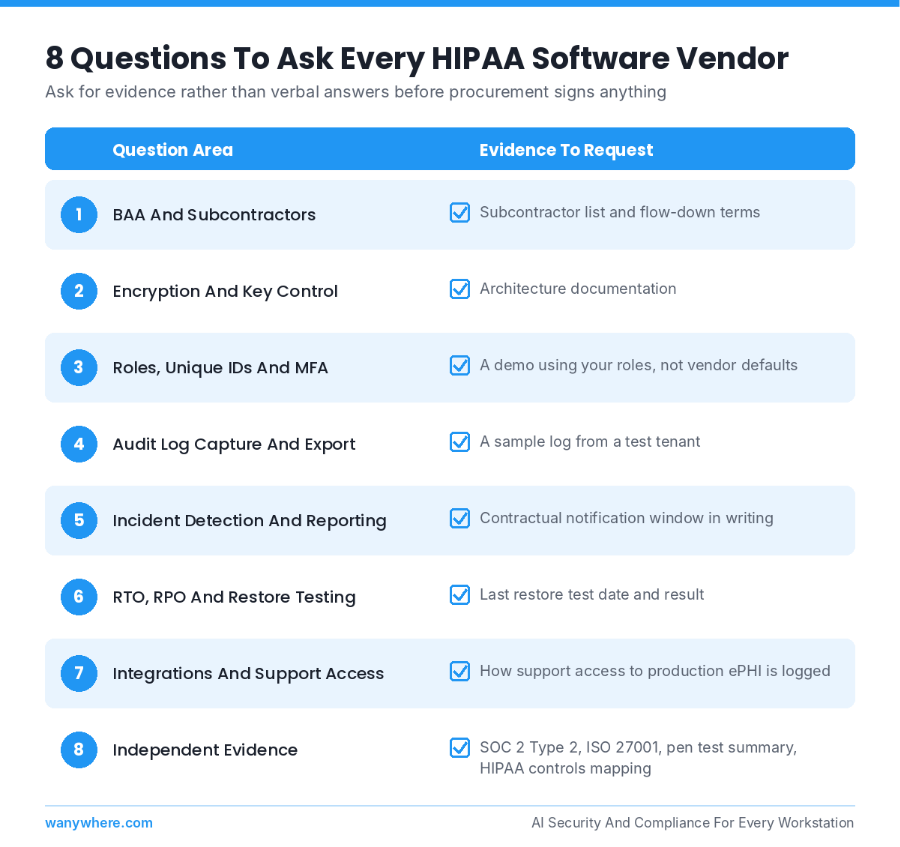
- Will you sign a BAA, and does it bind your subcontractors? Ask for the subcontractor list and the flow-down terms.
- How is ePHI encrypted at rest and in transit, and who controls the keys? Request architecture documentation.
- Can we enforce role-based permissions, unique user IDs and MFA? Demo it with your roles, not the vendor’s defaults.
- What do audit logs capture, how long are they kept and can we export them? Ask for a sample log from a test tenant.
- How do you detect, document and report incidents to customers? Get the contractual notification window in writing.
- What are your RTO and RPO, and when did you last test a restore? Ask for the test date and the result.
- How are integrations, subcontractors and support access controlled? Confirm whether support staff can reach production ePHI and how that access is logged.
- What independent evidence can you share? Look for SOC 2 Type 2 reports, ISO 27001 certificates, penetration test summaries and a HIPAA controls mapping.
Marketing claims are where an evaluation starts. Contracts, documentation and configuration are where it ends.
Also Read: How Security Remediation Workflows Reduce Response Time And Risk
How wAnywhere Supports Workforce Visibility And HIPAA-Oriented Security Monitoring
Healthcare BPOs, revenue cycle teams and remote support desks often handle ePHI far from the covered entity’s own facilities. Securing the application does not show you what happens at those desks.
wAnywhere is an AI-powered security and compliance platform built for this layer. For teams handling PHI, it provides:
- PHI masking in screen monitoring, so oversight does not create fresh exposure
- Facial authentication to confirm the right person is at the workstation
- Unknown-person and multiple-person detection to catch shoulder surfing and shared logins
- Mobile phone detection near screens displaying sensitive data
- SSID monitoring to flag unexpected network changes
- Audit trails, alerts and compliance reports that support investigations and audits
wAnywhere complements IAM, DLP, EDR and SIEM rather than replacing them, and no platform makes an organisation HIPAA compliant on its own. What it adds is proof that workstation policies hold up in daily operations. It fits healthcare BPO and contact centre operations, IT services teams and global capability centres serving healthcare clients.
See Who Is At Every Screen Handling PHI
Put PHI masking, facial authentication and endpoint alerts on every BPO seat with wAnywhere.
Verify Software Security Before Trusting It With Patient Data
Meeting HIPAA compliance software requirements is less about the feature list and more about verification. Encryption and secure logins are necessary, but the gaps that hurt organisations usually sit in access scope, log depth, integrity checks, vendor accountability and what happens at the workstation.
Treat compliance as an operating discipline, not a subscription. Pair well-configured software with clear policies, contracts that assign responsibility and continuous visibility into how your workforce handles ePHI. If that last layer is still a blind spot, see how wAnywhere brings workstation-level visibility into your security program.
Close The Gap Between HIPAA Policy And Workstation Reality
wAnywhere gives healthcare and BPO teams PHI masking, identity checks at the desk and audit-ready reports, alongside the security stack you already run.
Frequently Asked Questions
What Makes Software HIPAA Compliant?
No certification or single feature does. Compliance depends on how the software is configured and used, whether its controls match your risk analysis and whether the vendor signs a BAA and meets its own obligations.
Does HIPAA Require Encryption For All Healthcare Software?
Not under the current rule. Encryption is addressable, so you must assess it and either implement it or document a reasonable equivalent. The January 2025 proposal would make encryption required, but it is not yet final.
Is A Business Associate Agreement Required For HIPAA Software Vendors?
Yes, when the vendor creates, receives, maintains or transmits PHI on your behalf. HHS applies this to cloud providers even when they store only encrypted data and cannot access the key.
What Are The Five Technical Safeguards Under HIPAA?
Access control, audit controls, integrity, person or entity authentication and transmission security. Each standard carries implementation specifications, some required and some addressable, that shape what your software must support.
Can One Software Platform Make An Organisation HIPAA Compliant?
No. Compliance comes from risk management, policies, training, vendor agreements and layered technical controls, reviewed regularly. One platform can support several safeguards, never all of them.
What Should CISOs Check Before Purchasing HIPAA Compliant Software?
Check the BAA and subcontractor terms, encryption and key custody, role-based access and MFA, audit log depth, incident reporting timelines, tested backup and recovery, and independent evidence such as SOC 2 Type 2 reports.

Table of Contents
One AI Platform for Security, Compliance and Productivity
Read summarized version with