

 Set as a preferred Google source
TL;DR
- GCC data moves across offices, countries, remote staff, cloud apps, vendors and AI tools, so isolated controls leave blind spots.
- Detection starts with locating sensitive data, then monitoring access, transfers and AI usage everywhere.
- Correlating signals in a SIEM turns weak alerts into real investigations.
- No single tool covers every path. DLP, CASB, AI-specific DLP and workforce visibility each cover a different layer.
Global Capability Centres now run work that used to stay at headquarters. They process customer information, manage financial records, build products, write source code, run analytics and support global operations around the clock. That makes GCC data security a leadership concern, not an IT checkbox.
The difficulty is movement. Sensitive data travels daily between offices, countries, remote employees, cloud applications, enterprise systems, vendors and headquarters. Isolated controls, such as a DLP policy in one office or endpoint agents on some laptops, cannot show the full picture. Where visibility stops at a location boundary, leakage goes unnoticed.
This guide explains how to detect data leakage across that distributed footprint. You will learn:
- Where leakage typically happens in a multi-location GCC
- A six-step detection process security teams can apply across every site
- Which tool categories address conventional and AI-related leakage
- How to build a unified framework that holds up across jurisdictions

Know What Happens At Every Workstation, In Every GCC Location
Flag unapproved USB, Bluetooth and Wi-Fi activity, detect unknown people at the desk and keep audit-ready records across all your sites.
Why Is Data Leakage A Growing Concern For GCCs?
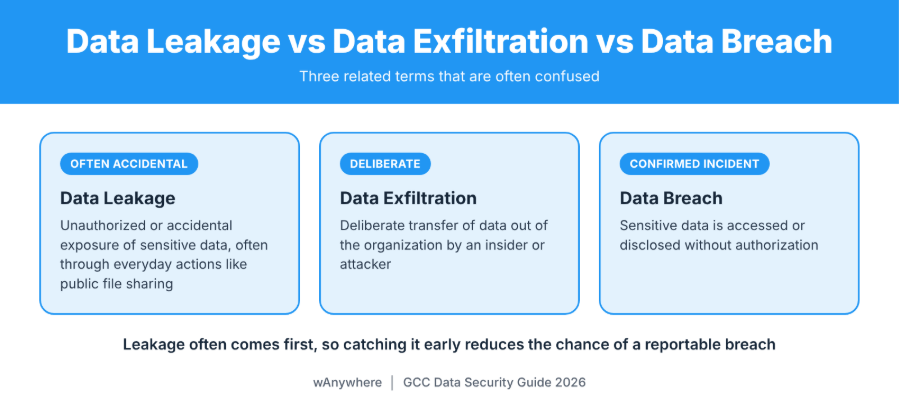
GCC data security covers the policies, controls and monitoring that keep sensitive information protected wherever a capability centre operates. Three related terms are often confused:
- Data leakage is the unauthorized or accidental exposure of sensitive data, often through everyday actions like public file sharing.
- Data exfiltration is the deliberate transfer of data out of the organization by an insider or attacker.
- A data breach is a confirmed incident where sensitive data is accessed or disclosed without authorization.
Leakage often comes first, so catching it early reduces the chance of a reportable breach.
Sensitive Data Moves Across Multiple Locations
Customer records, financial information, employee files, intellectual property, source code, contracts and internal reports all pass through a GCC. A finance team in one city reconciles records for headquarters while an engineering pod abroad commits code and a partner reviews contract drafts. Every handoff is a point where data can slip outside approved boundaries.
Different Locations Create Different Security Gaps
GCCs often grow quickly, and security maturity does not always keep pace. A newer site may run older endpoint protection, looser access permissions or different remote access rules than the flagship office. Legacy infrastructure inherited during expansion may lack modern logging. The result is uneven coverage, where one location records a risky transfer and another never sees it.
Regulatory And Third-Party Complexity
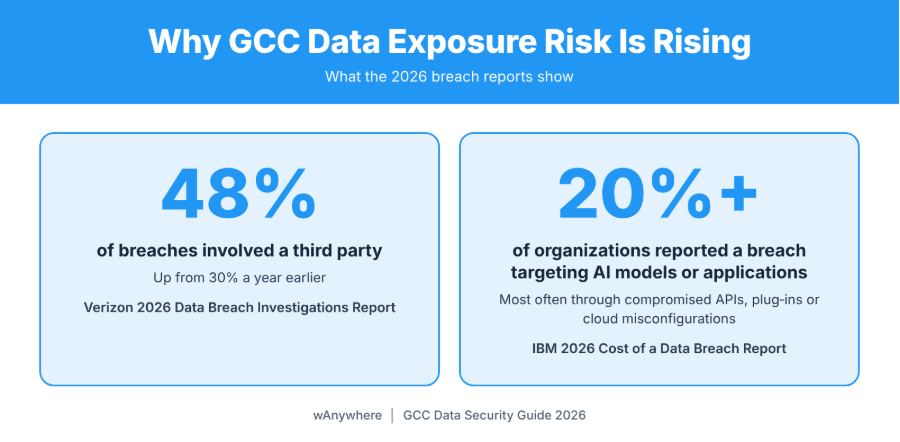
A GCC serving European customers may need to meet GDPR requirements, while one processing personal data in India falls under the Digital Personal Data Protection Act, 2023, whose rules were notified in November 2025 with obligations phased in through May 2027. Other regional laws may apply, so obligations differ from one GCC to the next. Verizon’s 2026 Data Breach Investigations Report found that a third party was involved in 48% of breaches, up from 30% a year earlier. Broad vendor access and cross-border transfers make consistent enforcement harder.
Where Can Data Leakage Occur In A Multi-Location GCC?
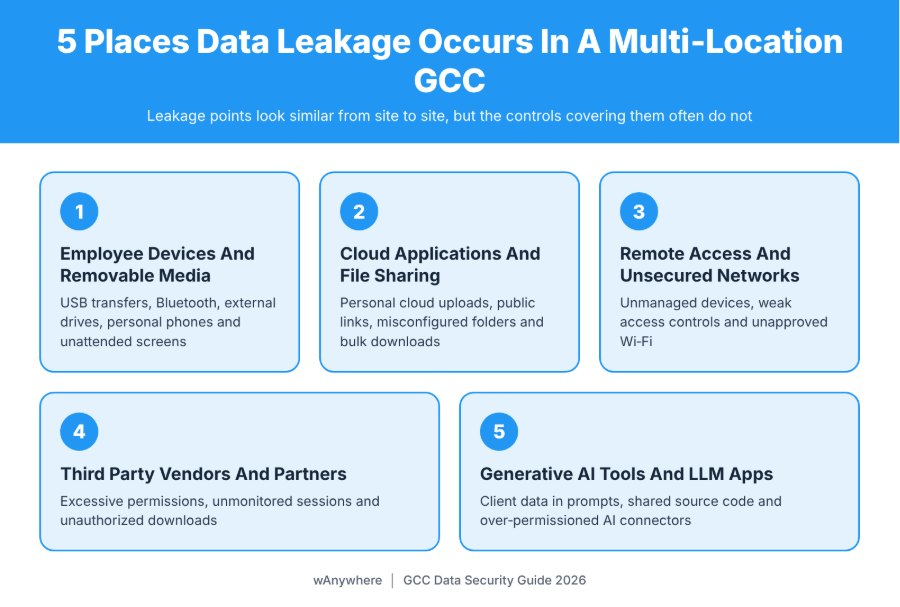
Leakage points look similar from site to site, but the controls covering them often do not. These are the channels any GCC data security program should map first.
Employee Devices And Removable Media
Unauthorized USB transfers remain one of the simplest ways to move files off a managed device. Bluetooth connections, external drives and personal phones create similar paths. Physical exposure matters too. An unlocked, unattended screen in an open-plan delivery centre can reveal client data to anyone walking past.
Cloud Applications And Unauthorized File Sharing
Common patterns include files uploaded to personal cloud accounts, folders with misconfigured permissions, public sharing links that never expire, bulk downloads before an employee exits and cloud-to-cloud transfers that never touch the corporate network.
Remote Access And Unsecured Networks
Unmanaged devices, weak access controls, unapproved home or public Wi-Fi networks and inconsistent endpoint security can expose data that would be well protected inside the office.
Third-Party Vendors And Business Partners
Vendors often receive more access than their contracts require. Excessive permissions, unmonitored sessions, unauthorized downloads and weak security practices at a partner can expose GCC data without any internal employee doing anything wrong.
Generative AI Tools And LLM Applications
An analyst pastes client figures into a public chatbot to draft a summary. A developer shares proprietary code to debug an error. A team connects an AI assistant to a shared drive with far broader permissions than the task needs, or lets an AI agent act across systems with little oversight. Integrations matter as much as prompts. IBM’s 2026 Cost of a Data Breach Report found that more than 20% of organizations reported a breach targeting AI models or applications, most often through compromised APIs, applications or plug-ins, or cloud misconfigurations affecting AI workloads.
Also Read: Impact Of Data Loss, Common Causes And Effective Solutions To Safeguard Your Business
How To Detect Data Leakage Across Multiple GCC Locations
Knowing how to detect data leakage in a distributed environment comes down to a repeatable process. The six steps below apply whether a GCC runs two sites or twenty, and they work best when every location feeds the same detection pipeline. Strong GCC data security depends less on any single control than on how well these steps connect.
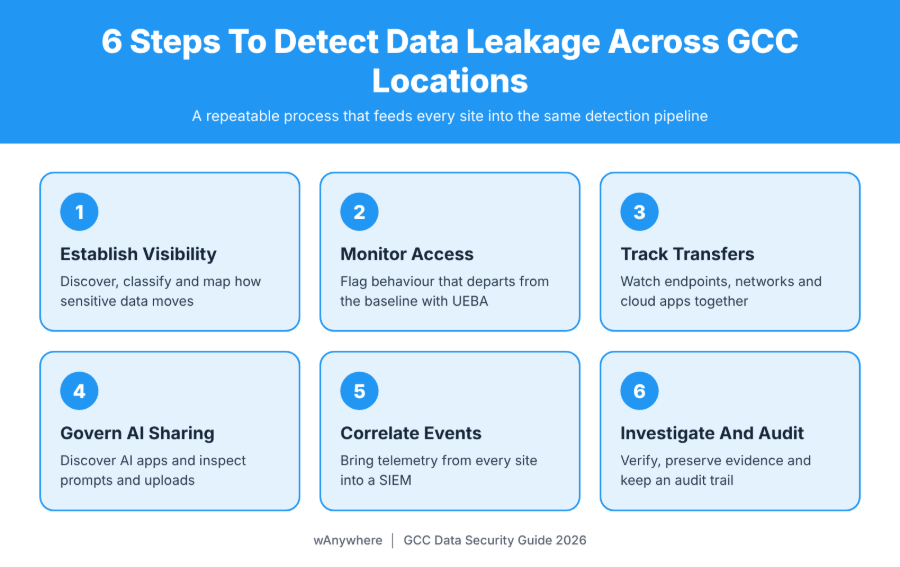
1. Establish Visibility Into Sensitive Data And Its Movement
Start with data discovery and classification across file shares, databases, SaaS platforms and endpoints, and label what is confidential, regulated or business-critical. Then map data flows: which repositories hold sensitive data, who is authorized to access them and how that data normally moves between locations, headquarters and partners. This baseline makes unusual movement visible later.
2. Monitor User Access And Unusual Activity
Watch for behaviour that departs from the baseline, such as unusually large downloads, sudden access to files outside a person’s role, activity at odd hours, sign-ins from unusual locations and suspicious permission changes on sensitive folders. User and entity behaviour analytics (UEBA) helps by learning normal patterns for each user and device and flagging deviations. Treat these flags as investigation signals, not proof of malicious intent. A late-night bulk download may simply be a deadline.
3. Track Data Transfers Across Endpoints, Networks And Cloud Applications
Endpoint controls see USB activity, local file copies and uploads from the device. Network monitoring sees outbound traffic, email attachments and connections to unauthorized applications. Cloud monitoring sees sharing changes, downloads and transfers inside SaaS platforms. A file synced from a corporate cloud drive to a personal account may never cross the corporate network, which is why endpoint, network and cloud monitoring must work together.
4. Identify Unauthorized AI And LLM Data Sharing
Begin with discovery: which AI applications are employees actually using, sanctioned or not? Then apply controls where the risk sits, including prompt monitoring, inspection of files uploaded to AI tools, sensitive-data detection and policies that warn or block users before confidential content is submitted. Review the permissions granted to AI connectors and agents, since an integration with broad read access can expose far more than a single prompt. Note that LLM security testing, which probes a model for weaknesses like prompt injection, differs from enterprise AI data loss prevention, which governs what employees share.
5. Correlate Security Events Across All Locations
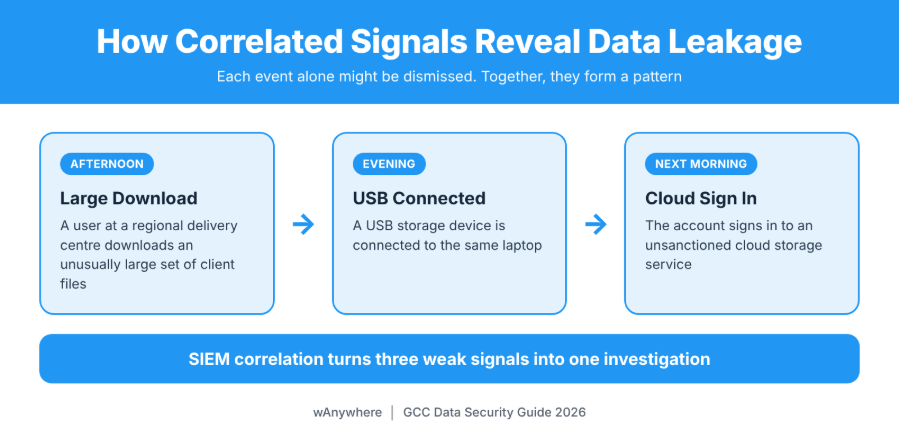
A security information and event management (SIEM) platform consolidates identity, endpoint, cloud, network and DLP telemetry from every site so analysts can connect events. Picture a user at a regional delivery centre who downloads an unusually large set of client files one afternoon. That evening, a USB storage device is connected to the same laptop. The next morning, the account signs in to an unsanctioned cloud storage service. Each event alone might be dismissed. Together, they form a pattern that justifies a closer look.
6. Investigate Alerts And Maintain An Audit Trail
When an alert fires, verify the activity, identify the user and device involved and review the relevant logs. Preserve evidence so its integrity holds up, then escalate confirmed incidents through a documented incident response process, such as one aligned with NIST SP 800-61 Rev. 3. A clear audit trail supports remediation, regulatory reporting and lessons learned.
What Are The Best Tools To Detect LLM Data Leakage And Other Data Exposure Risks?
Conventional enterprise DLP was built to find sensitive data in files, emails and endpoint transfers. AI-specific controls add visibility into prompts, AI uploads, AI applications, integrations and agent workflows. When teams compare the best tools to detect LLM data leakage, they usually find they need both, along with cloud-layer controls. Each category below covers a different layer, and no single product covers every leakage path.
1. Data Loss Prevention (DLP) Platforms
DLP tools identify sensitive information such as financial records or personal data, then monitor or restrict how it moves across endpoints, email and storage. Examples include Microsoft Purview, Forcepoint Data Loss Prevention, Broadcom Symantec DLP and Trellix DLP. Microsoft documents how Purview extends data security and compliance controls to generative AI apps, including Microsoft 365 Copilot.
2. Cloud Access Security Broker (CASB) And Security Service Edge (SSE) Platforms
CASB and SSE platforms sit between users and cloud services. They discover sanctioned and unsanctioned applications, expose shadow IT, monitor data moving into and between cloud services and enforce policy. Examples include Netskope One, Zscaler and Microsoft Defender for Cloud Apps. Their value for a distributed GCC is consistent policy wherever a user connects from.
3. AI-Specific Data Loss Prevention And AI Security Tools
These tools focus on what employees share with AI. Depending on the product, they can identify sensitive content in prompts and uploads, track usage across AI applications and flag risky integrations or agent activity. Examples include Nightfall AI, Cyberhaven and Harmonic Security. They differ from LLM testing and guardrail tools such as Promptfoo, Garak, Guardrails AI and LLM Guard, which help developers test or constrain their own AI applications. They are not employee data leakage detection platforms.
How To Choose The Right Data Leakage Detection Tools For A GCC
Evaluate options against criteria that reflect how a GCC actually operates:
- Coverage for multiple locations and remote workforces
- Endpoint, cloud, network and identity integrations
- Visibility into sanctioned and unsanctioned AI applications
- Prompt and file upload inspection where required
- Centralized alerts and investigation workflows
- Role-based policies and access controls
- Support for regulatory and audit requirements
- Integration with existing SIEM and incident response systems
| Tool Category | What It Detects | Where It Fits |
| DLP platforms | Sensitive data in files, email and endpoint transfers | Core control for regulated and confidential data |
| CASB and SSE | Cloud app usage, shadow IT and cloud data movement | Consistent cloud policy across offices and remote users |
| AI-specific DLP | Sensitive data in prompts, AI uploads and AI app usage | Governing generative AI adoption |
| SIEM | Correlated events across identity, endpoint, cloud and network | Central investigation across all locations |
| Workforce visibility tools | Device events, workspace compliance and session activity | Complementary layer for monitored work environments |
Also Read: What Can Employee Monitoring Software Do
How Can GCCs Build A Unified Data Leakage Detection Framework?
Tools generate signals. A framework makes them consistent and actionable across every location, which is what mature GCC data security looks like in practice. Three practices matter most.
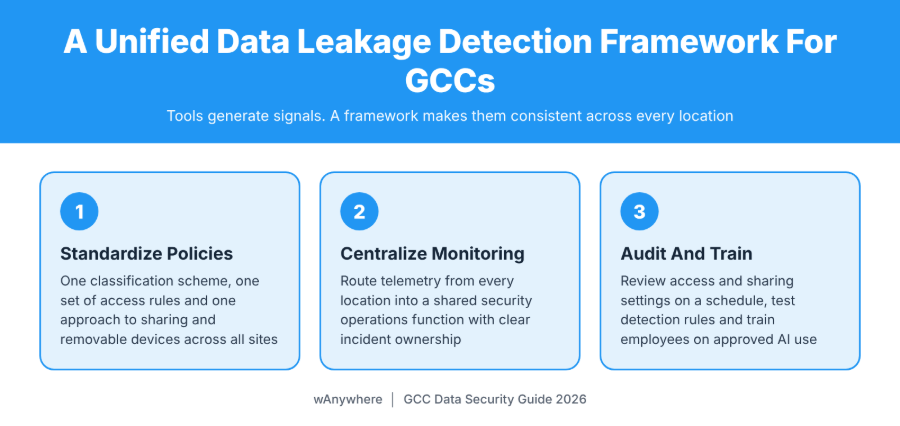
Standardize Security Policies Across Locations
Apply one data classification scheme, one set of access permission rules and one approach to external sharing and removable devices across all sites. Layer regional requirements on top where local law demands it, rather than letting each office write its own baseline.
Centralize Monitoring And Incident Response
Route telemetry from every location into a shared security operations function. Define escalation paths, response timelines and clear incident ownership so an alert raised at one site does not stall while teams decide whose problem it is.
Conduct Regular Audits And Employee Awareness Programs
Review access rights and cloud-sharing settings on a fixed schedule, and test whether detection rules actually fire. Train employees on approved AI use, data handling and how to report mistakes. Governance and awareness reduce the volume of risky activity, which lets technical controls focus on the events that matter.
Also Read :Free Workforce System Audit Tool To Monitor Device Health And Performance
How wAnywhere Can Support GCC Workforce Security And Compliance Visibility
DLP, CASB and SIEM platforms watch the data. wAnywhere adds visibility into the workforce environment where that data is handled, which makes it a complementary layer rather than a replacement for those tools. For GCC teams working in offices, at home or in hybrid setups, it supports:
- USB, Bluetooth and SSID detection to flag device and network policy deviations
- Mobile phone detection, Clean Desk monitoring, Unknown Person Detection and Multiple Person Detection
- PII and PHI masking
- Screenshots, recordings, timelapse, playback and audit trails for investigations
- Configurable screen lock, blackout and OTP-based controls where applicable
These signals give security and compliance teams workstation-level context when an alert from another system needs it. If your teams handle client data across several sites, see how wAnywhere can help you strengthen workforce visibility across your GCC.
Make Data Leakage Detection A Unified GCC Security Priority
Endpoints, cloud applications, user activity, third-party access and AI tools all need consistent monitoring, and the signals they produce need to come together in one place. Effective detection rests on data governance, centralized monitoring, disciplined investigation and continuous improvement. Map where sensitive data lives, close the gaps between locations, then add the workforce-level visibility data-centric tools cannot provide alone. Book a wAnywhere demo to see what consistent visibility looks like across your sites.
Strengthen Workforce Visibility Across Your GCC
Add device-level policy monitoring, Clean Desk compliance and investigation-ready audit trails alongside your existing DLP and SIEM stack.
Frequently Asked Questions
How Can Organizations Detect Data Leakage Across Multiple Locations?
Start by classifying sensitive data and mapping how it moves. Then monitor access, track transfers across endpoints, networks and cloud apps, watch AI usage, correlate events in a SIEM and investigate alerts through a documented process with a clear audit trail.
What Are The Most Common Causes Of Data Leakage In GCCs?
Common causes include unauthorized USB or personal device transfers, misconfigured cloud sharing, unmanaged remote access, over-permissioned vendors and employees pasting confidential data into public AI tools. Inconsistent policies between locations make each of these harder to catch.
What Are The Best Tools To Detect LLM Data Leakage?
AI-specific DLP tools such as Nightfall AI, Cyberhaven and Harmonic Security can identify sensitive data in prompts and AI uploads. Broader platforms like Microsoft Purview also extend controls to AI apps. LLM testing tools such as Promptfoo serve a different purpose.
How Does DLP Help Prevent Data Leakage In A GCC?
DLP identifies sensitive information and applies policies that monitor, warn or block risky transfers through email, endpoints, cloud storage and, in some products, AI tools. Applied consistently, it gives every location the same baseline of protection.
How Can GCCs Monitor Data Security Across Remote Employees?
Combine identity controls, managed endpoints, CASB or SSE policies and centralized logging, then add workforce visibility tools for device events and workspace compliance. Communicate monitoring policies clearly and follow local privacy laws wherever employees work.

Table of Contents
Boost productivity and compliance with wAnywhere
Read summarized version with